
Elecrow CrowPanel E-Paper with ESPHome & LVGL (4.2" and 5.79")
How to drive the Elecrow CrowPanel 4.2" and 5.79" e-paper displays with ESPHome and LVGL using a custom external component. Includes a minimal setup and a full weather dashboard with OpenWeatherMap.
I have had the Elecrow CrowPanel 5.79" E-Paper sitting on my desk for a while now. The hardware is great - a wide 792×272 e-paper panel on top of an ESP32-S3 with a rotary encoder, side buttons, a TF card slot, and battery charging built-in. A perfect candidate for a low-power home dashboard.
The component covered in this post supports two models: the 4.2" (400×300) and the 5.79" (792×272). The setup is identical - only the model: key and pin mapping differ.
Getting it talking to ESPHome, however, was a different story.
The existing community component for this board is semvis123/esphome-crowpanel-4.2-epaper (with excellent 5.79" dual-controller support added by siku2). It works for simple lambda-based drawing. But it does not work with LVGL - at all. The display component's architecture was incompatible with how ESPHome's LVGL integration hooks into the display buffer, so the screen either stayed blank or threw compile errors.
So I built a new one.
The crowpanel_epaper external component is a drop-in ESPHome display driver that supports both the 4.2" and 5.79" CrowPanel panels, with full LVGL compatibility. You get selective partial refresh, configurable full-refresh intervals to clear ghosting, and a force_full_update() call you can wire to a button.
This post covers the complete setup from scratch, including a minimal "Hello, E-Paper!" example and a full weather dashboard using the OpenWeatherMap API.
The Hardware #
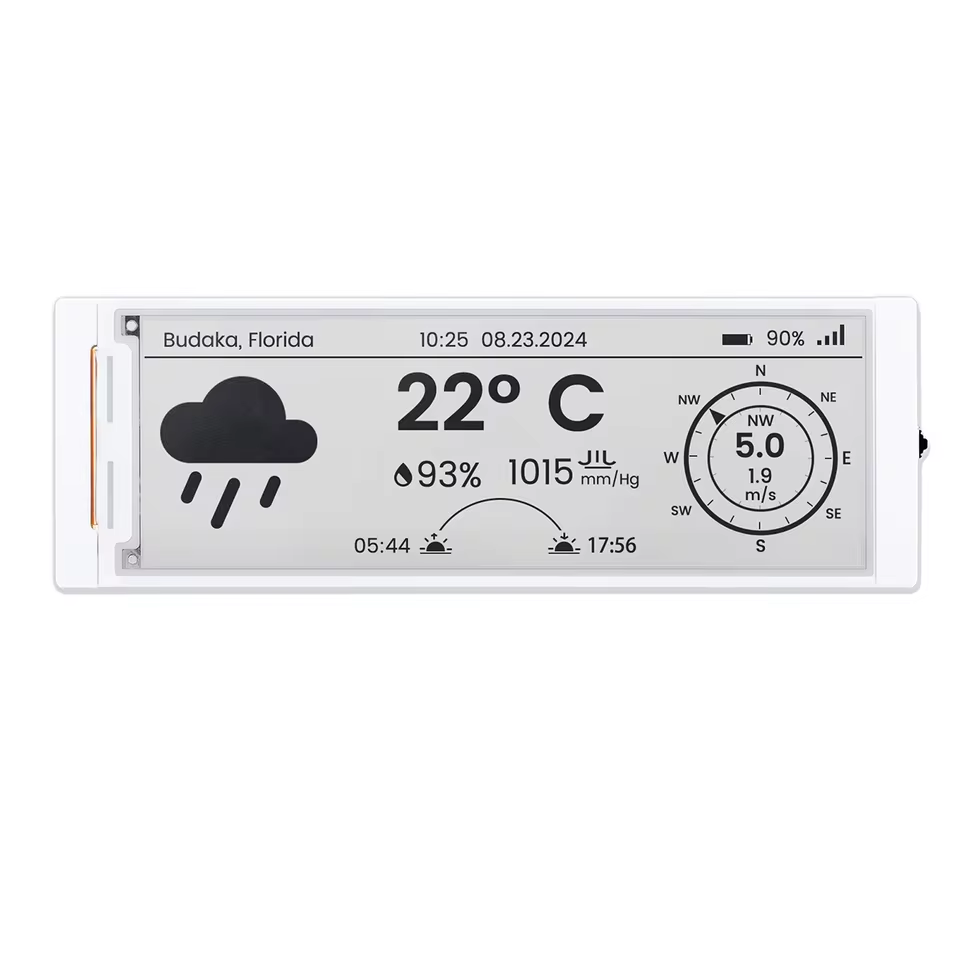
Elecrow CrowPanel 5.79" E-Paper
Elecrow CrowPanel 4.2" E-Paper
If you want a full rundown of the 5.79" hardware, check the Elecrow CrowPanel 5.79" review I did earlier. Short version: it is a well-built module with a clean acrylic case, USB-C, exposed GPIOs, and a satisfying rotary encoder. The 5.79" panel itself is driven by a pair of SSD1683 controllers in a split configuration - one for each half of the 792-pixel-wide display - which is part of why driving it from ESPHome is non-trivial. The 4.2" uses a single SSD1683 controller and is somewhat simpler, but benefits equally from LVGL support.
Why the Existing Component Did Not Work with LVGL #
ESPHome's LVGL integration requires a display component that:
- Extends
display::DisplayBuffer(so LVGL can write into a shared pixel buffer) - Supports
auto_clear_enabled: falseandupdate_interval: never(so LVGL controls when and what to render) - Triggers a display update via
component.updateat the end of each LVGL draw cycle
The semvis123 component predates some of these requirements. Wiring it into the lvgl: block causes a compilation failure or a display that simply never updates. After trying various workarounds, the cleanest solution was to rewrite the driver from scratch, inheriting correctly from DisplayBuffer and implementing a non-blocking state machine for the display update cycle.
The result works identically to any other ESPHome display when paired with LVGL.
Setting Up the Component #
Step 1: Add the External Component #
The component is a local external component, meaning you include it from a components/ directory alongside your YAML. If you are working from the example repository, it is already in the right place.
external_components:
  - source: components
If you are pointing at the GitHub repo instead:
external_components:
  - source:
      type: git
      url: https://github.com/ESPBoards/esphome-lvgl-crowpanel-epaper-5.79-4.2
    components: [crowpanel_epaper]
Step 2: Power the Display #
GPIO 7 controls the display power rail. It must be pulled high before anything else runs, otherwise the display will not respond.
switch:
  - platform: gpio
    pin: 7
    id: epd_power
    restore_mode: ALWAYS_ON
    internal: true
Wire it into on_boot with a short delay to let the panel settle:
esphome:
  name: crowpanel_epaper
  on_boot:
    - priority: 600
      then:
        - switch.turn_on: epd_power
        - delay: 500ms
Step 3: Configure the Display #
The 5.79" pin mapping is fixed (the ESP32-S3 on the board routes SPI to these specific GPIOs):
display:
  - platform: crowpanel_epaper
    id: epd
    model: "5.79in"
    clk_pin: 12
    mosi_pin: 11
    cs_pin: 45
    dc_pin: 46
    reset_pin: 47
    busy_pin: 48
    invert_colors: true
    full_update_every: 10
    update_interval: 60s
invert_colors: true is required on the 5.79" panel - without it, black and white are swapped.
full_update_every controls how often the display does a slow, complete refresh to clear ghosting from previous images. For a clock or dashboard refreshing every minute, a value of 10 means a full refresh every 10 updates (roughly every 10 minutes).
Step 4: Add LVGL #
When using LVGL, you let it manage the display buffer and call component.update at the end of each draw. Set update_interval: never and auto_clear_enabled: false so ESPHome does not interfere.
display:
  - platform: crowpanel_epaper
    id: epd
    model: "5.79in"
    clk_pin: 12
    mosi_pin: 11
    cs_pin: 45
    dc_pin: 46
    reset_pin: 47
    busy_pin: 48
    invert_colors: true
    full_update_every: 9999
    auto_clear_enabled: false
    update_interval: never

lvgl:
  displays: epd
  buffer_size: 25%
  color_depth: 16
  on_draw_end:
    component.update: epd
buffer_size: 25% means LVGL uses a quarter of the display's pixel buffer. The ESP32-S3 on this board has PSRAM, so there is plenty of RAM - but 25% is a safe starting point that keeps render latency reasonable on e-paper.
Minimal Example: Hello, E-Paper! #
Here is the full minimal configuration - WiFi, display power, LVGL, and a centered label:
esphome:
  name: crowpanel_epaper
  friendly_name: "CrowPanel E-Paper"
  on_boot:
    - priority: 600
      then:
        - switch.turn_on: epd_power
        - delay: 500ms

external_components:
  - source: components

esp32:
  board: esp32-s3-devkitc-1
  framework:
    type: esp-idf

psram:
  mode: octal
  speed: 80MHz

logger:

wifi:
  ssid: !secret wifi_ssid
  password: !secret wifi_password

switch:
  - platform: gpio
    pin: 7
    id: epd_power
    restore_mode: ALWAYS_ON
    internal: true

display:
  - platform: crowpanel_epaper
    id: epd
    model: "5.79in"
    clk_pin: 12
    mosi_pin: 11
    cs_pin: 45
    dc_pin: 46
    reset_pin: 47
    busy_pin: 48
    invert_colors: true
    full_update_every: 9999
    auto_clear_enabled: false
    update_interval: never

lvgl:
  displays: epd
  buffer_size: 25%
  color_depth: 16
  on_draw_end:
    component.update: epd
  pages:
    - id: main_page
      bg_color: 0xFFFFFF
      widgets:
        - label:
            align: CENTER
            text: "Hello, E-Paper!"
            text_color: 0x000000
            text_font: MONTSERRAT_48
Flash this and you should see the display initialize within a couple of seconds and settle on the label.
Weather Dashboard with OpenWeatherMap #
The more interesting use case: a live weather dashboard that pulls data from the OpenWeatherMap API and displays current conditions plus a 6-step 3-hour forecast timeline on a single screen.
The complete YAML is in the examples folder of the repo. Here are the highlights:
Fetching Weather Data #
The ESPHome http_request component calls the OpenWeatherMap free-tier endpoint every 30 minutes and stores the response into a set of global variables: current temperature, weather code, humidity, wind speed, and 6 forecast slots (time, temperature, weather code, precipitation probability).
http_request:
  id: http_client
  timeout: 10s

globals:
  - id: cur_temp
    type: float
    initial_value: "0"
  - id: fc_temps
    type: float[6]
    initial_value: "{0,0,0,0,0,0}"
  # ... etc
Fonts and Icons #
Fonts are pulled from Google Fonts at compile time. Weather icons come from the Material Design Icons webfont, mapping WMO weather codes to icon glyphs:
font:
  - file: "gfonts://Roboto"
    id: font_body
    size: 18
    bpp: 1
  - file: "gfonts://Roboto@700"
    id: font_temp_big
    size: 72
    bpp: 1
    glyphs: "0123456789.-:° "
  - file:
      type: web
      url: "https://cdn.jsdelivr.net/npm/@mdi/font@7.4.47/fonts/materialdesignicons-webfont.ttf"
    id: icon_big
    size: 56
    bpp: 1
    glyphs:
      - "\U000F0599"  # sunny
      - "\U000F0597"  # rainy
      - "\U000F0596"  # pouring
      # ...
Using bpp: 1 (1-bit per pixel) is important for e-paper - anti-aliased fonts look terrible on a binary display. 1-bit gives you crisp, clean edges.
The LVGL Layout #
The dashboard uses two LVGL pages - one for the weather view, one for a device info / settings page navigated by the rotary encoder. The weather page is split into:
- A full-width header bar (black background, white text - city name on the left, current time on the right)
- A left panel for current conditions: large weather icon, big temperature, wind speed and humidity
- A right panel with 6 forecast columns, each showing time, icon, temperature, and precipitation probability
All layout labels have id: fields so the fetch script can update them at runtime via lvgl.label.update.
Button Wiring #
The physical buttons on the board are wired as LVGL encoder input:
binary_sensor:
  - platform: gpio
    pin:
      number: 2
      mode: INPUT_PULLUP
      inverted: true
    id: btn_menu
    on_press:
      - lvgl.page.next:
    on_click:
      min_length: 1000ms
      max_length: 5000ms
      then:
        - lambda: 'id(epd).force_full_update();'
        - component.update: epd
A long press (1–5 seconds) on the menu button triggers a forced full refresh - useful when ghosting builds up and you want a clean slate without waiting for the automatic interval.
Forcing a Full Refresh #
E-paper partial updates are fast (~600 ms on this panel) but accumulate ghosting over time. The component has a built-in force_full_update() method you can call from any automation:
- lambda: 'id(epd).force_full_update();'
- component.update: epd
The automatic interval is controlled by full_update_every. Set it to a low number (e.g. 10) if you update frequently, or higher (e.g. 50) for infrequent wake-up scenarios. Set it to 9999 when you want to control it entirely manually.
A daily forced refresh at 3AM is a sensible default for a always-on dashboard:
time:
  - platform: sntp
    on_time:
      - seconds: 0
        minutes: 0
        hours: 3
        then:
          - lambda: 'id(epd).force_full_update();'
          - component.update: epd
Designing the UI with the LVGL Designer #
If you do not want to hand-code LVGL coordinates (and who does?), use the ESPHome LVGL Designer - a free web-based drag-and-drop tool that exports production-ready ESPHome YAML. Set the canvas to 792 × 272 to match the 5.79" display, design visually, and paste the output directly into the lvgl: block.
Component Options Reference #
| Option | Default | Description |
|---|---|---|
model | required | "4.20in" (400×300) or "5.79in" (792×272) |
clk_pin | required | SPI clock pin |
mosi_pin | required | SPI MOSI pin |
cs_pin | required | SPI chip select |
dc_pin | required | Data/Command pin |
reset_pin | required | Display reset pin |
busy_pin | required | Busy signal input |
invert_colors | false | Set true for the 5.79" panel |
full_update_every | 10 | Full refresh every N updates |
rotation | 0 | 0, 90, 180, or 270 degrees |
auto_clear_enabled | true | Set false when using LVGL |
update_interval | 60s | Set to never when using LVGL |
Credits #
This component builds directly on the work of two people:
- semvis123 - original ESPHome CrowPanel 4.2" component
- siku2 - dual-controller 5.79" support in the semvis123 fork
The core SSD1683 init sequences and refresh logic are derived from their work. The rewrite was purely to get LVGL working.
The full source and examples are on GitHub: ESPBoards/esphome-lvgl-crowpanel-epaper-5.79-4.2.