
KY-022 Infrared Receiver Module
The KY-022 is an infrared receiver module capable of detecting 38kHz IR signals. It's commonly used in projects requiring remote control signal reception, such as home automation and robotics.

KY-022 pinout
The KY-022 is a 3-pin infrared receiver module (38kHz demodulator):
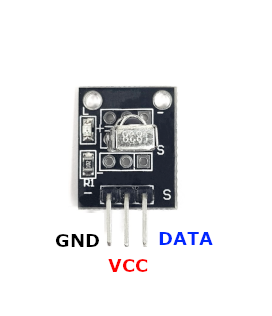
| Pin | Type | Description | Notes |
|---|---|---|---|
| Pin (-) | Power | Ground connection | |
| Pin (middle) | Power | Power supply | 3.3V to 5V |
| Pin (S) | Communication | Demodulated digital signal output | Outputs decoded IR signal |
Interface: Digital output (IR signal decoding)
Receiver: 38kHz IR demodulator (VS1838B or similar)
LED Indicator: Onboard LED lights when IR signal detected
Power: 3.3V to 5V operation
Compatibility: Works with most IR remotes (TV, AC, universal)
Applications: Remote control, wireless communication, IR data reception, pairs with KY-005
Wiring the KY-022 to ESP32
To interface the KY-022 with an ESP32 for IR signal reception:
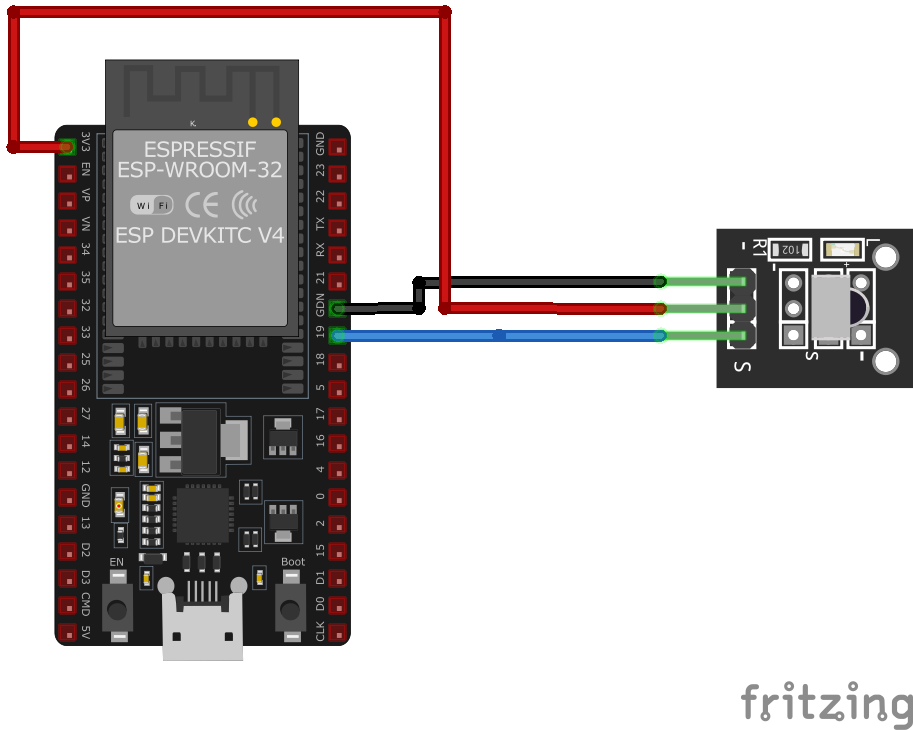
| KY-022 pin | ESP32 pin | Purpose |
|---|---|---|
| Pin (-) | GND | Ground |
| Pin (middle) | 3.3V | Power supply |
| Pin (S) | GPIO4 | Digital input (any GPIO) |
GPIO Selection: Any digital GPIO pin works, GPIO4 is just an example
Voltage: Use 3.3V for ESP32 compatibility
IR Remote: Use any 38kHz IR remote control
Library: Use IRremote or similar library for decoding IR protocols
Transmitter: Pairs with KY-005 IR transmitter for complete IR communication
KY-022 code examples
// Requires library: "IRremote"
#include <IRremote.hpp>

#define IR_RECEIVE_PIN 4 // KY-022 signal pin (GPIO4, matches the wiring above)

void setup() {
    Serial.begin(115200);
    IrReceiver.begin(IR_RECEIVE_PIN, ENABLE_LED_FEEDBACK);
    Serial.println("KY-022 IR Receiver Test - point a remote at the sensor");
}

void loop() {
    if (IrReceiver.decode()) {
        IrReceiver.printIRResultShort(&Serial); // Protocol, address, command
        IrReceiver.resume(); // Ready to receive the next signal
    }
}
The example uses version 4 of the IRremote library: IrReceiver.begin() attaches the receiver to GPIO4 (matching the wiring above), and every decoded frame is printed with its protocol, address and command via printIRResultShort(). Point any NEC-style remote (the most common kind in hobby kits) at the module and press buttons to see the codes; use IrReceiver.decodedIRData.command in your own logic.
#include <stdio.h>
#include "freertos/FreeRTOS.h"
#include "freertos/queue.h"
#include "driver/rmt_rx.h"

#define IR_GPIO       GPIO_NUM_4
#define RESOLUTION_HZ 1000000 // 1 MHz -> 1 tick = 1 us

static bool on_rx_done(rmt_channel_handle_t channel, const rmt_rx_done_event_data_t *edata, void *user_data)
{
    BaseType_t high_task_wakeup = pdFALSE;
    xQueueSendFromISR((QueueHandle_t)user_data, edata, &high_task_wakeup);
    return high_task_wakeup == pdTRUE;
}

static bool near(uint32_t ticks, uint32_t target_us)
{
    return ticks > target_us - target_us / 4 && ticks < target_us + target_us / 4;
}

static void decode_nec(rmt_symbol_word_t *symbols, size_t count)
{
    if (count == 2 && near(symbols[0].duration0, 9000) && near(symbols[0].duration1, 2250)) {
        printf("NEC repeat code\n");
        return;
    }
    if (count < 34 || !near(symbols[0].duration0, 9000) || !near(symbols[0].duration1, 4500)) {
        printf("Unknown frame (%u symbols)\n", (unsigned)count);
        return;
    }
    uint32_t data = 0;
    for (int i = 0; i < 32; i++)
        if (near(symbols[1 + i].duration1, 1690)) // long space = logical 1
            data |= 1UL << i;

    printf("NEC address 0x%02X, command 0x%02X\n",
           (unsigned)(data & 0xFF), (unsigned)((data >> 16) & 0xFF));
}

void app_main(void)
{
    rmt_rx_channel_config_t rx_config = {
        .clk_src = RMT_CLK_SRC_DEFAULT,
        .resolution_hz = RESOLUTION_HZ,
        .mem_block_symbols = 64,
        .gpio_num = IR_GPIO,
    };
    rmt_channel_handle_t rx_channel = NULL;
    ESP_ERROR_CHECK(rmt_new_rx_channel(&rx_config, &rx_channel));

    QueueHandle_t queue = xQueueCreate(4, sizeof(rmt_rx_done_event_data_t));
    rmt_rx_event_callbacks_t callbacks = {
        .on_recv_done = on_rx_done,
    };
    ESP_ERROR_CHECK(rmt_rx_register_event_callbacks(rx_channel, &callbacks, queue));
    ESP_ERROR_CHECK(rmt_enable(rx_channel));

    // NEC pulses are 560 us and up; anything longer than 12 ms ends the frame
    rmt_receive_config_t receive_config = {
        .signal_range_min_ns = 1250,
        .signal_range_max_ns = 12000000,
    };

    static rmt_symbol_word_t symbols[64];
    rmt_rx_done_event_data_t rx_data;
    ESP_ERROR_CHECK(rmt_receive(rx_channel, symbols, sizeof(symbols), &receive_config));

    while (1) {
        if (xQueueReceive(queue, &rx_data, pdMS_TO_TICKS(5000)) == pdTRUE) {
            decode_nec(rx_data.received_symbols, rx_data.num_symbols);
            ESP_ERROR_CHECK(rmt_receive(rx_channel, symbols, sizeof(symbols), &receive_config));
        }
    }
}
This example uses ESP-IDF's modern RMT receive driver (driver/rmt_rx.h) - no external component is needed. The RMT peripheral captures the demodulated pulse train from the KY-022's 38 kHz receiver with microsecond resolution, and a callback pushes each finished frame to a queue. decode_nec() then checks for the NEC protocol's 9 ms / 4.5 ms leader, decodes the 32 data bits by pulse-space length (a long ~1.69 ms space is a logical 1) and prints the address and command bytes; the short 9 ms / 2.25 ms frame sent while a button is held is reported as a repeat code. Most cheap IR remotes for hobby kits use NEC.
remote_receiver:
  pin:
    number: GPIO4  # KY-022 signal pin, matches the wiring above
    inverted: true
  dump: nec  # log every received NEC code

binary_sensor:
  - platform: remote_receiver
    name: "KY-022 Power Button"
    nec:
      address: 0x0000
      command: 0x2C  # replace with a code from the dump log
The remote_receiver component decodes IR on GPIO4 (inverted, as IR receiver modules idle high). dump: nec logs every received NEC code so you can discover your remote's codes, and the binary_sensor turns on when one specific code arrives - the example matches the frame the KY-005 transmitter page sends. Swap in any address/command pair from your own remote's dump output.
[env:esp32]
platform = espressif32
board = esp32dev
framework = arduino
lib_deps =
z3t0/IRremote#include <Arduino.h>
#include <IRremote.h>
#define RECV_PIN 4
IRrecv irrecv(RECV_PIN);
decode_results results;
void setup() {
Serial.begin(115200);
irrecv.enableIRIn(); // Start the IR receiver
Serial.println("KY-022 Infrared Receiver Test");
}
void loop() {
if (irrecv.decode(&results)) {
Serial.printf("Received IR Code: 0x%X\n", results.value);
irrecv.resume(); // Receive next value
}
delay(100);
}This PlatformIO code sets up the KY-022 infrared receiver on GPIO4 using the IRremote library. It decodes IR signals and prints the received data as a hexadecimal value.
from machine import Pin
import time

IR_PIN = Pin(4, Pin.IN)

def ir_callback(pin):
    print("IR signal detected")

IR_PIN.irq(trigger=Pin.IRQ_FALLING, handler=ir_callback)

while True:
    time.sleep(1)
This MicroPython script configures GPIO4 as an input for the KY-022 infrared receiver. It detects falling edges (IR signals) and prints a message when an IR signal is received.
KY-022 specifications
About the KY-022
The KY-022 is built around a VS1838B, a 3-pin IR receiver IC that already does the hard part: it band-pass filters incoming light around 38 kHz, runs automatic gain control, and demodulates the carrier so the output pin is just the raw pulse train a remote sent, ready to decode in software. That’s why the module works with practically any consumer IR remote without configuration - TVs, air conditioners, universal remotes - as long as the remote’s carrier is the common 38 kHz (940 nm is the typical wavelength these receivers are tuned for).
Decoding the pulse train still takes a library on the ESP32 side. The classic IRremote library handles the common protocols like NEC just fine, and IRremoteESP8266 - despite the name - also targets ESP32 and covers a much wider spread of air-conditioner and TV protocols if a project needs to talk to something less common. The receiver idles HIGH and pulls LOW during a signal, and it pairs naturally with the KY-005 IR transmitter module for a self-contained send/receive pair.
KY-022 troubleshooting
No Response from Sensor
›
Issue: The sensor does not output any signal when an IR remote is used.
Solutions:
- Ensure all connections are secure and correctly placed.
- Verify the module is receiving the appropriate voltage (3.3V to 5V).
- Check if the microcontroller's digital input pin is correctly configured.
- Confirm that the IR remote is functioning and its battery is not depleted.
Interference or False Signals
›
Issue: The sensor outputs signals without any IR input.
Solutions:
- Ensure the module is not exposed to direct sunlight or strong ambient light sources.
- Check for interference from other IR devices in the vicinity.
- Implement software filtering to ignore spurious signals.
Where to buy the KY-022

Resources
Similar sensors


