
ESP32 30-Pin DevKit (Generic Clone) is a development board based on the ESP32 microcontroller using XTENSA architecture.
This board features a maximum CPU frequency of 240 MHz and 4MB flash memory.
About ESP32 30-Pin DevKit (Generic Clone)
✅ How to Identify Which Board You Have
1. Check the USB-to-Serial ChipLook near the USB port for a square or rectangle IC with one of these labels:
- CH340C / CH340G → Most common on cheap clones. Rectangle chip.
- CP2102 → Common on mid-range boards. Square chip.
- CH9102F → Newer chip, similar to CP2102. Square chip.
- FT232RL → Less common but still found. Rectangle chip.


If you want to know more about USB-to-Serial chips, check out this detailed guide.
2. Count the Pins📏 30-pin boards are typically narrow "ESP32 DevKit V1" clones.
If you have 38 pins, you have a different 38-pin variant instead.
- AMS1117 → Older clones (gets hot under load)
- Usually comes in a larger SOT-223 package with a flat metal tab (heatsinkable)
- Often has "AMS1117" or "1117/3.3" printed directly on the chip
- If you see a chunky 3-lead component with a metal tab near the USB port, it's likely AMS1117
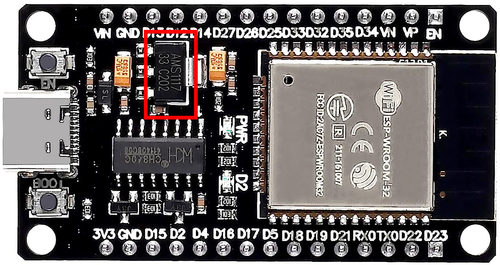
- ME6211 / HT7333 → Newer low-dropout regulators (better efficiency)
- Typically comes in small SOT-89 or SOT-23 packages (much smaller than SOT-223)
- If it's a tiny 3-pin SMD component next to the input capacitors, it's likely HT7333
- May have short marking codes that are harder to read

💡 Tip: Some boards print the regulator type on the silkscreen (check the board's underside or near the regulator for labels like "AMS1117" or "HT7333").
4. Verify Silkscreen LabelsMost clones follow standard Espressif naming (3V3, GND, EN, GPIO0, GPIO2, etc.) but positions may vary. The pinout below matches 99% of 30-pin boards.
⚠️ Important Notes
- Only 30 pins → Missing some GPIOs compared to 38-pin boards
- Some boards label ADC pins as
VP,VN,SVP,SVNinstead of GPIO numbers - Driver installation required for CH340 chips (automatic on most modern systems)
- Strapping pins (GPIO0, GPIO2, GPIO12, GPIO15) must be in correct state during boot
Where to Buy ESP32 30-Pin DevKit (Generic Clone)

Starting from
3-6$ per unit


Prices are subject to change. We earn from qualifying purchases as an Amazon Associate.
📋 Technical Specifications
Complete technical specification details for ESP32 30-Pin DevKit (Generic Clone)
🔌 USB
🛰️ Connectivity
🧠 Microcontroller
✨ Features & Pins
ESP32 30-Pin DevKit (Generic Clone) Board Dimensions
Physical measurements for ESP32 30-Pin DevKit (Generic Clone)
ESP32 30-Pin DevKit (Generic Clone) Pinout Diagram
Complete pin reference for ESP32 30-Pin DevKit (Generic Clone)

Universal 30-Pin Layout (Matches 99% of Clones)
This pinout is based on the most common clone layout. Your board should match this unless it's a rare variant.
⚠️ Critical Boot Pins (Strapping Pins):
- GPIO0 - Boot mode: HIGH = normal boot, LOW = download/flash mode
- GPIO2 - Must be LOW or floating during boot
- GPIO12 - Flash voltage: LOW = 3.3V (default), HIGH = 1.8V
- GPIO15 - Debug output: LOW = normal (not exposed on 30-pin boards)
🔌 Power
- VIN: Not exposed
- USB: 5V Micro-USB
- 3V3 Out: ~500mA max
- GPIO: 40mA/pin max
📡 Serial
- UART0: TX=GPIO1, RX=GPIO3
USB programming - UART2: TX=GPIO17, RX=GPIO16
Available for sensors
🔧 I2C & SPI
- I2C: SDA=GPIO21, SCL=GPIO22
Software configurable - VSPI: MOSI=23, MISO=19, CLK=18, CS=5
- HSPI: MOSI=13, MISO=12, CLK=14, CS=15
🔧 Analog & Touch Capabilities
Use these when WiFi is active
Not reliable with WiFi
8-bit digital-to-analog
No external components needed
💡 Pro Tips:
- Always use
ADC1channels (GPIO32-39) if WiFi is active - Avoid using GPIO6-11 (connected to internal flash)
- GPIO34-39 are input-only (no internal pull-up/down resistors)
- Use external pull-up resistors on I2C lines (4.7kΩ typical)
- Most 30-pin boards have an onboard LED on GPIO2
✅ Safe Pins to Use
These pins are safe for general GPIO usage without boot or system conflicts
💡 Why Are These Pins Safe?
⚠️ Pins to Avoid or Use with Caution
Reserved for critical functions. Misuse may cause boot failures, programming issues, or system conflicts.
Boot behavior & flash voltage
Low-level debugging interface
USB Serial/JTAG communication
Memory & PSRAM connections
Debugging & firmware uploads
| PIN | Label | Why Avoid | Type |
|---|---|---|---|
| IO36 | GPIO36 (SENSOR_VP) | Cannot be used as output; only suitable for input (e.g., analog read). | 🪛 Other |
| IO39 | GPIO39 (SENSOR_VN) | Cannot be used as output; only suitable for input. | 🪛 Other |
| IO34 | GPIO34 | Cannot be used as output (no drive capability); only suitable for analog/digital input. | 🪛 Other |
| IO35 | GPIO35 | Cannot be used as output; only suitable for input. | 🪛 Other |
| IO14 | MTMS (GPIO14) | Used for JTAG debugging (TMS); driving it as GPIO may interfere with JTAG or produce spurious signals at boot. | 🪛 Other |
| IO12 | MTDI (GPIO12) | Keep LOW during boot (internal PD); pulling HIGH at reset selects 1.8V flash mode, causing flash brownout if 3.3V flash is used. | 🛠️ Strapping |
| IO13 | MTCK (GPIO13) | Used for JTAG debugging (TCK); avoid using as GPIO if JTAG is needed. | 🪛 Other |
| IO9 | GPIO9 (Flash SD2) | Used by internal flash/PSRAM; typically not exposed on modules, avoid using as GPIO. | ⚡ Flash |
| IO5 | GPIO5 | Must be HIGH during boot; if pulled LOW at reset, alters SDIO slave timing and may prevent normal boot. | 🛠️ Strapping |
| IO17 | GPIO17 | Connected to internal PSRAM on PSRAM-enabled modules; not usable as GPIO on those modules. | ⚡ Flash |
| IO16 | GPIO16 | Connected to internal PSRAM on PSRAM-enabled modules; not usable as GPIO on those modules. | ⚡ Flash |
| IO4 | GPIO4 | Sampled at reset for boot config; should not be driven at boot (affects boot mode timing). | 🛠️ Strapping |
| IO0 | GPIO0 | Must be HIGH during boot for normal startup; if held LOW on reset, forces flash programming mode. | 🛠️ Strapping |
| IO2 | GPIO2 | If driven HIGH on reset (while IO0 is LOW), selects an unsupported SDIO boot mode, causing boot failure. | 🛠️ Strapping |
Useful Links
Datasheets and resources for ESP32 30-Pin DevKit (Generic Clone)
ESP32 30-Pin DevKit (Generic Clone) Custom Pin Mapping
Pin configuration and GPIO mapping for ESP32 30-Pin DevKit (Generic Clone)
| Pin | Function | ESP Pin | I/O Type | Description |
|---|---|---|---|---|
| 1 | 3V3 | 3.3V | POWER OUTPUT | 3.3V regulated output (~500mA max) |
| 2 | IO36 | VP / SVP | INPUT ONLY | ADC1_CH0, input only, no pull resistors |
| 3 | IO39 | VN / SVN | INPUT ONLY | ADC1_CH3, input only, no pull resistors |
| 4 | IO34 | INPUT ONLY | INPUT ONLY | ADC1_CH6, input only |
| 5 | IO35 | INPUT ONLY | INPUT ONLY | ADC1_CH7, input only |
| 6 | IO32 | GPIO32 | BIDIRECTIONAL | ADC1_CH4, Touch9 |
| 7 | IO33 | GPIO33 | BIDIRECTIONAL | ADC1_CH5, Touch8 |
| 8 | IO25 | GPIO25 | BIDIRECTIONAL | DAC1, ADC2_CH8 |
| 9 | IO26 | GPIO26 | BIDIRECTIONAL | DAC2, ADC2_CH9 |
| 10 | IO27 | GPIO27 | BIDIRECTIONAL | ADC2_CH7, Touch7 |
| 11 | IO14 | GPIO14 | BIDIRECTIONAL | ADC2_CH6, Touch6, HSPI_CLK |
| 12 | IO12 | GPIO12 | BIDIRECTIONAL | ADC2_CH5, Touch5, HSPI_MISO, ⚠️ Strapping pin |
| 13 | GND | GND | GROUND | Ground connection |
| 14 | IO13 | GPIO13 | BIDIRECTIONAL | ADC2_CH4, Touch4, HSPI_MOSI |
| 15 | IO9 | GPIO9 | SPECIAL | ⚠️ Flash pin - Do not use |
| 16 | EN | EN | INPUT | Enable/Reset pin (active LOW) |
| 17 | IO23 | GPIO23 | BIDIRECTIONAL | VSPI_MOSI |
| 18 | IO22 | GPIO22 | BIDIRECTIONAL | I2C_SCL (default) |
| 19 | TX0 | GPIO1 | BIDIRECTIONAL | UART0 TX (USB serial) |
| 20 | RX0 | GPIO3 | BIDIRECTIONAL | UART0 RX (USB serial) |
| 21 | IO21 | GPIO21 | BIDIRECTIONAL | I2C_SDA (default) |
| 22 | GND | GND | GROUND | Ground connection |
| 23 | IO19 | GPIO19 | BIDIRECTIONAL | VSPI_MISO |
| 24 | IO18 | GPIO18 | BIDIRECTIONAL | VSPI_CLK |
| 25 | IO5 | GPIO5 | BIDIRECTIONAL | VSPI_CS |
| 26 | IO17 | TX2 | BIDIRECTIONAL | UART2 TX |
| 27 | IO16 | RX2 | BIDIRECTIONAL | UART2 RX |
| 28 | IO4 | GPIO4 | BIDIRECTIONAL | ADC2_CH0, Touch0 |
| 29 | IO0 | GPIO0 | BIDIRECTIONAL | ADC2_CH1, Touch1, ⚠️ Boot button (strapping pin) |
| 30 | IO2 | GPIO2 | BIDIRECTIONAL | ADC2_CH2, Touch2, LED, ⚠️ Strapping pin |
Default Tools & Configuration
Build and upload settings for ESP32 30-Pin DevKit (Generic Clone)
| Setting | Value |
|---|---|
| Bootloader tool | esptool_py |
| Uploader tool | esptool_py |
| Network uploader tool | esp_ota |
| Bootloader address | 0x1000 |
| Flash mode | dio |
| Boot mode | dio |
| Maximum upload size | 1280 KB (1310720 bytes) |
| Maximum data size | 320 KB (327680 bytes) |
The ESP32 30-Pin DevKit (Generic Clone) uses esptool_py for uploads , esp_ota for OTA updates, and esptool_py bootloader at 0x1000.
Flash mode: dio | Boot mode: dio
Max sketch size: 1280 KB | Max data size: 320 KB
Similar Boards
Other development boards with ESP32 microcontroller

Heltec WiFi LoRa 32
Heltec WiFi LoRa 32 development board is based on esp32 microcontroller and uses xtensa architecture.

LilyGo T5 4.7 Inch E-Paper V2.3
LilyGo T5 4.7 Inch E-Paper V2.3 development board is based on esp32 microcontroller and uses xtensa...

Frog Board ESP32
Frog Board ESP32 development board is based on esp32 microcontroller and uses xtensa architecture.