
ESP32 C3 Zero
Minimalist ESP32-C3 board with Wi-Fi & BLE - ideal for simple, budget-friendly IoT builds in tight spaces.

ESP32 C3 Zero Pinout
18 pins · 2.54 mm pitch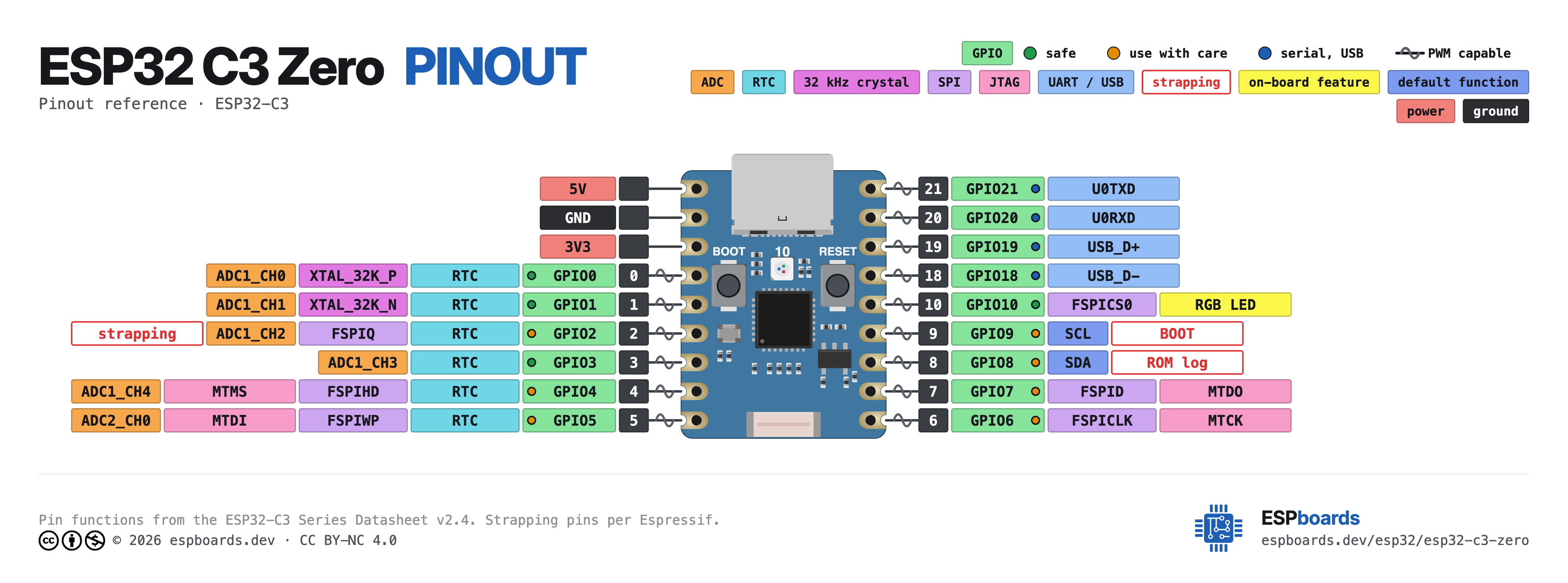
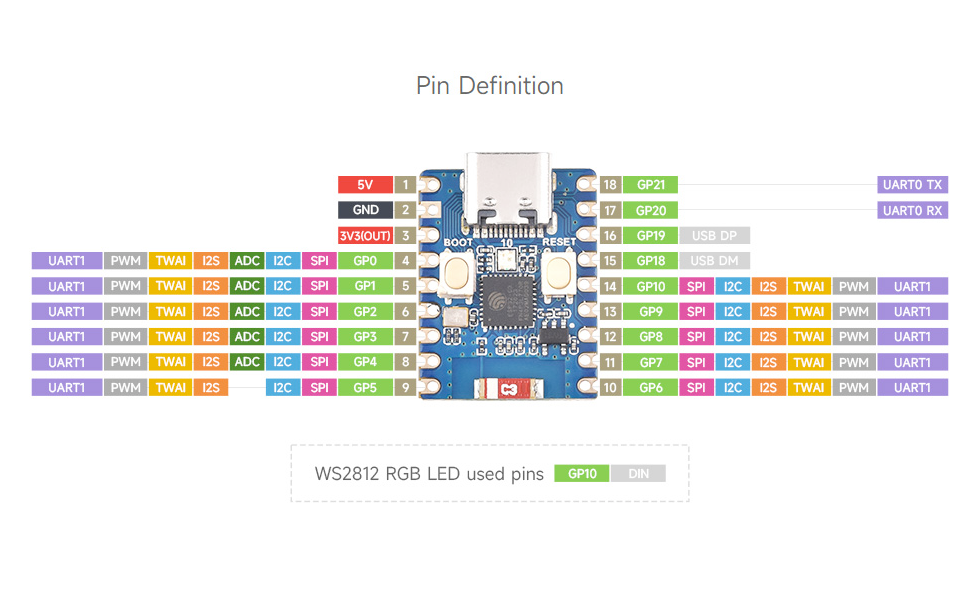
| Pin | GPIO | Labels | Status | Capabilities | Notes |
|---|---|---|---|---|---|
| 1 | - | 5V | power | - | 5V power input for the board |
| 2 | - | GND | ground | - | Ground connection |
| 3 | - | 3V33.3V | power | - | 3.3V power output |
| 4 | 0 | IO0 | safe | adc | GPIO, ADC |
| 5 | 1 | IO1 | safe | adc | GPIO, ADC |
| 6 | 2 | IO2 | strapping | adc | GPIO, ADC |
| 7 | 3 | IO3 | safe | adc | GPIO, ADC |
| 8 | 4 | IO4 | strapping | adc | GPIO, ADC |
| 9 | 5 | IO5 | strapping | - | GPIO |
| 10 | 6 | IO6 | strapping | - | GPIO |
| 11 | 7 | IO7 | strapping | - | GPIO |
| 12 | 8 | IO8SDA | strapping | i2c | GPIO |
| 13 | 9 | IO9SCL | strapping | i2c | GPIO |
| 14 | 10 | IO10 | safe | - | GPIO; drives the on-board WS2812 RGB LED (DIN) |
| 15 | 18 | IO18 | uart | - | USB DM |
| 16 | 19 | IO19 | uart | - | USB DP |
| 17 | 20 | IO20RX | uart | uart | GPIO, UART Receive (secondary) |
| 18 | 21 | IO21TX | uart | uart | GPIO, UART Transmit |
Start with these
4 pins with no boot or system involvementFreely assignable - no strapping, flash, USB or JTAG duties. Ideal first picks for buttons, sensors and LEDs.
Fine - with a little care
9 pins · 9 things to knowIO2 Strapping pin, but it does not select the boot mode - GPIO9 does. Espressif only recommend pulling it up against reset-time glitches. Floating by default. Strapping
A strapping pin: Espressif recommend an external pull-up against glitches at reset, so avoid heavy capacitive loads or a strong low drive here. It does not put the chip into download mode (that is GPIO9).
IO4 Bootstrapping pin; JTAG TMS; Flash data (FSPIHD in internal-flash models) JTAG
Used during boot; JTAG TMS for debugging; acts as Quad-SPI flash IO (hold data line) in internal-flash variants
IO5 Bootstrapping pin; JTAG TDI; Flash data (FSPIWP in internal-flash models) JTAG
Used during boot; JTAG TDI for debugging; acts as Quad-SPI flash IO (write-protect data line) in internal-flash variants
IO6 Bootstrapping pin; JTAG TCK; Flash clock (FSPICLK in internal-flash models) JTAG
Used during boot; JTAG TCK for debugging; provides flash clock in internal-flash variants
IO7 Bootstrapping pin; JTAG TDO; Flash data (FSPID in internal-flash models) JTAG
Used during boot; JTAG TDO for debugging; acts as Quad-SPI flash IO (data line) in internal-flash variants
IO8 Bootstrapping pin (needs HIGH at reset); also gates ROM boot message printing (UART_PRINT_CONTROL efuse) Strapping
Must be held high during reset (if low, UART flashing/boot may not work)
IO9 Bootstrapping pin; selects boot mode (HIGH = SPI flash boot, LOW = UART download) Strapping
Controls boot mode on reset (HIGH for normal flash boot, LOW enters serial download mode)
IO20 UART0 RXD (default serial input) UART
Used as UART0 receive (console/bootloader); repurposing may disable serial programming and debug logs
IO21 UART0 TXD (default serial output) UART
Used as UART0 transmit (console/bootloader); repurposing may disable serial console output and printing
Only if you know the tricks
2 pins · 2 things to knowIO18 USB D- line (USB Serial/JTAG interface) USB
By default connected to on-chip USB Serial/JTAG controller; to use as GPIO it must be reconfigured from its USB function
IO19 USB D+ line (USB Serial/JTAG interface) USB
By default connected to on-chip USB Serial/JTAG controller; not available for GPIO use unless USB functionality is disabled or remapped
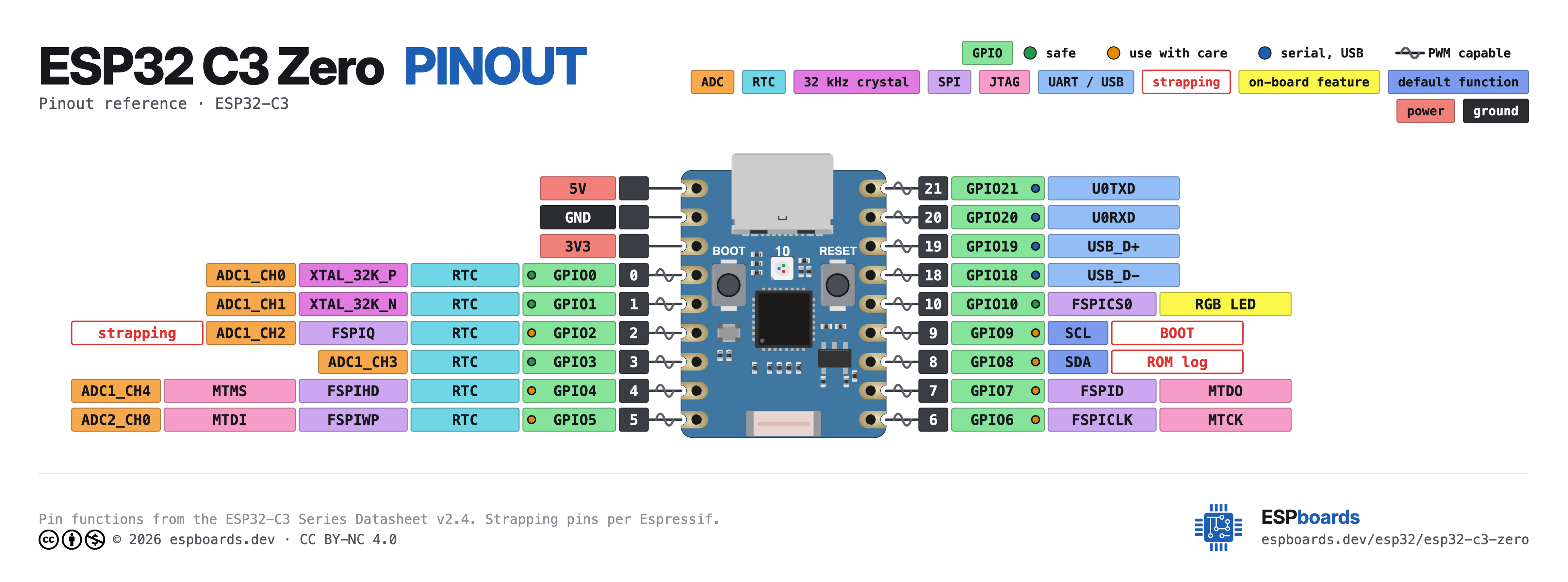
The ESP32 C3 Zero pinout brings out 18 pins at a 2.54 mm pitch - 15 usable GPIO alongside the 5V, GND and 3V3 power rails.
Peripheral wiring is straightforward: I²C is mapped to SDA on GPIO8 and SCL on GPIO9, while TX/RX on GPIO21 and GPIO20 cover serial logging and flashing.
Beyond plain digital I/O you get 5 ADC-capable pins for sensors and battery monitoring.
9 of the exposed pins carry boot-time or system duties on the ESP32-C3 (IO2, IO4, IO5 and 6 more) - check the guidance above before wiring anything to them. IO0, IO1, IO3 and IO10 are free of any such role - the safest first picks.
Getting started
flash your first firmware in ~2 minutesBoard: ESP32C3 Dev Module USB CDC On Boot: Enabled Flash Size: 4MB (32Mb) Flash Mode: QIO Partition Scheme: Default 4MB with spiffs (1.2MB APP/1.5MB SPIFFS) Upload Speed: 921600
// toggle GPIO0 - wire an LED and resistor to it
void setup() {
  pinMode(0, OUTPUT);
}
void loop() {
  digitalWrite(0, HIGH); delay(500);
  digitalWrite(0, LOW);  delay(500);
}[env:esp32-c3-zero]
platform = espressif32
board = esp32-c3-devkitm-1
framework = arduino
monitor_speed = 115200
upload_speed = 921600esp32-c3-devkitm-1 - or type it after board =.esp32:
board: esp32-c3-devkitm-1
variant: esp32c3
framework:
type: esp-idf
# blink - GPIO0
output:
- platform: gpio
pin: 0
id: led_out
light:
- platform: binary
name: "LED"
output: led_outesp32-c3-devkitm-1 (same ids as PlatformIO).esptool.py --chip esp32c3 --port /dev/ttyACM0 \
--baud 921600 write_flash 0x0 firmware.bin--port = your /dev/tty* (macOS/Linux) or COMx (Windows).Good to know
board-specific quirks worth 60 seconds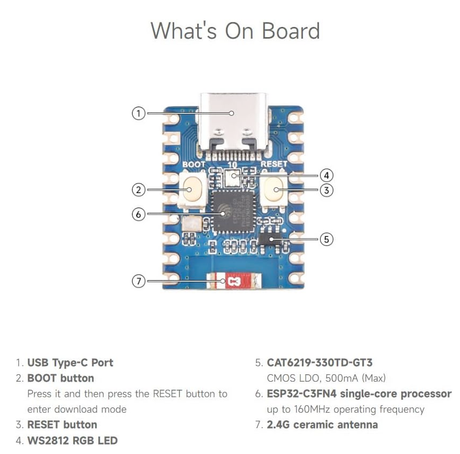
Downloads
Free for non-commercial use, credit espboards.dev · License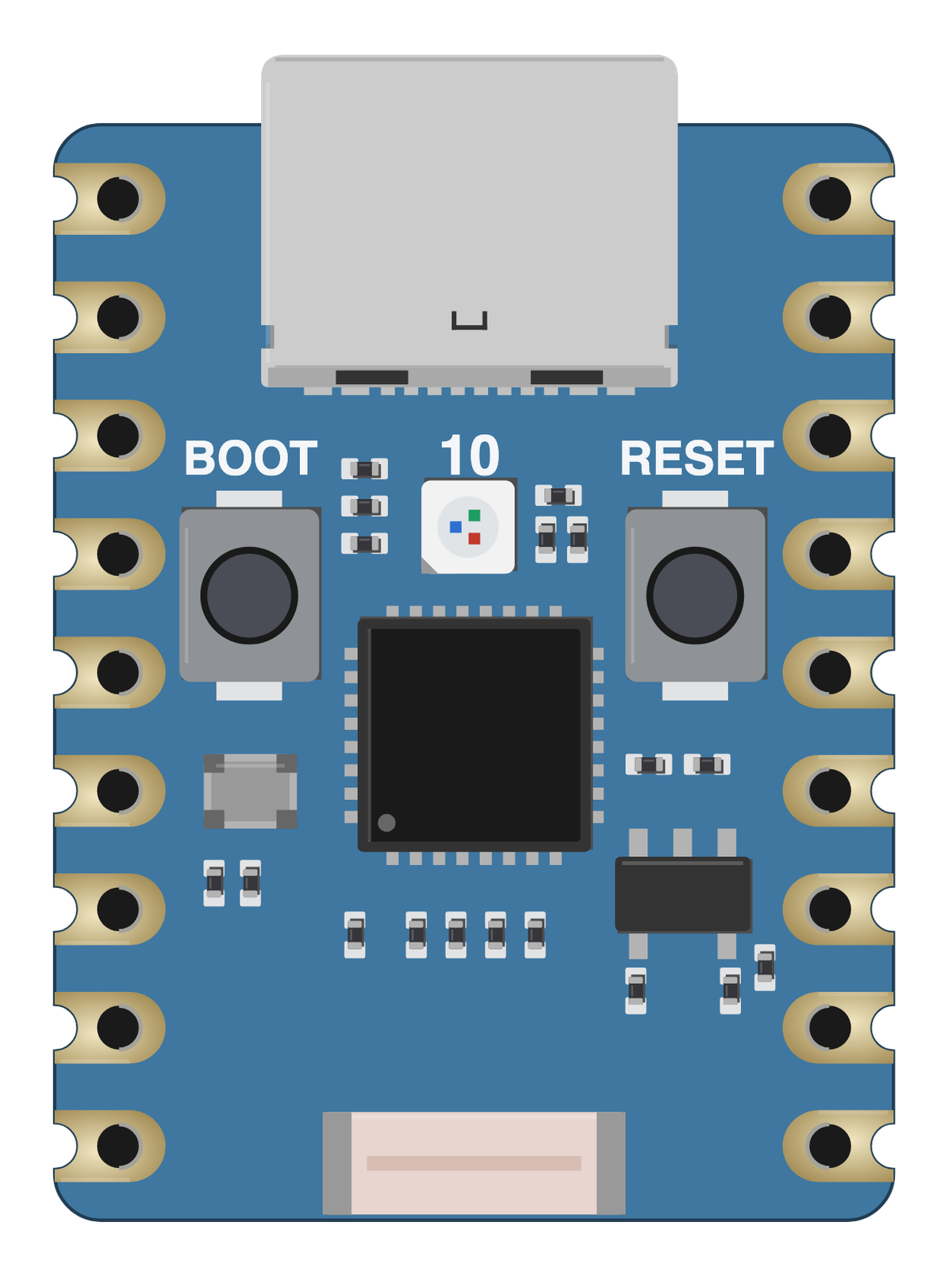
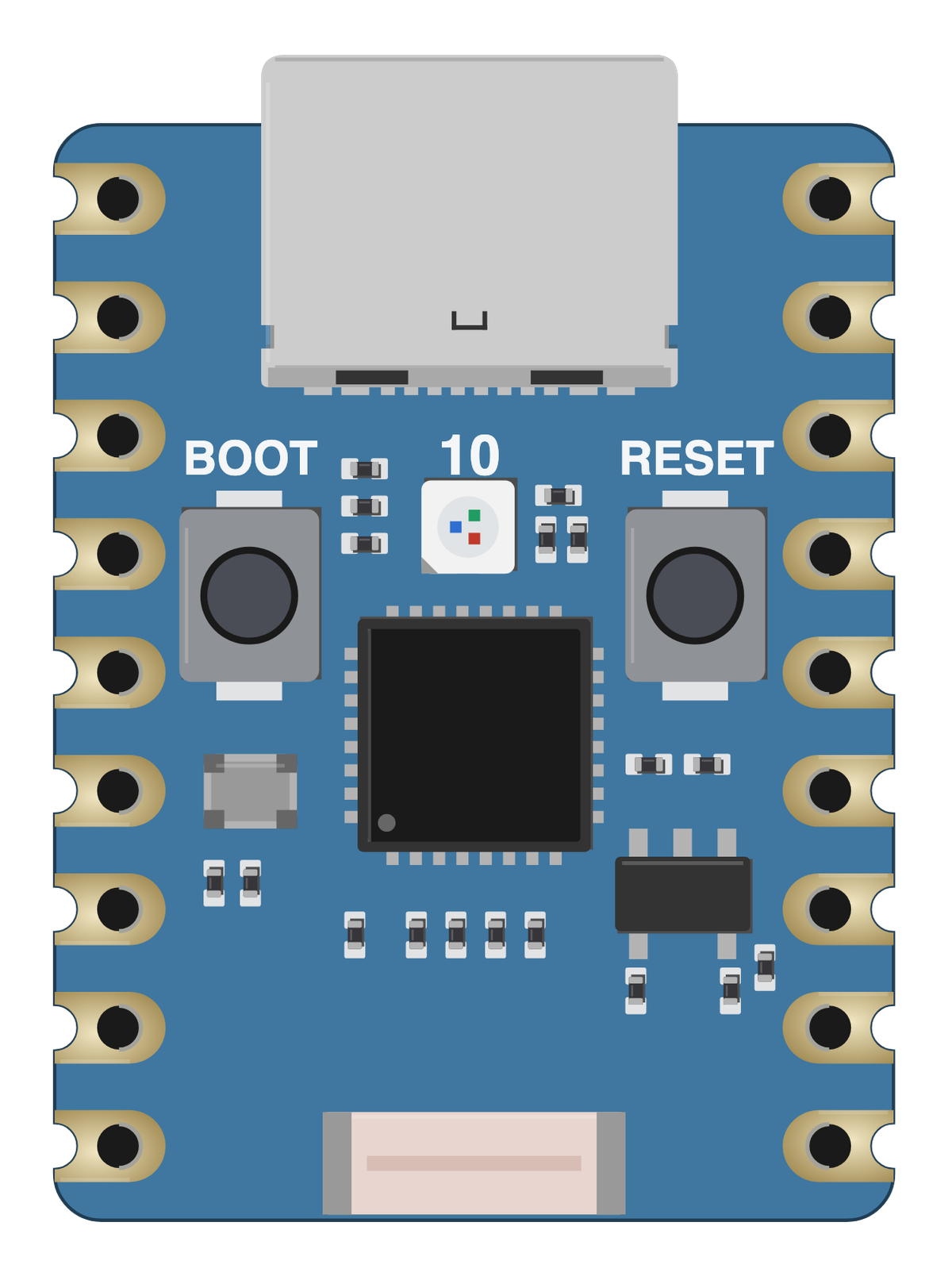
Board illustration
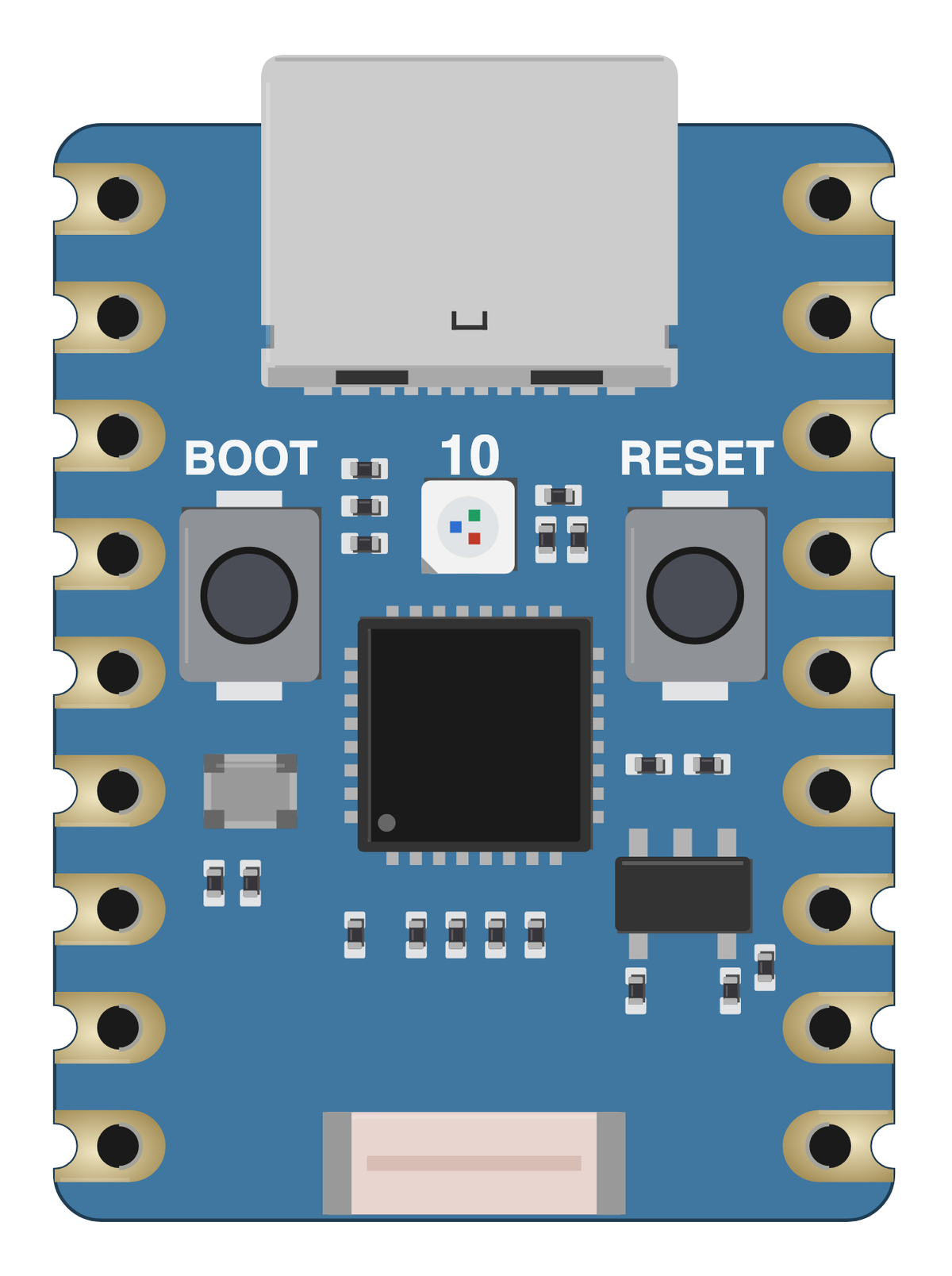
The bare ESP32 C3 Zero board drawn to scale at 23.5 × 18 mm, with no pin labels on it. Made for slide decks, wiring diagrams and project write-ups where a photo is too busy. Take the scalable SVG for print or editing, the high-resolution PNG to drop straight in, or the transparent PNG when you need it with no background behind it.
Pinout diagram
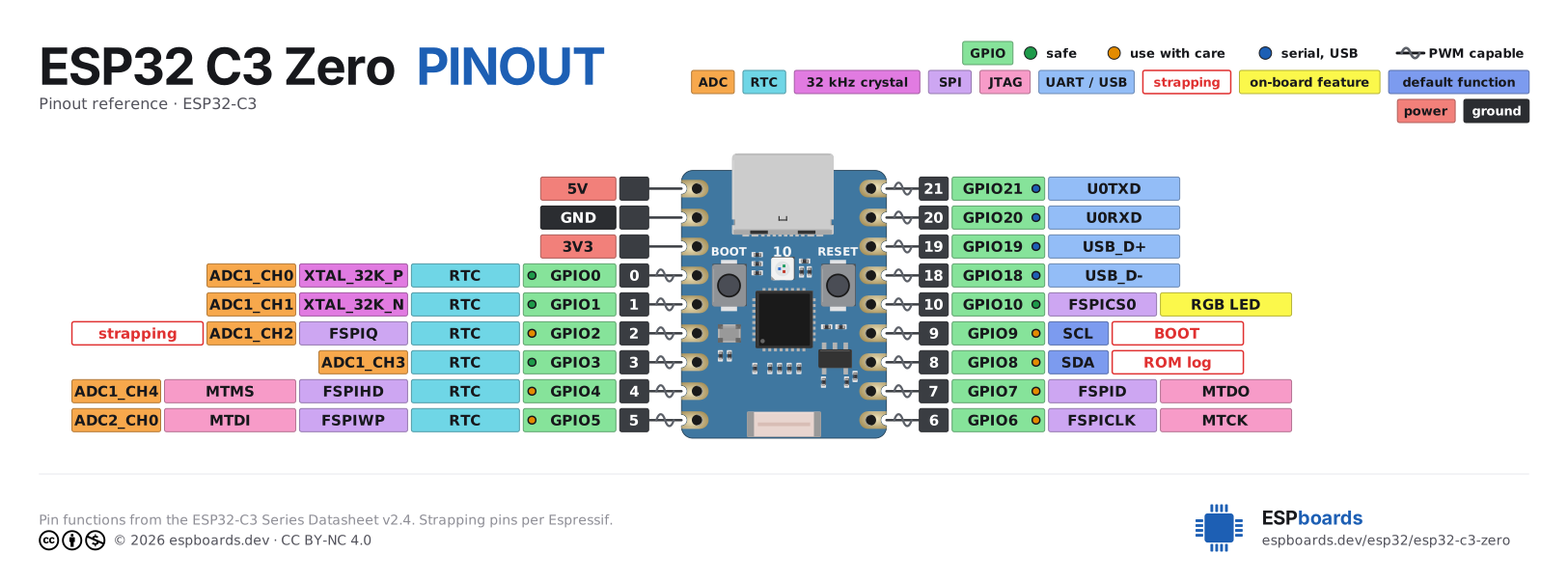
Every pin on both sides of the board with its functions, drawn by ESPboards from the ESP32-C3 Series Datasheet v2.4 - the same sheet shown at the top of this page. The PNG is a high-resolution image for screens, the SVG is vector so it stays sharp at any size, and the PDF is laid out to print on A4 or Letter.
Yours to use, share and adapt for non-commercial work, as long as you credit espboards.dev - the full terms and ready-made credit lines are here.
Specifications
ESP32-C3 · 23.5 × 18 mm · vs other ESP32 chips →Dimensions

About this board
At 23.5 × 18 mm it's the smallest Zero-format board we've measured.
Inside sits the ESP32-C3 - a single-core RISC-V and the budget low-power pick. Sibling Zero-format boards cover the ESP32-C6 and ESP32-S3, so you can change radios or horsepower without changing the footprint.
At $4.90 it's cheaper than most Zero-format boards, which usually run around $6.27.
Around the module: an addressable RGB LED (GPIO10) and Reset/Boot buttons.
It flashes over native USB - no serial-converter driver needed.
- Ultra-compact size: 23.5 × 18 mm
- Low power consumption: deep sleep current ~43μA
- Onboard WS2812 RGB LED (GPIO10)
Where to buy
prices are typical street pricesResources
Similar boards
All Zero boards →

