
ESP32 ESP-WROOM-32D 0.96" OLED Display
ESP32 development board with integrated 0.96" OLED display (yellow/blue) and 30 GPIO pins for compact IoT projects.

ESP32 ESP-WROOM-32D 0.96" OLED Display Pinout
30 pins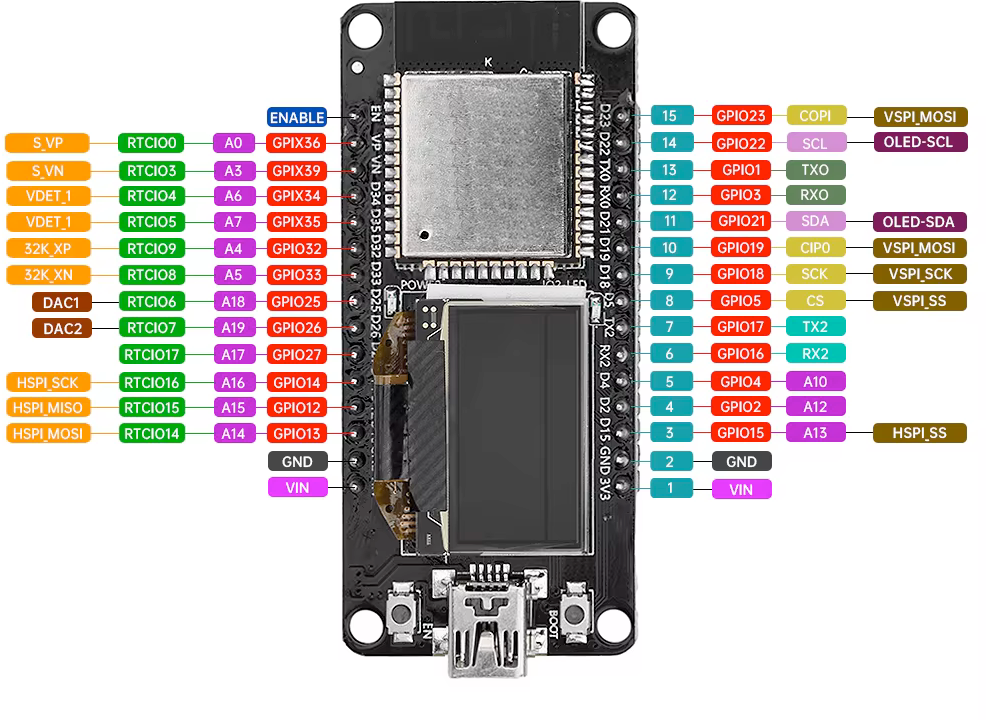
| Pin | GPIO | Labels | Status | Capabilities | Notes |
|---|---|---|---|---|---|
| 1 | 16 | OLED RSTGPIO16 | safe | - | OLED Reset |
| 2 | 4 | OLED SDAGPIO4 | safe | i2c | I2C Data Line for OLED |
| 3 | 15 | OLED SCLGPIO15 | strapping | i2c | I2C Clock Line for OLED |
| 4 | 0 | IO0GPIO0 | strapping | - | GPIO0, Boot Mode Selection |
| 5 | 2 | IO2GPIO2 | strapping | - | GPIO2, General Purpose I/O |
| 6 | 5 | IO5GPIO5 | strapping | - | GPIO5, General Purpose I/O |
| 7 | 12 | IO12GPIO12 | strapping | adc | GPIO12, ADC or GPIO |
| 8 | 13 | IO13GPIO13 | strapping | adc | GPIO13, ADC or GPIO |
| 9 | 14 | IO14GPIO14 | strapping | adc | GPIO14, ADC or GPIO |
| 10 | 16 | IO16GPIO16 | safe | - | GPIO16, General Purpose I/O |
| 11 | 3 | RXD0GPIO3 | uart | uart | UART0 Receive |
| 12 | 1 | TXD0GPIO1 | uart | uart | UART0 Transmit |
| 13 | 17 | IO17GPIO17 | safe | - | GPIO17, General Purpose I/O |
| 14 | 18 | IO18GPIO18 | safe | - | GPIO18, General Purpose I/O |
| 15 | 19 | IO19GPIO19 | safe | - | GPIO19, General Purpose I/O |
| 16 | 21 | IO21GPIO21 | safe | i2c | GPIO21, I2C SDA |
| 17 | 22 | IO22GPIO22 | safe | i2c | GPIO22, I2C SCL |
| 18 | 23 | IO23GPIO23 | safe | spi | GPIO23, SPI MOSI |
| 19 | 25 | IO25GPIO25 | safe | dac | GPIO25, DAC1 |
| 20 | 26 | IO26GPIO26 | safe | dac | GPIO26, DAC2 |
| 21 | 27 | IO27GPIO27 | safe | adc | GPIO27, ADC |
| 22 | 32 | IO32GPIO32 | safe | adc | GPIO32, ADC |
| 23 | 33 | IO33GPIO33 | safe | adc | GPIO33, ADC |
| 24 | 34 | IO34GPIO34 | strapping | adc | GPIO34, ADC Input Only |
| 25 | 35 | IO35GPIO35 | strapping | adc | GPIO35, ADC Input Only |
| 26 | - | EN | control | - | ESP32 Enable |
| 27 | - | 3V3 | power | - | 3.3V Power Supply |
| 28 | - | GND | ground | - | Ground |
| 29 | - | VIN | power | - | 5V Input |
| 30 | - | GND | ground | - | Ground |
Start with these
14 pins with no boot or system involvementFreely assignable - no strapping, flash, USB or JTAG duties. Ideal first picks for buttons, sensors and LEDs.
Fine - with a little care
11 pins · 11 things to knowOLED SCLGPIO15 Bootstrapping pin; JTAG TDO; controls UART0 boot log output; also HSPICS0 (secondary SPI CS). Strapping
Keep HIGH during boot (internal PU); if LOW on reset, bootloader log is silenced and boot mode may change.
IO0 Bootstrapping pin (enter bootloader when low); internal pull-up. Strapping
Must be HIGH during boot for normal startup; if held LOW on reset, forces flash programming mode.
IO2 Bootstrapping pin (must be low or floating at reset); internal pull-down. Strapping
If driven HIGH on reset (while IO0 is LOW), selects an unsupported SDIO boot mode, causing boot failure.
IO5 Bootstrapping pin; internal pull-up; VSPI CS0 (default SPI chip-select); acts as FSPIWP (flash write-protect) on internal-flash variants. Strapping
Must be HIGH during boot; if pulled LOW at reset, alters SDIO slave timing and may prevent normal boot.
IO12 Bootstrapping pin; JTAG TDI; sets flash voltage (VDD_SDIO); also HSPIQ (flash data line). Strapping
Keep LOW during boot (internal PD); pulling HIGH at reset selects 1.8V flash mode, causing flash brownout if 3.3V flash is used.
IO13 JTAG clock pin (TCK); also ADC2 channel 4 / Touch4 input. JTAG
Used for JTAG debugging (TCK); avoid using as GPIO if JTAG is needed.
IO14 JTAG mode select pin (TMS); also HSPI CLK and PWM-capable GPIO. JTAG
Used for JTAG debugging (TMS); driving it as GPIO may interfere with JTAG or produce spurious signals at boot.
RXD0GPIO3 Default UART0 RX pin for USB-serial programming (console input). UART
Used for receiving data from USB-UART (programming); also pulled HIGH at boot for console communication, so using as GPIO can disrupt uploads.
TXD0GPIO1 Default UART0 TX pin for USB-serial programming and console. UART
Connected to on-board USB-UART for uploading and logs; drives serial output at boot, so using as GPIO can disrupt programming or console.
IO34 Input-only GPIO (no output driver); ADC1 channel 6. Other
Cannot be used as output (no drive capability); only suitable for analog/digital input.
IO35 Input-only GPIO (no output driver); ADC1 channel 7. Other
Cannot be used as output; only suitable for input.
The ESP32 ESP-WROOM-32D 0.96" OLED Display pinout brings out 30 pins - 25 usable GPIO alongside the 3V3, GND and VIN power rails.
Beyond plain digital I/O you get 8 ADC-capable pins for sensors and battery monitoring and 2 true DAC outputs.
11 of the exposed pins carry boot-time or system duties on the ESP32 (OLED SCL, IO0, IO2 and 8 more) - check the guidance above before wiring anything to them. OLED RST, OLED SDA, IO16, IO17 and 10 more are free of any such role - the safest first picks.
Getting started
flash your first firmware in ~2 minutesBoard: ESP32 Dev Module Flash Size: 4MB (32Mb) Flash Mode: DIO Partition Scheme: Default 4MB with spiffs (1.2MB APP/1.5MB SPIFFS) Upload Speed: 921600
// toggle GPIO16 - wire an LED and resistor to it
void setup() {
  pinMode(16, OUTPUT);
}
void loop() {
  digitalWrite(16, HIGH); delay(500);
  digitalWrite(16, LOW);  delay(500);
}[env:esp32-wroom-32d-oled]
platform = espressif32
board = esp32dev
framework = arduino
monitor_speed = 115200
upload_speed = 921600esp32dev - or type it after board =.esp32:
board: esp32dev
variant: esp32
framework:
type: esp-idf
# blink - GPIO16
output:
- platform: gpio
pin: 16
id: led_out
light:
- platform: binary
name: "LED"
output: led_outesp32dev (same ids as PlatformIO).esptool.py --chip esp32 --port /dev/ttyACM0 \
--baud 921600 write_flash 0x1000 firmware.bin--port = your /dev/tty* (macOS/Linux) or COMx (Windows).Good to know
board-specific quirks worth 60 seconds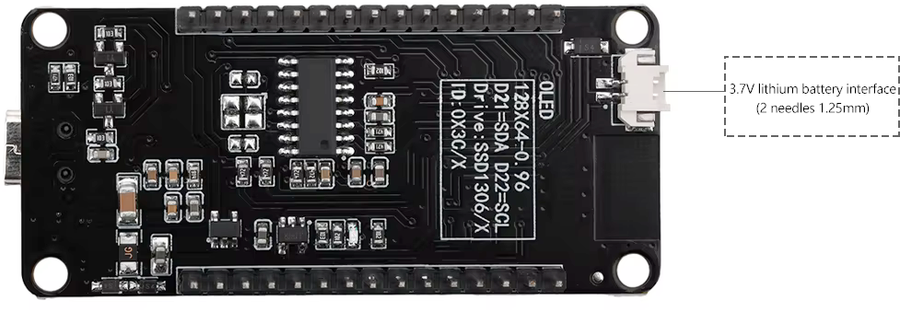
ESP32 ESP-WROOM-32D OLED Features Built-in Display 0.96" OLED Screen: 128x64 resolution with yellow/blue color scheme I2C Interface: Connected to GPIO 21 (SDA) and GPIO 22 (SCL) Driver: SSD1306 controller for easy integration Technical Specifications Based on ESP32-WROOM-32D module with 30 GPIO pins. Perfect for projects requiring visual feedback without external display modules. Perfect For Ideal for IoT…
ESP32 ESP-WROOM-32D OLED Features
Built-in Display
- 0.96" OLED Screen: 128x64 resolution with yellow/blue color scheme
- I2C Interface: Connected to GPIO 21 (SDA) and GPIO 22 (SCL)
- Driver: SSD1306 controller for easy integration
Technical Specifications
Based on ESP32-WROOM-32D module with 30 GPIO pins. Perfect for projects requiring visual feedback without external display modules.
Perfect For
Ideal for IoT projects, sensor monitoring, status displays, and compact embedded applications where a built-in screen is advantageous.
Specifications
ESP32 · vs other ESP32 chips →About this board
Inside sits the ESP32 - a dual-core Xtensa with both Bluetooth Classic and BLE.
At $10.49 it's cheaper than most ESP32 boards, which usually run around $20.
Around the module: an OLED 0.96" 128x64 display and EN/Boot buttons.
The ESP32 ESP-WROOM-32D OLED is a compact development board featuring the ESP32-WROOM-32D module with integrated Wi-Fi 802.11 b/g/n and Bluetooth 4.2 + BLE connectivity.
Powered by a dual-core Xtensa 32-bit LX6 processor running at up to 240 MHz, with 4MB flash memory and 520KB SRAM, it's perfect for IoT applications and embedded projects.
The board features a built-in 0.96" OLED display with yellow/blue color (128x64 resolution) connected via I2C, ideal for displaying sensor data, status information, or user interfaces. It offers 30 GPIO pins with support for ADC (18 channels, 12-bit), DAC (2 channels), PWM, and various communication interfaces including UART, SPI, I2C, I2S, and CAN.
Operating at 3.3V with Micro-USB interface for programming and power. Compact design makes it suitable for space-constrained applications.
- OLED Screen
Where to buy
prices are typical street pricesResources
Similar boards


