
ESP32S3 Walter Module
Compact ESP32-S3 module with rich I/O and connectivity - great for advanced IoT, edge AI, and embedded integration.

ESP32S3 Walter Module Pinout
28 pins · 2.54 mm pitch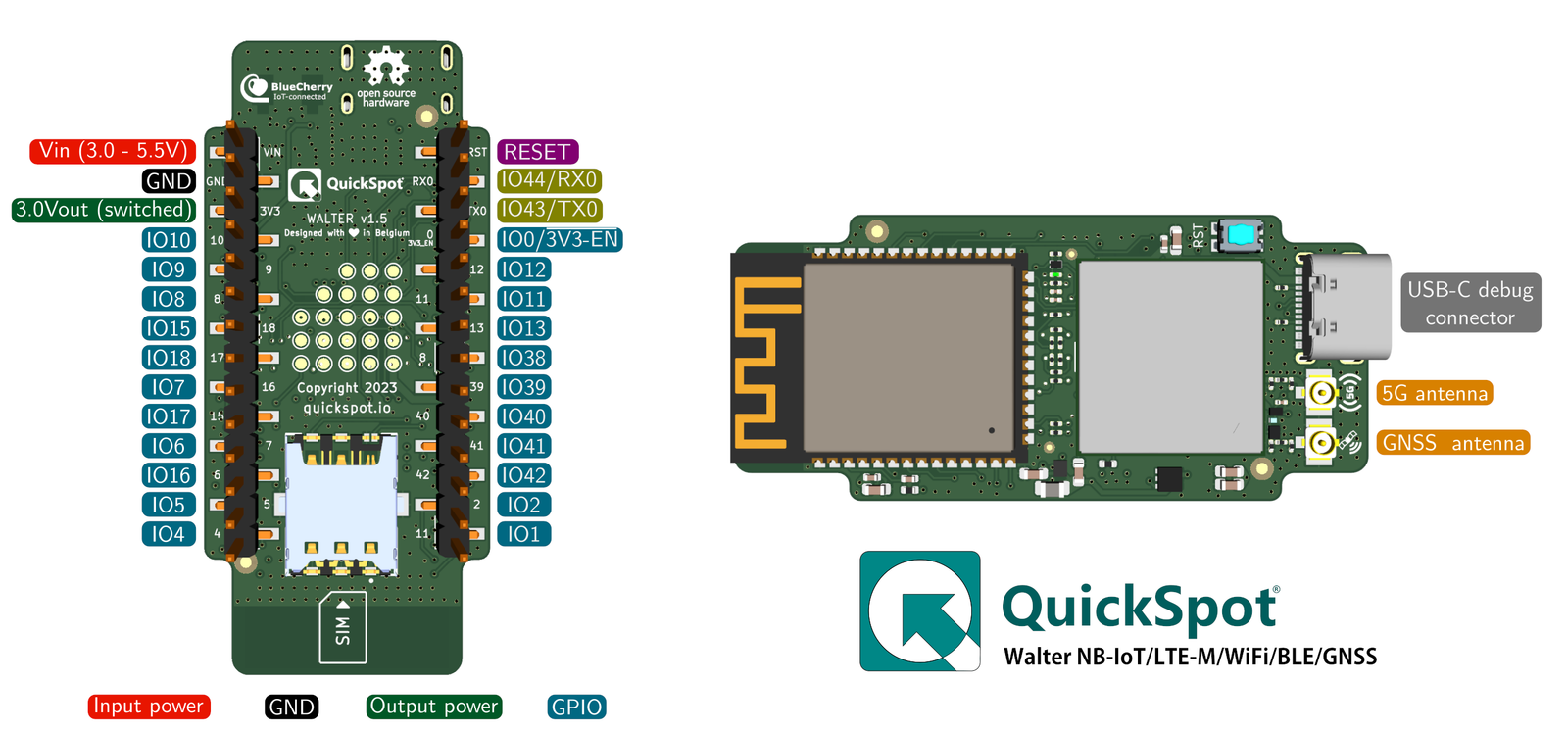
| Pin | GPIO | Labels | Status | Capabilities | Notes |
|---|---|---|---|---|---|
| 1 | - | RESETEN | control | - | ESP32 reset with 10k pullup |
| 2 | 44 | IO44/RX0RXD0 | uart | uart | ESP32 UART0 Receive |
| 3 | 43 | IO43/TX0TXD0 | uart | uart | ESP32 UART0 Transmit |
| 4 | 0 | DFU/3V3 ENIO0 | strapping | - | DFU when low on boot and 3V3 output enable |
| 5 | 12 | IO12 | strapping | - | General purpose I/O |
| 6 | 11 | IO11 | strapping | - | General purpose I/O |
| 7 | 13 | IO13 | strapping | - | General purpose I/O |
| 8 | 38 | IO38 | safe | - | General purpose I/O |
| 9 | 39 | IO39 | strapping | - | General purpose I/O |
| 10 | 40 | IO40 | strapping | - | General purpose I/O |
| 11 | 41 | IO41 | strapping | - | General purpose I/O |
| 12 | 42 | IO42 | strapping | - | General purpose I/O |
| 13 | 2 | IO2 | safe | - | General purpose I/O |
| 14 | 1 | IO1 | safe | - | General purpose I/O |
| 15 | 4 | IO4 | safe | - | General purpose I/O |
| 16 | 5 | IO5 | safe | - | General purpose I/O |
| 17 | 6 | IO6 | safe | - | General purpose I/O |
| 18 | 7 | IO7 | safe | - | General purpose I/O |
| 19 | 15 | IO15 | safe | - | General purpose I/O |
| 20 | 16 | IO16 | safe | - | General purpose I/O |
| 21 | 17 | IO17 | safe | - | General purpose I/O |
| 22 | 18 | IO18 | safe | - | General purpose I/O |
| 23 | 8 | IO8 | safe | - | General purpose I/O |
| 24 | 9 | IO9 | strapping | - | General purpose I/O |
| 25 | 10 | IO10 | strapping | - | General purpose I/O |
| 26 | - | 3V3 OUTN/A | power | - | Switchable 3.3VDC output |
| 27 | - | GND | ground | - | GND connection |
| 28 | - | VINN/A | power | - | DC Power input port |
Start with these
12 pins with no boot or system involvementFreely assignable - no strapping, flash, USB or JTAG duties. Ideal first picks for buttons, sensors and LEDs.
Fine - with a little care
12 pins · 8 things to knowIO44/RX0GPIO44 UART0 receive pin (U0RXD), default serial console RX UART
Used for bootloader input (download mode via serial). If repurposed, you cannot use the default UART0 download mode for programming the chip.
IO43/TX0GPIO43 UART0 transmit pin (U0TXD), default serial console TX UART
Used for bootloader output and UART console logs. If repurposed, you will lose the default serial output (and programming via UART0).
DFU/3V3 ENGPIO0 Bootstrapping pin (Chip boot mode selection) Strapping
Must be pulled high (default) or low (to enter UART download mode) at reset. Using it for other functions can interfere with boot mode configuration.
IO12IO11IO13IO9IO10 General-purpose SPI2 (FSPI) IO MUX pins Other
IO MUX pin of the general-purpose SPI2 (FSPI) bus, not of the in-package flash - that sits on GPIO26-32. The datasheet lists it as a priority-2 pin ("can be freely used without restrictions"), so it is only taken if your board wires flash, an SD card or a display to FSPI.
- IO12General-purpose SPI2 (FSPI) IO MUX pin - clock (FSPICLK)
- IO11General-purpose SPI2 (FSPI) IO MUX pin - data in (FSPID)
- IO13General-purpose SPI2 (FSPI) IO MUX pin - data out (FSPIQ)
- IO9General-purpose SPI2 (FSPI) IO MUX pin - hold/data line (FSPIHD)
- IO10General-purpose SPI2 (FSPI) IO MUX pin - chip select (FSPICS0)
IO39 JTAG test clock (MTCK); IO MUX alternates CLK_OUT3 and SUBSPICS1 (chip select on the alternative SUBSPI memory bus, unused on standard modules) JTAG
Default JTAG TCK - keep it free if you debug over JTAG. It is not a flash or PSRAM line on standard modules: those sit on GPIO26-37.
IO40 JTAG test data out pin (MTDO) JTAG
Default JTAG TDO output for debugging. Using it as GPIO will interfere with JTAG debugging functionality.
IO41 JTAG test data in pin (MTDI) JTAG
Default JTAG TDI input for debugging. Should be reserved for JTAG or left unused if JTAG is to remain available.
IO42 JTAG test mode select pin (MTMS) JTAG
Default JTAG TMS signal for debugging. Using this pin for other purposes will disable the JTAG interface (unless JTAG is rerouted to USB).
The ESP32S3 Walter Module breaks out 28 pins in total: 24 GPIO for your project, with 3V3 OUT, GND and VIN handling power.
12 of the exposed pins carry boot-time or system duties on the ESP32-S3 (IO44/RX0, IO43/TX0, DFU/3V3 EN and 9 more) - check the guidance above before wiring anything to them. IO38, IO2, IO1, IO4 and 8 more are free of any such role - the safest first picks.
Getting started
flash your first firmware in ~2 minutesBoard: ESP32S3 Dev Module USB CDC On Boot: Enabled Flash Size: 16MB (128Mb) Flash Mode: DIO PSRAM: QSPI PSRAM Partition Scheme: 16M Flash (3MB APP/9.9MB FATFS) Upload Speed: 921600
// toggle GPIO38 - wire an LED and resistor to it
void setup() {
  pinMode(38, OUTPUT);
}
void loop() {
  digitalWrite(38, HIGH); delay(500);
  digitalWrite(38, LOW);  delay(500);
}[env:esp32s3-walter]
platform = espressif32
board = esp32-s3-devkitc-1
framework = arduino
monitor_speed = 115200
upload_speed = 921600
board_build.arduino.memory_type = qio_qspi
build_flags = -DBOARD_HAS_PSRAMesp32-s3-devkitc-1 - or type it after board =.esp32:
board: esp32-s3-devkitc-1
variant: esp32s3
framework:
type: esp-idf
psram:
mode: quad
speed: 80MHz
# blink - GPIO38
output:
- platform: gpio
pin: 38
id: led_out
light:
- platform: binary
name: "LED"
output: led_outesp32-s3-devkitc-1 (same ids as PlatformIO).esptool.py --chip esp32s3 --port /dev/ttyACM0 \
--baud 921600 write_flash 0x0 firmware.bin--port = your /dev/tty* (macOS/Linux) or COMx (Windows).Specifications
ESP32-S3 · 55 × 24.8 mm · vs other ESP32 chips →Dimensions
About this board
Inside sits the ESP32-S3 - a dual-core Xtensa with vector extensions suited to AI workloads.
At $54.00 it's on the expensive side for an ESP32-S3 board - most land around $29.
Around the module: 2MB (QSPI) PSRAM, GPS, cellular connectivity (Sequans Monarch 2 GM02SP) and Reset buttons.
It flashes over native USB - no serial-converter driver needed, which isn't a given among ESP32-S3 boards.
Walter is a small, highly integrated IoT module built to tackle complex connectivity and processing needs. At its core is the ESP32-S3, a versatile system-on-chip (SoC) featuring a dual-core processor with hardware acceleration for machine learning, cryptography, and signal processing. It includes a range of peripherals, such as UART, SPI, I²C, and CAN, alongside built-in Wi-Fi b/g/n and Bluetooth 5, providing robust local networking and communication options.
What sets Walter apart is its inclusion of the Sequans GM02SP modem, offering LTE-M and NB-IoT 5G connectivity for low-power, wide-area communication, ideal for IoT applications. The modem also integrates a GNSS receiver, adding precise positioning capabilities for tasks like asset tracking, navigation, or geolocation.
- LTE: CAT M1/NB1/NB2 (GM02SP module)
- GPS: GPS, GNSS Constellation support (GM02SP module)
- Ultra low deep sleep current of 9.8µA
- Certified for CE, FCC, IC, UKCA, New-Zealand and Australia
- Nano-SIM card slot plus integrated eSIM
- u.FL/IPEX connectors for the LTE and GNSS antennas, on-board PCB antenna for Wi-Fi/BLE
- 22 debug/flash testpoints on the underside for the GM02SP and ESP32-S3
Where to buy
prices are typical street pricesResources
Similar boards

