
NodeMCU-32S is a development board based on the ESP32 microcontroller using XTENSA architecture.
This board features a maximum CPU frequency of 240 MHz and 4MB flash memory.
About NodeMCU-32S
The NodeMCU-32S is a feature-rich development board based on the Espressif ESP32-WROOM-32 module. With integrated Wi-Fi 802.11 b/g/n and Bluetooth 4.2 (BR/EDR + BLE), it’s ready for IoT projects that demand robust wireless connectivity. 📡
Its breadboard-friendly form factor pairs with an on-board CP2102 USB-to-UART converter, so you can plug in, program, and prototype in seconds-no extra hardware required. 🔌
For convenient development, the board comes with an EN (reset) button 🔁 and a BOOT (IO0) button, making flashing firmware and entering download mode a breeze. 🚀
A built-in PCB antenna delivers stable RF performance without the need for external antennas, keeping your setup compact. 📶
Exposing 30+ versatile GPIOs that support ADC, DAC, PWM, I²C, SPI, UART, capacitive touch, and more, the NodeMCU-32S empowers you to interface with a wide range of sensors, displays, and actuators. ⚙️
Where to Buy NodeMCU-32S

Starting from
8$ per unit


Prices are subject to change. We earn from qualifying purchases as an Amazon Associate.
Technical Specifications
Complete technical specification details for NodeMCU-32S
Connectivity
Microcontroller
✨ Features & Pins
Quick Setup
Copy-paste configs for NodeMCU-32S - auto‑generated from this board's exact hardware specs.
In Arduino IDE 2 select Nodemcu 32s from the esp32 by Espressif package. In PlatformIO use board = esp32dev. ESP32 · 240 MHz · 4MB · DIO.
In Arduino IDE 2, open Boards Manager, search "esp32" by Espressif and install it. Then go to Tools → Board and select "Nodemcu 32s" for the NodeMCU-32S.
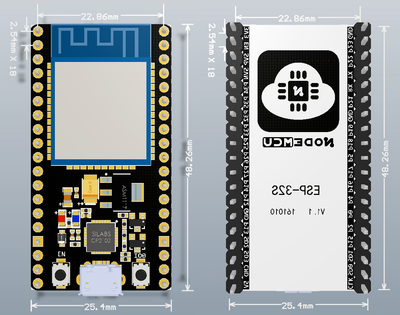
NodeMCU-32S Board Dimensions
Physical measurements for NodeMCU-32S
NodeMCU-32S Pinout Diagram
Complete pin reference for NodeMCU-32S
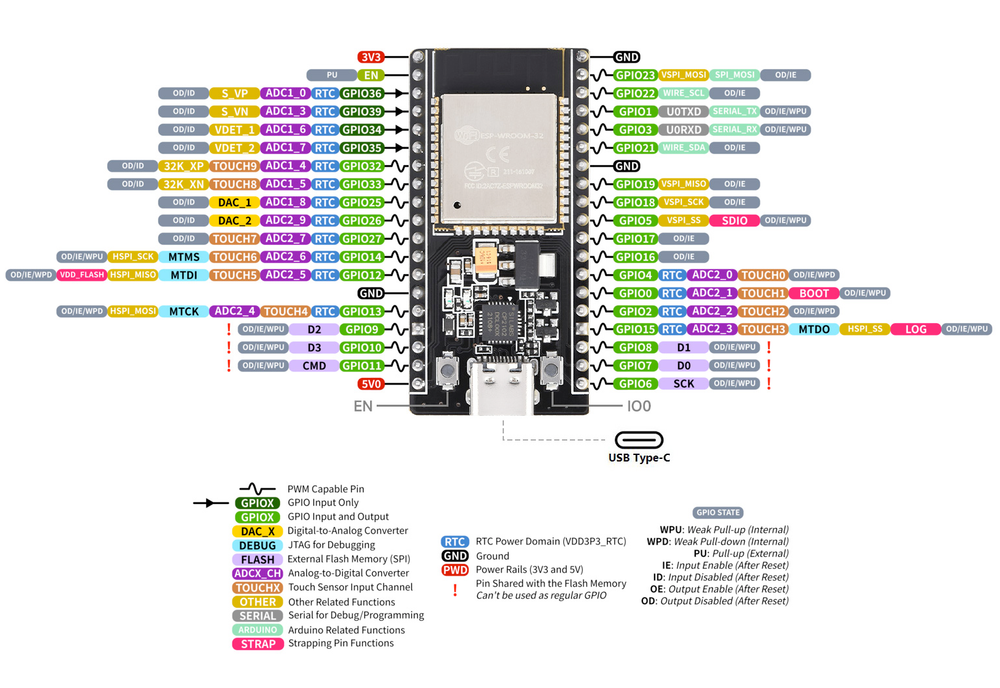
The NodeMCU-32S pinout gives you nearly every feature of the ESP32-WROOM-32 module in a breadboard-friendly format. Key power rails-VIN (5 V), 3V3, and multiple GND pins-let you power the board itself or feed external sensors and actuators with ease.
For serial communication the board breaks out RX0 and TX0 (UART0, connected to the on-board CP2102 for USB programming) plus an extra pair, RX2 (GPIO16) and TX2 (GPIO17), for a second hardware UART. Default I²C lines are SDA (GPIO21) and SCL (GPIO22), while the default VSPI port maps to MOSI (GPIO23), MISO (GPIO19), SCK (GPIO18), and CS (GPIO5). An alternate HSPI bus (GPIO12-15) is available when you need multiple SPI devices.
On the analog side, GPIO32 – GPIO39 expose ADC1 channels, and several ADC2 channels appear on GPIO0, GPIO2, GPIO4, GPIO12-15, and GPIO25-27 (ADC2 is not usable while Wi-Fi is running). Two 8-bit DAC outputs live on GPIO25 and GPIO26, perfect for audio or reference-voltage generation. Many of these pads double as capacitive-touch inputs for sleek, button-free interfaces.
Every GPIO supports PWM for LED dimming or motor control, and special-function pins such as EN (reset) and BOOT (IO0) make flashing easy. Take note of bootstrapping pins GPIO0, GPIO2, and GPIO15; keep them in the proper state (usually pulled HIGH) during reset to ensure normal startup.
With plentiful digital I/O, rich analog capabilities, and multiple high-speed buses, the NodeMCU-32S pinout delivers the versatility needed for everything from simple sensor nodes to complex connected gadgets-all while staying compact enough for quick prototyping.
Safe Pins to Use
These pins are safe for general GPIO usage without boot or system conflicts
Why Are These Pins Safe?
Pins to Avoid or Use with Caution
Reserved for critical functions. Misuse may cause boot failures, programming issues, or system conflicts.
Boot behavior & flash voltage
Low-level debugging interface
USB Serial/JTAG communication
Memory & PSRAM connections
Debugging & firmware uploads
| PIN | Label | Why Avoid | Type |
|---|---|---|---|
| IO3 | U0RXD (GPIO3) | Used for receiving data from USB-UART (programming); also pulled HIGH at boot for console communication, so using as GPIO can disrupt uploads. | 🔌 USB |
| IO1 | U0TXD (GPIO1) | Connected to on-board USB-UART for uploading and logs; drives serial output at boot, so using as GPIO can disrupt programming or console. | 🔌 USB |
| IO5 | GPIO5 | Must be HIGH during boot; if pulled LOW at reset, alters SDIO slave timing and may prevent normal boot. | 🛠️ Strapping |
| IO36 | GPIO36 (SENSOR_VP) | Cannot be used as output; only suitable for input (e.g., analog read). | 🪛 Other |
| IO39 | GPIO39 (SENSOR_VN) | Cannot be used as output; only suitable for input. | 🪛 Other |
| IO14 | MTMS (GPIO14) | Used for JTAG debugging (TMS); driving it as GPIO may interfere with JTAG or produce spurious signals at boot. | 🪛 Other |
| IO12 | MTDI (GPIO12) | Keep LOW during boot (internal PD); pulling HIGH at reset selects 1.8V flash mode, causing flash brownout if 3.3V flash is used. | 🛠️ Strapping |
| IO13 | MTCK (GPIO13) | Used for JTAG debugging (TCK); avoid using as GPIO if JTAG is needed. | 🪛 Other |
| IO15 | MTDO (GPIO15) | Keep HIGH during boot (internal PU); if LOW on reset, bootloader log is silenced and boot mode may change. | 🛠️ Strapping |
| IO4 | GPIO4 | Sampled at reset for boot config; should not be driven at boot (affects boot mode timing). | 🛠️ Strapping |
| IO16 | GPIO16 | Connected to internal PSRAM on PSRAM-enabled modules; not usable as GPIO on those modules. | ⚡ Flash |
| IO17 | GPIO17 | Connected to internal PSRAM on PSRAM-enabled modules; not usable as GPIO on those modules. | ⚡ Flash |
| IO0 | GPIO0 | Must be HIGH during boot for normal startup; if held LOW on reset, forces flash programming mode. | 🛠️ Strapping |
| IO34 | GPIO34 | Cannot be used as output (no drive capability); only suitable for analog/digital input. | 🪛 Other |
| IO35 | GPIO35 | Cannot be used as output; only suitable for input. | 🪛 Other |
Useful Links
Datasheets and resources for NodeMCU-32S
NodeMCU-32S Custom Pin Mapping
Pin configuration and GPIO mapping for NodeMCU-32S
| Pin | Function | ESP Pin | I/O Type | Description |
|---|---|---|---|---|
| 1 | LED_BUILTIN | GPIO2 | output | On-board user LED (active-LOW) |
| 2 | IO3 | GPIO3 | input | UART0 RX (USB serial) |
| 3 | IO1 | GPIO1 | output | UART0 TX (USB serial) |
| 4 | IO21 | GPIO21 | bidirectional | I²C SDA |
| 5 | IO22 | GPIO22 | bidirectional | I²C SCL |
| 6 | IO5 | GPIO5 | bidirectional | VSPI CS / SS |
| 7 | IO23 | GPIO23 | bidirectional | VSPI MOSI |
| 8 | IO19 | GPIO19 | bidirectional | VSPI MISO |
| 9 | IO18 | GPIO18 | bidirectional | VSPI SCK |
| 10 | IO36 | GPIO36 | input | ADC1 Channel 0 (SVP) |
| 11 | IO39 | GPIO39 | input | ADC1 Channel 3 (SVN) |
| 12 | IO32 | GPIO32 | input | ADC1 Channel 4 / Touch 9 |
| 13 | IO33 | GPIO33 | input | ADC1 Channel 5 / Touch 8 |
| 14 | IO25 | GPIO25 | output | DAC1 |
| 15 | IO26 | GPIO26 | output | DAC2 |
| 16 | IO27 | GPIO27 | bidirectional | ADC2 Channel 7 / Touch 7 |
| 17 | IO14 | GPIO14 | bidirectional | HSPI SCK / Touch 6 |
| 18 | IO12 | GPIO12 | bidirectional | HSPI MISO / Touch 5 |
| 19 | IO13 | GPIO13 | bidirectional | HSPI MOSI / Touch 4 |
| 20 | IO15 | GPIO15 | bidirectional | MTDO / ADC2 Channel 3 |
| 21 | IO4 | GPIO4 | bidirectional | Touch 0 / ADC2 Channel 0 |
| 22 | IO16 | GPIO16 | bidirectional | UART2 RX / CLK_OUT |
| 23 | IO17 | GPIO17 | bidirectional | UART2 TX |
| 24 | IO0 | GPIO0 | bidirectional | BOOT-strap / Touch 1 (keep HIGH at reset) |
| 25 | IO34 | GPIO34 | input | ADC1 Channel 6 |
| 26 | IO35 | GPIO35 | input | ADC1 Channel 7 |
Pin Mappings
Complete pinout and GPIO mapping for NodeMCU-32S
| Pin | Analog | Touch | PWM | Other |
|---|---|---|---|---|
| 0 | A11 | T1 | KEY_BUILTIN | |
| 1 | PWM | TX | ||
| 2 | A12 | T2 | PWM | LED_BUILTIN |
| 3 | PWM | RX | ||
| 4 | A10 | T0 | PWM | |
| 5 | PWM | SS | ||
| 12 | A15 | T5 | PWM | |
| 13 | A14 | T4 | PWM | |
| 14 | A16 | T6 | PWM | |
| 15 | A13 | T3 | PWM | |
| 18 | PWM | SCK | ||
| 19 | PWM | MISO | ||
| 21 | PWM | SDA | ||
| 22 | PWM | SCL | ||
| 23 | PWM | MOSI | ||
| 25 | A18 | PWM | DAC1 | |
| 26 | A19 | PWM | DAC2 | |
| 27 | A17 | T7 | PWM | |
| 32 | A4 | T9 | PWM | |
| 33 | A5 | T8 | PWM | |
| 34 | A6 | |||
| 35 | A7 | |||
| 36 | A0 | |||
| 39 | A3 |
Default Tools & Configuration
Build and upload settings for NodeMCU-32S
| Setting | Value |
|---|---|
| Bootloader tool | esptool_py |
| Uploader tool | esptool_py |
| Network uploader tool | esp_ota |
| Bootloader address | 0x1000 |
| Flash mode | dio |
| Boot mode | dio |
| Maximum upload size | 1280 KB (1310720 bytes) |
| Maximum data size | 320 KB (327680 bytes) |
The NodeMCU-32S uses esptool_py for uploads , esp_ota for OTA updates, and esptool_py bootloader at 0x1000.
Flash mode: dio | Boot mode: dio
Max sketch size: 1280 KB | Max data size: 320 KB
Similar Boards
Other development boards with ESP32 microcontroller

M5Stack-Core2
M5Stack-Core2 development board is based on esp32 microcontroller and uses xtensa architecture.

Heltec Wireless Stick
Heltec Wireless Stick development board is based on esp32 microcontroller and uses xtensa architecture.

IfZero KITS ESP32 EDU
IfZero KITS ESP32 EDU development board is based on esp32 microcontroller and uses xtensa architecture.