
Sharp GP2Y1010AU0F Optical Dust Sensor
The Sharp GP2Y1010AU0F is an optical dust sensor designed for air quality monitoring. It detects fine particles like cigarette smoke by measuring the reflected light from an internal infrared LED. The sensor provides an analog voltage output proportional to the dust concentration, making it suitable for integration into air purifiers and HVAC systems.

GP2Y1010AU0F pinout
The GP2Y1010AU0F has 6 pins for power, LED control, and analog output.
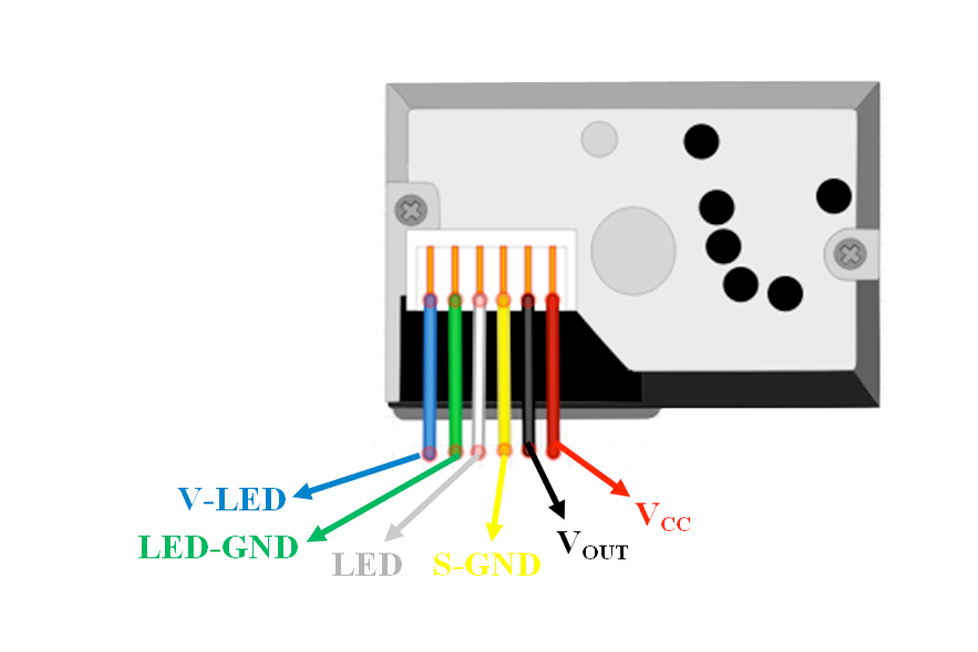
| Pin | Type | Description | Notes |
|---|---|---|---|
| Pin 1 (V-LED) | Power | LED power supply. Connect to 5V through 150Ω resistor. | Resistor limits current to LED. |
| Pin 2 (LED-GND) | Power | LED ground connection. Connect to system ground. | |
| Pin 3 (LED) | Control | LED control input. Connect to digital output pin for pulsing. | Control LED timing: 0.32ms pulse, 10ms cycle. |
| Pin 4 (S-GND) | Power | Signal ground connection. Connect to system ground. | |
| Pin 5 (Vo) | Analog | Analog voltage output proportional to dust density. | Connect to ADC pin. Output: ~0V (clean) to ~3.5V (very dusty). |
| Pin 6 (Vcc) | Power | Power supply input (4.5V-5.5V). Typically 5V. | Stable 5V required for accurate measurements. |
Operating voltage: 4.5V-5.5V (typically 5V)
Current consumption: max 20mA
Detection: Fine dust particles (cigarette smoke, house dust)
Analog output: voltage proportional to dust density
LED pulse timing critical: 0.32ms pulse, 9.68ms off (10ms cycle)
Sampling timing: Read Vo 0.28ms after LED turn-on
Wiring the GP2Y1010AU0F to ESP32
To interface the GP2Y1010AU0F with an ESP32, connect Vcc to 5V, LED-GND and S-GND to ground, Vo to an ADC pin (GPIO 34), LED to a GPIO (GPIO 25), and V-LED to 5V through a 150Ω resistor.
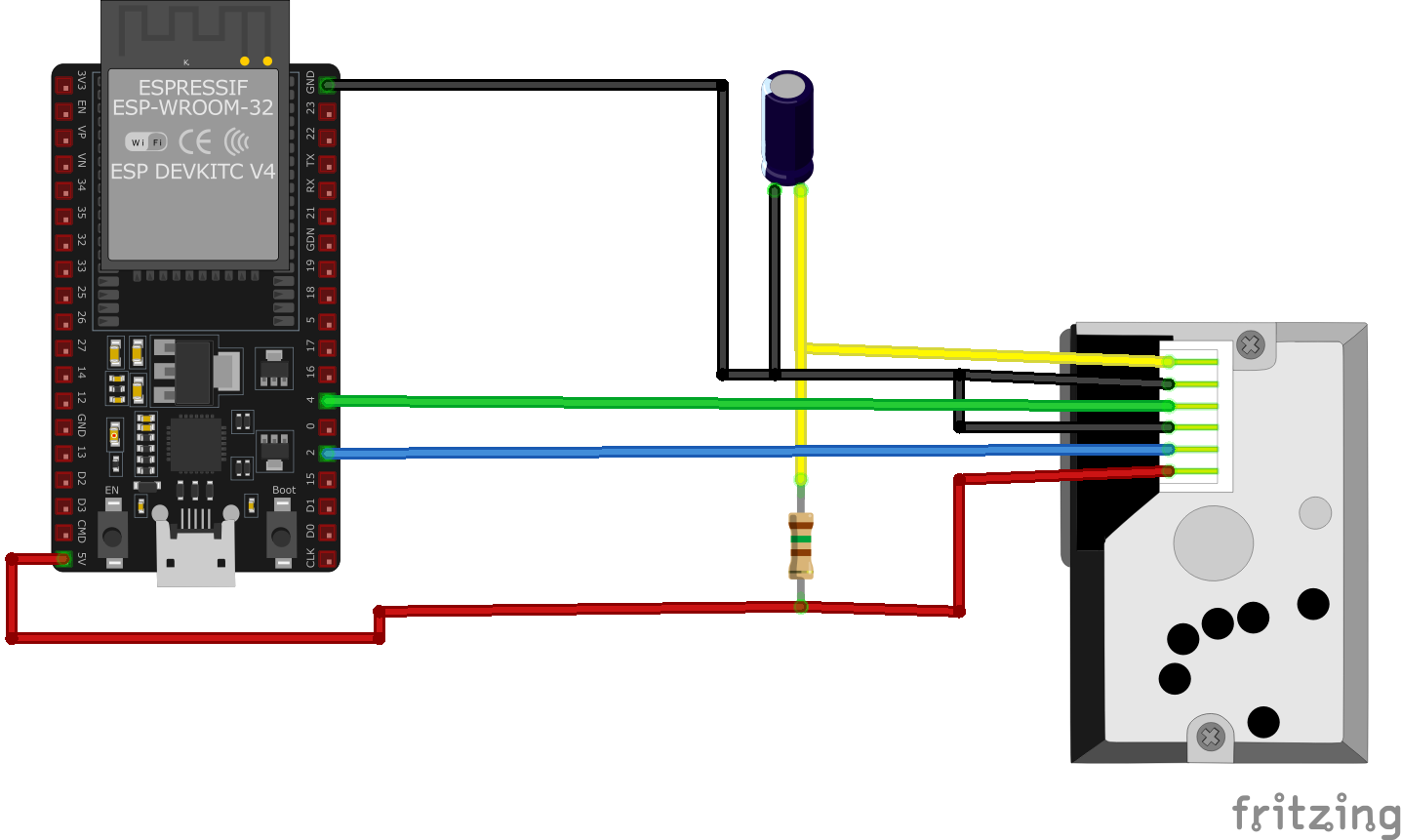
| GP2Y1010AU0F pin | ESP32 pin | Purpose |
|---|---|---|
| Pin 6 (Vcc) | 5V | Power supply (5V). Use stable regulated power. |
| Pin 2 (LED-GND) | GND | LED ground connection. |
| Pin 4 (S-GND) | GND | Signal ground connection. |
| Pin 1 (V-LED) | 5V via 150Ω Resistor | LED power through current-limiting resistor. |
| Pin 3 (LED) | GPIO 25 | LED control. Pulse HIGH for 0.32ms every 10ms. |
| Pin 5 (Vo) | GPIO 34 (ADC1_CH6) | Analog output. Read 0.28ms after LED turn-on. |
CRITICAL: 150Ω resistor required between 5V and V-LED (Pin 1)
CRITICAL: LED timing: Pulse HIGH for 0.32ms, then LOW for 9.68ms (10ms cycle)
CRITICAL: Read Vo (analog) 0.28ms after LED turns on
Use ESP32 ADC1 (GPIO 32-39) - avoid ADC2 when WiFi active
Add 220µF capacitor between Vcc and GND for stable power
Conversion: Dust density (mg/m³) = (Vo - 0.6V) × 0.17
Clean air: Vo ≈ 0.6V, Heavy dust: Vo ≈ 3.5V
Keep sensor away from direct airflow and vibrations
GP2Y1010AU0F code examples
// Requires library: "Sharp GP2Y Dust Sensor"
#include <GP2YDustSensor.h>

const uint8_t SHARP_LED_PIN = 25; // LED drive pin (GPIO25, matches the wiring above)
const uint8_t SHARP_VO_PIN = 34;  // Analog output Vo (GPIO34 / ADC1_CH6)

GP2YDustSensor dustSensor(GP2YDustSensorType::GP2Y1010AU0F, SHARP_LED_PIN, SHARP_VO_PIN);

void setup() {
  Serial.begin(115200);
  //dustSensor.setBaseline(0.4); // set no-dust voltage according to your own experiments
  //dustSensor.setCalibrationFactor(1.1); // calibrate against a precision instrument
  dustSensor.begin();
}

void loop() {
  Serial.print("Dust density: ");
  Serial.print(dustSensor.getDustDensity());
  Serial.print(" ug/m3; Running average: ");
  Serial.print(dustSensor.getRunningAverage());
  Serial.println(" ug/m3");
  delay(1000);
}
This Arduino sketch interfaces with the GP2Y1014AU0F dust sensor to measure dust density in the air. The sensor is controlled using the GP2YDustSensor library.
Library Requirement
To use this code, you need to install the GP2YDustSensor library.
Installation in Arduino IDE
- Open Arduino IDE.
- Go to Sketch → Include Library → Manage Libraries.
- In the search bar, type “GP2YDustSensor”.
- Click Install on the library by Lucian Sabo.
Alternatively, you can manually download it from the GitHub repository"
GP2YDustSensor Library
// The GP2Y1010AU0F requires sampling its analog output DURING the 320 us LED
// pulse (sample ~280 us after switching the LED on) - the timing is what makes
// the reading meaningful.
#include <stdio.h>
#include <stdlib.h>
#include "freertos/FreeRTOS.h"
#include "freertos/task.h"
#include "driver/adc.h"
#include "esp_adc_cal.h"
#include "driver/gpio.h"
#include "esp_rom_sys.h"

#define LED_PIN     GPIO_NUM_25     // LED drive pin (GPIO25, matches the wiring above)
#define ADC_CHANNEL ADC1_CHANNEL_6  // Vo on GPIO34 (ADC1_CH6)
#define DEFAULT_VREF 1100

static esp_adc_cal_characteristics_t adc_chars;

void app_main(void) {
    gpio_reset_pin(LED_PIN);
    gpio_set_direction(LED_PIN, GPIO_MODE_OUTPUT);
    gpio_set_level(LED_PIN, 1); // LED off (active low through the drive circuit)

    ESP_ERROR_CHECK(adc1_config_width(ADC_WIDTH_BIT_12));
    ESP_ERROR_CHECK(adc1_config_channel_atten(ADC_CHANNEL, ADC_ATTEN_DB_11)); // Vo can reach ~3 V
    esp_adc_cal_characterize(ADC_UNIT_1, ADC_ATTEN_DB_11, ADC_WIDTH_BIT_12, DEFAULT_VREF, &adc_chars);

    while (1) {
        // Sharp's datasheet timing: LED on, sample at 280 us, LED off at 320 us
        gpio_set_level(LED_PIN, 0);         // LED on
        esp_rom_delay_us(280);
        int raw = adc1_get_raw(ADC_CHANNEL); // Sample while the LED is on
        esp_rom_delay_us(40);
        gpio_set_level(LED_PIN, 1);         // LED off

        uint32_t voltage_mv = esp_adc_cal_raw_to_voltage(raw, &adc_chars);
        // Approximate dust density per the datasheet curve: ~0.5 V per 0.1 mg/m3,
        // with a no-dust offset around 0.6 V (calibrate for your own sensor)
        float dust_ugm3 = (voltage_mv / 1000.0 - 0.6) / 0.5 * 100.0;
        if (dust_ugm3 < 0) dust_ugm3 = 0;

        printf("Vo: %lu mV, Dust density: %.0f ug/m3\n", (unsigned long)voltage_mv, dust_ugm3);
        vTaskDelay(pdMS_TO_TICKS(1000)); // The 10 ms pulse cycle is only needed for continuous operation
    }
}
The critical detail with the GP2Y1010AU0F is timing: the analog output is only valid during the sensor's LED pulse, so the code switches the LED on (active low through the recommended drive circuit on GPIO25), waits 280 microseconds, samples the ADC while the LED is still on, and switches it off - per the Sharp datasheet's 0.28 ms/0.32 ms timing diagram. Vo on GPIO34 is read with 11 dB attenuation since it can reach about 3 V, and the voltage is converted with the datasheet's approximate curve (~0.5 V per 0.1 mg/m3 above a ~0.6 V no-dust offset - calibrate the offset for your own unit).
[env:esp32dev]
platform = espressif32
board = esp32dev
framework = arduino
monitor_speed = 115200
lib_deps =
luciansabo/Sharp GP2Y Dust Sensor @ ^1.1.0#include <Arduino.h>
#include <GP2YDustSensor.h>
const uint8_t SHARP_LED_PIN = 25; // LED drive pin (GPIO25, matches the wiring above)
const uint8_t SHARP_VO_PIN = 34; // Analog output Vo (GPIO34 / ADC1_CH6)
GP2YDustSensor dustSensor(GP2YDustSensorType::GP2Y1010AU0F, SHARP_LED_PIN, SHARP_VO_PIN);
void setup() {
Serial.begin(115200);
//dustSensor.setBaseline(0.4); // set no-dust voltage according to your own experiments
//dustSensor.setCalibrationFactor(1.1); // calibrate against a precision instrument
dustSensor.begin();
}
void loop() {
Serial.print("Dust density: ");
Serial.print(dustSensor.getDustDensity());
Serial.print(" ug/m3; Running average: ");
Serial.print(dustSensor.getRunningAverage());
Serial.println(" ug/m3");
delay(1000);
}This PlatformIO example interfaces with the GP2Y1010AU0F sensor using GPIO4 to control the LED and GPIO36 for analog readings. The LED is pulsed for 280 microseconds during each measurement. The analog value is converted to voltage using a 3.3V ADC reference and then to dust density in µg/m³ using a calibration formula. Dust density is printed to the Serial Monitor every second.
from machine import Pin, ADC
import time

# Pins per the wiring above: LED drive on GPIO25, Vo on GPIO34 (ADC1)
led_pin = Pin(25, Pin.OUT)
adc = ADC(Pin(34))
adc.width(ADC.WIDTH_12BIT)
adc.atten(ADC.ATTN_11DB)  # Vo can reach ~3V

led_pin.value(1)  # LED off (active low through the recommended drive circuit)

def read_dust_density():
    # Sharp datasheet timing: LED on, sample at 280 us, LED off
    led_pin.value(0)
    time.sleep_us(280)
    raw_value = adc.read()
    led_pin.value(1)

    voltage = raw_value * (3.3 / 4095.0)
    # Datasheet curve: ~0.5 V per 0.1 mg/m3 above a ~0.6 V no-dust offset
    dust_ugm3 = (voltage - 0.6) / 0.5 * 100.0
    return max(dust_ugm3, 0)

while True:
    print("Dust Density: {:.0f} ug/m3".format(read_dust_density()))
    time.sleep(1)
The critical detail with this sensor is timing, which MicroPython can handle with time.sleep_us: the LED is switched on (active low through the recommended drive circuit on GPIO25), the ADC on GPIO34 is sampled 280 microseconds later - inside the valid output window - and the LED switches off, per the Sharp datasheet's timing diagram. The voltage converts to dust density with the datasheet's approximate curve (~0.5 V per 0.1 mg/m3 above a ~0.6 V no-dust offset - calibrate the offset for your own unit).
GP2Y1010AU0F specifications
About the GP2Y1010AU0F
The GP2Y1010AU0F is Sharp’s classic optical dust sensor: an infrared LED and a phototransistor sit at an angle inside a small optical chamber, and the sensor reports how much light gets scattered back by whatever particles happen to be passing through. That makes it a dust-density sensor, not a particle counter - it outputs one analog voltage proportional to how much is in the air rather than a per-size particle count the way a laser PM2.5/PM10 sensor does, so it is best treated as a smoke/dust trend indicator. Sharp’s own datasheet does note one useful trick: the shape of the output pulse itself can distinguish cigarette smoke from ordinary house dust, since the two scatter light differently even at the same density reading.
Getting a clean reading depends on following Sharp’s pulsed-LED drive circuit exactly: the LED needs a 150 ohm current-limiting resistor and a 220 uF capacitor across the supply, per the datasheet’s own application circuit, pulsed high for 0.32 ms out of every 10 ms cycle, with the analog output sampled about 0.28 ms after the LED turns on - reading Vo at any other moment picks up noise instead of a real measurement. Sharp’s sensitivity spec spans 0.35 to 0.65 V per 0.1 mg/m3 of dust density (typical 0.5 V), and the no-dust baseline itself ranges from 0 to 1.5 V (typical 0.9 V) from one unit to the next, so a quick calibration in clean air is worth doing per sensor rather than trusting one fixed baseline.
Worth knowing for a project meant to run for years: the datasheet flags that the LED’s optical output degrades roughly 50% over 5 years of continuous operation, which shows up as a slow downward drift in reported dust density unless the baseline gets rechecked occasionally. For a sensor that hands back a finished air-quality number instead of a raw voltage to calibrate, ENS160 measures VOCs rather than particulates but returns a ready-made index over I2C.
GP2Y1010AU0F troubleshooting
Consistent Zero or Negative Dust Density Readings
›
Issue: The GP2Y1010AU0F sensor outputs constant zero or negative dust density values, indicating potential issues with sensor readings.
Possible causes include incorrect wiring, improper LED control timing, or incorrect voltage reference in calculations.
Solution: Ensure that the sensor's LED control pin is correctly connected to a digital output pin on the microcontroller and that the timing sequence for LED pulsing aligns with the sensor's specifications. Verify that the analog output (Vo) is connected to an appropriate analog input pin. Additionally, confirm that the voltage reference used in calculations matches the actual operating voltage of the sensor (typically 5V).
Inconsistent or Fluctuating Readings
›
Issue: The sensor provides inconsistent or fluctuating dust density readings, making it difficult to obtain accurate measurements.
Possible causes include unstable power supply, external light interference, or improper sensor placement.
Solution: Use a regulated power supply to ensure stable voltage levels. Shield the sensor from external light sources, as ambient light can affect the internal photodetector. Position the sensor in a location with consistent airflow and minimal vibration to improve measurement stability.
Sensor Not Responding to Dust Presence
›
Issue: The GP2Y1010AU0F sensor does not show any change in readings when exposed to dust, indicating a lack of responsiveness.
Possible causes include a malfunctioning internal LED, blocked optical path, or incorrect sensor orientation.
Solution: Inspect the sensor for any obstructions in the optical path and clean if necessary. Ensure that the sensor is oriented correctly, with the dust entry hole unobstructed. If the internal LED is suspected to be faulty, consider replacing the sensor.
Incorrect Voltage Calculations Leading to Erroneous Readings
›
Issue: Miscalculations in converting analog readings to voltage result in incorrect dust density values.
Possible causes include using an incorrect reference voltage in calculations or not accounting for the sensor's sensitivity factor.
Solution: Ensure that the analog-to-digital conversion uses the correct reference voltage, matching the sensor's operating voltage (typically 5V). Apply the appropriate sensitivity factor as specified in the sensor's datasheet to convert voltage readings to dust density accurately.
Where to buy the GP2Y1010AU0F

Resources
Similar sensors


