
KY-003 Hall Magnetic Sensor Module
The KY-003 is a Hall Magnetic Sensor Module that detects magnetic fields using the A3144 Hall-effect sensor. It provides a digital output signal when a magnetic field is present, making it suitable for various applications such as proximity sensing and speed detection.

KY-003 pinout
The KY-003 is a 3-pin Hall-effect magnetic field sensor module (A3144 chip):
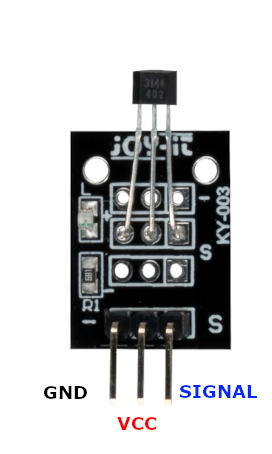
| Pin | Type | Description | Notes |
|---|---|---|---|
| Pin (-) | Power | Ground connection | |
| Pin (+) | Power | Power supply | 3.3V or 5V |
| Pin (S) | Communication | Digital signal output | Goes LOW when magnetic field detected |
Interface: Digital output (active low on magnetic field)
Sensor: A3144 Hall-effect sensor chip
Detection: Responds to south pole of magnet
Power: 3.3V or 5V operation
Low Power: Minimal current consumption
Applications: Speed sensing, position tracking, proximity detection, magnetic switches
Wiring the KY-003 to ESP32
To interface the KY-003 with an ESP32 for magnetic field detection:
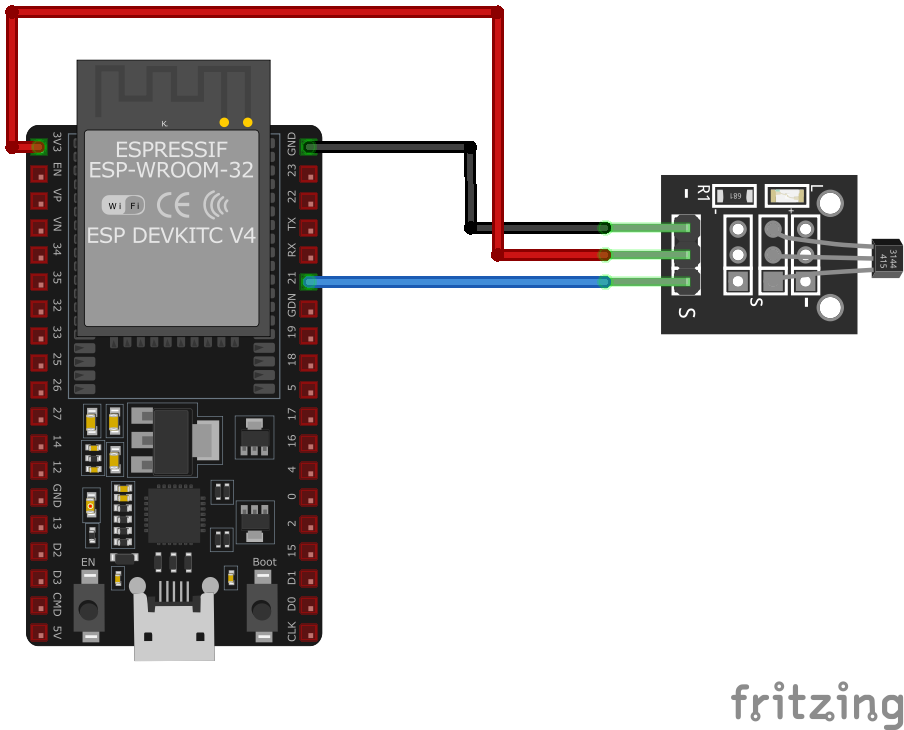
| KY-003 pin | ESP32 pin | Purpose |
|---|---|---|
| Pin (-) | GND | Ground |
| Pin (+) | 3.3V or 5V | Power supply |
| Pin (S) | GPIO4 | Digital input (any GPIO) |
GPIO Selection: Any digital GPIO pin works, GPIO4 is just an example
Voltage: Use 3.3V for ESP32 compatibility
Magnet: Use a permanent magnet (neodymium works well)
Distance: Detection range typically 1-15mm depending on magnet strength
KY-003 code examples
#define HALL_SENSOR_PIN 4 // KY-003 signal pin (GPIO4, matches the wiring above)
#define LED_PIN 2         // Onboard LED on most ESP32 dev boards

void setup() {
    pinMode(HALL_SENSOR_PIN, INPUT_PULLUP); // Open-collector output needs a pull-up
    pinMode(LED_PIN, OUTPUT);
    Serial.begin(115200);
    Serial.println("KY-003 Hall Magnetic Sensor Test");
}

void loop() {
    int sensorValue = digitalRead(HALL_SENSOR_PIN);
    if (sensorValue == LOW) {
        Serial.println("Magnetic field detected");
        digitalWrite(LED_PIN, HIGH);
    } else {
        Serial.println("No magnetic field detected");
        digitalWrite(LED_PIN, LOW);
    }
    delay(1000);
}
The sensor's signal pin connects to GPIO4 (matching the wiring above) and is read as a digital input with the internal pull-up enabled. On the ESP32, pull-ups are enabled with INPUT_PULLUP - the old AVR trick of writing HIGH to an input pin does nothing here. The hall sensor's open-collector output pulls the line LOW when a magnetic field is present, mirrored on the onboard LED (GPIO2).
#include <stdio.h>
#include "freertos/FreeRTOS.h"
#include "freertos/task.h"
#include "driver/gpio.h"

#define HALL_SENSOR_PIN GPIO_NUM_4
#define LED_PIN GPIO_NUM_2

void app_main(void) {
    gpio_set_direction(HALL_SENSOR_PIN, GPIO_MODE_INPUT);
    gpio_set_pull_mode(HALL_SENSOR_PIN, GPIO_PULLUP_ONLY);
    gpio_set_direction(LED_PIN, GPIO_MODE_OUTPUT);
    printf("KY-003 Hall Magnetic Sensor Test\n");
    while (1) {
        int sensor_value = gpio_get_level(HALL_SENSOR_PIN);
        if (sensor_value == 0) {
            printf("Magnetic field detected\n");
            gpio_set_level(LED_PIN, 1);
        } else {
            printf("No magnetic field detected\n");
            gpio_set_level(LED_PIN, 0);
        }
        vTaskDelay(pdMS_TO_TICKS(1000));
    }
}
This ESP-IDF code configures GPIO4 as an input for the KY-003 Hall Magnetic Sensor and GPIO2 as an output for an LED. When a magnetic field is detected (sensor outputs LOW), the LED turns on, and a message is printed to the console.
binary_sensor:
  - platform: gpio
    pin:
      number: GPIO4
      mode: INPUT_PULLUP
    name: "KY-003 Hall Magnetic Sensor"
    filters:
      - delayed_on: 10ms
      - delayed_off: 10ms
    on_press:
      - then:
          - lambda: |-
              ESP_LOGD("sensor", "Magnetic field detected!");
This ESPHome configuration sets up the KY-003 Hall Magnetic Sensor as a binary sensor on GPIO4 with an internal pull-up resistor. It applies filtering to debounce false triggers and logs when a magnetic field is detected.
[env:esp32]
platform = espressif32
board = esp32dev
framework = arduino#include <Arduino.h>
#define HALL_SENSOR_PIN 4
#define LED_PIN 2
void setup() {
pinMode(HALL_SENSOR_PIN, INPUT_PULLUP);
pinMode(LED_PIN, OUTPUT);
Serial.begin(115200);
Serial.println("KY-003 Hall Magnetic Sensor Test");
}
void loop() {
if (digitalRead(HALL_SENSOR_PIN) == LOW) {
Serial.println("Magnetic field detected");
digitalWrite(LED_PIN, HIGH);
} else {
Serial.println("No magnetic field detected");
digitalWrite(LED_PIN, LOW);
}
delay(1000);
}This PlatformIO code configures the KY-003 Hall Magnetic Sensor on GPIO4 and an LED on GPIO2. When a magnetic field is detected, the LED turns on, and a message is printed to the serial monitor.
import machine
import time

HALL_SENSOR_PIN = machine.Pin(4, machine.Pin.IN, machine.Pin.PULL_UP)
LED_PIN = machine.Pin(2, machine.Pin.OUT)

while True:
    if HALL_SENSOR_PIN.value() == 0:
        print("Magnetic field detected")
        LED_PIN.on()
    else:
        print("No magnetic field detected")
        LED_PIN.off()
    time.sleep(1)
This MicroPython script configures the KY-003 Hall Magnetic Sensor on GPIO4 and an LED on GPIO2. When a magnetic field is detected (LOW signal), the LED turns on, and a message is printed to the console.
KY-003 specifications
About the KY-003
The KY-003 wraps an A3144 Hall-effect switch in a 3-pin breakout with a status LED, per Joy-IT’s own documentation of the module. The A3144 is a digital on/off part, not a linear one: an internal Schmitt trigger snaps the open-collector output LOW once the field at the chip crosses a fixed threshold and holds it there until the magnet moves away. There’s no way to read field strength or distance from it, only presence or absence.
Two things are worth knowing before wiring one up. The output is active-low - LOW means “magnet detected,” the opposite of what a first sketch often assumes - and the onboard LED means the module is really meant for 5V; it still switches fine at 3.3V logic levels, but the LED will be dim or unlit off the ESP32’s 3.3V rail. If a project actually needs to measure field strength rather than just detect presence, the analog-output KY-024 uses a linear Hall sensor instead; for basic on/off detection without any active chip at all, a mechanical reed switch module like KY-025 does the same job passively.
KY-003 troubleshooting
No Response from KY-003 Module
›
Issue: The module does not detect any magnetic fields.
Solutions:
- Verify all connections are secure and correctly placed.
- Ensure the module is receiving the appropriate voltage (3.3V or 5V).
- Check the microcontroller's GPIO pin configuration in the code.
- Test the module with a known magnetic source to confirm functionality.
False Triggering of Magnetic Detection
›
Issue: The module sends signals without any actual magnetic field present.
Solutions:
- Reduce environmental electromagnetic interference that might affect the sensor.
- Implement software debouncing to filter out spurious signals.
- Ensure the module is securely mounted to prevent unintended movements.
Where to buy the KY-003

Resources
Similar sensors


