
KY-011 Two-Color LED Module
The KY-011 is a two-color LED module featuring a common cathode 5mm LED capable of emitting red and green light. By adjusting the intensity of each color using PWM, various colors can be achieved. It's ideal for visual feedback in electronic projects.

KY-011 pinout
The KY-011 is a 3-pin two-color LED module (red/green common cathode):
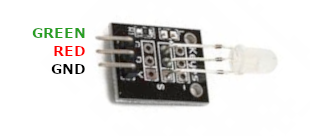
| Pin | Type | Description | Notes |
|---|---|---|---|
| Pin (G) | Power | Common cathode (ground) | Shared ground for both LEDs |
| Pin (R) | Communication | Red LED anode | 2.0-2.5V forward voltage, 20mA |
| Pin (Y) | Communication | Green LED anode | 2.0-2.5V forward voltage, 20mA (Y=Yellow marking) |
Interface: PWM control for each color channel
Colors: Red, green, and mixed colors (yellow/orange)
Configuration: Common cathode (shared ground)
Current: 20mA per LED, 2.0-2.5V forward voltage
Resistors: Current-limiting resistors required for each LED
Applications: Status indicators, visual feedback, alerts, decorative lighting
Wiring the KY-011 to ESP32
To interface the KY-011 with an ESP32 for two-color LED control:
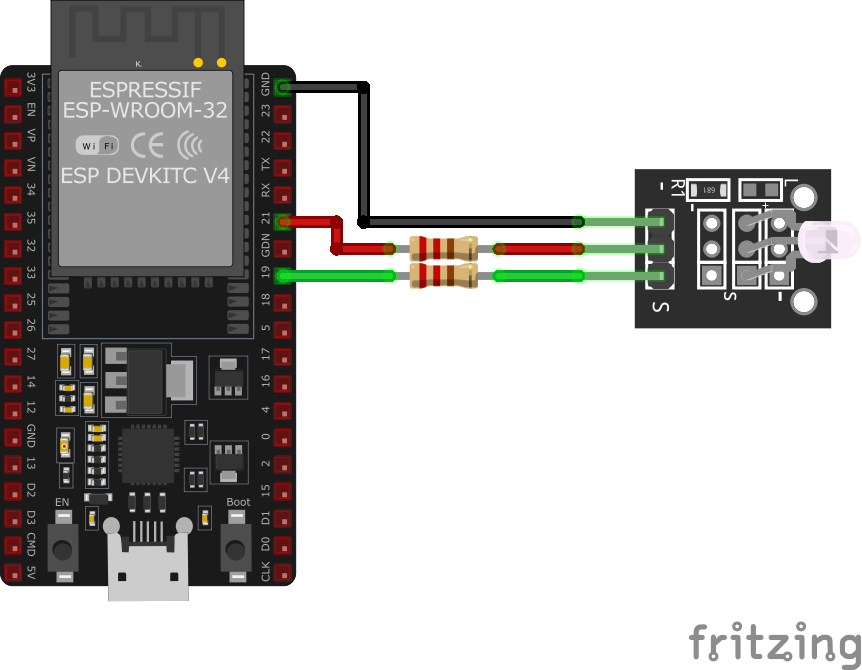
| KY-011 pin | ESP32 pin | Purpose |
|---|---|---|
| Pin (G) | GND | Common ground |
| Pin (R) | GPIO18 | Red channel (via current-limiting resistor) |
| Pin (Y) | GPIO19 | Green channel (via current-limiting resistor) |
Current-Limiting Resistors: Use ~100-220Ω resistors for LED protection
PWM Control: Use PWM for color mixing and brightness adjustment
GPIO Selection: Use any PWM-capable GPIOs, shown pins are examples
3.3V Logic: ESP32’s 3.3V output sufficient with proper resistors
KY-011 code examples
int redPin = 18;    // Pin for red LED (GPIO18, matches the wiring above)
int yellowPin = 19; // Pin for yellow LED (GPIO19)

void setup() {
    pinMode(redPin, OUTPUT);
    pinMode(yellowPin, OUTPUT);
}

void loop() {
    digitalWrite(redPin, HIGH);   // Red LED on
    digitalWrite(yellowPin, LOW); // Yellow LED off
    delay(3000);                  // Wait for 3 seconds
    digitalWrite(redPin, LOW);    // Red LED off
    digitalWrite(yellowPin, HIGH); // Yellow LED on
    delay(3000);                  // Wait for 3 seconds
}
This Arduino code alternates the KY-011 module's red and green LEDs every 3 seconds. Pins 10 and 9 are configured as outputs for the red and green LEDs, respectively.
#include <stdio.h>
#include "freertos/FreeRTOS.h"
#include "freertos/task.h"
#include "driver/gpio.h"
#include "driver/ledc.h"

#define RED_PIN GPIO_NUM_18
#define GREEN_PIN GPIO_NUM_19
#define LEDC_TIMER LEDC_TIMER_0
#define LEDC_MODE LEDC_HIGH_SPEED_MODE
#define LEDC_CHANNEL_R LEDC_CHANNEL_0
#define LEDC_CHANNEL_G LEDC_CHANNEL_1

void configure_led_pwm(gpio_num_t pin, ledc_channel_t channel) {
    ledc_timer_config_t ledc_timer = {
        .speed_mode = LEDC_MODE,
        .timer_num = LEDC_TIMER,
        .duty_resolution = LEDC_TIMER_8_BIT,
        .freq_hz = 5000,
        .clk_cfg = LEDC_AUTO_CLK
    };
    ledc_timer_config(&ledc_timer);

    ledc_channel_config_t ledc_channel = {
        .gpio_num = pin,
        .speed_mode = LEDC_MODE,
        .channel = channel,
        .intr_type = LEDC_INTR_DISABLE,
        .timer_sel = LEDC_TIMER,
        .duty = 0,
        .hpoint = 0
    };
    ledc_channel_config(&ledc_channel);
}

void set_led_color(uint32_t red, uint32_t green) {
    ledc_set_duty(LEDC_MODE, LEDC_CHANNEL_R, red);
    ledc_update_duty(LEDC_MODE, LEDC_CHANNEL_R);
    ledc_set_duty(LEDC_MODE, LEDC_CHANNEL_G, green);
    ledc_update_duty(LEDC_MODE, LEDC_CHANNEL_G);
}

void app_main(void) {
    configure_led_pwm(RED_PIN, LEDC_CHANNEL_R);
    configure_led_pwm(GREEN_PIN, LEDC_CHANNEL_G);

    while (1) {
        set_led_color(255, 0);  // Red on, Green off
        vTaskDelay(pdMS_TO_TICKS(3000));
        set_led_color(0, 255);  // Red off, Green on
        vTaskDelay(pdMS_TO_TICKS(3000));
    }
}
This ESP-IDF code configures the KY-011 two-color LED module using the ESP32's LEDC PWM hardware. GPIO18 controls the red LED, and GPIO19 controls the green LED. The configure_led_pwm() function initializes PWM for each LED channel, allowing brightness control. The LEDs alternate between red and green every 3 seconds.
output:
  - platform: ledc
    pin: GPIO18
    id: red_led
  - platform: ledc
    pin: GPIO19
    id: green_led

light:
  - platform: monochromatic
    name: "KY-011 Red LED"
    output: red_led
    gamma_correct: 2.8
  - platform: monochromatic
    name: "KY-011 Green LED"
    output: green_led
    gamma_correct: 2.8
This ESPHome configuration sets up the KY-011 two-color LED module with LEDC PWM on GPIO18 for red and GPIO19 for green. The LEDs can be controlled individually to create different color effects.
[env:esp32]
platform = espressif32
board = esp32dev
framework = arduino#include <Arduino.h>
#define RED_PIN 18
#define GREEN_PIN 19
void setup() {
pinMode(RED_PIN, OUTPUT);
pinMode(GREEN_PIN, OUTPUT);
}
void loop() {
digitalWrite(RED_PIN, HIGH);
digitalWrite(GREEN_PIN, LOW);
delay(3000);
digitalWrite(RED_PIN, LOW);
digitalWrite(GREEN_PIN, HIGH);
delay(3000);
}This PlatformIO code sets up GPIO18 and GPIO19 as outputs to control the KY-011 module. The red and green LEDs alternate every 3 seconds.
import machine
import time

RED_PIN = machine.Pin(18, machine.Pin.OUT)
GREEN_PIN = machine.Pin(19, machine.Pin.OUT)

while True:
    RED_PIN.value(1)
    GREEN_PIN.value(0)
    time.sleep(3)
    RED_PIN.value(0)
    GREEN_PIN.value(1)
    time.sleep(3)
This MicroPython script configures GPIO18 and GPIO19 as outputs for the KY-011 module. It alternates the red and green LEDs every 3 seconds.
KY-011 specifications
About the KY-011
The KY-011 is a 5mm two-color LED - a red and green die sharing one common-cathode package, not a true RGB LED - broken out to a 3-pin header. There’s no blue die and no controller onboard, so mixing the two colors with PWM tops out around yellow and orange, not the full spectrum; for a genuine third channel the KY-016 or its SMD twin KY-009 add blue and cover that gap.
The module carries no current-limiting resistor of its own, so each LED leg needs one: roughly 120 ohm at 3.3V or 220 ohm at 5V keeps both dies under their 20 mA rated forward current. Wire the shared cathode to GND and drive R and the other leg independently through PWM-capable GPIOs to fade or mix the two colors; a steady digitalWrite() HIGH just gives full brightness on whichever channel is set.
KY-011 troubleshooting
LED Not Lighting Up
›
Issue: The LED does not illuminate when expected.
Solutions:
- Ensure the module is properly connected to the microcontroller.
- Verify that appropriate current-limiting resistors are used to prevent damage to the LEDs.
- Check the code to ensure the correct GPIO pins are being controlled.
Incorrect Color Displayed
›
Issue: The LED displays an unexpected color.
Solutions:
- Confirm that the correct GPIO pins are connected to the respective LED anodes.
- Adjust the PWM values in the code to achieve the desired color mix.
- Ensure that the common cathode is connected to ground.
Where to buy the KY-011

Resources
Similar sensors


