
KY-033 Line Tracking Sensor Module
The KY-033 is a line tracking sensor module that detects light-reflective and light-absorbing surfaces using infrared technology. It provides a digital output signal upon detecting a line, making it suitable for applications like robotic navigation and line-following projects.

KY-033 pinout
The KY-033 is a 3-pin line tracking sensor module:
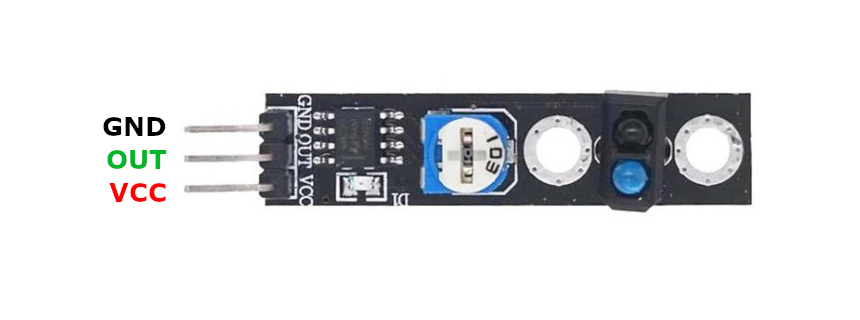
| Pin | Type | Description | Notes |
|---|---|---|---|
| GND | Power | Ground connection | |
| VCC | Power | Power supply | 3.3V or 5V |
| S | Communication | Signal output | LOW when line detected, HIGH over white surface |
Interface: Digital line detection
Sensor: IR LED emitter + phototransistor receiver pair
Signal: Active low - S pin LOW when over black line, HIGH over white/reflective surface
Power: 3.3V to 5V operation
Detection Height: Optimal 2-10mm above surface
Adjustment: Onboard potentiometer for sensitivity tuning
LED Indicators: Power LED and detection status LED
Applications: Line-following robots, automated guided vehicles (AGV), track detection
Wiring the KY-033 to ESP32
To interface the KY-033 with an ESP32 for line tracking:
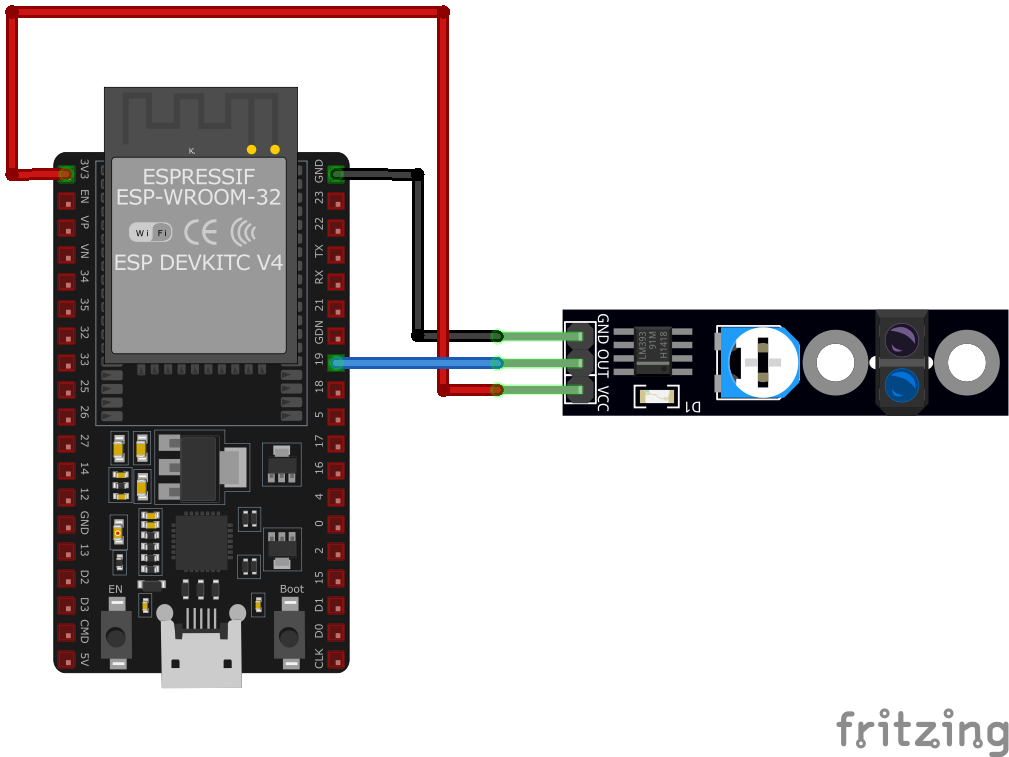
| KY-033 pin | ESP32 pin | Purpose |
|---|---|---|
| GND | GND | Ground |
| VCC | 3.3V or 5V | Power supply |
| S | GPIO16 | Digital input (any GPIO) |
Detection Logic: S reads LOW on black line, HIGH on white/reflective surface
Calibration: Adjust potentiometer for optimal contrast detection on your surface
Mounting Height: Keep sensor 2-10mm above surface for best performance
Pull-up: Internal pull-up recommended for stable HIGH state
Multi-Sensor Arrays: Use multiple sensors (3-5) for robust line following
Ambient Light: Works best indoors - bright sunlight can interfere
Power LED: Always on when powered
Status LED: Lights when line (dark surface) detected
KY-033 code examples
int linetracking = 16; // KY-033 signal pin (GPIO16, matches the wiring above)
int value;

void setup() {
    pinMode(linetracking, INPUT); // The module has its own output driver
    Serial.begin(115200);
    Serial.println("KY-033 Linetracking");
}

void loop() {
    value = digitalRead(linetracking);
    if (value == HIGH) {
        Serial.println("Line recognized");
        delay(200); // 200 ms break
    }
}
This Arduino code initializes the sensor input pin and serial communication. In the loop, it reads the sensor value and prints "Line recognized" to the serial monitor when a line is detected. A 200 ms delay is added to debounce the sensor readings.
#include <stdio.h>
#include "freertos/FreeRTOS.h"
#include "freertos/task.h"
#include "driver/gpio.h"

#define SENSOR_PIN GPIO_NUM_16

void app_main(void) {
    gpio_config_t io_conf = {
        .intr_type = GPIO_INTR_DISABLE,
        .mode = GPIO_MODE_INPUT,
        .pin_bit_mask = (1ULL << SENSOR_PIN),
        .pull_up_en = GPIO_PULLUP_ENABLE
    };
    gpio_config(&io_conf);

    printf("KY-033 Line Tracking Sensor Test\n");
    while (1) {
        int sensor_value = gpio_get_level(SENSOR_PIN);
        if (sensor_value == 1) { // Line detected
            printf("Line recognized\n");
        } else {
            printf("No line detected\n");
        }
        vTaskDelay(pdMS_TO_TICKS(500));
    }
}
This ESP-IDF code configures GPIO16 as an input with a pull-up resistor. It continuously reads the sensor's state and prints "Line recognized" or "No line detected" to the console based on the sensor's output.
binary_sensor:
  - platform: gpio
    pin:
      number: GPIO16
      mode: INPUT_PULLUP
      inverted: true
    name: "KY-033 Line Tracking Sensor"
    device_class: motion
    on_press:
      then:
        - logger.log: "Line detected"
    on_release:
      then:
        - logger.log: "No line detected"
The tracker's output is read on GPIO16 with the internal pull-up; inverted: true on the pin makes the entity read ON when the line is detected. The old filters: - invert: syntax this page used previously is not valid - inversion belongs on the pin schema.
[env:esp32]
platform = espressif32
board = esp32dev
framework = arduino#include <Arduino.h>
#define SENSOR_PIN 16
void setup() {
pinMode(SENSOR_PIN, INPUT_PULLUP);
Serial.begin(115200);
Serial.println("KY-033 Line Tracking Sensor Test");
}
void loop() {
int sensor_value = digitalRead(SENSOR_PIN);
if (sensor_value == HIGH) {
Serial.println("Line detected");
} else {
Serial.println("No line detected");
}
delay(500);
}This PlatformIO code sets up GPIO16 as an input with a pull-up resistor for the KY-033 sensor. It prints "Line detected" or "No line detected" to the serial monitor based on the sensor's state.
import machine
import time

SENSOR_PIN = machine.Pin(16, machine.Pin.IN, machine.Pin.PULL_UP)

while True:
    if SENSOR_PIN.value() == 1:
        print("Line detected")
    else:
        print("No line detected")
    time.sleep(0.5)
This MicroPython script configures GPIO16 as an input with a pull-up resistor for the KY-033 sensor. It continuously checks for lines and prints the corresponding message every 500ms.
KY-033 specifications
About the KY-033
The KY-033 pairs a TCRT5000 reflective IR emitter/receiver pair with an LM393 comparator and a single potentiometer, the same comparator-plus-pot formula used across most of the KY-0xx analog modules. The TCRT5000 shines IR down at the surface below it and reads how much bounces back into its own phototransistor; the comparator turns that reflectivity reading into a clean digital edge once it crosses whatever level the pot is set to, rather than leaving a project to interpret a raw analog signal.
Because it works purely on contrast, it needs a genuinely dark line on a genuinely light background (or vice versa) and a fairly close, consistent mounting height above the surface - a few millimeters is typical - to keep the reflectivity reading stable. Like the KY-032’s reflective sensing, it’s not immune to strong ambient light washing out the signal, so it performs best indoors. A single KY-033 only reports one point of contrast; real line-following robots almost always run three or more of these (or an array board built around the same TCRT5000 sensor) side by side to track a line’s position, not just its presence.
KY-033 troubleshooting
No Line Detection
›
Issue: The sensor does not detect lines.
Solutions:
- Ensure proper wiring connections and verify the power supply voltage.
- Adjust the sensitivity using the onboard potentiometer to suit the surface and lighting conditions.
- Check for any obstructions or dirt on the sensor's infrared emitter and receiver.
False Positives
›
Issue: The sensor indicates a line when none is present.
Solutions:
- Reduce the sensitivity using the potentiometer to prevent detection of unintended surfaces.
- Ensure the sensor is not exposed to direct sunlight or strong ambient infrared sources.
- Verify that the sensor is mounted at an appropriate height and angle relative to the surface.
Where to buy the KY-033

Resources
Similar sensors


