
KY-038 Microphone Sound Sensor Module
The KY-038 is a microphone sound sensor module equipped with an electret condenser microphone and an LM393 comparator. It offers both analog and digital outputs, making it suitable for various sound detection applications, including voice-activated systems and sound level monitoring.

KY-038 pinout
The KY-038 is a 4-pin microphone sound sensor module with dual outputs:
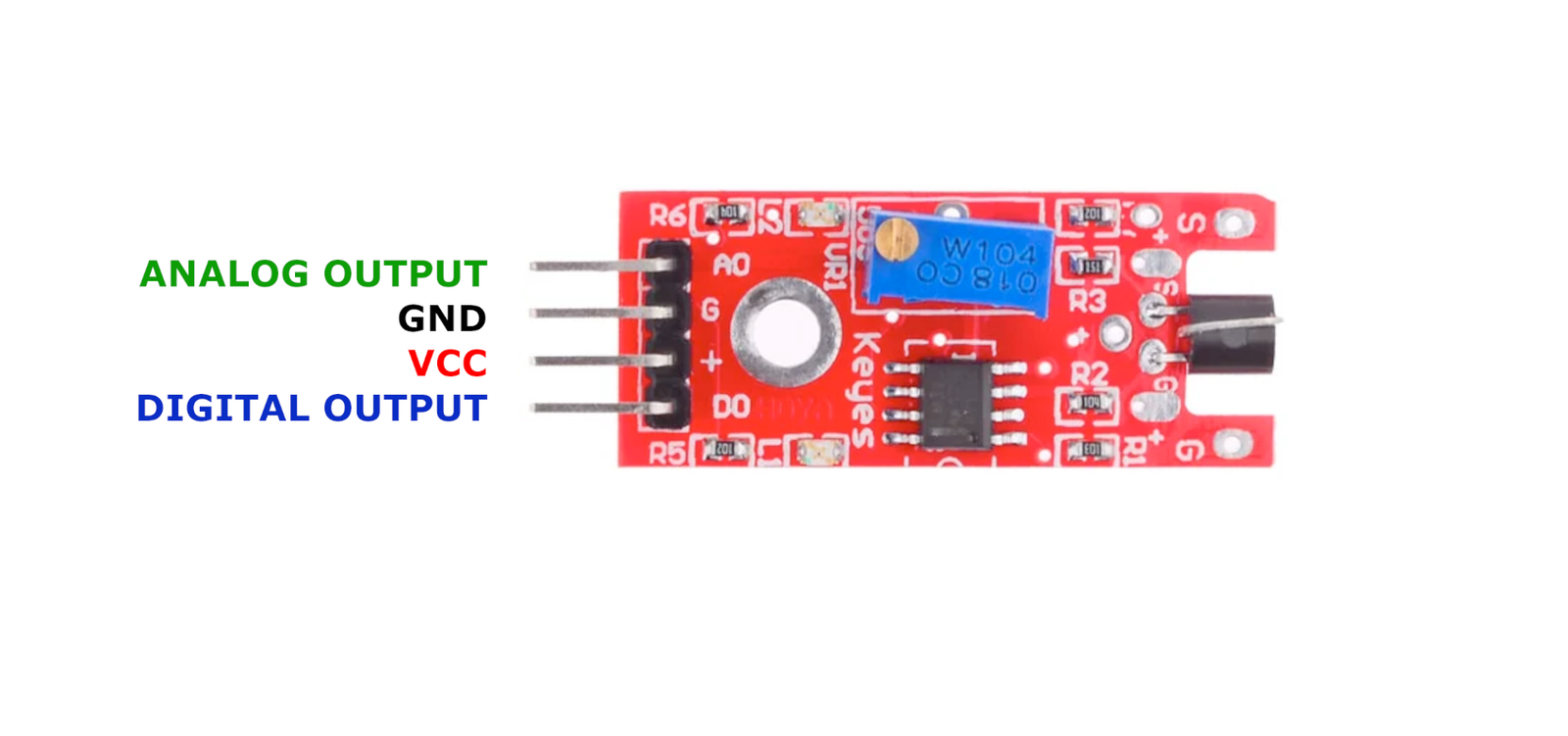
| Pin | Type | Description | Notes |
|---|---|---|---|
| +V | Power | Power supply | 3.3V or 5V |
| GND | Power | Ground connection | |
| D0 | Communication | Digital output | HIGH when sound exceeds threshold |
| A0 | Communication | Analog output | Voltage proportional to sound intensity |
Interface: Dual output (analog + digital with comparator)
Sensor: Electret condenser microphone
Comparator: LM393 for digital threshold detection
Analog Output: Continuous voltage reading proportional to sound level
Digital Output: Threshold-based trigger (adjustable via potentiometer)
Power: 3.3V or 5V operation
Wiring the KY-038 to ESP32
To interface the KY-038 with an ESP32 for sound detection:
| KY-038 pin | ESP32 pin | Purpose |
|---|---|---|
| +V | 3.3V | Power supply |
| GND | GND | Ground |
| D0 | GPIO15 | Digital input (any GPIO) · optional |
| A0 | GPIO34 | Analog input (ADC pin) · optional |
Dual Use: Use analog for sound level measurement or digital for threshold detection
ADC Pins: Use GPIO32-39 for analog input on ESP32
Voltage: 3.3V recommended for ESP32
Adjustment: Turn onboard potentiometer to set sensitivity threshold
Applications: Voice activation, sound level monitoring, clap detection, interactive installations
KY-038 code examples
// Declaration and initialization of the input pins
int analog_input = 34;  // Analog output of the sensor (GPIO34, matches the wiring above)
int digital_input = 15; // Digital output of the sensor (GPIO15)

void setup() {
    pinMode(digital_input, INPUT);
    Serial.begin(115200);
    Serial.println("KY-038 Sound Detection Module Test");
}

void loop() {
    // Read current values and convert to voltage (ESP32: 12-bit ADC, 3.3V)
    float analog_value = analogRead(analog_input) * (3.3 / 4095.0);
    int digital_value = digitalRead(digital_input);

    Serial.print("Analog voltage value: ");
    Serial.print(analog_value, 4);
    Serial.print(" V, 	 Threshold value: ");

    if (digital_value == 1) {
        Serial.println("reached");
    } else {
        Serial.println("not reached");
    }
    Serial.println("-------------------------------");
    delay(1000);
}
This Arduino code initializes the analog and digital pins connected to the KY-038 sensor. It reads the analog voltage to monitor sound intensity and checks the digital output to determine if the sound level has exceeded the set threshold. The results are printed to the serial monitor every second.
#include <stdio.h>
#include "freertos/FreeRTOS.h"
#include "freertos/task.h"
#include "driver/adc.h"
#include "driver/gpio.h"

#define ANALOG_PIN ADC1_CHANNEL_6 // GPIO34
#define DIGITAL_PIN GPIO_NUM_15

void app_main(void) {
    adc1_config_width(ADC_WIDTH_BIT_12);
    adc1_config_channel_atten(ANALOG_PIN, ADC_ATTEN_DB_11);
    gpio_set_direction(DIGITAL_PIN, GPIO_MODE_INPUT);

    printf("KY-038 Sound Detection Module Test\n");
    while (1) {
        int raw = adc1_get_raw(ANALOG_PIN);
        float voltage = raw * (3.3 / 4095.0);
        int digital_state = gpio_get_level(DIGITAL_PIN);

        printf("Analog Voltage: %.2f V, Sound Detected: %s\n", voltage, digital_state ? "Yes" : "No");
        vTaskDelay(pdMS_TO_TICKS(1000));
    }
}
This ESP-IDF code configures GPIO34 as an analog input and GPIO15 as a digital input for the KY-038 sound sensor. It reads the analog voltage and digital state, printing the voltage and whether a sound is detected to the console every second.
sensor:
  - platform: adc
    pin: GPIO34
    name: "KY-038 Sound Sensor Analog"
    update_interval: 1s
    filters:
      - multiply: 3.3
      - lambda: |-
          return x * 1000;  // Convert to millivolts

binary_sensor:
  - platform: gpio
    pin:
      number: GPIO15
      mode: INPUT_PULLUP
    name: "KY-038 Sound Sensor Digital"
This ESPHome configuration sets up the KY-038 sensor with both an analog and digital sensor. The analog value from GPIO34 is converted to millivolts, while the digital sensor on GPIO15 acts as a binary sensor to indicate sound detection.
[env:esp32]
platform = espressif32
board = esp32dev
framework = arduino#include <Arduino.h>
#define ANALOG_PIN 34
#define DIGITAL_PIN 15
void setup() {
pinMode(DIGITAL_PIN, INPUT_PULLUP);
Serial.begin(115200);
Serial.println("KY-038 Sound Sensor Test");
}
void loop() {
int raw_value = analogRead(ANALOG_PIN);
float voltage = raw_value * (3.3 / 4095.0) * 1000; // Convert to millivolts
int digital_value = digitalRead(DIGITAL_PIN);
Serial.printf("Analog Voltage: %.2f mV, Digital State: %s\n", voltage, digital_value ? "Sound Detected" : "No Sound");
delay(1000);
}This PlatformIO code sets up GPIO34 as an analog input and GPIO15 as a digital input for the KY-038 sensor. It reads the analog voltage and digital state, logging the voltage and sound detection status to the serial monitor every second.
import machine
import time

ANALOG_PIN = machine.ADC(machine.Pin(34))
ANALOG_PIN.atten(machine.ADC.ATTN_11DB)
DIGITAL_PIN = machine.Pin(15, machine.Pin.IN, machine.Pin.PULL_UP)

while True:
    analog_value = ANALOG_PIN.read()
    voltage = (analog_value / 4095) * 3300  # Convert to millivolts
    digital_value = DIGITAL_PIN.value()
    print("Analog Voltage:", voltage, "mV", "| Digital State:", "Sound Detected" if digital_value == 1 else "No Sound")
    time.sleep(1)
This MicroPython script configures GPIO34 as an ADC input and GPIO15 as a digital input for the KY-038 sensor. It continuously reads the sensor values and prints the voltage and sound detection state every second.
KY-038 specifications
About the KY-038
The KY-038 is built around an electret condenser microphone feeding an LM393 comparator - the same design as the larger KY-037 sound sensor, just on a smaller board with a smaller microphone capsule, which sellers generally market as slightly less sensitive than its bigger sibling even though the circuit is otherwise the same. The digital pin trips once sound intensity crosses whatever level the onboard potentiometer is set to, useful for a clap switch or basic noise alarm, while the analog pin exposes the microphone’s raw amplified level ahead of that threshold.
Neither output is audio, though. This module reports how loud the ambient sound is, not a waveform fast or clean enough to reconstruct speech or music - polling the analog pin with analogRead() gives a sound-level trend, not a recording. For projects that actually need to capture or analyze sound, an I2S MEMS microphone read through the ESP32’s I2S peripheral is the appropriate part; the KY-038 is a fine, cheap way to detect that a sound occurred and roughly how loud it was, nothing more.
KY-038 troubleshooting
No Response from Sensor
›
Issue: The sensor does not respond to sound.
Solutions:
- Ensure the module is properly powered with the correct voltage (3.3V or 5V).
- Verify all connections are secure and correctly wired.
- Adjust the sensitivity using the onboard potentiometer.
- Check if the microphone is functioning correctly and not obstructed.
False Triggering
›
Issue: The sensor triggers without any sound input.
Solutions:
- Reduce the sensitivity using the potentiometer to prevent false triggers.
- Ensure the environment is free from electrical noise or interference.
- Check for any loose connections or faulty components on the module.
Where to buy the KY-038

Resources
Similar sensors


