
KY-020 Tilt Switch Module
The KY-020 is a tilt switch module that detects changes in orientation. It provides a digital signal output, making it suitable for applications like motion detection, security systems, and tilt-based controls.

KY-020 pinout
The KY-020 is a 3-pin ball tilt switch sensor module:
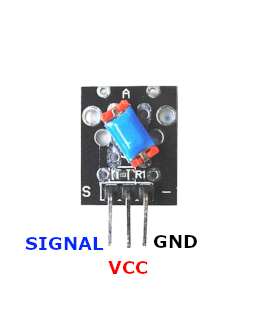
| Pin | Type | Description | Notes |
|---|---|---|---|
| Pin (-) | Power | Ground connection | |
| Pin (middle) | Power | Power supply | 3.3V to 5V |
| Pin (S) | Communication | Digital signal output | Changes state when tilted |
Interface: Digital output (tilt/orientation detection)
Sensor: Metallic ball switch mechanism
Operation: Ball moves with tilt, connecting or disconnecting circuit
Power: 3.3V to 5V operation
Binary: Simple binary tilt detection (on/off)
Applications: Orientation detection, motion sensors, anti-theft alarms, tilt-based controls
Wiring the KY-020 to ESP32
To interface the KY-020 with an ESP32 for tilt detection:
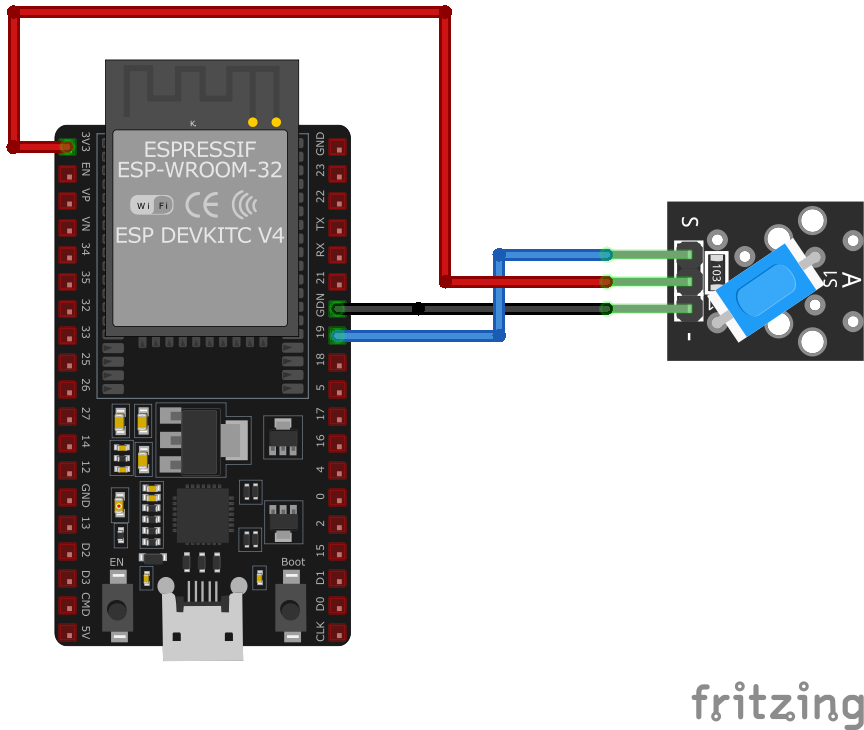
| KY-020 pin | ESP32 pin | Purpose |
|---|---|---|
| Pin (-) | GND | Ground |
| Pin (middle) | 3.3V | Power supply |
| Pin (S) | GPIO4 | Digital input (any GPIO) |
GPIO Selection: Any digital GPIO pin works, GPIO4 is just an example
Voltage: Use 3.3V for ESP32 compatibility
Ball Switch: Physical ball moves inside to make/break contact
Binary Output: Simple HIGH/LOW state based on tilt angle
Safer Alternative: The KY-020 ball switch is itself the mercury-free option - prefer it over the mercury-based KY-017
KY-020 code examples
int tilt_switch = 4; // KY-020 signal pin (GPIO4, matches the wiring above)
int value;

void setup() {
    pinMode(tilt_switch, INPUT_PULLUP); // Ball switch closes to GND when tilted
    Serial.begin(115200);
    Serial.println("KY-020 Inclination test");
}

void loop() {
    value = digitalRead(tilt_switch);
    if (value == LOW) {
        Serial.println("Inclination recognized");
        delay(1000); // 1s break
    }
}
The sensor's signal pin connects to GPIO4 (matching the wiring above) and is read as a digital input with the internal pull-up enabled. On the ESP32, pull-ups are enabled with INPUT_PULLUP - the old AVR trick of writing HIGH to an input pin does nothing here. The ball switch closes to GND when tilted, which reads LOW.
#include <stdio.h>
#include "freertos/FreeRTOS.h"
#include "freertos/task.h"
#include "driver/gpio.h"

#define TILT_SWITCH_PIN GPIO_NUM_4

void app_main(void) {
    gpio_config_t io_conf = {
        .pin_bit_mask = (1ULL << TILT_SWITCH_PIN),
        .mode = GPIO_MODE_INPUT,
        .pull_up_en = GPIO_PULLUP_ENABLE,
        .pull_down_en = GPIO_PULLDOWN_DISABLE,
        .intr_type = GPIO_INTR_DISABLE
    };
    gpio_config(&io_conf);

    printf("KY-020 Tilt Switch Test\n");

    while (1) {
        int level = gpio_get_level(TILT_SWITCH_PIN);
        if (level == 0) {
            printf("Inclination recognized\n");
            vTaskDelay(pdMS_TO_TICKS(1000)); // 1s delay
        }
        vTaskDelay(pdMS_TO_TICKS(100));
    }
}
This ESP-IDF code configures GPIO4 as an input with an internal pull-up resistor for the KY-020 tilt switch. It continuously checks the pin state and prints a message when an inclination is detected.
binary_sensor:
  - platform: gpio
    pin:
      number: GPIO4
      mode: INPUT_PULLUP
    name: "KY-020 Tilt Switch"
    filters:
      - delayed_on: 50ms
      - delayed_off: 50ms
    on_press:
      - then:
          - lambda: |-
              ESP_LOGD("sensor", "Inclination recognized!");
This ESPHome configuration sets up the KY-020 tilt switch as a binary sensor on GPIO4 with an internal pull-up resistor enabled. Debouncing filters are applied to avoid false triggers. When the sensor detects an inclination, a log message is recorded.
[env:esp32]
platform = espressif32
board = esp32dev
framework = arduino#include <Arduino.h>
#define TILT_SWITCH_PIN 4
void setup() {
pinMode(TILT_SWITCH_PIN, INPUT_PULLUP);
Serial.begin(115200);
Serial.println("KY-020 Tilt Switch Test");
}
void loop() {
if (digitalRead(TILT_SWITCH_PIN) == LOW) {
Serial.println("Inclination recognized");
delay(1000);
}
delay(100);
}This PlatformIO code configures GPIO4 as an input with a pull-up resistor for the KY-020 tilt switch. It detects inclination changes and prints a message when a tilt is recognized.
import machine
import time

TILT_SWITCH_PIN = machine.Pin(4, machine.Pin.IN, machine.Pin.PULL_UP)

while True:
    if TILT_SWITCH_PIN.value() == 0:
        print("Inclination recognized")
        time.sleep(1)
    time.sleep(0.1)
This MicroPython script configures GPIO4 as an input with an internal pull-up resistor for the KY-020 tilt switch. It continuously checks the sensor state and prints a message when an inclination is detected.
KY-020 specifications
About the KY-020
The KY-020 is the non-toxic tilt switch: a small metal ball rolling inside a two-contact housing that bridges the circuit once it’s tilted past the housing’s built-in angle, no mercury involved - the mercury-free part some vendors substitute under the “KY-017” name too, which is worth knowing since the two modules get confused often enough that the actual switch inside either one is worth confirming with the seller if it matters. The KY-020 itself typically carries its own onboard pull-up resistor, so no external one is needed.
Behaviorally it’s the same simple mechanical contact as the KY-017: read the signal pin as a digital input, debounce it in software the way you would any switch, and don’t expect a graduated tilt reading back - only a binary state once the ball rolls past the geometry built into the switch, which is fixed by construction rather than anything adjustable in code.
KY-020 troubleshooting
No Response from Sensor
›
Issue: The sensor does not output any signal when tilted.
Solutions:
- Verify that all connections are secure and correctly placed.
- Ensure the module is receiving the appropriate voltage (3.3V to 5V).
- Check if the microcontroller's digital input pin is correctly configured.
False Triggering
›
Issue: The sensor outputs a signal without being tilted.
Solutions:
- Ensure stable mounting to prevent unintended movements.
- Check for loose connections or interference from nearby electronic components.
- Implement software debouncing to filter out spurious signals.
Where to buy the KY-020

Resources
Similar sensors


