
KY-017 Mercury Tilt Switch Module
The KY-017 is a mercury tilt switch module that detects changes in orientation. When tilted beyond a certain angle, the internal mercury switch closes, sending a digital signal. It's suitable for projects requiring simple tilt or motion detection.

KY-017 pinout
The KY-017 is a 3-pin mercury tilt switch sensor module:
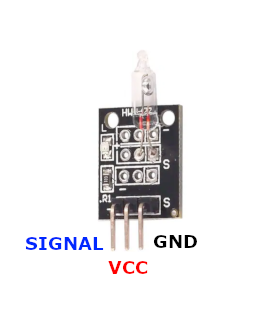
| Pin | Type | Description | Notes |
|---|---|---|---|
| Pin (-) | Power | Ground connection | |
| Pin (middle) | Power | Power supply | 3.3V to 5.5V |
| Pin (S) | Communication | Digital signal output | Changes state when tilted |
Interface: Digital output (tilt/orientation detection)
Sensor: Mercury switch (handle with care - contains mercury)
Detection: Circuit closes when tilted beyond threshold angle
Power: 3.3V to 5.5V operation
Operation: Simple binary tilt detection (on/off)
Applications: Tilt detection, orientation sensing, motion alarms, anti-theft
Wiring the KY-017 to ESP32
To interface the KY-017 with an ESP32 for tilt detection:
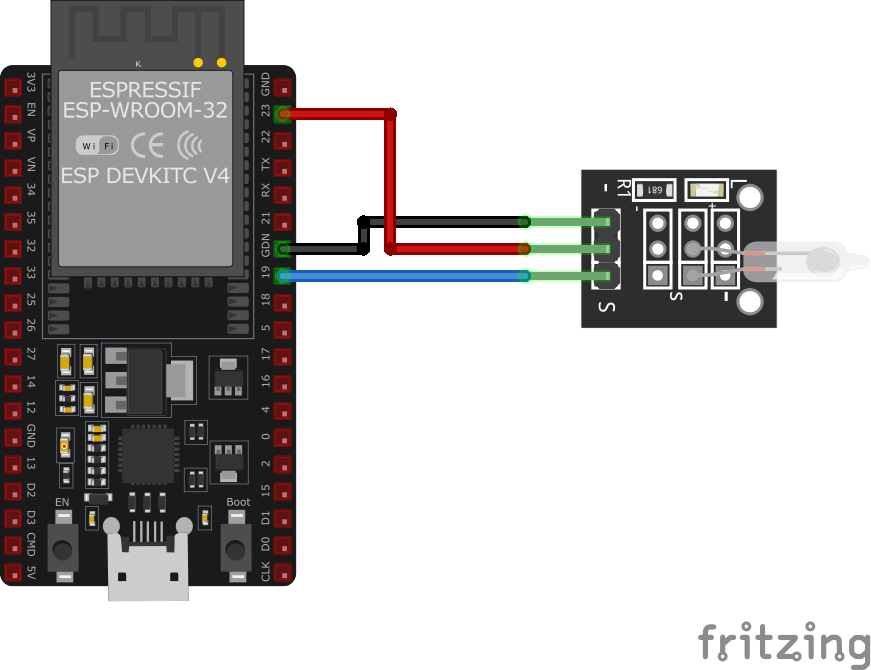
| KY-017 pin | ESP32 pin | Purpose |
|---|---|---|
| Pin (-) | GND | Ground |
| Pin (middle) | 3.3V or 5V | Power supply |
| Pin (S) | GPIO4 | Digital input (any GPIO) |
GPIO Selection: Any digital GPIO pin works, GPIO4 is just an example
Voltage: Use 3.3V for ESP32 compatibility
Safety: Mercury switch - handle carefully, avoid breaking
Binary Output: Simple HIGH/LOW state based on tilt angle
KY-017 code examples
int tiltPin = 4; // KY-017 signal pin (GPIO4, matches the wiring above)
int ledPin = 2;  // Onboard LED on most ESP32 dev boards
int sensorValue = 0;

void setup() {
    pinMode(tiltPin, INPUT_PULLUP); // Mercury switch closes to GND when tilted
    pinMode(ledPin, OUTPUT);
    Serial.begin(115200);
    Serial.println("KY-017 Tilt Sensor Test");
}

void loop() {
    sensorValue = digitalRead(tiltPin);
    if (sensorValue == LOW) {
        digitalWrite(ledPin, HIGH);
        Serial.println("Tilt detected");
    } else {
        digitalWrite(ledPin, LOW);
    }
    delay(1000);
}
The sensor's signal pin connects to GPIO4 (matching the wiring above) and is read as a digital input with the internal pull-up enabled. On the ESP32, pull-ups are enabled with INPUT_PULLUP - the old AVR trick of writing HIGH to an input pin does nothing here. The mercury switch closes to GND when tilted, which reads LOW and lights the onboard LED (GPIO2).
#include <stdio.h>
#include "freertos/FreeRTOS.h"
#include "freertos/task.h"
#include "driver/gpio.h"

#define TILT_SENSOR_PIN GPIO_NUM_4
#define LED_PIN GPIO_NUM_2

void app_main(void) {
    gpio_config_t io_conf = {
        .pin_bit_mask = (1ULL << TILT_SENSOR_PIN) | (1ULL << LED_PIN),
        .mode = GPIO_MODE_INPUT_OUTPUT,
        .pull_up_en = GPIO_PULLUP_ENABLE,
        .pull_down_en = GPIO_PULLDOWN_DISABLE,
        .intr_type = GPIO_INTR_DISABLE
    };
    gpio_config(&io_conf);

    printf("KY-017 Tilt Sensor Test\n");

    while (1) {
        int sensor_value = gpio_get_level(TILT_SENSOR_PIN);
        if (sensor_value == 0) {
            gpio_set_level(LED_PIN, 1);
            printf("Tilt detected\n");
        } else {
            gpio_set_level(LED_PIN, 0);
        }
        vTaskDelay(pdMS_TO_TICKS(1000));
    }
}
This ESP-IDF code configures GPIO4 as an input for the KY-017 tilt sensor and GPIO2 as an output for an LED. When the sensor detects a tilt (sensor output is LOW), the LED turns on, and a message is printed to the console. The status is checked every second.
binary_sensor:
  - platform: gpio
    pin:
      number: GPIO4
      mode: INPUT_PULLUP
    name: "KY-017 Tilt Sensor"
    filters:
      - delayed_on: 50ms
      - delayed_off: 50ms
    on_press:
      - then:
          - lambda: |-
              ESP_LOGD("sensor", "Tilt detected!");
This ESPHome configuration sets up the KY-017 mercury tilt switch as a binary sensor on GPIO4. The internal pull-up resistor is enabled, and debounce filtering is applied to prevent false triggering. When the sensor detects a tilt, a log message is generated.
[env:esp32]
platform = espressif32
board = esp32dev
framework = arduino#include <Arduino.h>
#define TILT_SENSOR_PIN 4
#define LED_PIN 2
void setup() {
pinMode(TILT_SENSOR_PIN, INPUT_PULLUP);
pinMode(LED_PIN, OUTPUT);
Serial.begin(115200);
Serial.println("KY-017 Tilt Sensor Test");
}
void loop() {
if (digitalRead(TILT_SENSOR_PIN) == LOW) {
Serial.println("Tilt detected");
digitalWrite(LED_PIN, HIGH);
} else {
digitalWrite(LED_PIN, LOW);
}
delay(1000);
}This PlatformIO code configures GPIO4 as an input with an internal pull-up resistor for the KY-017 tilt sensor. GPIO2 is used to control an LED. When the sensor detects a tilt (output is LOW), the LED turns on, and a message is printed to the serial monitor.
import machine
import time

TILT_SENSOR_PIN = machine.Pin(4, machine.Pin.IN, machine.Pin.PULL_UP)
LED_PIN = machine.Pin(2, machine.Pin.OUT)

while True:
    if TILT_SENSOR_PIN.value() == 0:
        print("Tilt detected")
        LED_PIN.on()
    else:
        LED_PIN.off()
    time.sleep(1)
This MicroPython script configures GPIO4 as an input with a pull-up resistor for the KY-017 tilt sensor. GPIO2 controls an LED. When a tilt is detected (sensor output is LOW), the LED turns on, and a message is printed to the console.
KY-017 specifications
About the KY-017
The KY-017 is billed as a mercury tilt switch: a sealed glass capsule holding a bead of liquid mercury and two contacts that bridge when gravity pulls the mercury against them past a threshold angle - a design phased out of most new electronics since the early 2000s over its toxicity, and worth handling gently given the capsule can break. What’s actually inside the one you receive can vary by supplier, though: some vendor documentation for the “KY-017” describes the same generic ball-in-a-tube mechanism used for the genuinely mercury-free KY-020, so if the distinction matters for disposal, shipping, or RoHS compliance, it’s worth confirming with the seller rather than assuming either way.
Electrically it makes no difference which switch is inside: it’s a bare mechanical contact bridging - to - S and + rather than any calibrated signal, so treat it exactly like a mechanical switch on a GPIO - debounce the transitions in software, and expect only a binary tilted/not-tilted state rather than a measured angle.
KY-017 troubleshooting
No Response from Sensor
›
Issue: The sensor does not output any signal when tilted.
Solutions:
- Verify that all connections are secure and correctly placed.
- Ensure the module is receiving the appropriate voltage (3.3V to 5V).
- Check if the microcontroller's GPIO pin is correctly configured as an input.
False Triggering
›
Issue: The sensor outputs a signal without being tilted.
Solutions:
- Ensure the module is mounted securely to prevent unintended movement.
- Check for external vibrations or movements that might affect the sensor.
- Implement software debouncing to filter out spurious signals.
Where to buy the KY-017

Resources
Similar sensors


