
KY-027 Magic Light Cup Module
The KY-027 is a motion detection module featuring a mercury tilt switch and an LED. It detects tilt or orientation changes and can be used in various interactive applications.

KY-027 pinout
The KY-027 is a 4-pin magic light cup module with integrated tilt switch and LED:
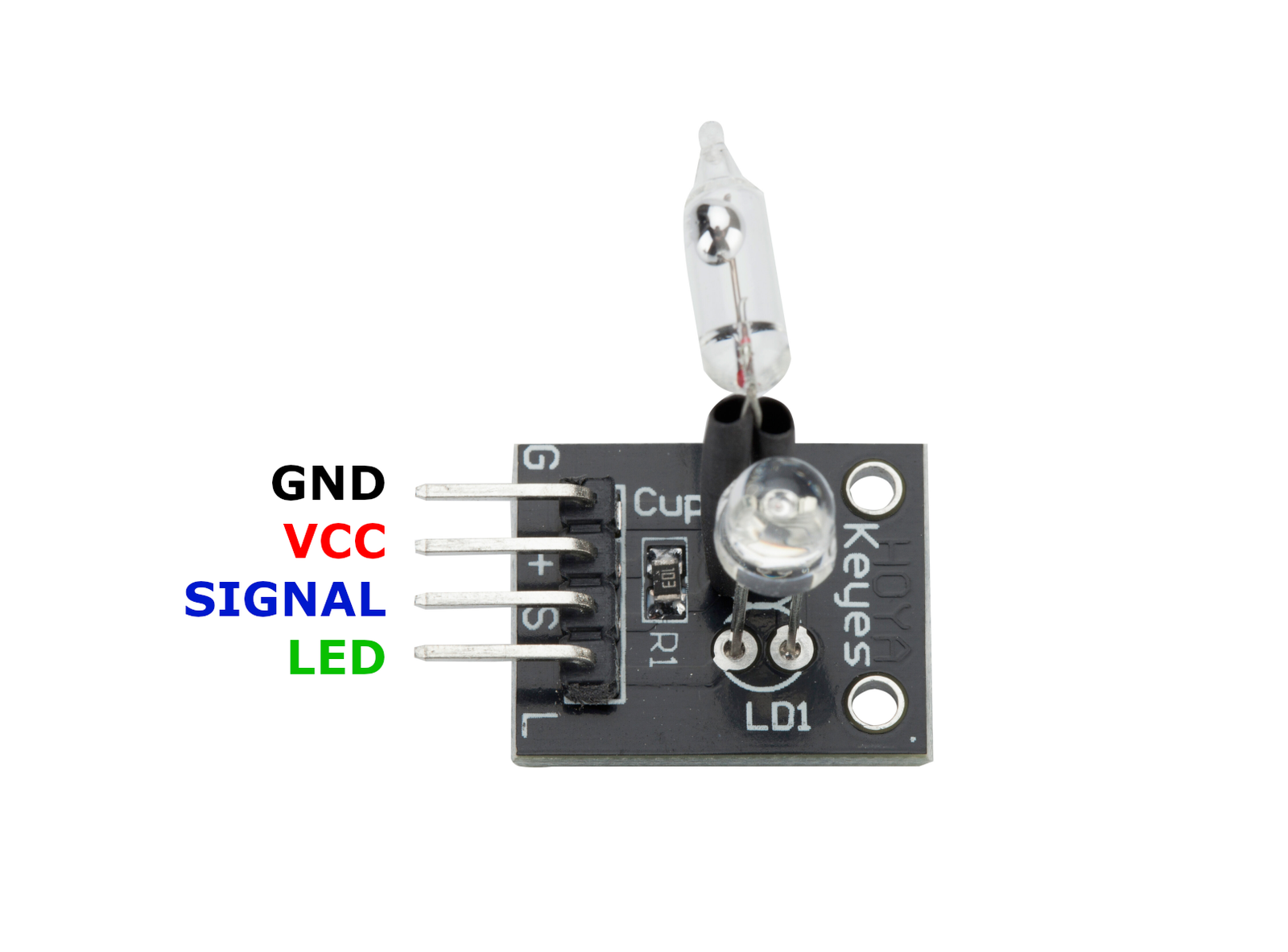
| Pin | Type | Description | Notes |
|---|---|---|---|
| GND | Power | Ground connection | |
| +V | Power | Power supply | 3.3V or 5V |
| S | Communication | Signal output from tilt switch | LOW when tilted (active low) |
| L | Communication | LED control input | Drive HIGH to turn on LED |
Interface: Digital tilt switch + LED control
Sensor: Mercury tilt switch (sealed glass tube with mercury droplet)
LED Output: Onboard LED controllable via L pin
Signal: Active low - S pin goes LOW when tilted
Power: 3.3V to 5V operation
Mercury Warning: Contains mercury - handle with care, dispose properly
Applications: Interactive lights, magic cup games, tilt-activated systems, orientation alarms
Wiring the KY-027 to ESP32
To interface the KY-027 with an ESP32 for tilt detection:
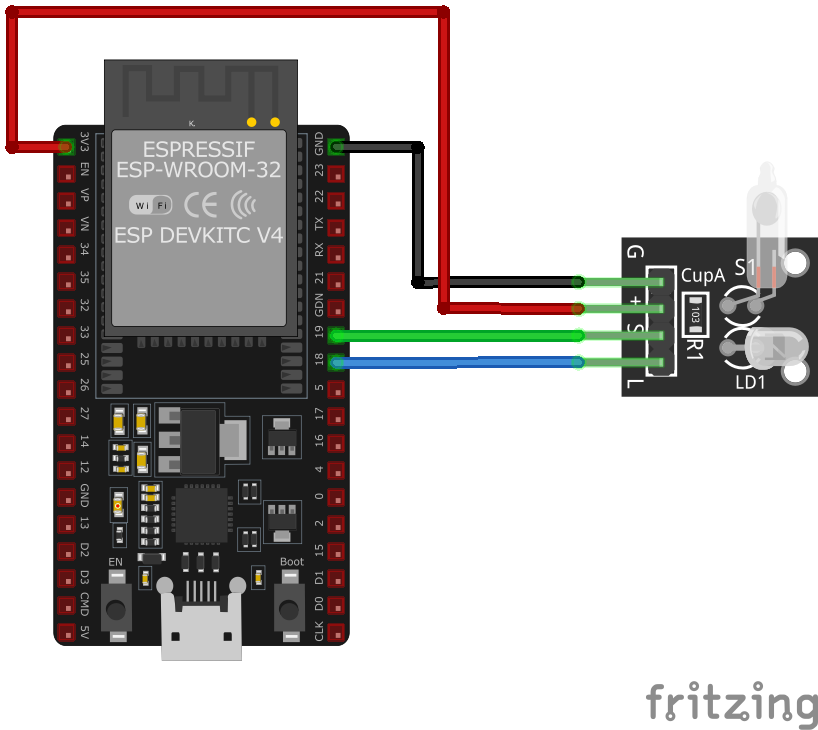
| KY-027 pin | ESP32 pin | Purpose |
|---|---|---|
| GND | GND | Ground |
| +V | 3.3V or 5V | Power supply |
| S | GPIO17 | Digital input for tilt switch (any GPIO) |
| L | GPIO16 | LED control output (any GPIO) · optional |
Tilt Detection: Read S pin - LOW when tilted, HIGH when upright
LED Control: Write HIGH to L pin to illuminate onboard LED
Magic Cup Effect: Use two modules to create interactive light transfer effect
Pull-up: Internal pull-up recommended on S pin for stable readings
Mercury Safety: Do not break or incinerate module - contains toxic mercury
Power LED: Separate power indicator LED always on when powered
Tilt Angle: Typically activates at 15-30° from vertical
KY-027 code examples
int led = 16;          // KY-027 LED pin "L" (GPIO16, matches the wiring above)
int shock_sensor = 17; // KY-027 signal pin "S" (GPIO17)
int value;

void setup() {
    pinMode(led, OUTPUT);
    pinMode(shock_sensor, INPUT_PULLUP); // Mercury switch closes to GND when tilted
}

void loop() {
    value = digitalRead(shock_sensor); // Read current signal from sensor
    if (value == LOW) {
        digitalWrite(led, HIGH); // Tilt detected - light the module's LED
        delay(200);
    } else {
        digitalWrite(led, LOW); // No tilt - LED off
    }
}
The magic-light-cup module's mercury switch is read on GPIO17 with the internal pull-up (matching the wiring above), and its LED pin is driven from GPIO16. Tilting the module closes the switch to GND (LOW), which the sketch answers by lighting the LED - tilt the pair of modules against each other for the classic light-passing effect.
#include <stdio.h>
#include "freertos/FreeRTOS.h"
#include "freertos/task.h"
#include "driver/gpio.h"

#define TILT_SENSOR_PIN GPIO_NUM_17
#define LED_PIN GPIO_NUM_16

void app_main(void) {
    gpio_set_direction(TILT_SENSOR_PIN, GPIO_MODE_INPUT);
    gpio_set_pull_mode(TILT_SENSOR_PIN, GPIO_PULLUP_ONLY);
    gpio_set_direction(LED_PIN, GPIO_MODE_OUTPUT);

    printf("KY-027 Tilt Detection\n");
    while (1) {
        int sensor_value = gpio_get_level(TILT_SENSOR_PIN);
        if (sensor_value == 0) {
            gpio_set_level(LED_PIN, 1); // Turn on LED
        } else {
            gpio_set_level(LED_PIN, 0); // Turn off LED
        }
        vTaskDelay(pdMS_TO_TICKS(200));
    }
}
This ESP-IDF code initializes the tilt sensor input and LED output pins. It continuously monitors the tilt sensor state and controls the LED accordingly. When a tilt is detected (sensor output low), the LED is turned on; otherwise, it is turned off.
binary_sensor:
  - platform: gpio
    pin:
      number: GPIO17
      mode: INPUT_PULLUP
    name: "KY-027 Tilt Sensor"
    filters:
      - invert:
    on_press:
      then:
        - light.turn_on: led
    on_release:
      then:
        - light.turn_off: led

light:
  - platform: binary
    id: led
    output: led_output

output:
  - platform: gpio
    pin: GPIO16
    id: led_output
This ESPHome configuration sets up the KY-027 tilt sensor as a binary sensor on GPIO17. When a tilt is detected, it turns on an LED connected to GPIO16. The LED turns off when the tilt is no longer detected.
[env:esp32]
platform = espressif32
board = esp32dev
framework = arduino#include <Arduino.h>
#define TILT_SENSOR_PIN 17
#define LED_PIN 16
void setup() {
pinMode(TILT_SENSOR_PIN, INPUT_PULLUP);
pinMode(LED_PIN, OUTPUT);
Serial.begin(115200);
Serial.println("KY-027 Magic Light Cup Module Test");
}
void loop() {
int sensor_value = digitalRead(TILT_SENSOR_PIN);
if (sensor_value == LOW) {
digitalWrite(LED_PIN, HIGH);
Serial.println("Tilt detected - LED ON");
} else {
digitalWrite(LED_PIN, LOW);
Serial.println("No tilt detected - LED OFF");
}
delay(200);
}This PlatformIO code configures GPIO17 as an input with a pull-up resistor for the KY-027 tilt sensor and GPIO16 as an output for the LED. When a tilt is detected, the LED turns on, and a message is printed to the serial monitor.
import machine
import time

TILT_SENSOR_PIN = machine.Pin(17, machine.Pin.IN, machine.Pin.PULL_UP)
LED_PIN = machine.Pin(16, machine.Pin.OUT)

while True:
    if TILT_SENSOR_PIN.value() == 0:
        LED_PIN.on()
        print("Tilt detected - LED ON")
    else:
        LED_PIN.off()
        print("No tilt detected - LED OFF")
    time.sleep(0.2)
This MicroPython script configures GPIO17 as an input with a pull-up resistor for the KY-027 tilt sensor and GPIO16 as an output for the LED. When a tilt is detected, the LED turns on, and a message is printed every 200ms.
KY-027 specifications
About the KY-027
The KY-027 pairs a genuine mercury tilt switch with an onboard LED on the same small board - unlike the naming mix-up that clouds the KY-017, sources describing the KY-027 specifically (including its “magic light cup” branding, sold in matched pairs) consistently agree it’s the mercury version, not the ball-and-tube kind. Tilt the board and the sealed bead of mercury bridges the switch’s contacts, which a sketch reads as LOW and answers by driving the LED - tilt two of these against each other and the light appears to pour from one cup into the other.
Mercury switches carry the same handling caveat as the KY-017: they’ve been phased out of most new consumer electronics since the early 2000s over the metal’s toxicity, and the glass capsule inside is fragile enough that a hard drop is a real spill risk, not just a theoretical one. If that’s a dealbreaker, the ball-based KY-020 tilt switch is mercury-free and behaves the same way electrically - it just doesn’t come with a built-in LED, so driving one would need a separate GPIO and resistor to recreate the light-cup effect.
KY-027 troubleshooting
LED Not Lighting Up
›
Issue: The LED does not turn on when the module is tilted.
Solutions:
- Ensure the module is properly powered with the correct voltage.
- Verify that the
Lpin is correctly connected to a digital output pin on the microcontroller. - Check the tilt switch functionality by measuring the voltage on the
Spin when the module is tilted.
False Triggering
›
Issue: The LED turns on without tilting the module.
Solutions:
- Ensure there is no external vibration or movement causing the tilt switch to activate.
- Check for loose connections or wiring issues that might cause intermittent signals.
Where to buy the KY-027

Resources
Similar sensors


