
KY-001 Temperature Sensor Module
The KY-001 is a temperature sensor module that operates within a wide temperature range. It supports 1-Wire communication and is based on the popular <a href='/sensors/ds18b20/'><strong>DS18B20 digital sensor</strong></a>. This module is ideal for temperature monitoring projects requiring precise and reliable readings.

KY-001 pinout
The KY-001 is a 3-pin temperature sensor module based on the DS18B20 chip:
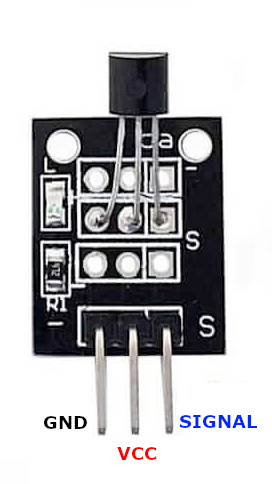
| Pin | Type | Description | Notes |
|---|---|---|---|
| Pin 1 (GND) | Power | Ground connection | |
| Pin 2 (VCC) | Power | Power supply | 3.3V or 5V |
| Pin 3 (DATA) | Communication | 1-Wire data line | Requires 4.7kΩ pull-up resistor |
Interface: 1-Wire (Dallas/Maxim single-wire protocol)
Based On: DS18B20 digital sensor
Pull-up Required: 4.7kΩ resistor between DATA and VCC
Power: 3.3V or 5V operation
Accuracy: ±0.5°C from -10°C to +85°C
Range: -55°C to +125°C operating range
Wiring the KY-001 to ESP32
To interface the KY-001 with an ESP32 using 1-Wire protocol:
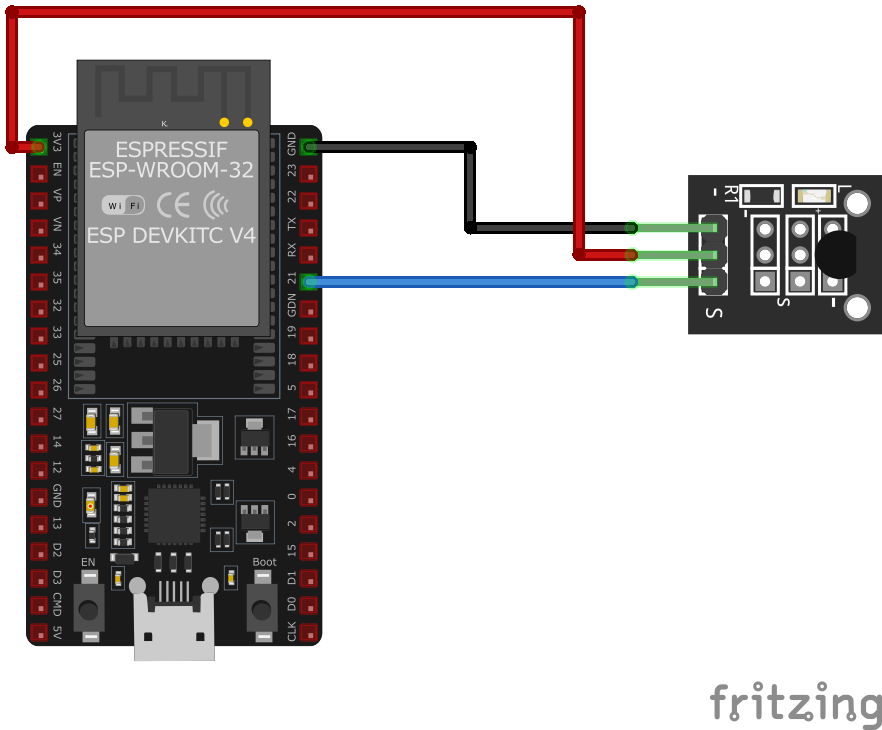
| KY-001 pin | ESP32 pin | Purpose |
|---|---|---|
| Pin 1 (GND) | GND | Ground |
| Pin 2 (VCC) | 3.3V or 5V | Power supply |
| Pin 3 (DATA) | GPIO21 | 1-Wire data line (any GPIO) |
Pull-up Resistor: Add 4.7kΩ resistor between DATA pin and VCC
GPIO Selection: Can use any GPIO pin, GPIO21 is just an example
Voltage: Use 3.3V for ESP32 to avoid level shifting
Multiple Sensors: Can connect multiple DS18B20 sensors on same data line
KY-001 code examples
#include <OneWire.h>
#include <DallasTemperature.h>

#define ONE_WIRE_BUS 21 // DATA pin, matches the wiring above
OneWire oneWire(ONE_WIRE_BUS);
DallasTemperature sensors(&oneWire);

void setup() {
    Serial.begin(115200);
    sensors.begin();
}

void loop() {
    sensors.requestTemperatures();
    Serial.print("Temperature: ");
    Serial.println(sensors.getTempCByIndex(0));
    delay(2000);
}
This code initializes and reads the KY-001 sensor using the OneWire and DallasTemperature libraries.
// Requires the official Espressif 1-Wire and DS18B20 drivers from the ESP Component Registry:
//   idf.py add-dependency "espressif/ds18b20^0.4.0"
//   idf.py add-dependency "espressif/onewire_bus^1.1.1"

#include <stdio.h>
#include "freertos/FreeRTOS.h"
#include "freertos/task.h"
#include "onewire_bus.h"
#include "ds18b20.h"

#define ONE_WIRE_GPIO 21 // DATA pin, matches the wiring above

void app_main(void)
{
    onewire_bus_handle_t bus = NULL;
    onewire_bus_config_t bus_config = {
        .bus_gpio_num = ONE_WIRE_GPIO,
    };
    onewire_bus_rmt_config_t rmt_config = {
        .max_rx_bytes = 10,
    };
    ESP_ERROR_CHECK(onewire_new_bus_rmt(&bus_config, &rmt_config, &bus));

    ds18b20_config_t config = {};
    ds18b20_device_handle_t sensor = NULL;
    ESP_ERROR_CHECK(ds18b20_new_device_from_bus(bus, &config, &sensor));

    while (1) {
        float temperature;
        if (ds18b20_trigger_temperature_conversion(sensor) == ESP_OK) {
            vTaskDelay(pdMS_TO_TICKS(750)); // 12-bit conversion time
            if (ds18b20_get_temperature(sensor, &temperature) == ESP_OK)
                printf("Temperature: %.2f C\n", temperature);
            else
                printf("Could not read temperature\n");
        }
        vTaskDelay(pdMS_TO_TICKS(2000));
    }
}
ESP-IDF ships no DS18B20 driver of its own, so this example uses Espressif's official ds18b20 and onewire_bus components from the ESP Component Registry - the KY-001 is simply a DS18B20 on a breakout board. Install it into your project first with idf.py add-dependency "espressif/ds18b20^0.4.0" and idf.py add-dependency "espressif/onewire_bus^1.1.1", then build as usual.
The 1-Wire bus is driven by the RMT peripheral for reliable timing. ds18b20_new_device_from_bus() attaches to the first sensor on the line, and the loop triggers a conversion, waits the 750 ms a 12-bit conversion needs, and prints the temperature. Do not forget the 4.7 kOhm pull-up between the data line and 3.3 V.
one_wire:
  - platform: gpio
    pin: GPIO21

sensor:
  - platform: dallas_temp
    name: "KY-001 Temperature"
    update_interval: 60s
Since ESPHome 2024.2 the 1-Wire bus is configured with the one_wire component on the module's data pin (GPIO21 per the wiring above), and the DS18B20 on the KY-001 becomes a dallas_temp sensor. With one sensor on the bus no address is required.
[env:esp32]
platform = espressif32
board = esp32dev
framework = arduino
lib_deps =
    paulstoffregen/OneWire
milesburton/DallasTemperature#include <Arduino.h>
#include <OneWire.h>
#include <DallasTemperature.h>
#define ONE_WIRE_BUS 21 // DATA pin, matches the wiring above
OneWire oneWire(ONE_WIRE_BUS);
DallasTemperature sensors(&oneWire);
void setup() {
Serial.begin(115200);
sensors.begin();
}
void loop() {
sensors.requestTemperatures();
Serial.print("Temperature: ");
Serial.println(sensors.getTempCByIndex(0));
delay(2000);
}PlatformIO example for reading the KY-001 sensor.
import machine
import onewire
import ds18x20
import time

pin = machine.Pin(21)  # DATA pin, matches the wiring above
ow = onewire.OneWire(pin)
ds = ds18x20.DS18X20(ow)
roms = ds.scan()
while True:
    ds.convert_temp()
    time.sleep(1)
    for rom in roms:
        print("Temperature:", ds.read_temp(rom))
    time.sleep(2)
MicroPython script to read temperature from KY-001 using the DS18B20 driver.
KY-001 specifications
About the KY-001
The KY-001 module is literally a DS18B20 chip on a 3-pin breakout - a small PCB with header pins and pads for a pull-up resistor. It adds nothing over the bare DS18B20 itself, so everything that actually determines behavior - the ±0.5 degC accuracy from -10 to 85 degC, the -55 to 125 degC full range, the 9-12 bit configurable resolution, and the well-documented cheap-clone problem in bags of these chips - is covered on that page, not repeated here.
What the module changes is convenience, not capability, and even that comes with a catch: it breaks the DS18B20’s three legs out to a friendlier header, but it still needs an external 4.7 kOhm pull-up resistor between DATA and VCC - the board itself doesn’t carry one. Wire DATA to any GPIO (1-Wire doesn’t care which), and because every DS18B20 carries a unique 64-bit ROM address, several of these modules can share one data pin and pull-up on the same bus.
KY-001 troubleshooting
KY-001 Not Detecting Temperature
›
Issue: The sensor is not detected, returning -127°C or no data.
Solutions:
- Ensure proper wiring connections and check the pull-up resistor (4.7kΩ).
- Use a multimeter to verify voltage on the VCC and DATA pins.
- Confirm the correct GPIO pin is used in the code.
Incorrect Temperature Readings
›
Issue: The sensor outputs incorrect or fluctuating temperature values.
Solutions:
- Check for noise interference on the data line; use shielded cables if necessary.
- Ensure the sensor is properly powered (3.3V or 5V).
- Retry the sensor readings after resetting the microcontroller.
Where to buy the KY-001

Resources
Similar sensors


