
KY-010 Photo Interrupter Module
The KY-010 is a photo interrupter module that detects objects by sensing interruptions in an infrared beam. It's ideal for applications requiring non-contact object detection, such as counting or speed measurement.

KY-010 pinout
The KY-010 is a 3-pin photo interrupter (optical light barrier) module:
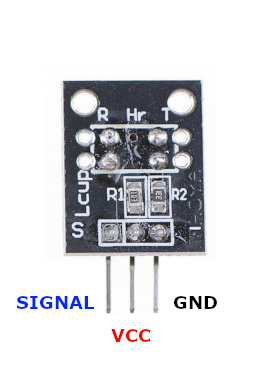
| Pin | Type | Description | Notes |
|---|---|---|---|
| Pin (-) | Power | Ground connection | |
| Pin (+) | Power | Power supply | 3.3V or 5V |
| Pin (S) | Communication | Digital signal output | Changes state when beam interrupted |
Interface: Digital output (light barrier detection)
Sensor: Infrared emitter/receiver pair with slot
Detection: Beam interruption changes output state
Power: 3.3V or 5V operation
Slot: Object must pass through optical slot
Applications: Object counting, speed measurement, edge detection, position sensing
Wiring the KY-010 to ESP32
To interface the KY-010 with an ESP32 for optical interruption detection:
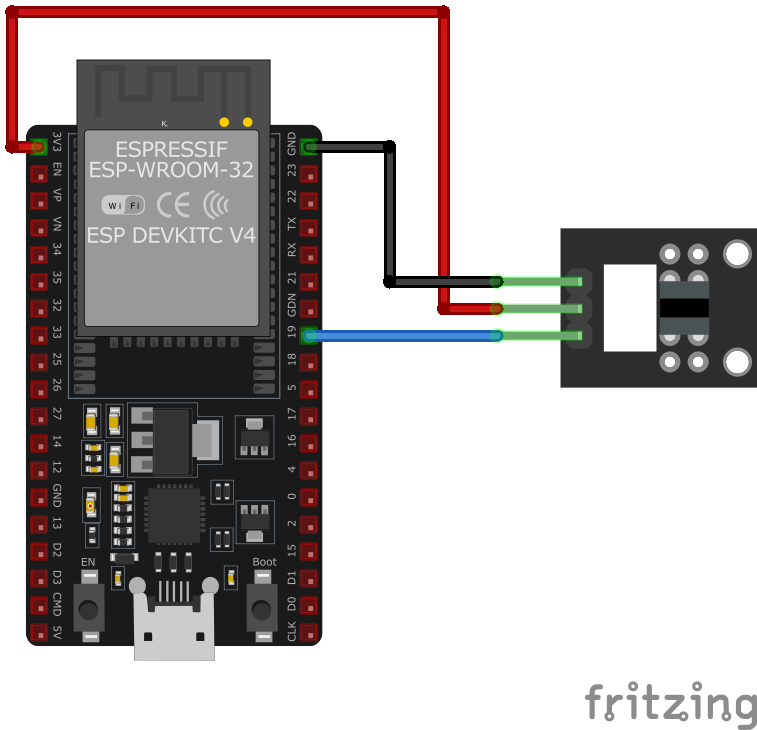
| KY-010 pin | ESP32 pin | Purpose |
|---|---|---|
| Pin (-) | GND | Ground |
| Pin (+) | 3.3V or 5V | Power supply |
| Pin (S) | GPIO15 | Digital input (any GPIO) |
GPIO Selection: Any digital GPIO pin works, GPIO15 is just an example
Voltage: Use 3.3V for ESP32 compatibility
Object Detection: Output changes when object blocks IR beam in slot
Counting: Ideal for counting objects on conveyor or rotating disk
KY-010 code examples
int sensorPin = 15; // KY-010 signal pin (GPIO15, matches the wiring above)
int ledPin = 2;     // Onboard LED on most ESP32 dev boards
int sensorValue = 0;

void setup() {
    pinMode(ledPin, OUTPUT);
    pinMode(sensorPin, INPUT_PULLUP); // Output is open when the beam is blocked
    Serial.begin(115200);
}

void loop() {
    sensorValue = digitalRead(sensorPin);
    if (sensorValue == HIGH) {
        digitalWrite(ledPin, HIGH); // Turn on LED
        Serial.println("Object detected");
    } else {
        digitalWrite(ledPin, LOW); // Turn off LED
    }
    delay(100);
}
The sensor's signal pin connects to GPIO15 (matching the wiring above) and is read as a digital input with the internal pull-up enabled. On the ESP32, pull-ups are enabled with INPUT_PULLUP - the old AVR trick of writing HIGH to an input pin does nothing here. When an object blocks the light barrier the output goes HIGH and the onboard LED (GPIO2) turns on.
#include <stdio.h>
#include "freertos/FreeRTOS.h"
#include "freertos/task.h"
#include "driver/gpio.h"

#define SENSOR_PIN GPIO_NUM_15
#define LED_PIN GPIO_NUM_2

void app_main(void) {
    // Configure sensor pin as input with pull-up resistor
    gpio_config_t sensor_io_conf = {
        .pin_bit_mask = (1ULL << SENSOR_PIN),
        .mode = GPIO_MODE_INPUT,
        .pull_up_en = GPIO_PULLUP_ENABLE,
        .pull_down_en = GPIO_PULLDOWN_DISABLE,
        .intr_type = GPIO_INTR_DISABLE
    };
    gpio_config(&sensor_io_conf);

    // Configure LED pin as output
    gpio_config_t led_io_conf = {
        .pin_bit_mask = (1ULL << LED_PIN),
        .mode = GPIO_MODE_OUTPUT,
        .pull_up_en = GPIO_PULLUP_DISABLE,
        .pull_down_en = GPIO_PULLDOWN_DISABLE,
        .intr_type = GPIO_INTR_DISABLE
    };
    gpio_config(&led_io_conf);

    printf("KY-010 Photo Interrupter Module Test\n");

    while (1) {
        int sensor_value = gpio_get_level(SENSOR_PIN);
        if (sensor_value == 1) {
            gpio_set_level(LED_PIN, 1); // Turn on LED
            printf("Object detected\n");
        } else {
            gpio_set_level(LED_PIN, 0); // Turn off LED
        }
        vTaskDelay(pdMS_TO_TICKS(100));
    }
}
This ESP-IDF code configures the KY-010 Photo Interrupter Module on GPIO15 and an LED on GPIO2. The sensor pin is set up as an input with an internal pull-up resistor, while the LED pin is configured as an output. The main loop continuously checks if an object interrupts the infrared beam. If an object is detected, the LED turns on, and a message is printed to the console.
binary_sensor:
  - platform: gpio
    pin:
      number: GPIO15
      mode: INPUT_PULLUP
    name: "KY-010 Object Detector"
    filters:
      - delayed_on: 10ms
      - delayed_off: 10ms
    on_press:
      - then:
          - lambda: |-
              ESP_LOGD("sensor", "Object detected!");
This ESPHome configuration sets up the KY-010 Photo Interrupter Module as a binary sensor on GPIO15 with an internal pull-up resistor. It applies filtering to debounce false triggers and logs when an object is detected.
[env:esp32]
platform = espressif32
board = esp32dev
framework = arduino#include <Arduino.h>
#define SENSOR_PIN 15
#define LED_PIN 2
void setup() {
pinMode(SENSOR_PIN, INPUT_PULLUP);
pinMode(LED_PIN, OUTPUT);
Serial.begin(115200);
Serial.println("KY-010 Photo Interrupter Module Test");
}
void loop() {
if (digitalRead(SENSOR_PIN) == HIGH) {
Serial.println("Object detected");
digitalWrite(LED_PIN, HIGH);
} else {
digitalWrite(LED_PIN, LOW);
}
delay(100);
}This PlatformIO code configures the KY-010 sensor on GPIO15 and an LED on GPIO2. When an object interrupts the infrared beam, the LED turns on, and a message is printed to the serial monitor.
import machine
import time

SENSOR_PIN = machine.Pin(15, machine.Pin.IN, machine.Pin.PULL_UP)
LED_PIN = machine.Pin(2, machine.Pin.OUT)

while True:
    if SENSOR_PIN.value() == 1:
        print("Object detected")
        LED_PIN.on()
    else:
        LED_PIN.off()
    time.sleep(0.1)
This MicroPython script configures the KY-010 Photo Interrupter Module on GPIO15 and an LED on GPIO2. When an object interrupts the sensor's beam, the LED turns on, and a message is printed to the console.
KY-010 specifications
About the KY-010
The KY-010 is a slotted photo interrupter: an IR emitter and phototransistor face each other across a small gap, so anything opaque passing through the slot breaks the beam and flips the output. Unlike some other KY-series optical modules there’s no comparator chip onboard - by most teardown accounts the signal pin is just the raw phototransistor output through a load resistor - so the transition isn’t a clean, threshold-snapped digital edge; expect some sensitivity to ambient IR and a bit of ramp at the edges rather than an instant flip.
With a 5mm slot width, it only ever sees whatever fits through that gap - a spinning disc with a cutout for RPM counting, a slitted flag on a conveyor, a print-head carriage - not general obstacle detection in open space. For sensing objects that don’t pass through a fixed slot, a reflective sensor like the KY-032 bounces IR off the object instead of interrupting a beam between two fixed points. Debounce or filter noisy transitions in software the same way as a mechanical switch if edge counts matter.
KY-010 troubleshooting
No Signal Detection
›
Issue: The module does not detect any object passing through the slot.
Solutions:
- Ensure the module is properly powered with the correct voltage.
- Verify that the signal pin is correctly connected to the microcontroller's GPIO pin.
- Check for any obstructions or debris within the slot that could affect detection.
False Triggering
›
Issue: The module outputs signals without any object present.
Solutions:
- Ensure there is no ambient infrared light interfering with the sensor.
- Check for loose connections or unstable power supply.
- Verify that the microcontroller's input pin is properly configured with pull-up or pull-down resistors as needed.
Where to buy the KY-010

Resources
Similar sensors


