KY-037 High Sensitivity Sound Detection Module

View on Amazon
Overview


About KY-037 High Sensitivity Sound Detection Module
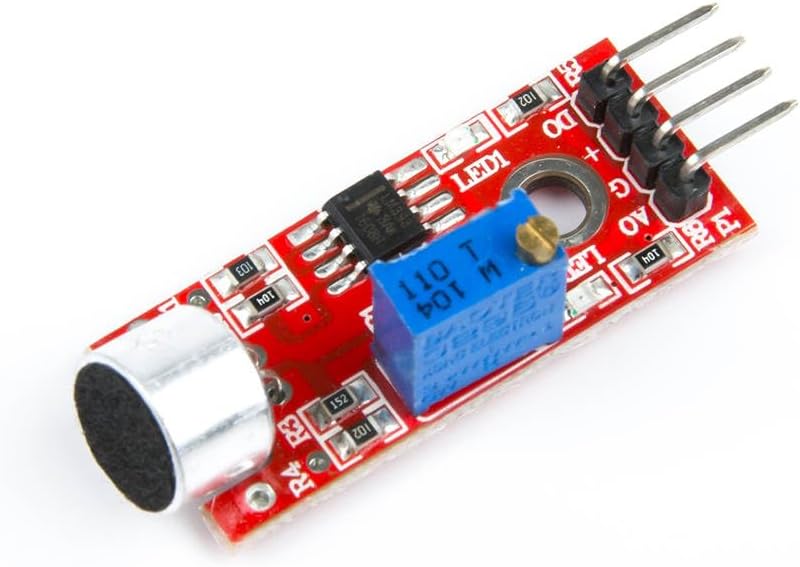
The KY-037 High Sensitivity Sound Detection Module is equipped with an electret condenser microphone and an LM393 comparator to detect sound levels in the environment. It provides both analog and digital outputs: the analog output gives a voltage proportional to the sound intensity, while the digital output goes high when the sound exceeds a user-defined threshold, adjustable via an onboard potentiometer. This module is ideal for projects involving sound detection, such as voice-activated systems, sound level monitoring, and interactive sound installations.
Get Your KY-037
Starting from
$2 per unit


💡 Prices are subject to change. We earn from qualifying purchases as an Amazon Associate.
KY-037 Specifications
Complete technical specification details for KY-037 High Sensitivity Sound Detection Module
📊 Technical Parameters
KY-037 Pinout
The **KY-037** is a 4-pin high sensitivity sound detection module:
Visual Pinout Diagram

Pin Types
Quick Tips
**Interface**: Dual output (analog + digital with comparator),🎤 **Sensor**: Electret condenser microphone (high sensitivity),📊 **Analog Output**: Continuous sound intensity measurement
**Digital Output**: Threshold-based trigger (adjustable via potentiometer),⚡ **Power**: 3.3V or 5V operation,🎚️ **Sensitivity**: Adjustable via onboard potentiometer
**Frequency Range**: 50Hz - 10kHz typical,🔋 **LED Indicators**: Power LED and sound detection LED,🎯 **Applications**: Voice-activated systems, sound level monitoring, clap switches, noise detection
Pin Descriptions
| Pin Name | Type | Description | Notes |
|---|---|---|---|
1 GND | Power | Ground connection | |
2 +V | Power | Power supply | 3.3V or 5V |
3 D0 | Communication | Digital output | HIGH when sound exceeds threshold |
4 A0 | Communication | Analog output | Voltage proportional to sound intensity |
Wiring KY-037 to ESP32
To interface the **KY-037** with an **ESP32** for sound detection:
Visual Wiring Diagram

Connection Status
Protocol
Pin Connections
| KY-037 Pin | Connection | ESP32 Pin | Description |
|---|---|---|---|
1 GND Required | GND | Ground | |
2 +V Required | 3.3V or 5V | Power supply | |
3 D0 Optional | GPIO15 | Digital input (any GPIO) | |
4 A0 Optional | GPIO34 | Analog input (ADC pin) |
**Digital Mode**: Use D0 for simple sound-activated trigger (clap switch, alarm)
**Analog Mode**: Use A0 for sound level measurement and audio analysis
**ADC Pins**: Use GPIO32-39 for analog input on ESP32
**Voltage**: 3.3V recommended for ESP32 ADC compatibility
**Threshold Adjustment**: Turn potentiometer to set sound detection sensitivity
**High Sensitivity**: More sensitive than KY-038, better for quiet environments
**Comparison**: Similar to KY-038 but with higher sensitivity microphone
**LED Feedback**: Status LED lights when sound threshold exceeded
KY-037 Troubleshooting
Common issues and solutions to help you get your sensor working
Common Issues
Issue: The sensor does not respond to sound.
Solutions:
- Ensure the module is properly powered with the correct voltage (3.3V or 5V).
- Verify all connections are secure and correctly wired.
- Adjust the sensitivity using the onboard potentiometer.
- Check if the microphone is functioning correctly and not obstructed.
Issue: The sensor triggers without any sound input.
Solutions:
- Reduce the sensitivity using the potentiometer to prevent false triggers.
- Ensure the environment is free from electrical noise or interference.
- Check for any loose connections or faulty components on the module.
Debugging Tips
Use the Serial Monitor to check for error messages and verify the sensor's output. Add debug prints in your code to track the sensor's state.
Use a multimeter to verify voltage levels and check for continuity in your connections. Ensure the power supply is stable and within the sensor's requirements.
Additional Resources
KY-037 Programming Examples
Ready-to-use code examples for different platforms and frameworks
int analogPin = A0;   // Analog output of the sensor
int digitalPin = 7;   // Digital output of the sensor
int ledPin = 13;      // Onboard LED

void setup() {
    pinMode(analogPin, INPUT);
    pinMode(digitalPin, INPUT);
    pinMode(ledPin, OUTPUT);
    Serial.begin(9600);
    Serial.println("KY-037 Sound Detection Module Test");
}

void loop() {
    int analogValue = analogRead(analogPin);
    int digitalValue = digitalRead(digitalPin);

    if (digitalValue == HIGH) {
        digitalWrite(ledPin, HIGH); // Turn ON the LED when sound is detected
    } else {
        digitalWrite(ledPin, LOW);  // Turn OFF the LED when no sound is detected
    }

    Serial.print("Analog Value: ");
    Serial.println(analogValue);
    delay(1000);
}
This Arduino code initializes the analog and digital pins connected to the KY-037 sensor. It reads the analog value to monitor sound intensity and uses the digital output to control the onboard LED, indicating when the sound level exceeds the set threshold. The analog values are printed to the serial monitor every second.
#include <stdio.h>
#include "freertos/FreeRTOS.h"
#include "freertos/task.h"
#include "driver/adc.h"
#include "driver/gpio.h"

#define ANALOG_PIN ADC1_CHANNEL_6 // GPIO34
#define DIGITAL_PIN GPIO_NUM_15

void app_main(void) {
    adc1_config_width(ADC_WIDTH_BIT_12);
    adc1_config_channel_atten(ANALOG_PIN, ADC_ATTEN_DB_11);
    gpio_set_direction(DIGITAL_PIN, GPIO_MODE_INPUT);

    printf("KY-037 Sound Detection Module Test\n");
    while (1) {
        int raw = adc1_get_raw(ANALOG_PIN);
        float voltage = raw * (3.3 / 4095.0);
        int digital_state = gpio_get_level(DIGITAL_PIN);

        printf("Analog Voltage: %.2f V, Sound Detected: %s\n", voltage, digital_state ? "Yes" : "No");
        vTaskDelay(pdMS_TO_TICKS(1000));
    }
}
This ESP-IDF code configures GPIO34 as an analog input and GPIO15 as a digital input for the KY-037 sound sensor. It reads the analog voltage and digital state, printing the voltage and whether a sound is detected to the console every second.
sensor:
  - platform: adc
    pin: GPIO34
    name: "KY-037 Sound Sensor Analog"
    update_interval: 1s
    filters:
      - multiply: 3.3
      - lambda: |-
          return x * 1000;  // Convert to millivolts

binary_sensor:
  - platform: gpio
    pin:
      number: GPIO15
      mode: INPUT_PULLUP
    name: "KY-037 Sound Sensor Digital"
This ESPHome configuration sets up the KY-037 sensor with both an analog and digital sensor. The analog value from GPIO34 is converted to millivolts, while the digital sensor on GPIO15 acts as a binary sensor to indicate sound detection.
platformio.ini
[env:esp32]
platform = espressif32
board = esp32dev
framework = arduino
main.cpp
#include <Arduino.h>

#define ANALOG_PIN 34
#define DIGITAL_PIN 15

void setup() {
    pinMode(DIGITAL_PIN, INPUT_PULLUP);
    Serial.begin(115200);
    Serial.println("KY-037 Sound Sensor Test");
}

void loop() {
    int raw_value = analogRead(ANALOG_PIN);
    float voltage = raw_value * (3.3 / 4095.0) * 1000; // Convert to millivolts
    int digital_value = digitalRead(DIGITAL_PIN);
    Serial.printf("Analog Voltage: %.2f mV, Digital State: %s\n", voltage, digital_value ? "Sound Detected" : "No Sound");
    delay(1000);
}
This PlatformIO code sets up GPIO34 as an analog input and GPIO15 as a digital input for the KY-037 sensor. It reads the analog voltage and digital state, logging the voltage and sound detection status to the serial monitor every second.
import machine
import time

ANALOG_PIN = machine.ADC(machine.Pin(34))
ANALOG_PIN.atten(machine.ADC.ATTN_11DB)
DIGITAL_PIN = machine.Pin(15, machine.Pin.IN, machine.Pin.PULL_UP)

while True:
    analog_value = ANALOG_PIN.read()
    voltage = (analog_value / 4095) * 3300  # Convert to millivolts
    digital_value = DIGITAL_PIN.value()
    print("Analog Voltage:", voltage, "mV", "| Digital State:", "Sound Detected" if digital_value == 1 else "No Sound")
    time.sleep(1)
This MicroPython script configures GPIO34 as an ADC input and GPIO15 as a digital input for the KY-037 sensor. It continuously reads the sensor values and prints the voltage and sound detection state every second.
Wrapping Up KY-037
The ESP32 KY-037 High Sensitivity Sound Detection Module is a powerful KY-0xx module sensor that offers excellent performance and reliability. With support for multiple development platforms including Arduino, ESP-IDF, ESPHome, PlatformIO, and MicroPython, it's a versatile choice for your IoT projects.
Best Practices
For optimal performance, ensure proper wiring and follow the recommended configuration for your chosen development platform.
Safety First
Always verify power supply requirements and pin connections before powering up your project to avoid potential damage.
Ready to Start Building?
Now that you have all the information you need, it's time to integrate the KY-037 into your ESP32 project and bring your ideas to life!
Explore Alternative Sensors
Looking for alternatives to the KY-037? Check out these similar sensors that might fit your project needs.

KY-017 Mercury Tilt Switch Module
The KY-017 is a mercury tilt switch module that detects changes in orientation. When tilted beyond a certain angle, the internal mercury...

KY-034 Automatic Flashing Color LED Module
The KY-034 is an automatic flashing color LED module that emits a sequence of seven colors when powered. It's suitable for decorative and...

KY-031 Knock Sensor Module
The KY-031 is a knock sensor module that detects physical impacts or vibrations. Upon detecting a knock, it outputs a digital signal, making...