
KY-053 Analog Digital Converter Module
The KY-053 is an analog-to-digital converter module featuring the ADS1115 ADC. It provides four 16-bit resolution channels and communicates via the <strong>I²C interface</strong>. This module is ideal for expanding the analog input capabilities of microcontrollers and single-board computers, enabling precise voltage measurements in various applications.

KY-053 pinout
The KY-053 is a 7-pin 16-bit ADC module with 4 analog input channels:
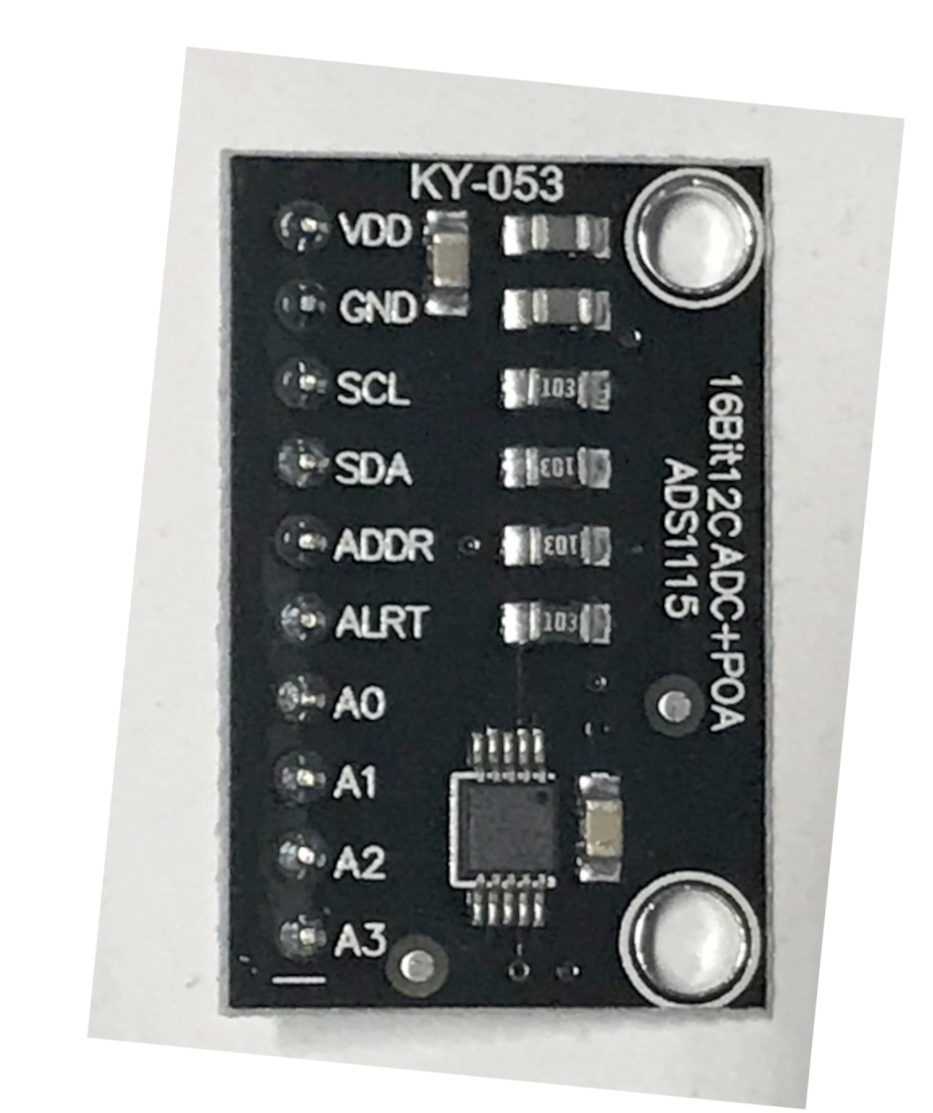
| Pin | Type | Description | Notes |
|---|---|---|---|
| GND | Power | Ground connection | |
| VDD | Power | Power supply | 2V to 5.5V |
| SDA | Communication | I2C data line | Bidirectional data |
| SCL | Communication | I2C clock line | Clock signal |
| ADDR | Communication | I2C address select | Connect to GND/VDD/SDA/SCL (0x48-0x4B) |
| ALRT | Communication | Alert/ready pin | Optional - conversion ready or comparator output |
| A0-A3 | Communication | Analog input channels | 4 single-ended or 2 differential inputs |
Interface: I2C (two-wire)
ADC: ADS1115 16-bit precision analog-to-digital converter
Resolution: 16-bit (65,536 levels)
Channels: 4 single-ended or 2 differential inputs
I2C Address: 0x48-0x4B (selectable via ADDR pin)
Power: 2V to 5.5V operation
Sampling Rate: 8 to 860 SPS (samples per second)
PGA: Programmable gain amplifier (±6.144V to ±0.256V range)
Applications: Precision voltage measurement, sensor interfacing, data acquisition, battery monitoring
Wiring the KY-053 to ESP32
To interface the KY-053 with an ESP32 for high-precision analog measurements:
| KY-053 pin | ESP32 pin | Purpose |
|---|---|---|
| GND | GND | Ground |
| VDD | 3.3V or 5V | Power supply |
| SDA | GPIO21 | I2C data (default ESP32 I2C SDA) |
| SCL | GPIO22 | I2C clock (default ESP32 I2C SCL) |
| ADDR | GND | I2C address select (0x48 when GND) · optional |
| ALRT | GPIO15 | Alert/ready interrupt (optional) · optional |
| A0-A3 | Analog signals | Connect to sensors or voltage sources |
16-bit Precision: Much higher resolution than ESP32’s 12-bit ADC (16x more precise)
I2C Addresses: ADDR→GND: 0x48, ADDR→VDD: 0x49, ADDR→SDA: 0x4A, ADDR→SCL: 0x4B
Voltage: 3.3V recommended for ESP32, but 5V compatible
PGA Settings: Adjust gain for optimal range: ±6.144V, ±4.096V, ±2.048V, ±1.024V, ±0.512V, ±0.256V
Differential Mode: Measure voltage difference between two inputs (A0-A1, A2-A3)
Pull-ups: External 4.7kΩ pull-ups may be needed on SDA/SCL
Input Protection: Don’t exceed VDD+0.3V on analog inputs
ALRT Pin: Optional interrupt when conversion complete or threshold exceeded
KY-053 code examples
#include <Wire.h>
#include <Adafruit_ADS1X15.h>

Adafruit_ADS1115 ads;

void setup() {
    Serial.begin(9600);
    ads.setGain(GAIN_TWOTHIRDS); // 2/3x gain ±6.144V 1 bit = 0.1875mV
    if (!ads.begin()) {
        Serial.println("Failed to initialize KY-053 ADS1115!");
        while (1);
    }
}

void loop() {
    int16_t adc0, adc1, adc2, adc3;
    adc0 = ads.readADC_SingleEnded(0);
    adc1 = ads.readADC_SingleEnded(1);
    adc2 = ads.readADC_SingleEnded(2);
    adc3 = ads.readADC_SingleEnded(3);

    Serial.print("AIN0: "); Serial.println(adc0);
    Serial.print("AIN1: "); Serial.println(adc1);
    Serial.print("AIN2: "); Serial.println(adc2);
    Serial.print("AIN3: "); Serial.println(adc3);
    Serial.println("----------------");
    delay(1000);
}
This Arduino code initializes the KY-053 ADC module using the ADS1115 library. It sets the gain to GAIN_TWOTHIRDS, allowing a maximum input voltage range of ±6.144V. The code continuously reads the values from all four analog input channels and prints them to the serial monitor.
// Requires the esp-idf-lib ADS111x driver from the ESP Component Registry:
//   idf.py add-dependency "esp-idf-lib/ads111x^1.1.14"

#include <stdio.h>
#include <string.h>
#include "freertos/FreeRTOS.h"
#include "freertos/task.h"
#include "ads111x.h"

#define SDA_GPIO GPIO_NUM_21
#define SCL_GPIO GPIO_NUM_22
#define GAIN ADS111X_GAIN_4V096

void app_main(void)
{
    ESP_ERROR_CHECK(i2cdev_init());

    i2c_dev_t dev;
    memset(&dev, 0, sizeof(i2c_dev_t));
    ESP_ERROR_CHECK(ads111x_init_desc(&dev, ADS111X_ADDR_GND, 0, SDA_GPIO, SCL_GPIO));

    ESP_ERROR_CHECK(ads111x_set_mode(&dev, ADS111X_MODE_CONTINUOUS));
    ESP_ERROR_CHECK(ads111x_set_data_rate(&dev, ADS111X_DATA_RATE_32));
    ESP_ERROR_CHECK(ads111x_set_input_mux(&dev, ADS111X_MUX_0_GND)); // channel A0
    ESP_ERROR_CHECK(ads111x_set_gain(&dev, GAIN));

    while (1) {
        int16_t raw;
        if (ads111x_get_value(&dev, &raw) == ESP_OK) {
            float voltage = ads111x_gain_values[GAIN] / ADS111X_MAX_VALUE * raw;
            printf("Raw %d, Voltage %.4f V\n", raw, voltage);
        } else {
            printf("Could not read data from ADC\n");
        }
        vTaskDelay(pdMS_TO_TICKS(1000));
    }
}
ESP-IDF ships no ADS1115 driver of its own, so this example uses the maintained esp-idf-lib ADS111x driver from the ESP Component Registry. Install it into your project first with idf.py add-dependency "esp-idf-lib/ads111x^1.1.14", then build as usual.
The ADC is configured for continuous conversion on channel A0 (ADS111X_MUX_0_GND) with a +/-4.096 V input range. ads111x_get_value() returns the raw 16-bit reading, which is converted to volts using the driver's ads111x_gain_values table. Change the mux setting to read other channels or differential pairs, and ADS111X_ADDR_GND if your ADDR pin is wired differently.
i2c:
  sda: GPIO21
  scl: GPIO22

ads1115:
  - address: 0x48

sensor:
  - platform: ads1115
    multiplexer: 'A0_GND'
    gain: 6.144
    name: "KY-053 ADC Channel 0"
    update_interval: 1s
  - platform: ads1115
    multiplexer: 'A1_GND'
    gain: 6.144
    name: "KY-053 ADC Channel 1"
    update_interval: 1s
  - platform: ads1115
    multiplexer: 'A2_GND'
    gain: 6.144
    name: "KY-053 ADC Channel 2"
    update_interval: 1s
  - platform: ads1115
    multiplexer: 'A3_GND'
    gain: 6.144
    name: "KY-053 ADC Channel 3"
    update_interval: 1s
ESPHome splits the ADS1115 into a hub (ads1115:, address 0x48 with ADDR to GND) and one sensor entry per measurement. Each channel here reads single-ended at the +/-6.144V gain setting; change multiplexer to pairs like A0_A1 for differential readings.
[env:esp32]
platform = espressif32
board = esp32dev
framework = arduino
lib_deps =
adafruit/Adafruit ADS1X15#include <Arduino.h>
#include <Wire.h>
#include <Adafruit_ADS1X15.h>
Adafruit_ADS1115 ads;
void setup() {
Serial.begin(115200);
ads.setGain(GAIN_TWOTHIRDS);
if (!ads.begin()) {
Serial.println("Failed to initialize KY-053 ADS1115!");
while (1);
}
}
void loop() {
int16_t values[4];
for (int i = 0; i < 4; i++) {
values[i] = ads.readADC_SingleEnded(i);
Serial.printf("AIN%d: %d\n", i, values[i]);
}
delay(1000);
}This PlatformIO code sets up the KY-053 ADC module (ADS1115) using the I2C interface. It continuously reads and prints the values from all four analog input channels every second.
# Requires driver: ads1x15 - install with: mpremote mip install github:robert-hh/ads1x15
import machine
import time
from ads1x15 import ADS1115

i2c = machine.I2C(0, scl=machine.Pin(22), sda=machine.Pin(21))
adc = ADS1115(i2c, address=0x48, gain=1)

while True:
    for channel in range(4):
        value = adc.read(4, channel)  # (rate index, single-ended channel)
        print("AIN{}: {}".format(channel, value))
    time.sleep(1)
The example uses robert-hh's ads1x15 driver (mpremote mip install github:robert-hh/ads1x15). Note the read signature: adc.read(rate, channel) - the first argument is the sample-rate index, the second the single-ended channel, so adc.read(4, 0) reads AIN0. Gain 1 covers +/-4.096V.
KY-053 specifications
About the KY-053
The KY-053 is a breakout for the ADS1115, a 16-bit ADC that exists specifically because the ESP32’s own built-in ADC is not great: 12-bit resolution, noticeably non-linear near the rails, and shared across two banks where ADC2 gets disabled while WiFi is active. The ADS1115 sidesteps all of that over I2C, with a programmable gain amplifier that rescales each reading to the expected input range (as tight as +/-0.256V for small signals, as wide as +/-6.144V) instead of forcing everything through one fixed 3.3V window.
The ADDR pin is what makes this practical to scale: tying it to GND, VDD, SDA or SCL selects one of four I2C addresses (0x48 through 0x4B), so up to four KY-053 boards can share the same bus for 16 total precision analog channels without any additional wiring beyond the address pin. It sits in Joy-IT’s numbered kit right after the KY-052 pressure module as the other general-purpose I2C expansion board in the series - reach for it whenever a project needs more resolution or more analog channels than the ESP32 can offer directly, such as reading a load cell amplifier, a precision voltage divider, or several analog sensors that would otherwise compete for the same handful of ADC1 pins.
KY-053 troubleshooting
Module Not Detected
›
Issue: The KY-053 module is not recognized by the microcontroller.
Solutions:
- Verify that the I²C interface is enabled and properly configured on the microcontroller.
- Ensure correct wiring connections, especially the SCL and SDA lines.
- Check that the ADDR pin is connected appropriately to set the desired I²C address.
Incorrect Voltage Readings
›
Issue: The module provides inaccurate or fluctuating voltage measurements.
Solutions:
- Confirm that the input voltage on analog pins does not exceed the operating voltage (2V to 5.5V).
- Ensure stable power supply to the module to prevent noise interference.
- Adjust the programmable gain amplifier (PGA) settings to match the expected input voltage range for better resolution.
Resources
Similar sensors


