
How to Use a Multimeter - A Practical Guide for ESP32 & Electronics Makers
Learn how to use a multimeter to test voltage, check continuity, measure current, and debug your ESP32 projects. A hands-on guide with real maker examples.
A multimeter is the single most useful debugging tool on your workbench. If your ESP32 isn't booting, keeps browning out, or a sensor just won't respond - a $15 multimeter will tell you why in about 60 seconds.
Most multimeter guides are written for electricians or car mechanics. This one is written for you - someone working with ESP32 dev boards, sensors, batteries, and breadboards. Every example below is something you'll actually encounter.
TL;DR - What you need to know
Any digital autoranging multimeter with a continuity buzzer is enough - $15–30. See our types of multimeters & best picks guide for specific recommendations.
In this guide
Understanding the Multimeter - Symbols & Dial Positions #
Before you start probing, get familiar with the symbols on your multimeter's dial. Every digital multimeter uses the same set - even if the exact layout varies between brands.
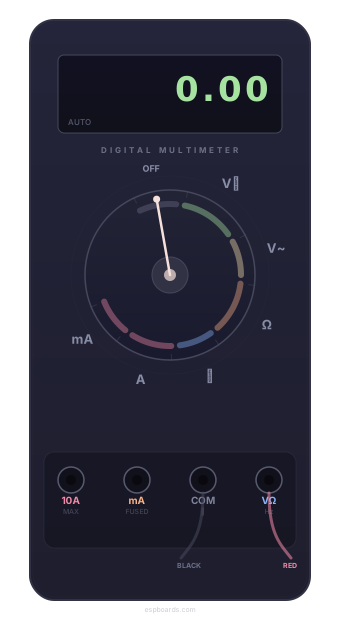
This is a generic/mock multimeter for illustration. Your model may look different, but the symbols and modes are the same.
| Symbol | Mode | ESP32 use case |
|---|---|---|
| V⎓ | DC Voltage | 3.3 V rail, 5 V USB, GPIO state, battery |
| V~ | AC Voltage | Rarely used - wall outlet only |
| Ω | Resistance | Verify pull-up / pull-down values, thermistors |
| ⏚ | Continuity | Solder joints, jumper wires, PCB traces |
| A / mA | Current | Power draw, deep-sleep verification |
Safety Basics #
Do
- Black probe always in COM socket
- Red probe in VΩ for voltage, resistance & continuity
- Move red to A / mA socket only for current measurement
- Start with a higher range if manual-ranging
Don't
- Never probe voltage with the dial in current (A) mode - this short-circuits through the meter
- Don't measure resistance on a powered circuit
- Don't leave the red probe in the A socket after measuring current - you'll forget next time
How to Use a Multimeter to Measure Voltage #
Voltage measurement is what you'll use 90% of the time with ESP32 projects. It answers one simple question: "Is there power here, and is it the right amount?"
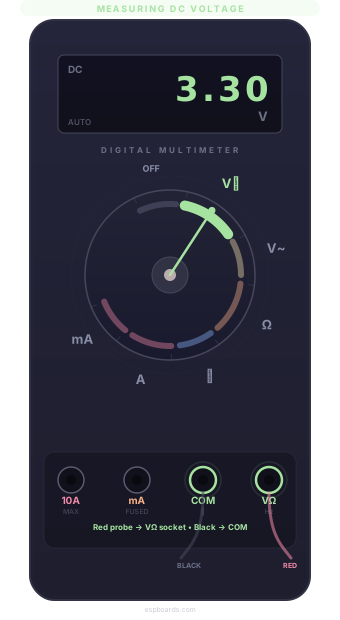
Steps
Set the dial to V⎓ (DC Voltage).
Red probe → VΩ socket. Black probe → COM.
Touch red to the point you want to test, black to GND.
Read the voltage on the display.
Expected readings
3V3 pin → ~3.3 V · VIN/5V → ~4.8–5.2 V · GPIO HIGH → ~3.3 V · GPIO LOW → ~0 V
What the display is telling you
- 0.000 - no power or broken connection
- −3.3 - probes reversed, swap them
- OL - overload: reading exceeds range, switch higher
ESP32 voltage checks you'll actually do
Check the 3.3 V rail
Red → 3V3, Black → GND. Should read ~3.3 V. Under 3.0 V? Your regulator or USB source is sagging - the ESP32 brownouts below ~2.8 V.
Check USB power
Red → 5V / VIN, Black → GND. Expect 4.8–5.2 V. Cheap cables and chargers often sag under load.
GPIO pin HIGH or LOW?
Red → GPIO pin, Black → GND. HIGH ≈ 3.3 V, LOW ≈ 0 V. Great for checking strapping pin states at boot.
12 V power supply
Driving LED strips? Red → 12V+, Black → GND. Should read 11.5–12.5 V. Below 11 V and LEDs will flicker.
How to Use a Multimeter to Check Continuity #
Continuity mode tells you whether two points are electrically connected. The meter beeps when there's a path - no beep means broken. This is your best friend after soldering.
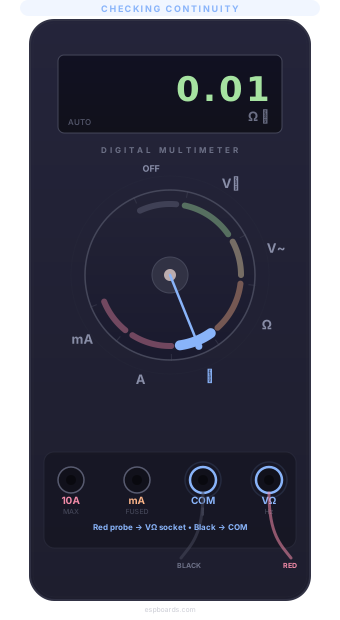
Steps
Set the dial to ⏚ (continuity / buzzer symbol).
Touch probes together - you should hear a beep. This confirms the meter works.
Touch one probe to each end of the connection you want to check.
Beep = connected | No beep = broken
Tip: Test on a known-good wire first so you know what a real beep sounds like on your meter - some are quiet.
What the display shows
- 0–10 Ω - connected (and beeping)
- OL - open circuit, no connection
- ~0.6 V - some meters show diode voltage drop instead of Ω
ESP32 continuity checks you'll actually do
Solder joint verification
After soldering headers: probe the pin and the pad underneath. Beep = good. No beep = cold solder joint - reheat it.
Trace a GND path
One probe on a component's GND pad, the other on the ESP32 GND pin. Beep confirms the ground path is intact.
Suspect jumper wire
Dupont wires break internally more than you'd think. Probe both ends - no beep means dead wire. Throw it out.
Check for accidental shorts
Probe two adjacent GPIO pins - they should not beep. If they do, you've got a solder bridge somewhere.
How to Use a Multimeter to Test Resistance #
Resistance mode measures how much a component resists current flow (in Ohms / Ω). Essential for checking you grabbed the right resistor from the parts bin.
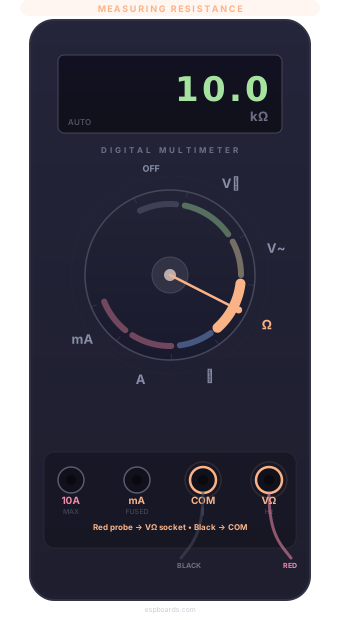
Steps
Set the dial to Ω (Resistance).
Touch probes to both leads of the resistor (either way - resistors aren't polarized).
Read the value on the display.
Always measure components out of circuit - other paths can skew the reading.
Common values in ESP32 projects
- 330 Ω - LED current limiter
- 4.7 kΩ / 10 kΩ - I2C pull-ups, button pull-ups
- 10 kΩ - NTC thermistor at 25 °C
- OL - open circuit (broken lead or wrong mode)
ESP32 resistance checks you'll actually do
Pull-up / pull-down
I2C needs 4.7 kΩ or 10 kΩ. Probe it - confirm it's not 470 Ω (easy color-band mixup).
NTC thermistor
A 10 kΩ NTC thermistor should read ~10 kΩ at 25 °C before wiring to an ADC pin. Way off = wrong part.
Mystery SMD resistor
Can't read the tiny code? Measure directly. 330 Ω → probably an LED current limiter.
How to Use a Multimeter to Measure Current #
Current measurement tells you how much power your project is drawing - critical for battery-powered builds. This is the one mode where the setup is different.
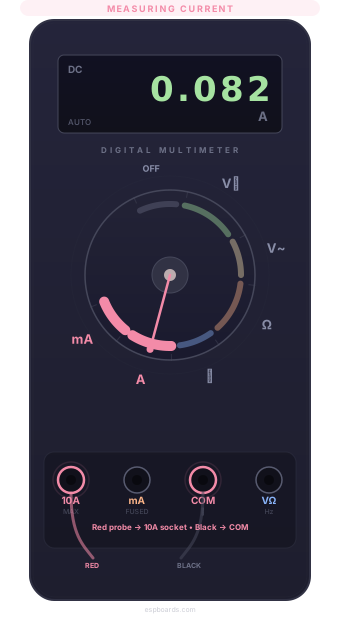
Current = SERIES measurement
You must break the circuit and route current through the meter. Red probe → A or mA socket (not VΩ). Probing voltage in this mode will blow the meter's fuse.
Steps
Dial → A (or mA for small currents).
Move red probe to the A or mA socket.
Break the circuit at the positive wire - insert the meter in series.
Read the current on the display.
ESP32 current measurements you'll actually do
Total project draw
ESP32 alone: ~80 mA idle, ~240 mA peak (Wi-Fi on). Add sensors/LEDs to size your battery.
Deep-sleep check
Should be ~10 µA. If you see milliamps, something isn't sleeping - check LEDs, regulators, peripherals. See our ESP32 deep sleep optimization guide for fixes.
Parasitic draw
Battery draining overnight? 20+ mA when "asleep" = parasitic draw from an always-on LED or hungry regulator.
How to Use a Multimeter to Test a Battery #
Running battery-powered ESP32 projects? A quick voltage check tells you if it's healthy or needs recharging.
Set dial to DC Voltage (V⎓). Touch red → (+), black → (−).
| Battery type | Full | Replace at | ESP32 use |
|---|---|---|---|
| 18650 / LiPo (3.7 V) | ~4.2 V | < 3.3 V | Battery-powered projects |
| 9 V (PP3) | ~9.5 V | < 7 V | Via Vin + voltage regulator |
| CR2032 coin cell (3 V) | ~3.0 V | < 2.5 V | RTC backup, low-power sensors |
| USB power bank (5 V) | ~5.1 V | < 4.7 V | Portable power, check under load |
How to Use a Multimeter to Test a Fuse #
Some ESP32 dev boards and power modules have tiny onboard fuses. Board suddenly dead? A blown fuse is a 5-second test.
Dial → Continuity. Touch one probe to each end of the fuse.
Beep = good fuse. No beep = blown - replace it.
This also works for checking the fuse inside your multimeter - if the current mode suddenly stops working, the meter's internal fuse may have blown. They're cheap to replace.
How to Use a Multimeter to Test a Circuit #
"It's not working" is the most common debug state. A multimeter helps you systematically trace the problem from power source → ESP32 → sensor/actuator.
4-Step debugging checklist
1 - Is there voltage at the sensor's VCC?
DC V mode. Probe VCC to GND. No voltage → issue upstream (wiring, regulator, or source).
2 - Is the GPIO outputting the right level?
Button not registering? Check GPIO reads ~3.3 V (HIGH) or ~0 V (LOW). Floating = missing pull resistor.
3 - Is the actuator actually switching?
Check voltage on the relay output before/after triggering. No change → relay isn't firing - check trigger voltage, transistor driver.
4 - Are all wires actually connected?
Switch to continuity, check every connection point-to-point. Breadboard contact issues and broken Dupont wires cause more "bugs" than code.
Quick Reference Table #
| Task | Mode | Probes | Expected |
|---|---|---|---|
| Check 3.3 V rail | DC V | Red → 3V3, Black → GND | ~3.3 V |
| Check USB power | DC V | Red → 5V, Black → GND | ~4.8–5.1 V |
| GPIO HIGH / LOW | DC V | Red → pin, Black → GND | ~3.3 V / ~0 V |
| Solder joint | ⏚ | Both ends of trace | Beep |
| Verify resistor | Ω | Both resistor leads | Labelled value |
| 18650 battery | DC V | Red → +, Black → − | 3.0–4.2 V |
| Current draw | A / mA | Break circuit, in series | ~80–240 mA |
| Blown fuse? | ⏚ | Both fuse ends | Beep = good |