
XIAO ESP32S3 Plus is a development board based on the ESP32S3 microcontroller using XTENSA architecture.
This board features a maximum CPU frequency of 240 MHz and 16MB flash memory.
About XIAO ESP32S3 Plus
With a compact yet powerful design, it includes a USB-C port for fast programming and power, and features additional onboard peripherals such as an integrated accelerometer and external memory support. ⚡
The XIAO ESP32S3 Plus supports multiple communication interfaces, including UART, I2C, SPI, and ADC, making it a great choice for advanced embedded applications.
Where to Buy XIAO ESP32S3 Plus

Starting from
20$ per unit

Prices are subject to change. We earn from qualifying purchases as an Amazon Associate.
Technical Specifications
Complete technical specification details for XIAO ESP32S3 Plus
USB
Connectivity
Microcontroller
✨ Features & Pins
- • Dual-core Xtensa LX7 processor with enhanced AI capabilities
- • Integrated accelerometer and external memory support
- • Supports WiFi 4 and Bluetooth 5 (LE)
- • Ultra-small size (21x17.5 mm)
Quick Setup
Copy-paste configs for XIAO ESP32S3 Plus - auto‑generated from this board's exact hardware specs.
In Arduino IDE 2 select Xiao Esp32s3 Plus from the esp32 by Espressif package. In PlatformIO use board = esp32-s3-devkitm-1. ESP32S3 · 240 MHz · 16MB · QIO.
In Arduino IDE 2, open Boards Manager, search "esp32" by Espressif and install it. Then go to Tools → Board and select "Xiao Esp32s3 Plus" for the XIAO ESP32S3 Plus.
XIAO ESP32S3 Plus Pinout Diagram
Complete pin reference for XIAO ESP32S3 Plus
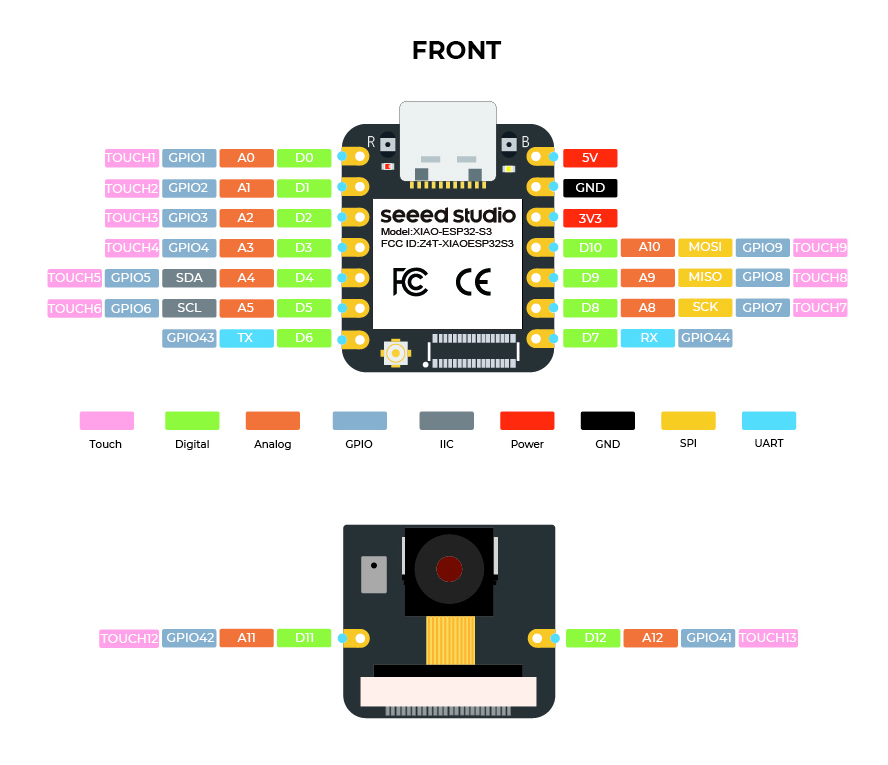
The XIAO ESP32S3 Plus pinout is designed for expanded functionality and includes additional peripheral connections. It features key power pins like 5V, 3.3V, and GND for stable power delivery.
It supports multiple communication protocols, including UART (RX and TX), I2C (SDA and SCL), and SPI (SCK, MISO, MOSI, and SS).
Analog input pins labeled A0 to A3 enable sensor integration, while additional GPIOs provide further expandability.
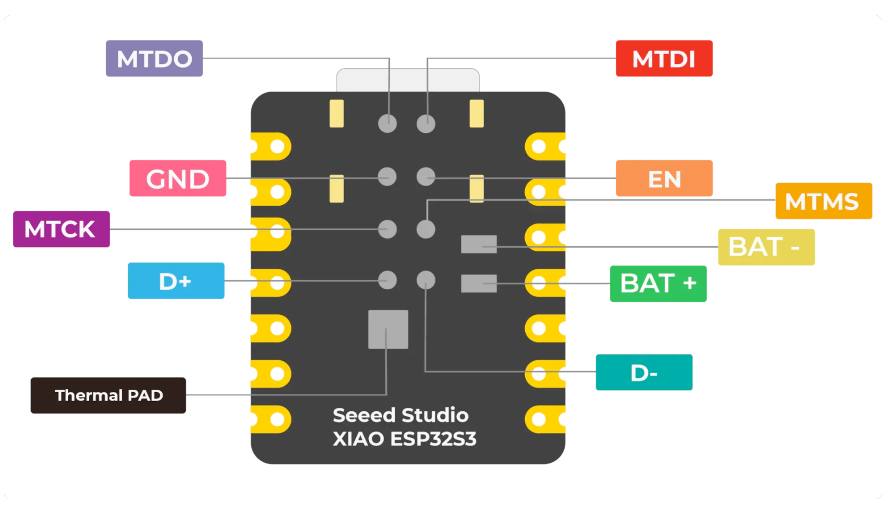
Safe Pins to Use
These pins are safe for general GPIO usage without boot or system conflicts
Why Are These Pins Safe?
Pins to Avoid or Use with Caution
Reserved for critical functions. Misuse may cause boot failures, programming issues, or system conflicts.
Boot behavior & flash voltage
Low-level debugging interface
USB Serial/JTAG communication
Memory & PSRAM connections
Debugging & firmware uploads
| PIN | Label | Why Avoid | Type |
|---|---|---|---|
| IO3 | GPIO3 | Sampled at reset to select JTAG interface (USB Serial/JTAG controller vs. external pins). Improper use can disable external JTAG or alter debug interface. | 🛠️ Strapping |
| IO9 | FSPIHD | Connected to external flash (data/hold signal) on most modules. Not recommended for use as GPIO, since it must remain dedicated to flash communication. | ⚡ Flash |
| IO10 | FSPICS0 | Used to select the external flash chip. It is required for flash access and cannot be repurposed without losing flash connectivity | ⚡ Flash |
| IO20 | USB_D+ | By default connected to the on-chip USB Serial/JTAG controller. Using it as general GPIO without reconfiguring IO MUX will interfere with USB functionality. | 🔌 USB |
XIAO ESP32S3 Plus Additional Information
More details about XIAO ESP32S3 Plus

Useful Links
Datasheets and resources for XIAO ESP32S3 Plus
XIAO ESP32S3 Plus Custom Pin Mapping
Pin configuration and GPIO mapping for XIAO ESP32S3 Plus
| Pin | Function | ESP Pin | I/O Type | Description |
|---|---|---|---|---|
| 1 | 5V | 5V | POWER INPUT | 5V power input |
| 2 | GND | GND | GROUND | Ground connection |
| 3 | 3V3 | 3.3V | POWER OUTPUT | 3.3V power output |
| 4 | IO2 | A0 | BIDIRECTIONAL | GPIO, ADC |
| 5 | IO3 | A1 | BIDIRECTIONAL | GPIO, ADC |
| 6 | IO4 | A2 | BIDIRECTIONAL | GPIO, ADC |
| 7 | IO5 | A3 | BIDIRECTIONAL | GPIO, ADC |
| 8 | IO6 | SDA | BIDIRECTIONAL | GPIO, I2C Data |
| 9 | IO7 | SCL | BIDIRECTIONAL | GPIO, I2C Clock |
| 10 | IO8 | SCK | BIDIRECTIONAL | GPIO, SPI Clock |
| 11 | IO9 | MISO | BIDIRECTIONAL | GPIO, SPI Data |
| 12 | IO10 | MOSI | BIDIRECTIONAL | GPIO, SPI Data |
| 13 | IO20 | RX | BIDIRECTIONAL | GPIO, UART Receive |
| 14 | IO21 | TX | BIDIRECTIONAL | GPIO, UART Transmit |
Default Tools & Configuration
Build and upload settings for XIAO ESP32S3 Plus
| Setting | Value |
|---|---|
| Bootloader tool | esptool_py |
| Uploader tool | esptool_py |
| Network uploader tool | esp_ota |
| Bootloader address | 0x0 |
| Flash mode | qio |
| Boot mode | qio |
| Maximum upload size | 8192 KB (8388608 bytes) |
| Maximum data size | 320 KB (327680 bytes) |
The XIAO ESP32S3 Plus uses esptool_py for uploads , esp_ota for OTA updates, and esptool_py bootloader at 0x0.
Flash mode: qio | Boot mode: qio
Max sketch size: 8192 KB | Max data size: 320 KB
Similar Boards
Other development boards with ESP32S3 microcontroller

XIAO ESP32S3 Sense
XIAO ESP32S3 Sense development board is based on esp32s3 microcontroller and uses xtensa architecture.

XIAO ESP32C6
XIAO ESP32C6 development board is based on esp32c6 microcontroller and uses riscv32 architecture.

XIAO ESP32C3
XIAO ESP32C3 development board is based on esp32c3 microcontroller and uses riscv32 architecture.