
BMP085 Barometric Pressure Sensor
The BMP085 is a high-precision digital barometric pressure and temperature sensor, ideal for weather monitoring, altimetry, and navigation. It uses an I²C interface for communication and offers low power consumption, making it suitable for battery-powered devices.

BMP085 pinout
The BMP085 uses I²C communication (original model, predecessor to BMP180):
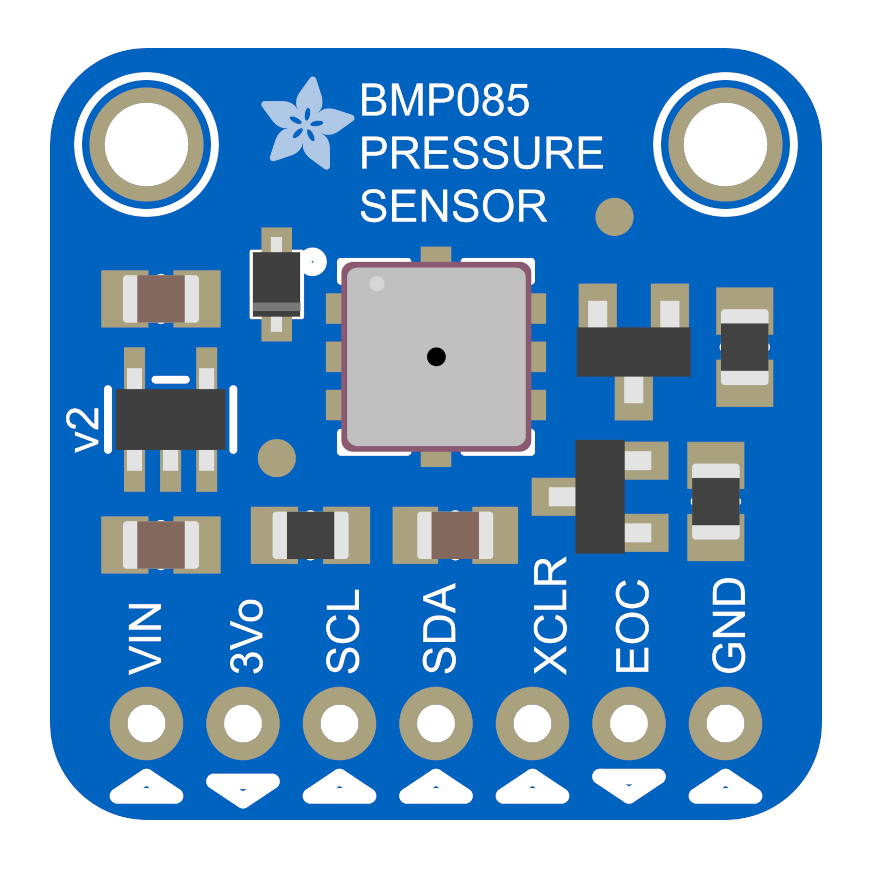
| Pin | Type | Description | Notes |
|---|---|---|---|
| VIN | Power | Power input | 3.3V or 5V compatible |
| GND | Power | Ground connection | |
| SDA | Communication | I²C data line | Connect to ESP32 GPIO21 |
| SCL | Communication | I²C clock line | Connect to ESP32 GPIO22 |
I²C Only: No SPI support
I²C Address: Fixed at 0x77
Temperature: -40°C to +85°C
Pressure: 300-1100 hPa
Altitude: -500m to +9000m
Power: 3.3V or 5V compatible
Legacy: Original model, replaced by BMP180/BMP280
Slow: Conversion time up to 25.5ms
Applications: Basic weather monitoring, legacy projects
Wiring the BMP085 to ESP32
To interface the BMP085 with an ESP32 using I²C:
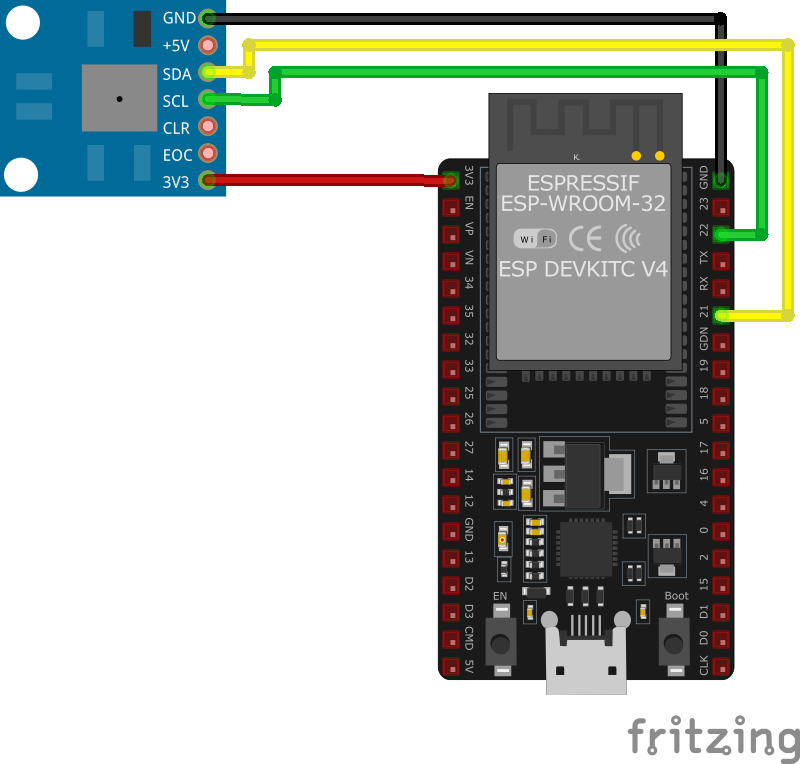
| BMP085 pin | ESP32 pin | Purpose |
|---|---|---|
| VIN | 3.3V | Power supply |
| GND | GND | Ground |
| SDA | GPIO21 | I²C data line |
| SCL | GPIO22 | I²C clock line |
I²C Address: Fixed at 0x77
Power: Use 3.3V for ESP32
Simple: Only 4 wires needed
Legacy: Consider BMP180 or BMP280 for new projects
Reliable: Original design, widely tested
Slower: BMP180 and BMP280 are faster
BMP085 code examples
#include <Wire.h>
#include <Adafruit_Sensor.h>
#include <Adafruit_BMP085_U.h>

Adafruit_BMP085_Unified bmp = Adafruit_BMP085_Unified(10085);

void setup() {
  Serial.begin(115200);
  if (!bmp.begin()) {
    Serial.println("Could not find a valid BMP085 sensor, check wiring!");
    while (1);
  }
}

void loop() {
  sensors_event_t event;
  bmp.getEvent(&event);
  if (event.pressure) {
    Serial.print("Pressure: ");
    Serial.print(event.pressure);
    Serial.println(" hPa");
  }
  float temperature;
  bmp.getTemperature(&temperature);
  Serial.print("Temperature: ");
  Serial.print(temperature);
  Serial.println(" *C");
  delay(2000);
}
This Arduino code initializes the BMP085 sensor using the Adafruit_BMP085_Unified library. In the loop() function, the code reads and prints atmospheric pressure and temperature values every two seconds. The sensor's event-based API ensures efficient data handling.
// Requires the esp-idf-lib BMP180 driver (BMP085-compatible) from the ESP Component Registry:
//   idf.py add-dependency "esp-idf-lib/bmp180^1.0.7"

#include <stdio.h>
#include <string.h>
#include "freertos/FreeRTOS.h"
#include "freertos/task.h"
#include "bmp180.h"

#define SDA_GPIO GPIO_NUM_21
#define SCL_GPIO GPIO_NUM_22

void app_main(void)
{
    ESP_ERROR_CHECK(i2cdev_init());

    bmp180_dev_t dev;
    memset(&dev, 0, sizeof(bmp180_dev_t));
    ESP_ERROR_CHECK(bmp180_init_desc(&dev, 0, SDA_GPIO, SCL_GPIO));
    ESP_ERROR_CHECK(bmp180_init(&dev));

    while (1) {
        float temperature;
        uint32_t pressure;
        if (bmp180_measure(&dev, &temperature, &pressure, BMP180_MODE_STANDARD) == ESP_OK)
            printf("Temp %.1f C, Press %lu Pa\n", temperature, (unsigned long)pressure);
        else
            printf("Could not read data from sensor\n");
        vTaskDelay(pdMS_TO_TICKS(2000));
    }
}
ESP-IDF ships no BMP085 driver of its own, so this example uses the maintained esp-idf-lib BMP180 driver from the ESP Component Registry - the BMP085 is protocol-compatible with the BMP180, so the driver works unchanged. Install it into your project first with idf.py add-dependency "esp-idf-lib/bmp180^1.0.7", then build as usual.
bmp180_measure() runs one complete blocking measurement and returns temperature in Celsius and pressure in Pascal. BMP180_MODE_STANDARD balances speed and noise; use BMP180_MODE_ULTRA_HIGH_RESOLUTION for the finest pressure resolution.
i2c:
  sda: GPIO21
  scl: GPIO22

sensor:
  - platform: bmp085
    temperature:
      name: "BMP085 Temperature"
    pressure:
      name: "BMP085 Pressure"
    address: 0x77
This ESPHome configuration integrates the BMP085 sensor. It creates sensor entities for temperature and pressure, which are monitored via the I2C address 0x77. The setup is ideal for weather monitoring and IoT systems.
[env:esp32dev]
platform = espressif32
board = esp32dev
framework = arduino
monitor_speed = 115200
lib_deps =
    adafruit/Adafruit BMP085 Unified @ ^1.1.3
adafruit/Adafruit Unified Sensor @ ^1.1.15#include <Arduino.h>
#include <Wire.h>
#include <Adafruit_Sensor.h>
#include <Adafruit_BMP085_U.h>
Adafruit_BMP085_Unified bmp = Adafruit_BMP085_Unified(10085);
void setup() {
Serial.begin(115200);
if (!bmp.begin()) {
Serial.println("Could not find a valid BMP085 sensor, check wiring!");
while (1);
}
}
void loop() {
sensors_event_t event;
bmp.getEvent(&event);
if (event.pressure) {
Serial.print("Pressure: ");
Serial.print(event.pressure);
Serial.println(" hPa");
}
float temperature;
bmp.getTemperature(&temperature);
Serial.print("Temperature: ");
Serial.print(temperature);
Serial.println(" *C");
delay(2000);
}This PlatformIO code integrates the Adafruit BMP085 library to read temperature and pressure values. The data is fetched and printed to the Serial Monitor every two seconds using simple function calls.
# Requires driver: bmp180.py from https://github.com/micropython-IMU/micropython-bmp180
# Copy it to the board: mpremote cp bmp180.py :
from time import sleep
from machine import I2C, Pin
from bmp180 import BMP180

# Initialize I2C (SDA=GPIO21, SCL=GPIO22)
i2c = I2C(0, scl=Pin(22), sda=Pin(21))

# The BMP085 is protocol-compatible with the BMP180, so the same driver works
bmp = BMP180(i2c)
bmp.oversample_sett = 2

while True:
    print("Temperature: {:.1f} C".format(bmp.temperature))
    print("Pressure: {:.1f} hPa".format(bmp.pressure / 100))
    sleep(2)
There is no dedicated BMP085 MicroPython driver, but the BMP085 is protocol-compatible with the BMP180, so the example uses bmp180.py from micropython-IMU/micropython-bmp180 (copy it to the board with mpremote). oversample_sett selects the accuracy/speed trade-off (0-3), and the driver exposes temperature (Celsius) and pressure (Pascal, divided by 100 for hPa).
BMP085 specifications
About the BMP085
The BMP085 was Bosch’s first mass-market digital barometric pressure sensor, and it has been fully discontinued since 2013 - distributor listings mark it obsolete with zero stock, and the part has had no active production for over a decade. If you already have one, it still measures pressure from 300 to 1100 hPa and reports temperature over I2C at the fixed address 0x77, the same interface every later Bosch pressure sensor kept.
Bosch built its replacement, the BMP180, to be firmware- and register-identical to the BMP085 specifically so existing code would keep working - the same Adafruit library and I2C commands drive both chips, and community drivers like esp-idf-lib’s BMP180 component document themselves as BMP085-compatible for the same reason. That compatibility is the only real reason to still reach for a BMP085 today: if you find one in a parts bin, existing BMP180 code and wiring will run it unmodified.
For a new project, skip both - BMP280 is what most current tutorials and breakout boards use in the BMP085’s place, though Bosch has itself since discontinued the raw BMP280 chip in favor of the BMP390. If you want a part still in full production, the humidity-capable BME280 is the safer pick.
BMP085 troubleshooting
Compilation Error: 'Adafruit_BMP085' does not name a type
›
Issue: When compiling code that utilizes the Adafruit BMP085 library, the following error occurs: 'Adafruit_BMP085' does not name a type.
Possible causes include incorrect installation of the library or mismatched library versions.
Solution: Ensure that the Adafruit BMP085 library is correctly installed in the Arduino IDE. Verify that the library folder is placed in the 'libraries' directory of your Arduino sketchbook and that the folder name does not contain hyphens or other special characters. Restart the Arduino IDE after installing the library to ensure it is recognized. Additionally, confirm that the example code matches the installed library version, as discrepancies can lead to such errors. ([forums.adafruit.com](https://forums.adafruit.com/viewtopic.php?t=62510))
Sensor Initialization Failure: 'Could not find a valid BMP085 sensor'
›
Issue: The BMP085 sensor fails to initialize, and the serial monitor displays: Could not find a valid BMP085 sensor, check wiring!.
Possible causes include incorrect wiring, improper power supply, or issues with the I2C communication.
Solution: Verify that the sensor's SDA and SCL lines are correctly connected to the corresponding pins on the microcontroller. Ensure that the sensor is powered with the appropriate voltage (3.3V or 5V, depending on the sensor's specifications). Use an I2C scanner to detect the sensor's address; if the sensor is not found, check for loose connections or potential damage to the sensor. Additionally, confirm that the correct I2C address is specified in your code, as some BMP085 modules may use different default addresses. ([community.particle.io](https://community.particle.io/t/solved-bmp085-pressure-sensor-fails-to-initialize/9083))
Python Error: 'IOError: [Errno 5] Input/output error'
›
Issue: When interfacing the BMP085 sensor with a Raspberry Pi using Python, the following error is encountered: IOError: [Errno 5] Input/output error.
Possible causes include incorrect I2C setup, wiring issues, or conflicts with other I2C devices.
Solution: Ensure that I2C is enabled on the Raspberry Pi and that the necessary Python libraries for I2C communication are installed. Verify that the sensor's connections are secure and correspond to the correct GPIO pins. If multiple I2C devices are connected, check for address conflicts and ensure each device has a unique address. Using the 'i2cdetect' command can help identify connected devices and their addresses. ([forums.raspberrypi.com](https://forums.raspberrypi.com/viewtopic.php?t=32878))
Incorrect Altitude Calculations Due to Pressure Readings
›
Issue: Altitude calculations based on BMP085 pressure readings are inaccurate, leading to erroneous altitude values.
Possible causes include incorrect pressure-to-altitude conversion formulas or uncalibrated sea-level pressure references.
Solution: Use the standard barometric formula to convert pressure readings to altitude, ensuring that the sea-level pressure reference is accurate for your location. Regularly updating the sea-level reference can improve accuracy. Additionally, consider using libraries that handle these calculations and calibrations automatically. ([forum.microchip.com](https://forum.microchip.com/s/topic/a5C3l000000MNFjEAO/t319443))
Resources
Similar sensors


