
BMP280 Barometric Pressure and Temperature Sensor
The BMP280 is a high-precision digital barometric pressure and temperature sensor, ideal for weather monitoring, altimetry, and navigation. It supports both I²C and SPI interfaces, offering flexibility in communication protocols.

BMP280 pinout
The BMP280 supports both I²C and SPI for temperature and pressure sensing:
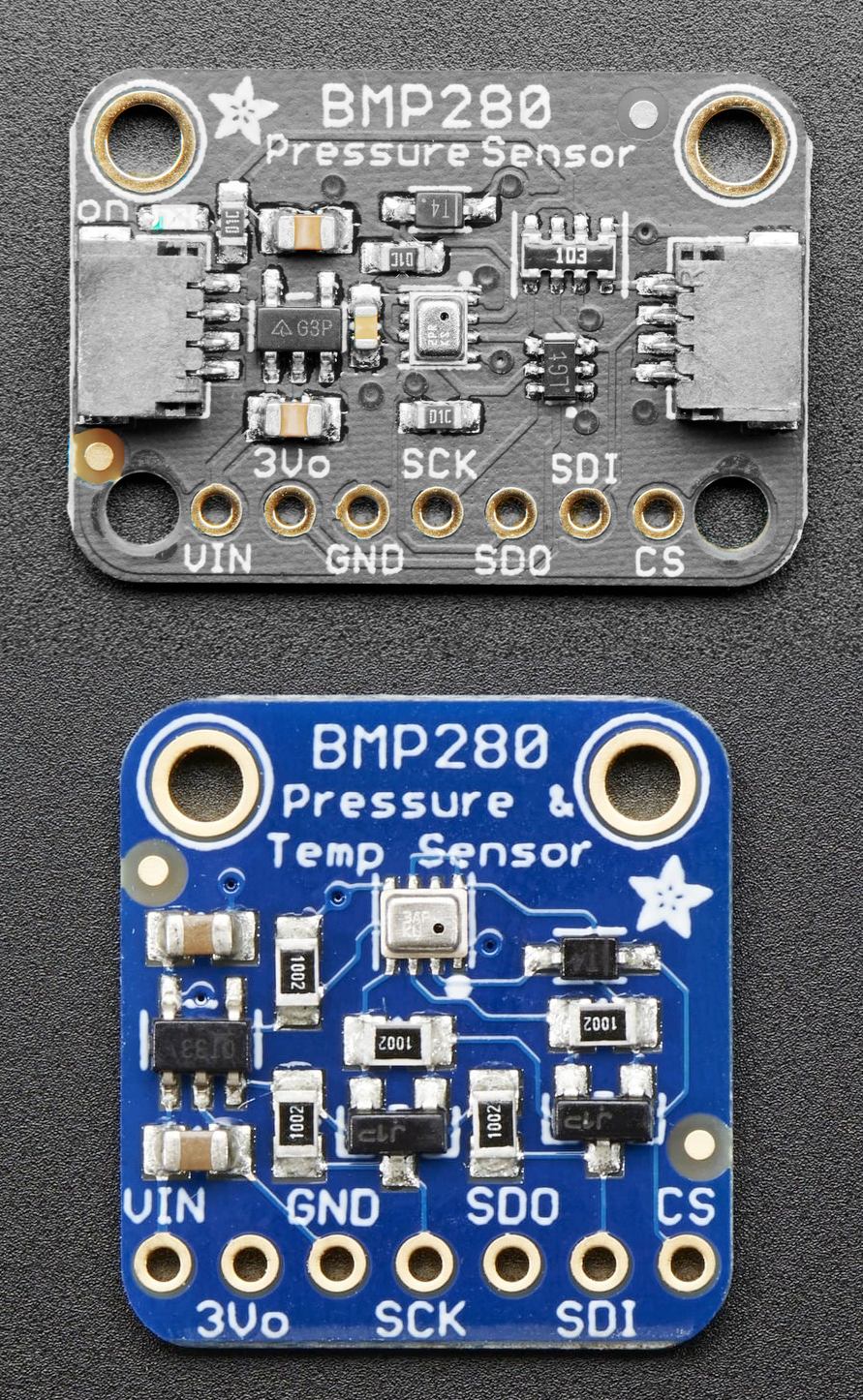
| Pin | Type | Description | Notes |
|---|---|---|---|
| VCC | Power | Power input | 3.3V or 5V compatible |
| GND | Power | Ground connection | |
| SDA | Communication | I²C data line | Connect to ESP32 GPIO21 |
| SCL | Communication | I²C clock line | Connect to ESP32 GPIO22 |
| CSB | Communication | Chip select for SPI | Tie to VCC for I²C mode - pulling it low switches the chip to SPI |
| SDO | Communication | SPI data out / I²C address select | GND=0x76, VCC=0x77 for I²C address |
Dual Protocol: Supports both I²C and SPI
I²C Address: 0x76 or 0x77 (SDO pin selects)
Temperature: -40°C to +85°C, ±1°C accuracy
Pressure: 300-1100 hPa, ±1 hPa accuracy
Altitude: Calculate altitude from pressure
Low Power: 2.7µA in sleep mode
Cost-Effective: Budget-friendly option
Applications: Weather stations, altimeters, drones
Wiring the BMP280 to ESP32
To interface the BMP280 with an ESP32 using I²C:
| BMP280 pin | ESP32 pin | Purpose |
|---|---|---|
| VCC | 3.3V | Power supply |
| GND | GND | Ground |
| SDA | GPIO21 | I²C data line |
| SCL | GPIO22 | I²C clock line |
| CSB | 3.3V | Tie to 3.3V (VCC) for I²C mode - low selects SPI |
| SDO | GND or VCC | I²C address: GND=0x76, VCC=0x77 · optional |
I²C Address: 0x76 (SDO→GND) or 0x77 (SDO→VCC)
CSB Pin: Must be tied to VCC for I²C mode - pulling it low selects SPI (many modules pull it high already)
Power: Use 3.3V or 5V
Simple Wiring: 4-6 wires depending on configuration
No Humidity: Use BME280 if humidity needed
BMP280 code examples
#include <Wire.h>
#include <Adafruit_Sensor.h>
#include <Adafruit_BMP280.h>

Adafruit_BMP280 bmp;

void setup() {
  Serial.begin(115200);
  if (!bmp.begin(0x76)) {
    Serial.println("Could not find a valid BMP280 sensor, check wiring!");
    while (1);
  }
}

void loop() {
  Serial.print("Temperature = ");
  Serial.print(bmp.readTemperature());
  Serial.println(" *C");

  Serial.print("Pressure = ");
  Serial.print(bmp.readPressure() / 100.0F);
  Serial.println(" hPa");

  delay(2000);
}
This Arduino code initializes the BMP280 sensor using the Adafruit BMP280 library. It reads temperature and pressure values and prints them to the Serial Monitor every two seconds. Ensure the I²C address (0x76 or 0x77) matches your sensor's configuration.
// Requires the esp-idf-lib BMP280 driver from the ESP Component Registry:
// idf.py add-dependency "esp-idf-lib/bmp280^1.0.7"
#include <stdio.h>
#include <string.h>
#include "freertos/FreeRTOS.h"
#include "freertos/task.h"
#include "bmp280.h"
#define SDA_GPIO GPIO_NUM_21
#define SCL_GPIO GPIO_NUM_22
void app_main(void)
{
ESP_ERROR_CHECK(i2cdev_init());
bmp280_params_t params;
bmp280_init_default_params(¶ms);
bmp280_t dev;
memset(&dev, 0, sizeof(bmp280_t));
ESP_ERROR_CHECK(bmp280_init_desc(&dev, BMP280_I2C_ADDRESS_0, 0, SDA_GPIO, SCL_GPIO));
ESP_ERROR_CHECK(bmp280_init(&dev, ¶ms));
float pressure, temperature;
while (1) {
if (bmp280_read_float(&dev, &temperature, &pressure, NULL) == ESP_OK)
printf("Temp %.2f C, Press %.2f Pa\n", temperature, pressure);
else
printf("Could not read data from sensor\n");
vTaskDelay(pdMS_TO_TICKS(2000));
}
}ESP-IDF ships no BMP280 driver of its own, so this example uses the maintained esp-idf-lib BMP280 driver from the ESP Component Registry - it handles the calibration-coefficient readout and the datasheet compensation math that a raw I2C read would otherwise have to implement. Install it into your project first with idf.py add-dependency "esp-idf-lib/bmp280^1.0.7", then build as usual.
i2cdev_init() sets up the shared I2C layer used by all esp-idf-lib drivers, and bmp280_read_float() returns compensated temperature in Celsius and pressure in Pascal every 2 seconds. The humidity argument is NULL because the BMP280 has no humidity sensor - the same driver also supports the BME280, which does. Wire SDA to GPIO 21 and SCL to GPIO 22, or change the defines to match your board.
i2c:
  sda: GPIO21
  scl: GPIO22

sensor:
  - platform: bmp280_i2c
    temperature:
      name: "BMP280 Temperature"
    pressure:
      name: "BMP280 Pressure"
    address: 0x76
This ESPHome configuration integrates the BMP280 sensor. It creates sensor entities for temperature and pressure, which are monitored via the I2C address 0x76. The configuration is ideal for home automation and IoT systems, enabling real-time environmental monitoring.
[env:esp32dev]
platform = espressif32
board = esp32dev
framework = arduino
lib_deps =
    adafruit/Adafruit BMP280 Library
    wire
monitor_speed = 115200#include <Wire.h>
#include <Adafruit_BMP280.h>
Adafruit_BMP280 bmp;
void setup() {
Serial.begin(115200);
if (!bmp.begin(0x76)) {
Serial.println("Could not find a valid BMP280 sensor, check wiring!");
while (1);
}
}
void loop() {
Serial.print("Temperature = ");
Serial.print(bmp.readTemperature());
Serial.println(" *C");
Serial.print("Pressure = ");
Serial.print(bmp.readPressure() / 100.0F);
Serial.println(" hPa");
delay(2000);
}This PlatformIO code uses the Adafruit BMP280 library to interface with the BMP280 sensor. It reads and prints temperature and pressure values to the Serial Monitor every two seconds. Ensure the I²C address (0x76 or 0x77) is correctly set for your module.
# Requires driver: bmp280.py from https://github.com/dafvid/micropython-bmp280
# Copy it to the board: mpremote cp bmp280.py :
from time import sleep
from machine import I2C, Pin
from bmp280 import BMP280

# Initialize I2C (SDA=GPIO21, SCL=GPIO22)
i2c = I2C(0, scl=Pin(22), sda=Pin(21))

# Initialize BMP280 (address 0x76 on most breakouts)
bmp = BMP280(i2c)

while True:
    print("Temperature: {:.2f} C".format(bmp.temperature))
    print("Pressure: {:.2f} hPa".format(bmp.pressure / 100))
    sleep(2)
The example uses dafvid/micropython-bmp280 (copy bmp280.py to the board with mpremote). The driver exposes temperature (Celsius) and pressure (Pascal - divided by 100 to print hPa) and defaults to address 0x76, matching most breakouts.
BMP280 specifications
About the BMP280
The BMP280 is Bosch’s most widely used pressure sensor: a roughly $1 module measuring barometric pressure (300-1100 hPa, ±1 hPa accuracy) and temperature over I2C or SPI, at 2.7 uA that barely dents a battery budget. It has no humidity sensor - for that you want its sibling the BME280, which shares the same footprint and register layout but adds a humidity channel.
Bosch has itself discontinued the raw BMP280 die - distributor listings mark it obsolete with zero stock and point to the BMP390 as the direct successor - but that has had little visible effect on the hobbyist market: BMP280 breakout boards remain some of the cheapest and most common pressure sensors sold, built from existing chip stock still moving through the supply chain.
For a new design where long-term chip availability matters, BME280 is the safer choice - Bosch still lists it as active production, and the humidity channel costs little extra on most breakouts. Stick with the BMP280 for existing designs, tutorials, or when its rock-bottom price is the deciding factor.
BMP280 troubleshooting
Incorrect Pressure Readings
›
Issue: The BMP280 sensor provides pressure readings significantly lower than expected, such as 700 hPa when the actual pressure is around 960 hPa.
Possible causes include incorrect configuration of the sensor's registers, particularly writing unintended values to reserved bits.
Solution: Ensure that when configuring the sensor's registers, especially the configuration register (0xF5), reserved bits are set to '0' as specified in the datasheet. Writing '1' to these bits can lead to erroneous pressure readings. Review your initialization code to confirm compliance with the sensor's specifications. ([forum.arduino.cc](https://forum.arduino.cc/t/bmp280-sensor-pressure-problems-solved/479974))
Static Temperature and Pressure Readings
›
Issue: The BMP280 sensor outputs static temperature and pressure values that do not change over time, indicating a lack of new measurements.
Possible causes include operating the sensor in forced mode without re-triggering measurements, leading to repeated readings of the same data.
Solution: In forced mode, the BMP280 performs a single measurement and then returns to sleep mode. To obtain continuous measurements, you must repeatedly set the sensor to forced mode before each read operation. Alternatively, configure the sensor to normal mode for continuous measurements. Ensure your code properly handles the sensor's operating modes to acquire updated data. ([esp32.com](https://esp32.com/viewtopic.php?t=10344))
Initialization Failure
›
Issue: The BMP280 sensor fails to initialize, resulting in error messages such as: Could not find a valid BMP280 sensor, check wiring!.
Possible causes include incorrect wiring, improper power supply, or issues with I2C communication.
Solution: Verify that the sensor's SDA and SCL lines are correctly connected to the corresponding pins on the microcontroller. Ensure that the sensor is powered with the appropriate voltage (3.3V or 5V, depending on the sensor's specifications). Use an I2C scanner to detect the sensor's address; if the sensor is not found, check for loose connections or potential damage to the sensor. Additionally, confirm that the correct I2C address is specified in your code, as some BMP280 modules may use different default addresses. ([forum.arduino.cc](https://forum.arduino.cc/t/bmp280-init-failed/1203471))
Incorrect Temperature Readings
›
Issue: The BMP280 sensor reports temperature readings that are significantly off, such as -142.6°C, indicating potential communication or configuration issues.
Possible causes include incorrect I2C address configuration, lack of pull-up resistors on the I2C lines, or faulty sensor modules.
Solution: Ensure that the correct I2C address is used in your code, typically 0x76 or 0x77 for BMP280 sensors. Verify the presence of appropriate pull-up resistors (e.g., 4.7kΩ) on the SDA and SCL lines to facilitate proper I2C communication. Additionally, consider testing the sensor with known working code and hardware to rule out defective modules. ([forum.arduino.cc](https://forum.arduino.cc/t/bmp280-sensor-wrong-data-readings/513455))
Where to buy the BMP280

Resources
Similar sensors


