
SHT31 / SHT31-D / GY-SHT31 / SI7021 Temperature and Humidity Sensor
The SHT31 series sensors utilize Sensirion's CMOSens® technology to deliver accurate, stable, and linear temperature and humidity data. Their robust calibration and long-term reliability make them ideal for applications that require consistent performance under varying conditions.

SHT31 / SHT31-D / GY-SHT31 / SI7021 pinout
The SHT31 uses standard I²C communication with 4 pins, offering high accuracy with wide voltage range.
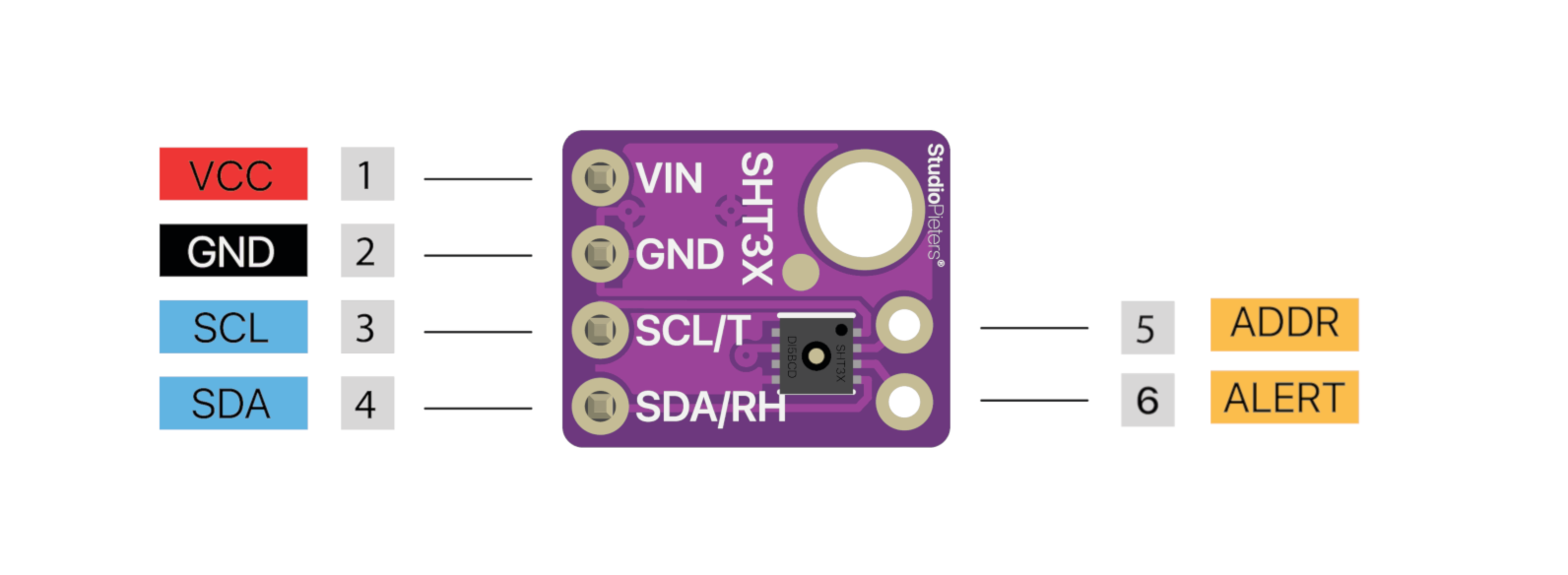
| Pin | Type | Description | Notes |
|---|---|---|---|
| VDD | Power | Power supply input (2.15V to 5.5V) | Wide voltage range for various applications |
| GND | Power | Ground connection | Connect to ESP32 ground |
| SDA | Communication | I²C data line | Bidirectional data communication |
| SCL | Communication | I²C clock line | Clock signal from master device |
Standard I²C interface for easy integration
Default I²C address is 0x44 or 0x45 (configurable)
Exceptional accuracy: ±0.2°C temp, ±2% humidity
Wide voltage range (2.15V-5.5V) for flexibility
Enhanced version of SHT30 with better performance
Wiring the SHT31 / SHT31-D / GY-SHT31 / SI7021 to ESP32
Connect the SHT31 using standard I²C interface for professional-grade measurements.
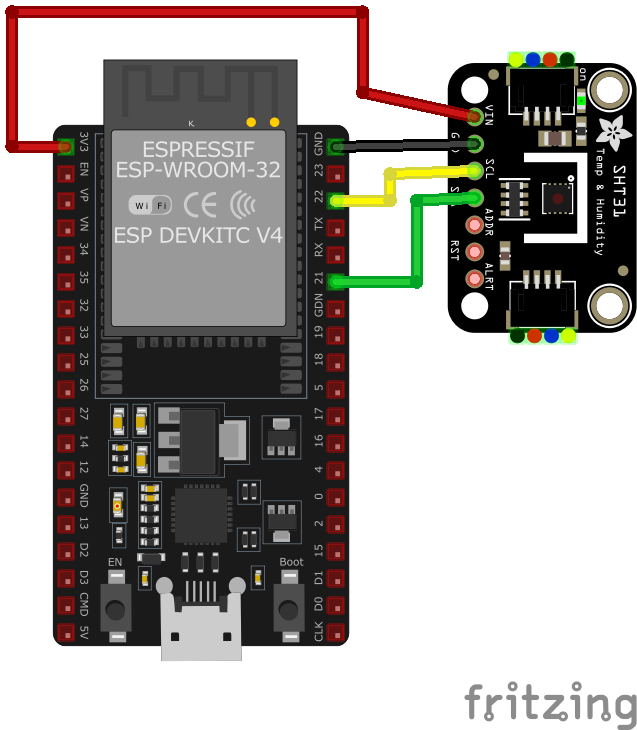
| SHT31 / SHT31-D / GY-SHT31 / SI7021 pin | ESP32 pin | Purpose |
|---|---|---|
| VDD | 3.3V | Power supply (2.15V to 5.5V supported) |
| GND | GND | Ground connection |
| SDA | GPIO21 | I²C data line (default SDA) |
| SCL | GPIO22 | I²C clock line (default SCL) |
GPIO21/22 are default I²C pins on ESP32
I²C address is 0x44 or 0x45 (check your module)
Add 10kΩ pull-up resistors on SDA/SCL if needed
Can share I²C bus with other devices
SHT31 / SHT31-D / GY-SHT31 / SI7021 code examples
#include <Wire.h>
#include "Adafruit_SHT31.h"

Adafruit_SHT31 sht31 = Adafruit_SHT31();

void setup() {
  Serial.begin(115200);
  while (!Serial) delay(10);

  if (!sht31.begin(0x44)) {   // Set to 0x45 for alternate I2C address
    Serial.println("Couldn't find SHT31");
    while (1) delay(1);
  }
}

void loop() {
  float t = sht31.readTemperature();
  float h = sht31.readHumidity();

  if (!isnan(t) && !isnan(h)) {  // Check if readings are valid
    Serial.print("Temp *C = "); Serial.print(t); Serial.print("	");
    Serial.print("Hum. % = "); Serial.println(h);
  } else {
    Serial.println("Failed to read from SHT31 sensor");
  }

  delay(1000);
}
This Arduino sketch demonstrates how to interface with the SHT31 series sensors using the Adafruit SHT31 library. It initializes the sensor and reads temperature and humidity data every second, printing the results to the Serial Monitor. If your sensor uses the alternate I2C address (0x45), adjust the initialization accordingly.
#include <stdio.h>
#include "freertos/FreeRTOS.h"
#include "freertos/task.h"
#include "driver/i2c.h"

#define I2C_MASTER_SCL_IO    22    /*!< GPIO number used for I2C master clock */
#define I2C_MASTER_SDA_IO    21    /*!< GPIO number used for I2C master data */
#define I2C_MASTER_NUM       I2C_NUM_0 /*!< I2C master I2C port number */
#define I2C_MASTER_FREQ_HZ   100000     /*!< I2C master clock frequency */
#define SHT31_SENSOR_ADDR    0x44       /*!< SHT31 I2C address */

static esp_err_t i2c_master_init(void) {
    i2c_config_t conf = {
        .mode = I2C_MODE_MASTER,
        .sda_io_num = I2C_MASTER_SDA_IO,
        .scl_io_num = I2C_MASTER_SCL_IO,
        .sda_pullup_en = GPIO_PULLUP_ENABLE,
        .scl_pullup_en = GPIO_PULLUP_ENABLE,
        .master.clk_speed = I2C_MASTER_FREQ_HZ,
    };
    esp_err_t err = i2c_param_config(I2C_MASTER_NUM, &conf);
    if (err != ESP_OK) {
        return err;
    }
    return i2c_driver_install(I2C_MASTER_NUM, conf.mode, 0, 0, 0);
}

void read_sht31_sensor() {
    uint8_t data[6];
    uint8_t cmd[] = {0x24, 0x00}; // Single-shot, high repeatability, no clock stretching
    i2c_master_write_to_device(I2C_MASTER_NUM, SHT31_SENSOR_ADDR, cmd, 2, pdMS_TO_TICKS(1000));
    vTaskDelay(pdMS_TO_TICKS(15)); // Wait for the measurement
    i2c_master_read_from_device(I2C_MASTER_NUM, SHT31_SENSOR_ADDR, data, sizeof(data), pdMS_TO_TICKS(1000));

    uint16_t temp_raw = (data[0] << 8) | data[1];
    uint16_t hum_raw = (data[3] << 8) | data[4];

    float temperature = -45 + 175 * ((float)temp_raw / 65535.0);
    float humidity = 100 * ((float)hum_raw / 65535.0);

    printf("Temperature: %.2f °C, Humidity: %.2f %%\n", temperature, humidity);
}

void app_main() {
    ESP_ERROR_CHECK(i2c_master_init());

    while (1) {
        read_sht31_sensor();
        vTaskDelay(pdMS_TO_TICKS(2000));
    }
}
This ESP-IDF code demonstrates how to interface with SHT31-compatible sensors using the I2C protocol. It initializes I2C communication, retrieves raw temperature and humidity data, converts it to human-readable values, and prints the results every 2 seconds.
i2c:
  sda: GPIO21
  scl: GPIO22

sensor:
  - platform: sht3xd
    address: 0x44
    temperature:
      name: "Room Temperature"
    humidity:
      name: "Room Humidity"
    update_interval: 60s
This ESPHome configuration uses the sht3xdd platform to integrate SHT31 sensors. It reads and updates temperature and humidity values every 60 seconds, with descriptive names like ‘Room Temperature’ and ‘Room Humidity.’
[env:esp32dev]
platform = espressif32
board = esp32dev
framework = arduino
lib_deps =
    adafruit/Adafruit SHT31 Library @ ^2.0.0
monitor_speed = 115200#include <Wire.h>
#include "Adafruit_SHT31.h"
Adafruit_SHT31 sht31 = Adafruit_SHT31();
void setup() {
Serial.begin(115200);
while (!Serial) delay(10);
if (!sht31.begin(0x44)) { // Default I2C address for SHT31
Serial.println("Couldn't find SHT31 sensor!");
while (1) delay(1);
}
}
void loop() {
float temperature = sht31.readTemperature();
float humidity = sht31.readHumidity();
if (!isnan(temperature) && !isnan(humidity)) {
Serial.print("Temperature: ");
Serial.print(temperature);
Serial.println(" °C");
Serial.print("Humidity: ");
Serial.print(humidity);
Serial.println(" %");
} else {
Serial.println("Failed to read from SHT31 sensor");
}
delay(2000);
}This PlatformIO example initializes the SHT31 sensor using the Adafruit library, reads temperature and humidity values, and prints the results every 2 seconds. It ensures compatibility with ESP32 and Arduino-based projects.
from machine import I2C, Pin
from time import sleep, sleep_ms

# The SHT31 speaks plain I2C - no driver needed (SDA=GPIO21, SCL=GPIO22)
i2c = I2C(0, scl=Pin(22), sda=Pin(21))
SHT3X_ADDR = 0x44  # 0x45 if the ADDR pin is pulled high

while True:
    i2c.writeto(SHT3X_ADDR, b'\x24\x00')  # single shot, high repeatability
    sleep_ms(20)  # wait for the measurement
    data = i2c.readfrom(SHT3X_ADDR, 6)
    temp_raw = (data[0] << 8) | data[1]
    hum_raw = (data[3] << 8) | data[4]
    temperature = -45 + 175 * temp_raw / 65535
    humidity = 100 * hum_raw / 65535
    print("Temperature: {:.2f} C".format(temperature))
    print("Humidity: {:.2f} %".format(humidity))
    sleep(2)
The SHT31 needs no driver - the example sends the single-shot high-repeatability command (0x2400), waits 20 ms, reads six bytes and applies the datasheet conversions. Address 0x44 by default, 0x45 with the ADDR pin pulled high.
SHT31 / SHT31-D / GY-SHT31 / SI7021 specifications
About the SHT31 / SHT31-D / GY-SHT31 / SI7021
The SHT31 is the standard-accuracy tier of Sensirion’s SHT3x line: the same I2C interface as the SHT30 (address 0x44, or 0x45 with the ADDR pin tied high) and the same ±0.2 degC / ±2 %RH headline numbers, but where the SHT30 only guarantees that humidity accuracy across a 10-90 %RH band, the SHT31 holds it across the sensor’s full 0-100 %RH range - the more useful spec for anything that might see very dry or very humid air.
This page’s listing groups the SHT31 with “Si7021” as an alternate name, but that’s a labeling quirk of the breakout-board market rather than the same chip: the Si7021 is a Silicon Labs part built to replace the earlier SHT21-generation sensor (fixed 0x40 address, an entirely different command set), not the SHT31. If the silicon actually printed on your board says Si7021, treat it as an SHT21-class sensor and use that page’s code instead.
For tighter numbers in the same 2.4-5.5 V, pin-compatible package, step up to the SHT35 at ±0.1 degC / ±1.5 %RH; for a couple of dollars less and the same accuracy guaranteed over a narrower RH band, the SHT30 is the budget option.
SHT31 / SHT31-D / GY-SHT31 / SI7021 troubleshooting
Sensor Stops Working After a Minute
›
Issue: The SHT31-D sensor functions correctly for a few minutes but then ceases to provide readings. The serial monitor may display repeated messages such as Failed to read temperature and Failed to read humidity.
Possible causes include unstable connections, power supply issues, or sensor malfunction.
Solution: Ensure all connections are secure and that the sensor is receiving a stable power supply. Consider testing with different wires or a breadboard to rule out connection issues. If the problem persists, the sensor may need to be power-cycled or replaced.
Incorrect Negative Temperature Readings
›
Issue: When measuring negative temperatures, the SHT31 sensor returns incorrect values, such as 42949672.0°C, instead of the expected negative readings.
Possible causes include limitations of the specific sensor model or issues with the data conversion method used in the code.
Solution: Verify that the sensor model supports the desired temperature range. If the sensor is appropriate, review the data conversion logic in the code to ensure it correctly handles negative values.
Compilation Error: 'Wire1' Not Declared
›
Issue: Attempting to compile code results in the error message: 'Wire1' was not declared in this scope.
Possible causes include the use of code intended for a different microcontroller that supports multiple I2C interfaces, while the current microcontroller does not.
Solution: Modify the code to use the appropriate I2C interface for your microcontroller. For instance, replace instances of Wire1 with Wire if only one I2C interface is available.
Sensor Not Detected at Expected I2C Address
›
Issue: The SHT31 sensor is not detected at the expected I2C address 0x44 or 0x45, leading to communication failures.
Possible causes include incorrect wiring of the address pin or improper sensor initialization.
Solution: Verify the connection of the address pin (ADDR) to set the desired I2C address: connecting to GND sets the address to 0x44, while connecting to VCC sets it to 0x45. Ensure the code matches the configured address and that the sensor is properly initialized.
Where to buy the SHT31 / SHT31-D / GY-SHT31 / SI7021

Resources
Similar sensors


