
SHT35 Temperature and Humidity Sensor
The SHT35 sensor is a high-precision digital temperature and humidity sensor that utilizes Sensirion's CMOSens® technology. It provides fully calibrated, linearized, and temperature-compensated digital output, making it ideal for applications requiring precise and reliable environmental measurements.

SHT35 pinout
The SHT35 uses standard I²C communication with 4 pins, offering top-tier accuracy and durability.
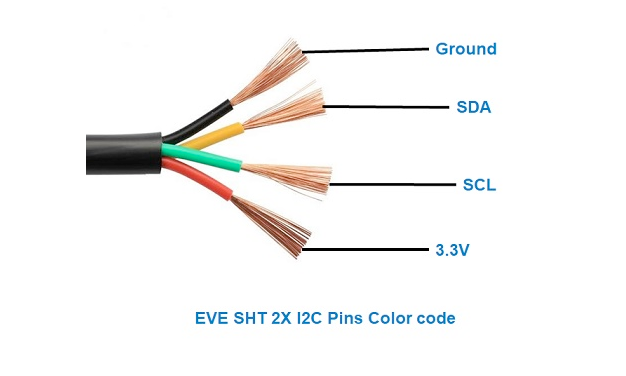
| Pin | Type | Description | Notes |
|---|---|---|---|
| VDD | Power | Power supply input (2.4V to 5.5V) | Wide voltage range for industrial applications |
| GND | Power | Ground connection | Connect to ESP32 ground |
| SDA | Communication | I²C data line | Bidirectional data communication |
| SCL | Communication | I²C clock line | Clock signal from master device |
Standard I²C interface for easy integration
Default I²C address is 0x44 or 0x45 (configurable)
Top accuracy: ±0.1°C temp, ±1.5% humidity
Wide voltage range (2.4V-5.5V) for industrial use
Premium sensor for demanding professional applications
Wiring the SHT35 to ESP32
Connect the SHT35 using standard I²C interface for maximum precision measurements.
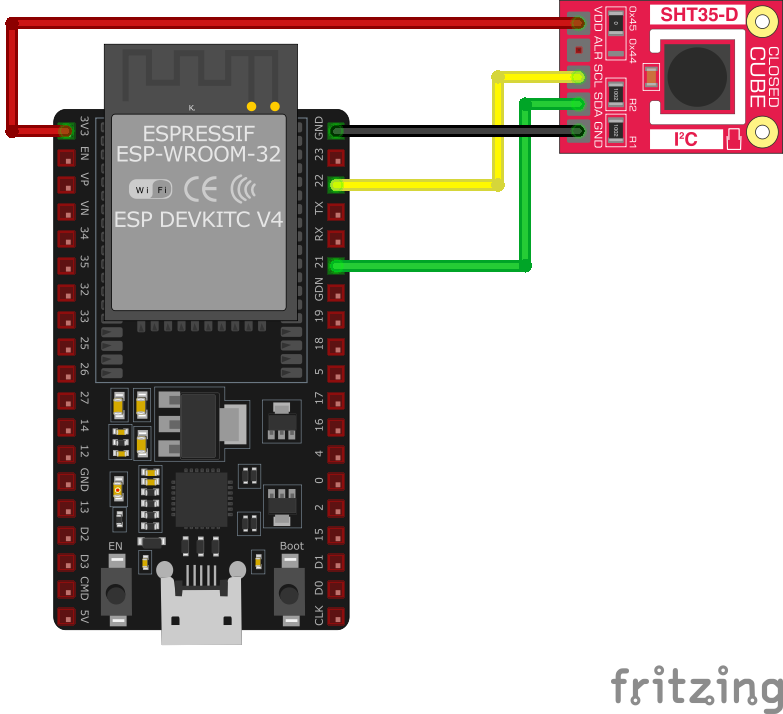
| SHT35 pin | ESP32 pin | Purpose |
|---|---|---|
| VDD | 3.3V | Power supply (2.4V to 5.5V supported) |
| GND | GND | Ground connection |
| SDA | GPIO21 | I²C data line (default SDA) |
| SCL | GPIO22 | I²C clock line (default SCL) |
GPIO21/22 are default I²C pins on ESP32
I²C address is 0x44 or 0x45 (check your module)
Add 10kΩ pull-up resistors on SDA/SCL if needed
Can share I²C bus with other devices
SHT35 code examples
#include <Wire.h>
#include "Adafruit_SHT31.h"

Adafruit_SHT31 sht31 = Adafruit_SHT31();

void setup() {
  Serial.begin(115200);
  while (!Serial) delay(10);

  if (!sht31.begin(0x44)) {   // Set to 0x45 for alternate I2C address
    Serial.println("Couldn't find SHT35");
    while (1) delay(1);
  }
}

void loop() {
  float t = sht31.readTemperature();
  float h = sht31.readHumidity();

  if (!isnan(t) && !isnan(h)) {  // check if 'is not a number'
    Serial.print("Temp *C = "); Serial.print(t); Serial.print("	");
    Serial.print("Hum. % = "); Serial.println(h);
  } else {
    Serial.println("Failed to read from SHT35 sensor");
  }

  delay(1000);
}
This Arduino sketch demonstrates how to interface with the SHT35 sensor using the Adafruit SHT31 library. It initializes the sensor and reads temperature and humidity data every second, printing the results to the Serial Monitor. The sensor’s I2C address is set to 0x44 by default; if your sensor uses the alternate address (0x45), adjust the initialization accordingly.
#include <stdio.h>
#include "freertos/FreeRTOS.h"
#include "freertos/task.h"
#include "driver/i2c.h"

#define I2C_MASTER_SCL_IO    22    /*!< GPIO number used for I2C master clock */
#define I2C_MASTER_SDA_IO    21    /*!< GPIO number used for I2C master data */
#define I2C_MASTER_NUM       I2C_NUM_0 /*!< I2C master I2C port number */
#define I2C_MASTER_FREQ_HZ   100000     /*!< I2C master clock frequency */
#define SHT35_SENSOR_ADDR    0x44       /*!< SHT35 I2C address */

static esp_err_t i2c_master_init(void) {
    i2c_config_t conf = {
        .mode = I2C_MODE_MASTER,
        .sda_io_num = I2C_MASTER_SDA_IO,
        .scl_io_num = I2C_MASTER_SCL_IO,
        .sda_pullup_en = GPIO_PULLUP_ENABLE,
        .scl_pullup_en = GPIO_PULLUP_ENABLE,
        .master.clk_speed = I2C_MASTER_FREQ_HZ,
    };
    esp_err_t err = i2c_param_config(I2C_MASTER_NUM, &conf);
    if (err != ESP_OK) {
        return err;
    }
    return i2c_driver_install(I2C_MASTER_NUM, conf.mode, 0, 0, 0);
}

void read_sht35_sensor() {
    uint8_t data[6];
    uint8_t cmd[] = {0x24, 0x00}; // Single-shot, high repeatability, no clock stretching
    i2c_master_write_to_device(I2C_MASTER_NUM, SHT35_SENSOR_ADDR, cmd, 2, pdMS_TO_TICKS(1000));
    vTaskDelay(pdMS_TO_TICKS(15)); // Wait for the measurement
    i2c_master_read_from_device(I2C_MASTER_NUM, SHT35_SENSOR_ADDR, data, sizeof(data), pdMS_TO_TICKS(1000));

    uint16_t temp_raw = (data[0] << 8) | data[1];
    uint16_t hum_raw = (data[3] << 8) | data[4];

    float temperature = -45 + 175 * ((float)temp_raw / 65535.0);
    float humidity = 100 * ((float)hum_raw / 65535.0);

    printf("Temperature: %.2f °C, Humidity: %.2f %%\n", temperature, humidity);
}

void app_main() {
    ESP_ERROR_CHECK(i2c_master_init());

    while (1) {
        read_sht35_sensor();
        vTaskDelay(pdMS_TO_TICKS(2000));
    }
}
This ESP-IDF code demonstrates how to interface with the SHT35 sensor using the I2C interface. The I2C master is initialized on GPIO21 (SDA) and GPIO22 (SCL). The read_sht35_sensor() function reads raw temperature and humidity data from the SHT35 sensor and converts it into human-readable values. These values are printed to the console every 2 seconds.
i2c:
  sda: GPIO21
  scl: GPIO22

sensor:
  - platform: sht3xd
    address: 0x44
    temperature:
      name: "Living Room Temperature"
    humidity:
      name: "Living Room Humidity"
    update_interval: 60s
This ESPHome configuration defines the SHT35 sensor using the sht3xdd platform. The I2C address is set to 0x44 (default for the sensor). Two entities are configured: one for temperature and one for humidity, with descriptive names like ‘Living Room Temperature’ and ‘Living Room Humidity.’ The update_interval is set to 60 seconds, meaning the data will be updated every minute.
[env:esp32dev]
platform = espressif32
board = esp32dev
framework = arduino
monitor_speed = 115200
lib_deps =
adafruit/Adafruit SHT31 Library @ ^2.2.2#include <Arduino.h>
#include <Wire.h>
#include "Adafruit_SHT31.h"
Adafruit_SHT31 sht31 = Adafruit_SHT31();
void setup() {
Serial.begin(115200);
while (!Serial) delay(10);
if (!sht31.begin(0x44)) { // Set to 0x45 for alternate I2C address
Serial.println("Couldn't find SHT35");
while (1) delay(1);
}
}
void loop() {
float t = sht31.readTemperature();
float h = sht31.readHumidity();
if (!isnan(t) && !isnan(h)) { // check if 'is not a number'
Serial.print("Temp *C = "); Serial.print(t); Serial.print(" ");
Serial.print("Hum. % = "); Serial.println(h);
} else {
Serial.println("Failed to read from SHT35 sensor");
}
delay(1000);
}This PlatformIO sketch demonstrates how to interface with the SHT35 sensor using the Adafruit SHT31 library. The sensor is initialized on its default I2C address (0x44). Temperature and humidity values are read every 2 seconds and printed to the Serial Monitor. If readings fail, an error message is displayed.
from machine import I2C, Pin
import time

# SHT35 default I2C address
SHT35_I2C_ADDRESS = 0x44

# Initialize I2C communication (SDA=21, SCL=22)
i2c = I2C(0, scl=Pin(22), sda=Pin(21))

def read_sht35():
    # Send measurement command (high repeatability, no clock stretching)
    i2c.writeto(SHT35_I2C_ADDRESS, b'\x24\x00')
    time.sleep(0.015)  # Wait for measurement to complete

    # Read 6 bytes of data
    data = i2c.readfrom(SHT35_I2C_ADDRESS, 6)

    # Convert the data
    temp_raw = (data[0] << 8) | data[1]
    humidity_raw = (data[3] << 8) | data[4]

    # Calculate temperature and humidity
    temperature = -45 + (175 * temp_raw / 65535.0)
    humidity = 100 * humidity_raw / 65535.0

    return temperature, humidity

while True:
    try:
        temperature, humidity = read_sht35()
        print("Temperature: {:.2f} °C".format(temperature))
        print("Humidity: {:.2f} %".format(humidity))
    except Exception as e:
        print("Failed to read from SHT35 sensor:", e)

    time.sleep(2)
This MicroPython script interfaces with the SHT35 sensor using the I2C protocol. The read_sht35 function sends a command to the sensor to initiate a measurement, waits for the response, and then reads 6 bytes of data. The raw data is processed into human-readable temperature (°C) and humidity (%) values. The script continuously reads and prints these values every 2 seconds. Error handling is included to manage failed readings.
SHT35 specifications
About the SHT35
The SHT35 tops Sensirion’s SHT3x accuracy ladder, above the low-cost SHT30 and the standard SHT31 tier: the same 0x44/0x45 selectable I2C address and 2.4-5.5 V supply, but accuracy tightened to ±0.1 degC / ±1.5 %RH, guaranteed across the full 0-100 %RH range. It’s the sensor most incubators, weather stations, and calibration rigs reach for when the SHT31’s ±2 %RH isn’t tight enough.
Sensirion also sells the same SHT35 die in a pin-type, cable-mount package as the SHT85, aimed at projects that need the sensing element physically separated from the board - useful for duct-mounted or probe-style installs, at roughly three times the SHT35’s price for the connector convenience.
The newer SHT4x generation’s SHT45 nearly matches these numbers (±0.1 degC / ±1.0 %RH) at lower power, but tops out at 3.6 V rather than the SHT35’s 5.5 V - stick with the SHT35 for a 5 V-powered project, or move to the SHT45 for a battery build.
SHT35 troubleshooting
Compilation Error: 'yield' was not declared in this scope
›
Issue: When compiling code for the SHT35 sensor using the Seeed Studio library, the following error occurs: 'yield' was not declared in this scope.
Possible causes include outdated or incorrect library versions that are incompatible with the current Arduino IDE.
Solution: Update the Arduino IDE to the latest version and ensure that the Seeed Studio SHT35 library is also up to date. If the issue persists, manually edit the library files to include the appropriate declarations or consider using an alternative library compatible with the SHT35 sensor. ([forum.arduino.cc](https://forum.arduino.cc/t/sht35-library-error/1110371))
Runtime Error: Errno 121 Remote I/O Error
›
Issue: When running a Python script on a Raspberry Pi to read data from the SHT35 sensor, the following error is encountered after a period of successful readings: Errno 121 Remote I/O Error.
Possible causes include intermittent I2C communication issues, loose connections, or power supply instability.
Solution: Check all physical connections between the Raspberry Pi and the SHT35 sensor to ensure they are secure. Verify that the I2C bus is properly configured and that pull-up resistors are correctly implemented. Additionally, monitor the power supply to ensure it remains stable during operation. ([forum.seeedstudio.com](https://forum.seeedstudio.com/t/errno-121-on-sht35/7113/1))
Sensor Not Detected on I2C Bus
›
Issue: The SHT35 sensor is not detected on the I2C bus, resulting in failed communication attempts.
Possible causes include incorrect wiring, improper I2C address configuration, or sensor malfunction.
Solution: Verify that the SDA and SCL lines are correctly connected to the appropriate pins on the microcontroller. Ensure that the sensor's I2C address matches the address specified in the code (default is 0x44). If using multiple I2C devices, confirm that there are no address conflicts. Test the sensor with an I2C scanner to detect its presence on the bus. ([arduinolearning.com](https://www.arduinolearning.com/code/sht35-humidity-sensor-and-arduino-example.php))
Data Retrieval Issues with Multiple Clients
›
Issue: When accessing the SHT35 sensor data from multiple clients simultaneously, the sensor becomes unresponsive, requiring a system reboot to restore functionality.
Possible causes include concurrent access to the I2C bus leading to communication conflicts.
Solution: Implement a data caching mechanism where a single process reads data from the sensor at regular intervals and stores it. Clients can then access the cached data instead of querying the sensor directly. This approach prevents simultaneous I2C access and reduces the risk of communication issues. ([forums.raspberrypi.com](https://forums.raspberrypi.com/viewtopic.php?t=261745))
Where to buy the SHT35

Resources
Similar sensors


