
SHT11 Temperature and Humidity Sensor
The SHT11 is a high-precision digital temperature and humidity sensor that offers fully calibrated digital output. Its compact design, low power consumption, and excellent long-term stability make it ideal for a wide range of environmental monitoring applications.

SHT11 pinout
The SHT11 uses a proprietary 2-wire Sensibus protocol (similar to I²C but not identical) with 4 pins.
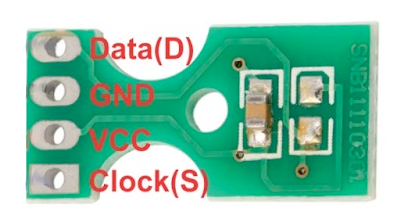
| Pin | Type | Description | Notes |
|---|---|---|---|
| GND | Power | Ground connection | Connect to ESP32 ground |
| DATA | Communication | Serial data line (Sensibus protocol) | Bidirectional data communication |
| SCK | Communication | Serial clock line | Clock signal for data synchronization |
| VDD | Power | Power supply input (2.4V to 5.5V) | Wide voltage range for flexible power options |
Uses Sensibus protocol - NOT standard I²C
Similar to I²C but with different timing requirements
Requires specialized library for communication
Pull-up resistor on DATA line may be required
High accuracy: ±0.4°C temperature, ±3% humidity
Wiring the SHT11 to ESP32
Connect the SHT11 using the Sensibus protocol with two GPIO pins for DATA and SCK.
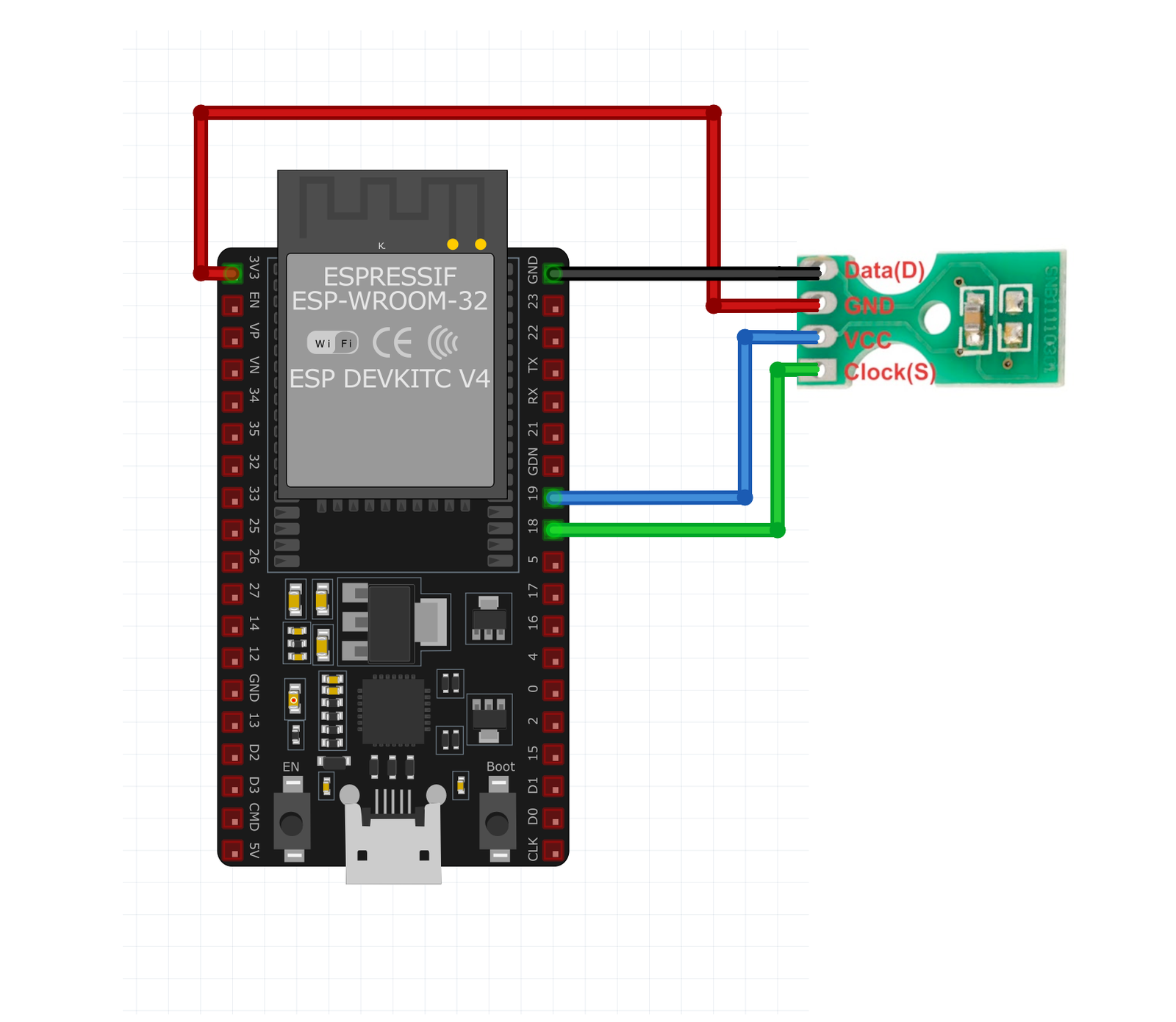
| SHT11 pin | ESP32 pin | Purpose |
|---|---|---|
| VDD | 3.3V | Power supply (2.4V to 5.5V supported) |
| GND | GND | Ground connection |
| DATA | GPIO21 | Serial data line (bidirectional) |
| SCK | GPIO22 | Serial clock line |
Sensibus is NOT I²C - use dedicated SHT1x library
Any GPIO pins work - GPIO21/22 commonly used
DATA line may need 10kΩ pull-up resistor
Timing requirements differ from I²C protocol
SHT11 code examples
// Requires library: "SHT1x sensor library for ESPx"
#include <SHT1x-ESP.h>

#define dataPin 21  // GPIO21, matches the wiring above
#define clockPin 22 // GPIO22

// The ESP32 runs the sensor at 3.3V - the voltage matters for the conversion formulas
SHT1x sht1x(dataPin, clockPin, SHT1x::Voltage::DC_3_3v);

void setup() {
  Serial.begin(115200);
}

void loop() {
  float tempC = sht1x.readTemperatureC();
  float humidity = sht1x.readHumidity();

  Serial.print("Temperature: ");
  Serial.print(tempC);
  Serial.println(" C");

  Serial.print("Humidity: ");
  Serial.print(humidity);
  Serial.println(" %");

  delay(2000);
}
This Arduino code initializes the SHT11 sensor using the SHT1x library. In the setup() function, it sets up serial communication. In the loop() function, it reads the temperature in Celsius and humidity from the sensor and prints the values to the Serial Monitor every two seconds. The SHT1x library facilitates communication with the sensor over its proprietary 2-wire interface.
#include <stdio.h>
#include "freertos/FreeRTOS.h"
#include "freertos/task.h"
#include "driver/gpio.h"
#include "esp_rom_sys.h"

#define DATA_GPIO GPIO_NUM_21
#define SCK_GPIO  GPIO_NUM_22

#define SHT1X_CMD_MEASURE_TEMP 0x03
#define SHT1X_CMD_MEASURE_RH   0x05

// DATA is open-drain: drive low actively, release for high (external/internal pull-up)
static void data_release(void) { gpio_set_direction(DATA_GPIO, GPIO_MODE_INPUT); }
static void data_low(void)     { gpio_set_direction(DATA_GPIO, GPIO_MODE_OUTPUT); gpio_set_level(DATA_GPIO, 0); }
static void sck(int level)     { gpio_set_level(SCK_GPIO, level); esp_rom_delay_us(2); }

// "Transmission start" sequence from the SHT1x datasheet
static void sht1x_start(void)
{
    data_release(); sck(1);
    data_low();     sck(0);
    sck(1);
    data_release(); sck(0);
}

static bool sht1x_send_cmd(uint8_t cmd)
{
    sht1x_start();
    for (int i = 7; i >= 0; i--) {
        if (cmd & (1 << i)) data_release(); else data_low();
        sck(1); sck(0);
    }
    data_release();
    sck(1);
    bool acked = gpio_get_level(DATA_GPIO) == 0; // sensor pulls DATA low to ACK
    sck(0);
    return acked;
}

static uint8_t sht1x_read_byte(bool ack)
{
    uint8_t value = 0;
    data_release();
    for (int i = 7; i >= 0; i--) {
        sck(1);
        if (gpio_get_level(DATA_GPIO)) value |= 1 << i;
        sck(0);
    }
    if (ack) data_low(); else data_release();
    sck(1); sck(0);
    data_release();
    return value;
}

static bool sht1x_measure(uint8_t cmd, uint16_t *raw)
{
    if (!sht1x_send_cmd(cmd)) return false;

    // Sensor pulls DATA low when the measurement is ready (up to ~320 ms)
    for (int i = 0; i < 100; i++) {
        vTaskDelay(pdMS_TO_TICKS(5));
        if (gpio_get_level(DATA_GPIO) == 0) {
            *raw = sht1x_read_byte(true) << 8;
            *raw |= sht1x_read_byte(false); // skip the CRC byte
            return true;
        }
    }
    return false;
}

void app_main(void)
{
    gpio_set_direction(SCK_GPIO, GPIO_MODE_OUTPUT);
    gpio_set_pull_mode(DATA_GPIO, GPIO_PULLUP_ONLY);
    data_release();

    while (1) {
        uint16_t raw_temp, raw_rh;
        if (sht1x_measure(SHT1X_CMD_MEASURE_TEMP, &raw_temp) &&
            sht1x_measure(SHT1X_CMD_MEASURE_RH, &raw_rh)) {
            // Conversion coefficients from the SHT1x datasheet (3.3 V, 14-bit / 12-bit)
            float temperature = -39.7f + 0.01f * raw_temp;
            float rh_linear = -2.0468f + 0.0367f * raw_rh - 1.5955e-6f * raw_rh * raw_rh;
            float humidity = (temperature - 25.0f) * (0.01f + 0.00008f * raw_rh) + rh_linear;
            printf("Temp %.1f C, Hum %.1f%%\n", temperature, humidity);
        } else {
            printf("Could not read data from sensor\n");
        }
        vTaskDelay(pdMS_TO_TICKS(2000));
    }
}
The SHT11 does not use I2C - it speaks Sensirion's proprietary 2-wire protocol, and since the sensor family is end-of-life there is no maintained ESP-IDF component for it. This example therefore bit-bangs the protocol directly: the DATA line is driven open-drain (enable the pull-up, or fit an external 10 kOhm resistor), sht1x_start() issues the datasheet's transmission-start sequence, and each measurement clocks out a command, waits for the sensor to pull DATA low (up to ~320 ms) and reads back 16 bits. The raw values are converted with the datasheet coefficients for 3.3 V operation. For new designs, consider a modern replacement like the SHT31 or SHT40.
[env:esp32dev]
platform = espressif32
board = esp32dev
framework = arduino
monitor_speed = 115200
lib_deps =
beegee-tokyo/SHT1x-ESP @ ^1.0.2#include <Arduino.h>
#include <SHT1x-ESP.h>
#define dataPin 21 // GPIO21, matches the wiring above
#define clockPin 22 // GPIO22
// The ESP32 runs the sensor at 3.3V - the voltage matters for the conversion formulas
SHT1x sht1x(dataPin, clockPin, SHT1x::Voltage::DC_3_3v);
void setup() {
Serial.begin(115200);
}
void loop() {
float tempC = sht1x.readTemperatureC();
float humidity = sht1x.readHumidity();
Serial.print("Temperature: ");
Serial.print(tempC);
Serial.println(" C");
Serial.print("Humidity: ");
Serial.print(humidity);
Serial.println(" %");
delay(2000);
}This PlatformIO code initializes the SHT11 sensor using the SHT1x library. The sensor communicates over GPIO pins 21 and 22 using its proprietary Sensibus interface. The program continuously reads and prints temperature and humidity values to the Serial Monitor every two seconds.
from machine import Pin
from time import sleep, sleep_ms, sleep_us

# The SHT11 speaks Sensirion's proprietary 2-wire protocol - bit-banged here.
# DATA needs a pull-up (internal used below); SCK is push-pull.
DATA = Pin(21, Pin.OPEN_DRAIN, Pin.PULL_UP)
SCK = Pin(22, Pin.OUT)

def _sck(level):
    SCK.value(level)
    sleep_us(2)

def _start():
    # "Transmission start" sequence from the SHT1x datasheet
    DATA.value(1); _sck(1)
    DATA.value(0); _sck(0)
    _sck(1)
    DATA.value(1); _sck(0)

def _send_cmd(cmd):
    _start()
    for i in range(7, -1, -1):
        DATA.value((cmd >> i) & 1)
        _sck(1); _sck(0)
    DATA.value(1)  # release the line
    _sck(1)
    acked = DATA.value() == 0  # sensor pulls DATA low to ACK
    _sck(0)
    return acked

def _read_byte(ack):
    value = 0
    DATA.value(1)
    for i in range(7, -1, -1):
        _sck(1)
        if DATA.value():
            value |= 1 << i
        _sck(0)
    DATA.value(0 if ack else 1)
    _sck(1); _sck(0)
    DATA.value(1)
    return value

def measure(cmd):
    if not _send_cmd(cmd):
        return None
    for _ in range(100):  # sensor pulls DATA low when ready (up to ~320 ms)
        sleep_ms(5)
        if DATA.value() == 0:
            raw = _read_byte(True) << 8
            raw |= _read_byte(False)  # skip the CRC byte
            return raw
    return None

while True:
    raw_temp = measure(0x03)
    raw_rh = measure(0x05)
    if raw_temp is not None and raw_rh is not None:
        # Conversion coefficients from the SHT1x datasheet (3.3 V, 14-bit / 12-bit)
        temperature = -39.7 + 0.01 * raw_temp
        rh_linear = -2.0468 + 0.0367 * raw_rh - 1.5955e-6 * raw_rh * raw_rh
        humidity = (temperature - 25.0) * (0.01 + 0.00008 * raw_rh) + rh_linear
        print("Temperature: {:.1f} C".format(temperature))
        print("Humidity: {:.1f} %".format(humidity))
    else:
        print("Could not read data from sensor")
    sleep(2)
The SHT11 does not use I2C - it speaks Sensirion's proprietary 2-wire protocol, and since the family is end-of-life no MicroPython driver exists, so this example bit-bangs it: the transmission-start sequence, an 8-bit command with ACK, a wait for the sensor to pull DATA low (up to ~320 ms), then a 16-bit read. The conversion uses the datasheet coefficients for 3.3 V operation. DATA runs open-drain with a pull-up; for new designs prefer a modern sibling like the SHT31 or SHT40.
SHT11 specifications
About the SHT11
The SHT11 was Sensirion’s original calibrated digital humidity and temperature sensor, combining a capacitive humidity element and a band-gap temperature sensor with signal processing on one chip - the design that established the company’s CMOSens branding. It doesn’t speak I2C: the 2-wire “Sensibus” protocol looks similar but uses different commands and timing, so I2C libraries and I2C scanners won’t find it. Accuracy is ±0.4 degC and ±3% RH, the middle tier of Sensirion’s old SHT1x lineup (below the SHT15, above the SHT10).
The SHT11 is also obsolete: distributors list it end-of-life, and Sensirion’s own product line moved on to the SHT3x and then SHT4x families years ago. New stock outside old surplus is essentially unavailable, and framework support has followed the part into retirement - ESPHome’s SHT1x support relied on the custom_component platform, which was removed entirely in ESPHome 2025.2, and neither ESPHome nor MicroPython has a maintained SHT1x driver left. Arduino and ESP-IDF still work, but only by bit-banging the Sensibus protocol directly, since no actively maintained library remains either.
Unless you’re keeping an existing design alive, there’s no reason to seek one out today: Sensirion’s SHT40 and SHT31 sit in the same accuracy class, cost about the same, speak standard I2C, and have first-class support across every framework this site covers.
SHT11 troubleshooting
Initialization Failure
›
Issue: The sensor fails to initialize, and no data is received.
Solution: Ensure that the DATA and SCK lines are correctly connected to the specified GPIO pins on the microcontroller. Verify that the power supply voltage is within the specified range (2.4V to 5.5V). Check for proper pull-up resistors on the DATA line if required by your specific setup.
Incorrect Readings
›
Issue: The sensor provides inaccurate temperature or humidity readings.
Solution: Avoid placing the sensor near heat sources or in direct sunlight. Ensure that the sensor is not exposed to condensation or water droplets. Allow the sensor to stabilize after power-up, as recommended by the manufacturer. Calibration may be necessary for precise measurements.
Communication Errors
›
Issue: Communication with the sensor is intermittent or fails.
Solution: Verify that the correct communication protocol (Sensibus) is implemented in your code. Ensure that the timing requirements for the SCK signal are met. Check the integrity of the DATA and SCK connections and ensure that appropriate pull-up resistors are in place if not already included on the sensor module.
Resources
Similar sensors


