
CCS811 Digital Gas Sensor
The CCS811 is a digital gas sensor for monitoring indoor air quality. It measures levels of Total Volatile Organic Compounds (TVOCs) and equivalent CO₂ (eCO₂), providing valuable data for applications like air purifiers, HVAC systems, and smart home devices. Operating over an I²C interface, it simplifies integration into various projects.

CCS811 pinout
The CCS811 has 8 pins for I²C communication, power, and optional control signals.
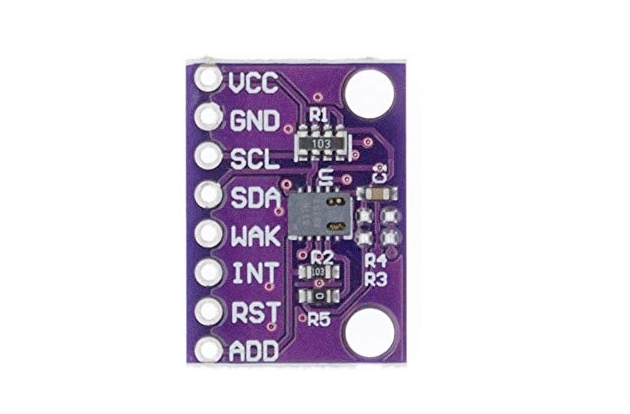
| Pin | Type | Description | Notes |
|---|---|---|---|
| VDD | Power | Supply voltage (3.3V to 5V). Powers the sensor. | Use stable power supply for accurate readings. |
| GND | Power | Ground connection. Connect to system ground. | |
| SDA | I2C | I²C data line. Bidirectional data communication. | Connect to ESP32 GPIO 21. Requires pull-up resistor. |
| SCL | I2C | I²C clock line. Clock signal for I²C communication. | Connect to ESP32 GPIO 22. Requires pull-up resistor. |
| nWAKE | Control | Wake pin (active low). Pull low to enable communication. | Connect to GND for continuous operation, or GPIO for power saving. |
| nINT | Interrupt | Interrupt pin (optional). Indicates data ready. | Active low. Connect to GPIO for interrupt-driven reading. |
| nRESET | Control | Reset pin (active low). Used to reset the sensor. | Optional - pull high or connect to GPIO for software reset. |
| ADDR | Address | I²C address select. Connect to GND (0x5A) or VDD (0x5B). | Default: GND (address 0x5A). |
I²C address: 0x5A (ADDR to GND) or 0x5B (ADDR to VDD)
Measures TVOC (0-1187 ppb) and eCO₂ (400-8192 ppm)
Ultra-low power: 1.2mA active, 0.7µA sleep
Integrated MCU and ADC for simplified processing
Requires 20-minute burn-in period for first use
Warm-up time: 20 minutes for stable readings
Wiring the CCS811 to ESP32
To interface the CCS811 with an ESP32 via I²C, connect VDD to 3.3V or 5V, GND to ground, SDA to GPIO 21, SCL to GPIO 22, and nWAKE to GND.
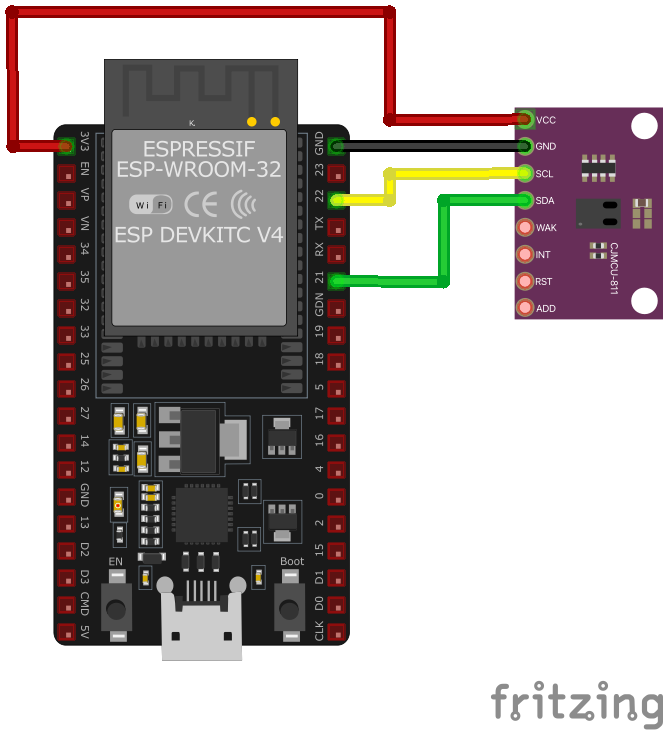
| CCS811 pin | ESP32 pin | Purpose |
|---|---|---|
| VDD | 3.3V | Power supply. Use 3.3V for most modules. |
| GND | GND | Ground connection. |
| SDA | GPIO 21 | I²C data line. Add 4.7kΩ pull-up resistor. |
| SCL | GPIO 22 | I²C clock line. Add 4.7kΩ pull-up resistor. |
| nWAKE | GND | Wake control. Connect to GND for continuous operation. |
| ADDR | GND or VDD | Address select. GND=0x5A (default), VDD=0x5B. |
| nINT | Optional GPIO | Interrupt output for data ready indication. · optional |
| nRESET | Optional GPIO or VDD | Reset control. Pull high for normal operation. · optional |
I²C pull-up resistors (4.7kΩ) required on SDA and SCL
Default I²C address: 0x5A (can be changed to 0x5B via ADDR pin)
IMPORTANT: Allow 20-minute burn-in on first use
Warm-up time: 20 minutes for stable readings after power-on
ESP8266 users: May need slower I²C speed due to clock stretching
Use Adafruit_CCS811 or SparkFun_CCS811 library
Baseline calibration: Store baseline values for accurate readings
Indoor use only - not for safety-critical gas detection
CCS811 code examples
#include <Wire.h>
#include "Adafruit_CCS811.h"

Adafruit_CCS811 ccs;

void setup() {
    Serial.begin(9600);
    Wire.begin();
    if (!ccs.begin()) {
        Serial.println("Failed to start sensor! Please check your wiring.");
        while (1);
    }
    // Wait for the sensor to be ready
    while (!ccs.available());
}

void loop() {
    if (ccs.available()) {
        if (!ccs.readData()) {
            Serial.print("eCO2: ");
            Serial.print(ccs.geteCO2());
            Serial.print(" ppm, TVOC: ");
            Serial.print(ccs.getTVOC());
            Serial.println(" ppb");
        } else {
            Serial.println("Error reading sensor data");
        }
    }
    delay(1000);
}
This Arduino sketch interfaces with the CCS811 sensor using the Adafruit_CCS811 library. In the setup() function, the sensor is initialized, and the code waits until the sensor is ready. The loop() function checks if new data is available and reads the eCO₂ and TVOC levels, printing them to the Serial Monitor every second.
// Requires the esp-idf-lib CCS811 driver from the ESP Component Registry:
//   idf.py add-dependency "esp-idf-lib/ccs811^1.0.7"

#include <stdio.h>
#include <string.h>
#include "freertos/FreeRTOS.h"
#include "freertos/task.h"
#include "ccs811.h"

#define SDA_GPIO GPIO_NUM_21
#define SCL_GPIO GPIO_NUM_22

void app_main(void)
{
    ESP_ERROR_CHECK(i2cdev_init());

    ccs811_dev_t sensor;
    memset(&sensor, 0, sizeof(ccs811_dev_t));
    ESP_ERROR_CHECK(ccs811_init_desc(&sensor, CCS811_I2C_ADDRESS_1, 0, SDA_GPIO, SCL_GPIO));
    ESP_ERROR_CHECK(ccs811_init(&sensor));
    ESP_ERROR_CHECK(ccs811_set_mode(&sensor, CCS811_MODE_1S));

    while (1) {
        uint16_t tvoc, eco2;
        if (ccs811_get_results(&sensor, &tvoc, &eco2, NULL, NULL) == ESP_OK)
            printf("TVOC %u ppb, eCO2 %u ppm\n", tvoc, eco2);
        else
            printf("Could not read data from sensor\n");
        vTaskDelay(pdMS_TO_TICKS(2000));
    }
}
ESP-IDF ships no CCS811 driver of its own, so this example uses the maintained esp-idf-lib CCS811 driver from the ESP Component Registry. Install it into your project first with idf.py add-dependency "esp-idf-lib/ccs811^1.0.7", then build as usual.
ccs811_set_mode(CCS811_MODE_1S) puts the sensor in one-measurement-per-second mode, and ccs811_get_results() returns TVOC in ppb and eCO2 in ppm. Remember that a fresh CCS811 needs a burn-in period (Ams recommends 48 hours) and about 20 minutes of run-in after each power-up before readings stabilise. If your board wires the ADDR pin low, use CCS811_I2C_ADDRESS_0 instead.
i2c:
  sda: GPIO21
  scl: GPIO22

sensor:
  - platform: ccs811
    eco2:
      name: "eCO2"
    tvoc:
      name: "TVOC"
    address: 0x5A
    update_interval: 1s
The ESPHome configuration sets up I²C communication with the CCS811 sensor using SDA (GPIO21) and SCL (GPIO22). The sensor platform fetches eCO₂ and TVOC data at 1-second intervals, displaying them as named sensors (‘eCO2’ and ‘TVOC’). The I²C address is set to 0x5A, the default address for the CCS811.
[env:esp32dev]
platform = espressif32
board = esp32dev
framework = arduino
monitor_speed = 115200
lib_deps =
adafruit/Adafruit CCS811 Library @ ^1.1.3#include <Arduino.h>
#include <Wire.h>
#include "Adafruit_CCS811.h"
Adafruit_CCS811 ccs;
void setup() {
Serial.begin(9600);
Wire.begin();
if (!ccs.begin()) {
Serial.println("Failed to start sensor! Please check your wiring.");
while (1);
}
// Wait for the sensor to be ready
while (!ccs.available());
}
void loop() {
if (ccs.available()) {
if (!ccs.readData()) {
Serial.print("eCO2: ");
Serial.print(ccs.geteCO2());
Serial.print(" ppm, TVOC: ");
Serial.print(ccs.getTVOC());
Serial.println(" ppb");
} else {
Serial.println("Error reading sensor data");
}
}
delay(1000);
}This PlatformIO example interfaces with the CCS811 sensor using SDA (GPIO21) and SCL (GPIO22). It initializes the sensor and retrieves eCO₂ and TVOC levels, printing the results to the Serial Monitor every second. Errors are handled gracefully.
from machine import I2C, Pin
import time

# CCS811 I2C address
CCS811_ADDR = 0x5A

# Register addresses
MEAS_MODE = 0x01
ALG_RESULT_DATA = 0x02
APP_START = 0xF4
HW_ID = 0x20

# Initialize I2C
i2c = I2C(0, scl=Pin(22), sda=Pin(21))

# Verify the sensor
hw_id = i2c.readfrom_mem(CCS811_ADDR, HW_ID, 1)
if hw_id[0] != 0x81:
    print("CCS811 not found!")
    while True:
        pass

# Start the sensor
i2c.writeto(CCS811_ADDR, bytes([APP_START]))
time.sleep(0.1)

# Set measurement mode
i2c.writeto_mem(CCS811_ADDR, MEAS_MODE, bytes([0x10]))

def read_data():
    data = i2c.readfrom_mem(CCS811_ADDR, ALG_RESULT_DATA, 8)
    eCO2 = (data[0] << 8) | data[1]
    TVOC = (data[2] << 8) | data[3]
    return eCO2, TVOC

while True:
    eCO2, TVOC = read_data()
    print(f"eCO2: {eCO2} ppm, TVOC: {TVOC} ppb")
    time.sleep(1)
This MicroPython script interfaces with the CCS811 sensor over I²C using SDA (GPIO21) and SCL (GPIO22). It verifies the sensor’s presence by reading its hardware ID, initializes it by writing to the APP_START register, and configures the measurement mode. In the main loop, the script reads eCO₂ and TVOC values from the ALG_RESULT_DATA register and prints the results every second.
CCS811 specifications
About the CCS811
The CCS811 was one of the first affordable metal-oxide gas sensors with the digitizing and processing logic built into the package: point it at I2C and it hands back an equivalent CO2 (eCO2) figure and a total VOC (TVOC) reading instead of a raw resistance value. That eCO2 number is calculated from the sensor’s VOC response with a fixed algorithm, not measured directly - it approximates how CO2 tends to track other indoor VOCs, so it should not stand in for an actual CO2 measurement. For real CO2, the NDIR-based MH-Z19 senses the gas directly through infrared absorption rather than inferring it from VOCs.
The part is also past its prime: major distributors list CCS811 parts, including the CCS811B package variant, as obsolete and no longer manufactured. ScioSense, which inherited the design from AMS, now points new designs at the ENS160, sold by the same module vendors explicitly as the CCS811 upgrade. An existing CCS811 design still works fine, but a new one is better served by the newer part.
That is worth knowing because the CCS811 asks for real patience: the datasheet calls for 48 hours of continuous burn-in early in the sensor’s life before readings settle, plus roughly 20 minutes of run-in after every power-up before values are trustworthy. It also maintains an internal baseline correction value that should be read back and stored periodically - every 24 to 48 hours for the first 500 hours of operation, then every 5 to 7 days after - and rewritten on startup, or accuracy drifts with every power cycle.
CCS811 troubleshooting
Intermittent Sensor Hang-ups on ESP8266
›
Issue: The CCS811 sensor intermittently hangs when connected to an ESP8266, resulting in failed read attempts and the error: False (255).
Possible causes include the ESP8266's inability to handle the CCS811's clock stretching requirements, leading to communication failures.
Solution: Implement clock stretching support by adjusting the I2C communication settings. Adding a delay in the I2C operations can help accommodate the sensor's timing requirements. Additionally, ensure that the sensor's firmware is up to date and consider using a microcontroller with better I2C clock stretching support if the issue persists. ([forums.adafruit.com](https://forums.adafruit.com/viewtopic.php?t=121816))
Initialization Failure on ESP8266
›
Issue: The CCS811 sensor fails to initialize on an ESP8266, displaying errors such as: setup: CCS811 begin FAILED and CCS811: I2C error.
Possible causes include incorrect wiring, lack of pull-up resistors on the I2C lines, or the ESP8266's inadequate handling of I2C clock stretching.
Solution: Verify that SDA and SCL are correctly connected to the ESP8266's designated pins and that appropriate pull-up resistors (typically 4.7kΩ) are present on the I2C lines. Since the ESP8266 may not handle I2C clock stretching well, consider adding delays in the I2C communication or using a library that accounts for this limitation. Additionally, ensure that the sensor's WAKE pin is properly managed, either by connecting it to ground or controlling it via a GPIO pin. ([forum.arduino.cc](https://forum.arduino.cc/t/esp8266-ccs811-i2c-error/968846))
Remote I/O Error on ESP32
›
Issue: When interfacing the CCS811 sensor with a ESP32, the following error occurs: OSError: [Errno 121] Remote I/O error.
Possible causes include incorrect I2C address configuration, insufficient handling of clock stretching, or wiring issues.
Solution: Confirm the sensor's I2C address using i2cdetect and ensure your code references the correct address (commonly 0x5A or 0x5B). The Raspberry Pi may struggle with the CCS811's clock stretching; therefore, reduce the I2C bus speed by adding dtparam=i2c_arm_baudrate=10000 to /boot/config.txt and rebooting. Verify that the sensor's connections are secure and that the Raspberry Pi's I2C interface is enabled and functioning correctly. ([forum.sparkfun.com](https://forum.sparkfun.com/viewtopic.php?t=59017))
Reading Error Code 2 on Particle Devices
›
Issue: When reading data from the CCS811 sensor on Particle devices, the sensor returns an error code: ERROR! 2.
Possible causes include insufficient warm-up time for the sensor or issues with the initialization sequence.
Solution: Allow the sensor adequate warm-up time before attempting to read data, as the CCS811 requires a stabilization period after power-up. Ensure that your initialization code follows the recommended sequence as per the sensor's datasheet. If the problem persists, consider using an alternative library that may better handle the sensor's initialization and data retrieval processes. ([community.particle.io](https://community.particle.io/t/ccs811-reading-error-2/49491))
Where to buy the CCS811

Resources
Similar sensors


