
DHT11 Temperature and Humidity Sensor
The DHT11 is a low-cost digital sensor for measuring temperature and humidity. It provides calibrated digital outputs and is easy to interface with microcontrollers. With a temperature measurement range of 0-50°C and humidity range of 20-90%, it's suitable for basic environmental sensing applications.

DHT11 pinout
The DHT11 features a simple 4-pin design for power and single-wire digital communication.
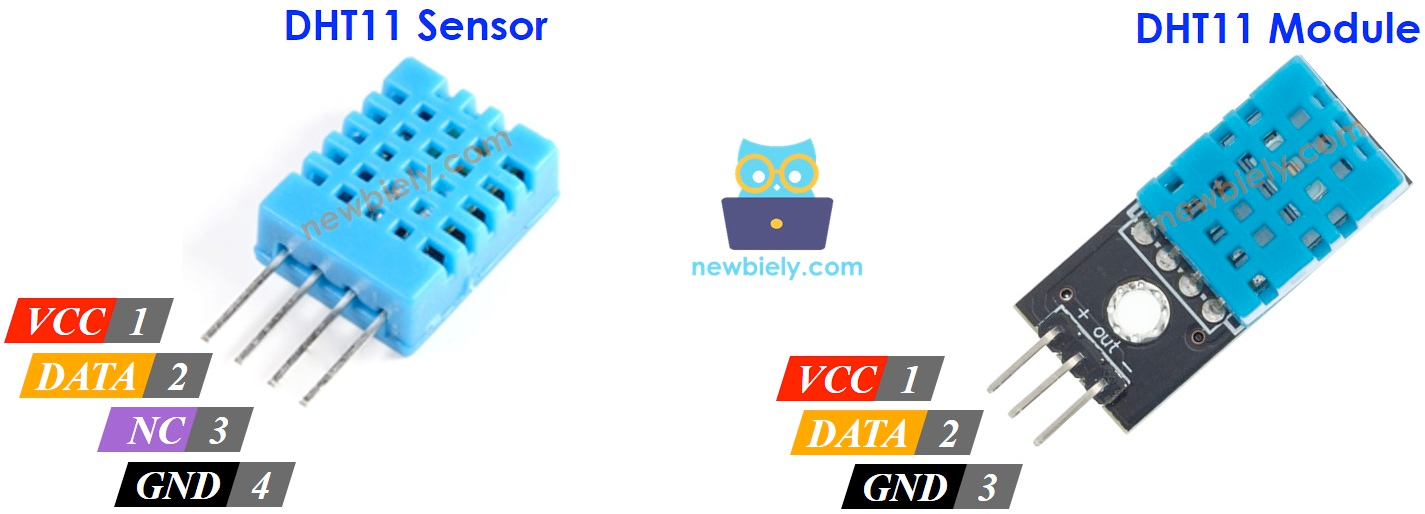
| Pin | Type | Description | Notes |
|---|---|---|---|
| VCC | Power | Power supply input (3.3V or 5V) | Compatible with both 3.3V and 5V logic levels |
| DATA | Communication | Digital signal output | Connect to any digital GPIO pin on microcontroller |
| NC | Control | Not connected | Leave this pin unconnected |
| GND | Power | Ground connection | Connect to ESP32 ground |
Sensor uses single-wire digital interface
Requires 10kΩ pull-up resistor on DATA pin
Works with both 3.3V and 5V power supplies
Sampling rate limited to once per second
Wiring the DHT11 to ESP32
Connect the DHT11 using the single-wire digital interface with a pull-up resistor for reliable communication.
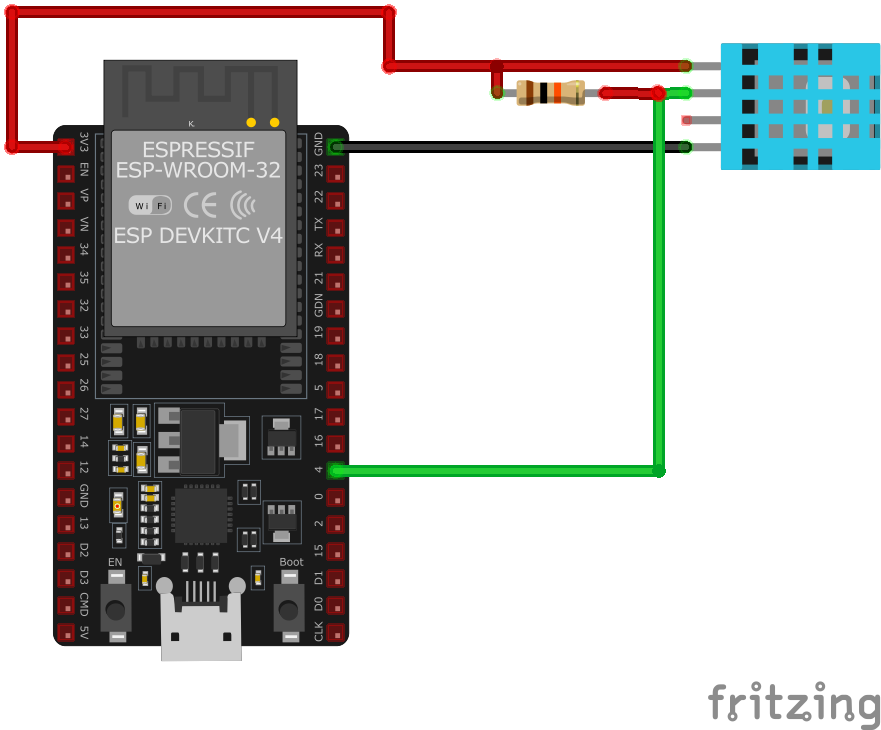
| DHT11 pin | ESP32 pin | Purpose |
|---|---|---|
| VCC | 3.3V | Power supply (can use 3.3V or 5V) |
| GND | GND | Ground connection |
| DATA | GPIO4 | Digital data line |
| DATA (Pull-up) | 10kΩ to VCC | Pull-up resistor for reliable communication |
GPIO4 is commonly used but any GPIO pin works
10kΩ pull-up resistor between DATA and VCC is required
Use 3.3V for ESP32 compatibility, 5V also works
Wait at least 2 seconds between readings
DHT11 code examples
#include "DHT.h"

#define DHTPIN 4 // Digital pin connected to the DHT sensor
#define DHTTYPE DHT11 // DHT11 sensor type

DHT dht(DHTPIN, DHTTYPE);

void setup() {
  Serial.begin(115200);
  Serial.println("DHT11 Sensor Initialization");
  dht.begin();
}

void loop() {
  delay(2000); // Wait a few seconds between measurements

  float humidity = dht.readHumidity();
  float temperature = dht.readTemperature();

  if (isnan(humidity) || isnan(temperature)) {
    Serial.println("Failed to read from DHT sensor!");
    return;
  }

  Serial.print("Humidity: ");
  Serial.print(humidity);
  Serial.print("%  Temperature: ");
  Serial.print(temperature);
  Serial.println("°C");
}
This Arduino sketch interfaces with the DHT11 sensor to read temperature and humidity data. It utilizes the DHT library to communicate with the sensor. The setup() function initializes serial communication and the sensor. In the loop() function, it waits for 2 seconds between measurements, reads humidity and temperature, checks for successful readings, and then prints the values to the Serial Monitor.
// Requires the esp-idf-lib DHT driver (ESP Component Registry):
//   idf.py add-dependency "esp-idf-lib/dht^1.2.0"

#include <stdio.h>
#include "freertos/FreeRTOS.h"
#include "freertos/task.h"
#include "dht.h"

#define DHT_GPIO  GPIO_NUM_4
#define DHT_TYPE  DHT_TYPE_DHT11

void app_main(void)
{
    float hum, temp;

    while (1) {
        if (dht_read_float_data(DHT_TYPE, DHT_GPIO, &hum, &temp) == ESP_OK) {
            printf("Hum %.1f%%  Temp %.1f C\n", hum, temp);
        } else {
            printf("Could not read data from sensor\n");
        }

        vTaskDelay(pdMS_TO_TICKS(2000));
    }
}
ESP-IDF ships no DHT driver of its own, so this example uses the maintained esp-idf-lib DHT driver from the ESP Component Registry. Install it into your project first with idf.py add-dependency "esp-idf-lib/dht^1.2.0", then build as usual.
dht_read_float_data() performs one complete read and fills in the humidity and temperature values, returning ESP_OK on success. DHT_TYPE_DHT11 selects the DHT11 protocol; for a DHT22/AM2302 or DHT21/AM2301 use DHT_TYPE_AM2301 instead. No extra include is needed for GPIO_NUM_4 - dht.h pulls in the GPIO driver. The loop prints a reading every 2 seconds.
sensor:
  - platform: dht
    model: DHT11
    pin: GPIO4
    temperature:
      name: "Living Room Temperature"
    humidity:
      name: "Living Room Humidity"
    update_interval: 60s
This ESPHome configuration specifies the dht platform and sets the model to DHT11 for correct handling of the sensor. The pin key defines the GPIO pin (e.g., GPIO4) to which the sensor’s data pin is connected. The temperature and humidity keys define the sensor outputs, giving user-friendly names like ‘Living Room Temperature’ and ‘Living Room Humidity.’ The update_interval is set to 60 seconds, which means the ESP32 will read and update the sensor data every 60 seconds.
[env:esp32dev]
platform = espressif32
board = esp32dev
framework = arduino
lib_deps =
    adafruit/DHT sensor library @ ^1.4.3
    adafruit/Adafruit Unified Sensor @ ^1.1.6
monitor_speed = 115200#include <Adafruit_Sensor.h>
#include <DHT.h>
#include <DHT_U.h>
#define DHTPIN 4 // Define the GPIO pin for the data pin
#define DHTTYPE DHT11 // Specify the DHT model
DHT dht(DHTPIN, DHTTYPE);
void setup() {
Serial.begin(115200);
Serial.println("DHT11 Sensor Example");
// Initialize the sensor
dht.begin();
}
void loop() {
// Read temperature and humidity
float temperature = dht.readTemperature();
float humidity = dht.readHumidity();
// Check if any readings failed
if (isnan(temperature) || isnan(humidity)) {
Serial.println("Failed to read from DHT sensor!");
return;
}
// Print results to Serial Monitor
Serial.print("Temperature: ");
Serial.print(temperature);
Serial.println(" °C");
Serial.print("Humidity: ");
Serial.print(humidity);
Serial.println(" %");
delay(2000); // Wait before next reading
}The platform = espressif32 specifies that the project is for ESP32 boards, and board = esp32dev sets the specific development board being used. The lib_deps field includes the required libraries for the DHT11 sensor (DHT sensor library and Adafruit Unified Sensor), ensuring compatibility. The code defines the GPIO pin (e.g., GPIO4) for the sensor’s data line and initializes the DHT11 sensor using the DHT library. Temperature and humidity readings are printed to the Serial Monitor every 2 seconds, with error handling to check for invalid readings.
from machine import Pin
from time import sleep
import dht

# Initialize the DHT11 sensor on GPIO4
dht_sensor = dht.DHT11(Pin(4))

print("DHT11 Sensor Example")

while True:
    try:
        # Measure temperature and humidity
        dht_sensor.measure()
        temperature = dht_sensor.temperature()  # Temperature in Celsius
        humidity = dht_sensor.humidity()  # Relative Humidity in %

        # Print temperature and humidity to the console
        print("Temperature: {:.1f} °C".format(temperature))
        print("Humidity: {:.1f} %".format(humidity))
    except OSError as e:
        print("Failed to read sensor.")

    # Delay between readings
    sleep(2)
The dht module simplifies interactions with the DHT11 sensor, handling initialization and data retrieval. The sensor is initialized with the GPIO pin (e.g., GPIO4), and a confirmation message is printed to indicate successful setup. Inside an infinite loop, the script continuously reads the temperature (in Celsius) and relative humidity (in percentage) using the measure() method. The readings are formatted and printed to the console. Error handling with try and except ensures the program can recover from sensor read failures. A 2-second delay between readings ensures manageable updates.
DHT11 specifications
About the DHT11
The DHT11 is one of the cheapest ways to get a digital temperature and humidity reading into an ESP32: a single chip combining a capacitive humidity element and a thermistor, reporting over a proprietary single-wire digital line rather than I2C or a true analog pin (despite the “Analog” protocol tag on this page). At around $2 a unit it’s the sensor most starter kits ship with, and its accuracy matches the price: ±2 degC and ±5% RH, over a narrow 0-50 degC / 20-90% RH range.
That single-wire link is also its main quirk. There’s no clock line - timing is bit-banged in software, and while the DHT11 is more forgiving of loose timing than its DHT22 sibling, long or noisy wiring can still produce the classic “Failed to read from DHT sensor” error. The datasheet allows a reading roughly once per second, though most library examples pause 2 s between reads to stay safe. None of this makes the DHT11 unreliable, just coarse: 1 degC and 1% RH resolution steps are fine for a desk thermometer demo, not for anything that needs to tell 45% humidity from 47%.
For a real project it’s worth stepping up: the DHT22 uses the same wiring and code with far better accuracy and range for a couple dollars more, the DS18B20 is a better pick if only temperature matters, and the DHT20 swaps the timing-critical single wire for plain I2C so it can share a bus with other sensors.
DHT11 troubleshooting
Failed to Read from DHT Sensor
›
Issue: Receiving 'Failed to read from DHT sensor!' or NaN readings when attempting to retrieve data from the DHT11 sensor.
Possible causes include incorrect wiring, insufficient power supply, or improper sensor initialization.
Solution: Double-check the wiring connections: ensure VCC is connected to 5V (or 3.3V if applicable), GND to ground, and the data pin to the appropriate GPIO pin on the microcontroller. Verify that a suitable pull-up resistor (typically 10kΩ) is connected between the data pin and VCC. Ensure the sensor is properly initialized in the code, and that the correct sensor type is specified in the library. Additionally, consider increasing the time between sensor readings, as the DHT11 has a sampling rate of once per second.
Inaccurate Humidity Readings
›
Issue: The DHT11 sensor provides humidity readings that are inconsistent or significantly different from expected values.
Possible causes include the sensor's inherent accuracy limitations, environmental factors, or sensor degradation over time.
Solution: Be aware that the DHT11 has an accuracy of ±5% RH. For improved accuracy, consider using a more precise sensor like the DHT22 or BME280. Ensure the sensor is placed in an environment free from rapid temperature or humidity changes, and avoid placing it near heat sources or in direct sunlight. If the sensor has been in use for an extended period, consider replacing it, as prolonged exposure to high humidity can degrade its performance.
Power-Related Issues
›
Issue: The microcontroller resets or the sensor fails to provide readings when additional components, such as servos, are connected.
Possible causes include insufficient power supply or voltage fluctuations caused by high-current components.
Solution: Ensure that the power supply can provide adequate current for all connected components. Use separate power sources for high-current devices like servos, and connect their grounds together with the microcontroller's ground to establish a common reference. Additionally, consider adding decoupling capacitors near the sensor to stabilize the voltage supply.
Sensor Not Detected on I2C Bus
›
Issue: The DHT11 sensor is not recognized on the I2C bus, leading to communication failures.
Possible causes include incorrect wiring, improper I2C address configuration, or sensor malfunction.
Solution: Verify that the sensor's VCC and GND are properly connected to the power supply, and that SDA and SCL lines are correctly connected to the corresponding I2C pins on the microcontroller. Ensure that the I2C address matches the sensor's default or configured address. Use an I2C scanner to detect the sensor's presence on the bus. If the sensor remains undetected, consider testing with a different microcontroller or replacing the sensor.
Where to buy the DHT11

Resources
Similar sensors


