
SHT25 Temperature and Humidity Sensor
The SHT25 sensor is a high-accuracy digital temperature and humidity sensor that utilizes Sensirion's CMOSens® technology. It provides calibrated, linearized sensor signals in digital I2C format, making it ideal for applications requiring precise and reliable environmental measurements.

SHT25 pinout
The SHT25 uses standard I²C communication with 4 pins, offering improved accuracy over SHT20.
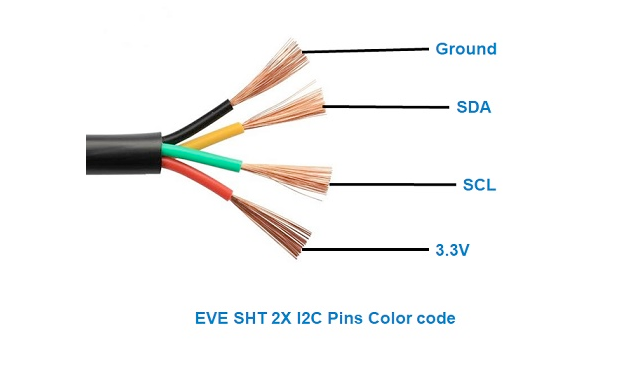
| Pin | Type | Description | Notes |
|---|---|---|---|
| VDD | Power | Power supply input (2.1V to 3.6V) | Low voltage operation for battery applications |
| GND | Power | Ground connection | Connect to ESP32 ground |
| SDA | Communication | I²C data line | Bidirectional data communication |
| SCL | Communication | I²C clock line | Clock signal from master device |
Standard I²C interface for easy integration
Default I²C address is 0x40
Enhanced accuracy over SHT20: ±0.2°C temp, ±2% humidity
Pull-up resistors (10kΩ) recommended on SDA/SCL
Professional-grade sensor for precision applications
Wiring the SHT25 to ESP32
Connect the SHT25 using standard I²C interface for high-precision measurements.
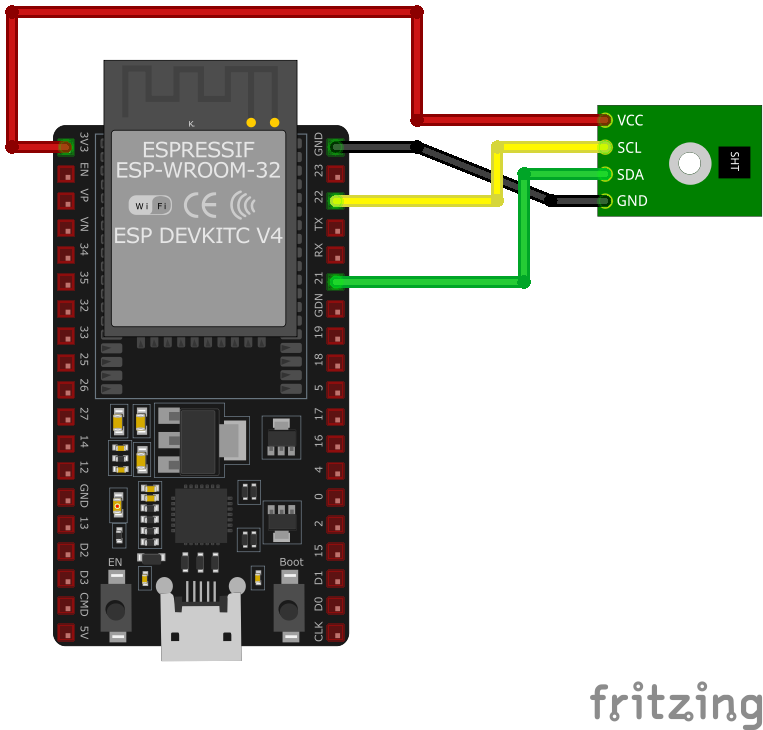
| SHT25 pin | ESP32 pin | Purpose |
|---|---|---|
| VDD | 3.3V | Power supply (2.1V to 3.6V) |
| GND | GND | Ground connection |
| SDA | GPIO21 | I²C data line (default SDA) |
| SCL | GPIO22 | I²C clock line (default SCL) |
GPIO21/22 are default I²C pins on ESP32
I²C address is 0x40 (standard)
Add 10kΩ pull-up resistors on SDA/SCL if needed
Compatible with SHT20/SHT21 libraries
SHT25 code examples
// Requires library: "SHT2x"
#include <Wire.h>
#include <SHT2x.h>

SHT2x sht;

void setup() {
  Serial.begin(115200);
  Wire.begin();
  if (!sht.begin()) {
    Serial.println("Could not find SHT25 sensor, check wiring!");
    while (1) delay(10);
  }
}

void loop() {
  if (sht.read()) {
    Serial.print("Temperature: ");
    Serial.print(sht.getTemperature());
    Serial.println(" C");
    Serial.print("Humidity: ");
    Serial.print(sht.getHumidity());
    Serial.println(" %");
  } else {
    Serial.println("Failed to read from SHT25 sensor");
  }
  delay(2000);
}
This example uses Rob Tillaart's SHT2x library (install "SHT2x" from the Library Manager), which covers the whole SHT2x family including the SHT25. read() performs a blocking measurement, after which getTemperature() and getHumidity() return the converted values. The sensor sits on the default I2C pins (SDA GPIO21, SCL GPIO22) at address 0x40.
#include <stdio.h>
#include "freertos/FreeRTOS.h"
#include "freertos/task.h"
#include "driver/i2c.h"

#define I2C_MASTER_SCL_IO    22    /*!< GPIO number used for I2C master clock */
#define I2C_MASTER_SDA_IO    21    /*!< GPIO number used for I2C master data */
#define I2C_MASTER_NUM       I2C_NUM_0 /*!< I2C master I2C port number */
#define I2C_MASTER_FREQ_HZ   100000     /*!< I2C master clock frequency */
#define SHT25_SENSOR_ADDR    0x40       /*!< I2C address */

void read_sensor() {
    uint8_t data[3];
    uint8_t cmd = 0xF5; // Humidity command
    i2c_master_write_to_device(I2C_MASTER_NUM, SHT25_SENSOR_ADDR, &cmd, 1, pdMS_TO_TICKS(1000));
    vTaskDelay(pdMS_TO_TICKS(50));
    i2c_master_read_from_device(I2C_MASTER_NUM, SHT25_SENSOR_ADDR, data, 3, pdMS_TO_TICKS(1000));

    uint16_t raw_humidity = (data[0] << 8) | (data[1] & 0xFC);
    float humidity = -6.0 + 125.0 * (raw_humidity / 65536.0);

    cmd = 0xF3; // Temperature command
    i2c_master_write_to_device(I2C_MASTER_NUM, SHT25_SENSOR_ADDR, &cmd, 1, pdMS_TO_TICKS(1000));
    vTaskDelay(pdMS_TO_TICKS(50));
    i2c_master_read_from_device(I2C_MASTER_NUM, SHT25_SENSOR_ADDR, data, 3, pdMS_TO_TICKS(1000));

    uint16_t raw_temperature = (data[0] << 8) | (data[1] & 0xFC);
    float temperature = -46.85 + 175.72 * (raw_temperature / 65536.0);

    printf("Temperature: %.2f °C\n", temperature);
    printf("Humidity: %.2f %%\n", humidity);
}

void app_main() {
    // Initialize I2C
    i2c_config_t conf = {
        .mode = I2C_MODE_MASTER,
        .sda_io_num = I2C_MASTER_SDA_IO,
        .scl_io_num = I2C_MASTER_SCL_IO,
        .sda_pullup_en = GPIO_PULLUP_ENABLE,
        .scl_pullup_en = GPIO_PULLUP_ENABLE,
        .master.clk_speed = I2C_MASTER_FREQ_HZ,
    };
    i2c_param_config(I2C_MASTER_NUM, &conf);
    i2c_driver_install(I2C_MASTER_NUM, conf.mode, 0, 0, 0);

    while (1) {
        read_sensor();
        vTaskDelay(pdMS_TO_TICKS(2000));
    }
}
The SHT25 speaks plain I2C, so this example needs no external driver - just ESP-IDF's built-in I2C master. After setting up the bus, read_sensor() issues the no-hold measurement commands from the datasheet (0xF5 for humidity, 0xF3 for temperature), waits for the conversion, reads the raw values and converts them with the formulas from the datasheet (the lower status bits are masked off). The readings are printed every 2 seconds.
i2c:
  sda: GPIO21
  scl: GPIO22

sensor:
  - platform: htu21d
    temperature:
      name: "Indoor Temperature"
    humidity:
      name: "Indoor Humidity"
    update_interval: 60s
The SHT25 belongs to Sensirion's SHT2x generation, which ESPHome serves with the htu21d platform (the HTU21D is the same die; the platform also covers Si7021 and SHT21) - not with sht3x-style platforms, which speak a different command set. The sensor sits at the family's fixed address 0x40 on the default I2C pins.
[env:esp32dev]
platform = espressif32
board = esp32dev
framework = arduino
monitor_speed = 115200
lib_deps =
robtillaart/SHT2x @ ^0.5.0#include <Arduino.h>
#include <Wire.h>
#include <SHT2x.h>
SHT2x sht;
void setup() {
Serial.begin(115200);
Wire.begin();
if (!sht.begin()) {
Serial.println("Could not find SHT25 sensor, check wiring!");
while (1) delay(10);
}
}
void loop() {
if (sht.read()) {
Serial.print("Temperature: ");
Serial.print(sht.getTemperature());
Serial.println(" C");
Serial.print("Humidity: ");
Serial.print(sht.getHumidity());
Serial.println(" %");
} else {
Serial.println("Failed to read from SHT25 sensor");
}
delay(2000);
}This PlatformIO example uses Rob Tillaart's SHT2x library (pinned as robtillaart/SHT2x in lib_deps), which covers the whole SHT2x family including the SHT25. read() performs a blocking measurement, then getTemperature() and getHumidity() return the converted values; the sensor sits at the family's fixed address 0x40 on the default I2C pins.
from machine import I2C, Pin
from time import sleep, sleep_ms

# The SHT25 speaks plain I2C - no driver needed (SDA=GPIO21, SCL=GPIO22)
i2c = I2C(0, scl=Pin(22), sda=Pin(21))
SHT25_ADDR = 0x40

def read_raw(command, wait_ms):
    i2c.writeto(SHT25_ADDR, bytes([command]))
    sleep_ms(wait_ms)  # wait for the measurement (no-hold mode)
    data = i2c.readfrom(SHT25_ADDR, 3)
    return ((data[0] << 8) | data[1]) & 0xFFFC  # mask the status bits

while True:
    temp_raw = read_raw(0xF3, 85)  # temperature, no hold master
    hum_raw = read_raw(0xF5, 30)   # humidity, no hold master
    temperature = -46.85 + 175.72 * temp_raw / 65536
    humidity = -6.0 + 125.0 * hum_raw / 65536
    print("Temperature: {:.2f} C".format(temperature))
    print("Humidity: {:.2f} %".format(humidity))
    sleep(2)
The SHT25 needs no driver - the example talks plain I2C: it issues the no-hold measurement commands from the datasheet (0xF3 temperature, 0xF5 humidity), waits for the conversion, masks the status bits and applies the datasheet conversion formulas. The sensor sits at the SHT2x family's fixed address 0x40.
SHT25 specifications
About the SHT25
The SHT25 sits at the top of Sensirion’s SHT2x accuracy ladder, above the budget SHT20 and the mid-tier SHT21: the same I2C address 0x40 and 2.1 V to 3.6 V supply, but accuracy tightened to ±0.2 degC / ±1.8 %RH - historically the choice for lab-grade data logging and HVAC calibration work where the SHT20’s ±3 %RH wasn’t good enough.
Sensirion lists the SHT25 as not recommended for new designs, with the SHT45 named as its direct successor. The numbers actually favor switching: the SHT45 matches the SHT25’s accuracy ambition with ±0.1 degC / ±1.0 %RH, draws less power, and on current listings costs less than the roughly $15 the SHT25 commands despite being the newer part.
One thing worth checking before trusting a reading: some SHT25 boards in circulation have turned up reporting from the wrong I2C address (0x38 instead of the expected 0x40), a sign of a mislabeled or non-genuine chip rather than a wiring mistake - scan the bus first if a driver that works fine on other SHT2x-family sensors won’t find this one.
SHT25 troubleshooting
Incorrect I2C Address Detection
›
Issue: The SHT25 sensor is expected to have an I2C address of 0x40, but an I2C scanner detects it at 0x38. Attempting to communicate using the standard address results in no response or incorrect data.
Possible causes include counterfeit or mislabeled sensors that do not conform to standard specifications.
Solution: Use the detected I2C address (0x38) in your code instead of the expected 0x40. If communication issues persist, consider verifying the authenticity of the sensor or replacing it with a genuine SHT25 sensor.
Communication Failure with I2C Interface
›
Issue: Attempts to read data from the SHT25 sensor over I2C result in receiving 0xF0 or 0x00, indicating unsuccessful communication.
Possible causes include incorrect I2C implementation, timing issues, or improper sensor initialization.
Solution: Ensure that the I2C communication is correctly implemented with appropriate timing delays as specified in the SHT25 datasheet. Verify that the sensor is properly initialized and that the correct commands are being sent. Reviewing and following the sensor's datasheet can provide guidance on proper communication protocols.
Higher Than Expected Temperature Readings
›
Issue: The SHT25 sensor reports temperatures higher than the actual ambient temperature, leading to inaccurate measurements.
Possible causes include heat generated by nearby components affecting the sensor or inadequate ventilation around the sensor.
Solution: Ensure that the sensor is placed away from heat sources and has proper ventilation. Consider implementing software calibration to offset any consistent discrepancies. If the issue persists, consult the sensor's datasheet for recommended operating conditions and verify that the sensor is being used within those parameters.
Compilation Errors with SHT25 Library
›
Issue: When compiling code that interfaces with the SHT25 sensor using the LibHumidity library, errors such as 'class TwoWire' has no member named 'send' and 'class TwoWire' has no member named 'receive' are encountered.
Possible causes include the use of outdated functions in the library that are incompatible with the current Wire library, which now uses write() and read() methods instead of send() and receive().
Solution: Update the LibHumidity library by replacing instances of send() with write() and receive() with read(). Alternatively, consider using a more recent library that supports the SHT25 sensor and is compatible with the current Wire library implementation.
Where to buy the SHT25

Resources
Similar sensors


