
KY-025 Reed Switch Module
The KY-025 is a reed switch module that provides both analog and digital outputs. It is equipped with a potentiometer to adjust sensitivity and is suitable for detecting magnetic fields in various applications.

KY-025 pinout
The KY-025 is a 4-pin reed switch module with dual outputs:
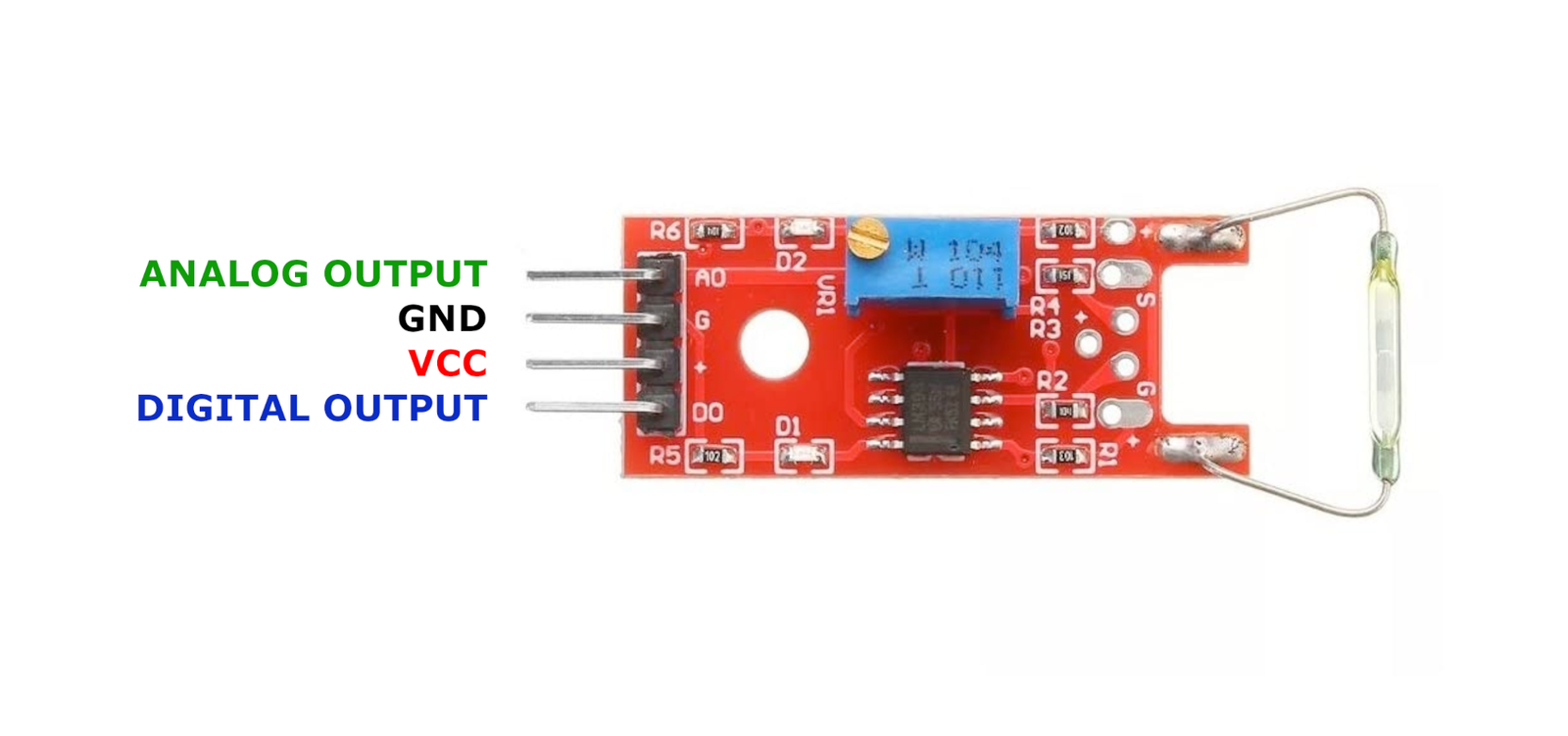
| Pin | Type | Description | Notes |
|---|---|---|---|
| GND | Power | Ground connection | |
| +V | Power | Power supply | 3.3V or 5V |
| D0 | Communication | Digital output | HIGH when magnetic field detected |
| A0 | Communication | Analog output | Voltage reading of reed switch state |
Interface: Dual output (analog + digital with comparator)
Sensor: Large reed switch (sealed glass tube with ferromagnetic contacts)
Analog Output: Continuous voltage level reading
Digital Output: Threshold-based trigger (adjustable via potentiometer)
Power: 3.3V or 5V operation
Range: Typically 10-30mm detection distance (depends on magnet strength)
Applications: Door/window sensors, security systems, proximity detection, position sensing
Wiring the KY-025 to ESP32
To interface the KY-025 with an ESP32 for magnetic detection:
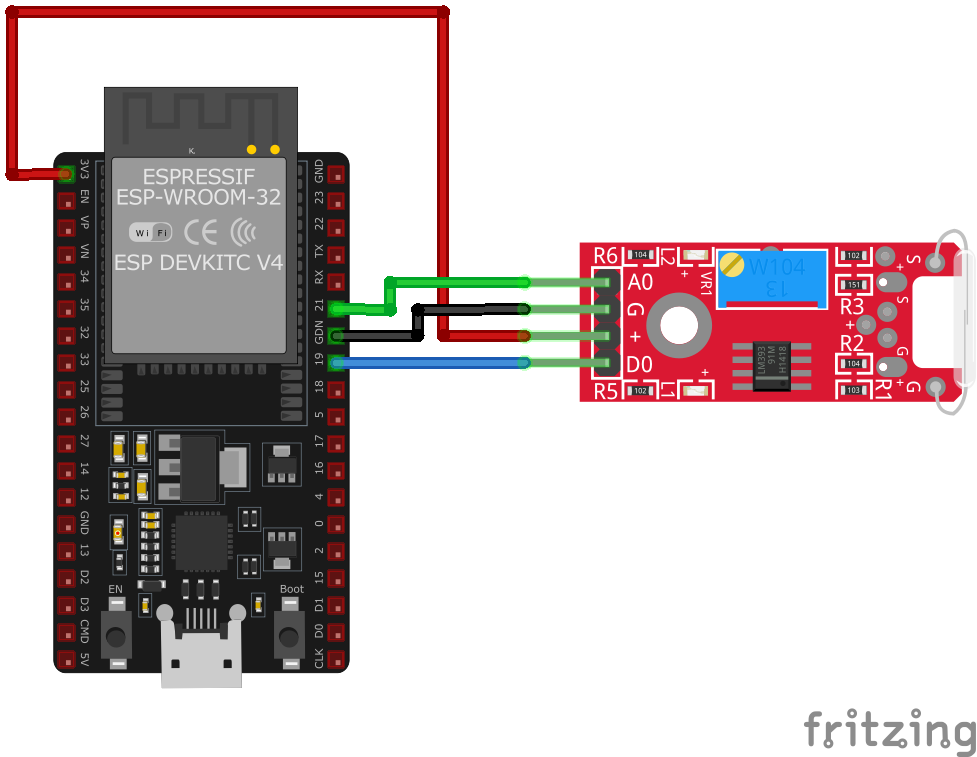
| KY-025 pin | ESP32 pin | Purpose |
|---|---|---|
| GND | GND | Ground |
| +V | 3.3V or 5V | Power supply |
| D0 | GPIO17 | Digital input (any GPIO) · optional |
| A0 | GPIO36 | Analog input (ADC pin) · optional |
Digital Mode: Use D0 for simple binary detection (magnet present/absent)
Analog Mode: Use A0 for continuous monitoring with adjustable sensitivity
ADC Pins: Use GPIO32-39 for analog input on ESP32
Voltage: 3.3V recommended for ESP32 ADC compatibility
Adjustment: Turn onboard potentiometer to set digital trigger threshold
Reed Switch: Binary sensor (open/closed) responding to magnetic fields
LED Indicator: Onboard LED shows detection status
Comparison: Larger reed switch than KY-021, potentially greater detection range
KY-025 code examples
// Declaration and initialization of the input pins
int analog_input = 36;  // Analog output of the sensor (GPIO36, matches the wiring above)
int digital_input = 17; // Digital output of the sensor (GPIO17)

void setup() {
    pinMode(digital_input, INPUT);
    Serial.begin(115200);
    Serial.println("KY-025 Magnetic field detection");
}

void loop() {
    // Read current values and convert to voltage (ESP32: 12-bit ADC, 3.3V)
    float analog_value = analogRead(analog_input) * (3.3 / 4095.0);
    int digital_value = digitalRead(digital_input);

    Serial.print("Analog voltage value: ");
    Serial.print(analog_value, 4);
    Serial.print(" V, 	 Threshold value: ");

    if (digital_value == 1) {
        Serial.println("reached");
    } else {
        Serial.println("not reached");
    }
    Serial.println("-------------------------------");
    delay(1000);
}
This Arduino code reads the analog voltage from the KY-025 sensor's analog output and checks the digital output to determine if the magnetic field strength has surpassed the set threshold. The results are printed to the serial monitor every second.
#include <stdio.h>
#include "freertos/FreeRTOS.h"
#include "freertos/task.h"
#include "driver/adc.h"
#include "driver/gpio.h"

#define REED_SENSOR_ANALOG_PIN ADC1_CHANNEL_0 // GPIO36
#define REED_SENSOR_DIGITAL_PIN GPIO_NUM_17

void app_main(void) {
    adc1_config_width(ADC_WIDTH_BIT_12);
    adc1_config_channel_atten(REED_SENSOR_ANALOG_PIN, ADC_ATTEN_DB_11);
    gpio_set_direction(REED_SENSOR_DIGITAL_PIN, GPIO_MODE_INPUT);

    printf("KY-025 Magnetic Field Detection\n");
    while (1) {
        int analog_value = adc1_get_raw(REED_SENSOR_ANALOG_PIN);
        int digital_value = gpio_get_level(REED_SENSOR_DIGITAL_PIN);
        printf("Analog Value: %d, Digital Threshold: %s\n", analog_value, digital_value ? "Reached" : "Not Reached");
        vTaskDelay(pdMS_TO_TICKS(1000));
    }
}
This ESP-IDF code reads the analog value from the KY-025 sensor using ADC on GPIO36 and monitors the digital output on GPIO17 to determine if the magnetic field threshold is exceeded. The results are printed every second.
sensor:
  - platform: adc
    pin: GPIO36
    name: "KY-025 Magnetic Field Strength"
    update_interval: 1s
binary_sensor:
  - platform: gpio
    pin:
      number: GPIO17
      mode: INPUT_PULLUP
    name: "KY-025 Magnetic Threshold Trigger"
This ESPHome configuration reads the KY-025 sensor's analog output on GPIO36 and detects the threshold trigger using GPIO17 as a binary sensor. Updates are logged every second.
[env:esp32]
platform = espressif32
board = esp32dev
framework = arduino#include <Arduino.h>
#define REED_SENSOR_ANALOG_PIN A0
#define REED_SENSOR_DIGITAL_PIN 17
void setup() {
pinMode(REED_SENSOR_DIGITAL_PIN, INPUT);
Serial.begin(115200);
Serial.println("KY-025 Magnetic Sensor Test");
}
void loop() {
int analog_value = analogRead(REED_SENSOR_ANALOG_PIN);
int digital_value = digitalRead(REED_SENSOR_DIGITAL_PIN);
Serial.printf("Analog: %d, Digital: %s\n", analog_value, digital_value ? "Threshold Reached" : "Not Reached");
delay(1000);
}This PlatformIO code reads the KY-025 sensor's analog output and monitors the digital threshold trigger. The values are printed every second.
import machine
import time

REED_SENSOR_ANALOG_PIN = machine.ADC(machine.Pin(36))
REED_SENSOR_ANALOG_PIN.atten(machine.ADC.ATTN_11DB)
REED_SENSOR_DIGITAL_PIN = machine.Pin(17, machine.Pin.IN, machine.Pin.PULL_UP)

while True:
    analog_value = REED_SENSOR_ANALOG_PIN.read()
    digital_value = REED_SENSOR_DIGITAL_PIN.value()
    print("Analog:", analog_value, "Digital:", "Threshold Reached" if digital_value else "Not Reached")
    time.sleep(1)
This MicroPython script reads the KY-025 sensor's analog signal using ADC on GPIO36 and monitors the digital output on GPIO17. The readings are printed every second.
KY-025 specifications
About the KY-025
The KY-025’s name invites confusion with the KY-021, and the sensing element inside is the same idea - a sealed reed switch - but the board around it isn’t: the KY-025 puts that switch on the same 4-pin LM393-comparator-plus-potentiometer layout used for the KY-024 Hall sensor, the KY-026 flame sensor, and the KY-028 thermistor, giving it both an analog and a digital output pin.
That “analog” output is worth treating with some skepticism, though - a reed switch is a mechanical contact with exactly two states, open or closed, so the analog pin doesn’t carry a continuously variable field-strength reading the way the KY-024’s genuinely linear Hall sensor does. It’s really just the switch’s binary state (roughly full-scale one way, near-zero the other) sitting ahead of the same comparator that drives the digital pin, and the trim pot just adjusts the switching threshold rather than any real sensitivity curve. For most projects the digital output alone is enough; the bare-bones KY-021 does the same detection with fewer parts if the adjustable threshold isn’t needed.
KY-025 troubleshooting
No Response from Sensor
›
Issue: The sensor does not provide any output when exposed to a magnetic field.
Solutions:
- Verify all connections are secure and correctly placed.
- Ensure the module is receiving the appropriate voltage (3.3V or 5V).
- Adjust the potentiometer to set the correct sensitivity threshold.
- Test the sensor with a known magnetic source to confirm functionality.
Unstable Analog Readings
›
Issue: The analog output fluctuates without any change in the magnetic field.
Solutions:
- Check for electromagnetic interference from nearby devices.
- Ensure that the power supply is stable and free from noise.
- Use shielded cables for analog signal transmission if necessary.
Where to buy the KY-025

Resources
Similar sensors


