
KY-028 Digital Temperature Sensor Module
The KY-028 is a digital temperature sensor module equipped with an NTC thermistor. It offers both analog and digital outputs, with an adjustable threshold via an onboard potentiometer, making it ideal for temperature monitoring and control applications.

KY-028 pinout
The KY-028 is a 4-pin digital temperature sensor module with dual outputs:
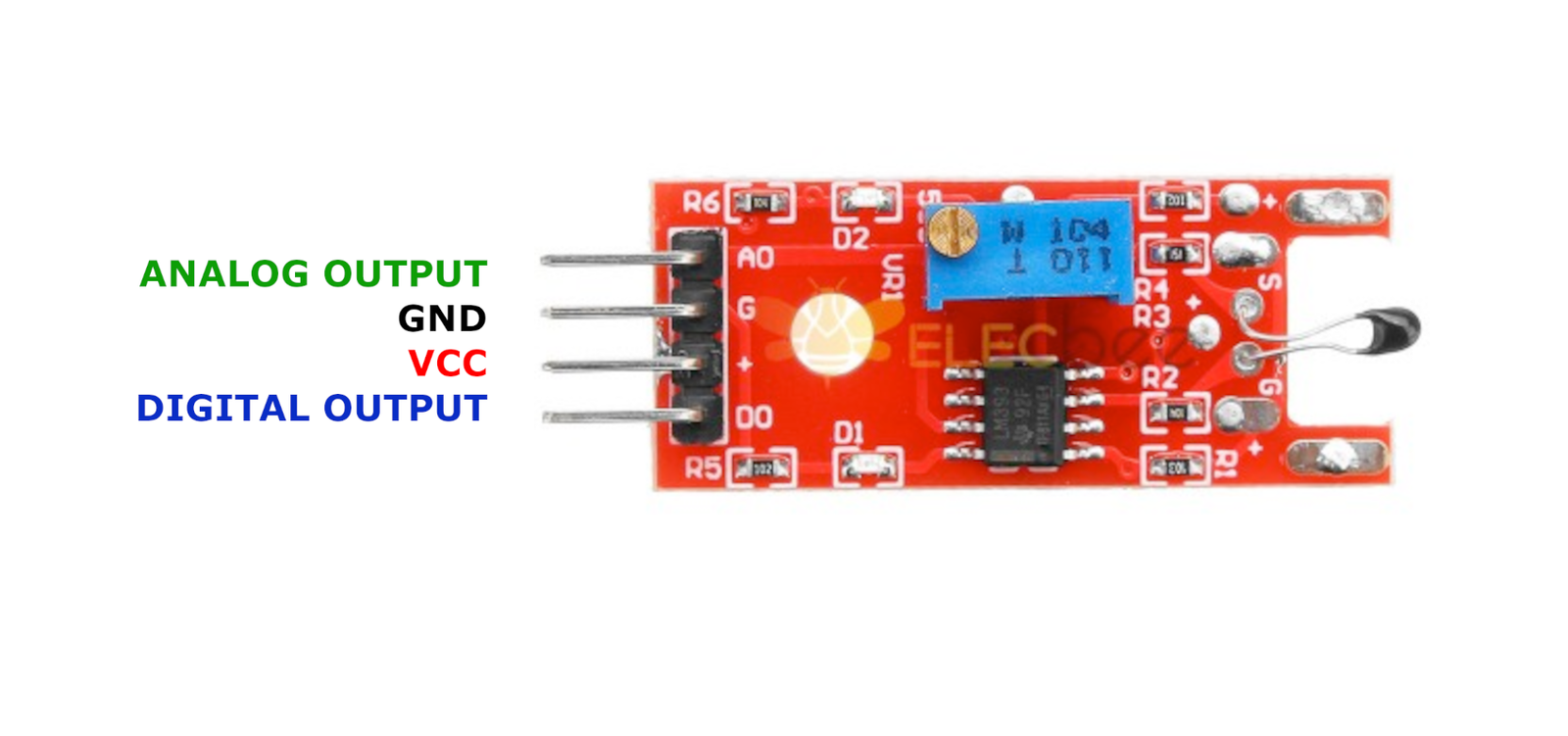
| Pin | Type | Description | Notes |
|---|---|---|---|
| GND | Power | Ground connection | |
| +V | Power | Power supply | 3.3V or 5V |
| A0 | Communication | Analog output | Voltage proportional to temperature |
| D0 | Communication | Digital output | HIGH when temperature exceeds threshold |
Interface: Dual output (analog + digital with comparator)
Sensor: NTC thermistor for temperature sensing
Analog Output: Continuous voltage reading proportional to temperature
Digital Output: Threshold-based alert (adjustable via potentiometer)
Power: 3.3V or 5V operation
Adjustment: Onboard potentiometer to set temperature threshold
Wiring the KY-028 to ESP32
To interface the KY-028 with an ESP32 for temperature monitoring:
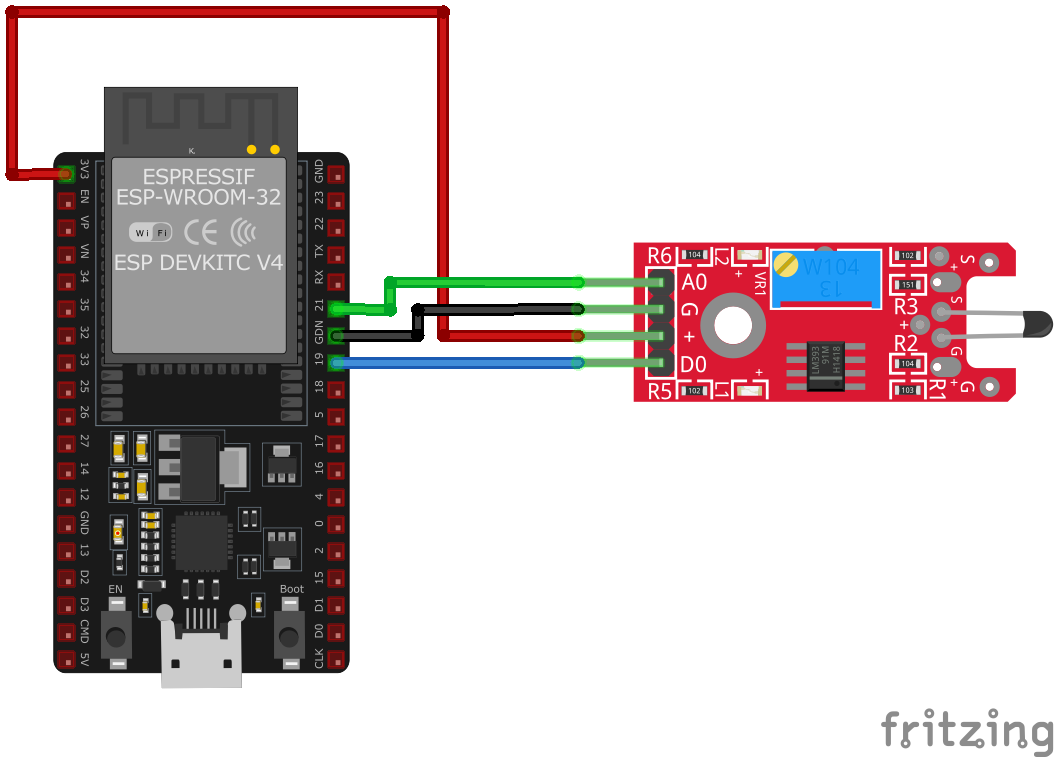
| KY-028 pin | ESP32 pin | Purpose |
|---|---|---|
| GND | GND | Ground |
| +V | 3.3V or 5V | Power supply |
| A0 | GPIO36 | Analog input (ADC pin) · optional |
| D0 | GPIO17 | Digital input (any GPIO) · optional |
Dual Use: Can use analog output for precise readings or digital for threshold alerts
ADC Pins: Use GPIO32-39 for analog input on ESP32
Voltage: 3.3V recommended for ESP32 ADC compatibility
Calibration: Adjust onboard potentiometer to set digital trigger temperature
KY-028 code examples
int led = 2;         // Onboard LED on most ESP32 dev boards
int digitalPin = 17; // KY-028 digital interface (GPIO17, matches the wiring above)
int analogPin = 36;  // KY-028 analog interface (GPIO36 / ADC1_CH0)
int digitalVal;      // digital readings
int analogVal;       // analog readings

void setup() {
    pinMode(led, OUTPUT);
    pinMode(digitalPin, INPUT);
    Serial.begin(115200);
}

void loop() {
    // Read the digital interface
    digitalVal = digitalRead(digitalPin);
    if (digitalVal == HIGH) { // if temperature threshold reached
        digitalWrite(led, HIGH);
    } else {
        digitalWrite(led, LOW);
    }

    // Read the analog interface (0-4095 on the ESP32's 12-bit ADC)
    analogVal = analogRead(analogPin);
    Serial.println(analogVal);

    delay(100);
}
The digital threshold output is read on GPIO17 and mirrored on the onboard LED (GPIO2); the analog output on GPIO36 returns 0-4095 on the ESP32's 12-bit ADC, so you can see the raw thermistor value alongside the comparator's verdict. Adjust the module's potentiometer to set the temperature threshold.
#include <stdio.h>
#include "freertos/FreeRTOS.h"
#include "freertos/task.h"
#include "driver/adc.h"
#include "driver/gpio.h"

#define TEMP_SENSOR_ANALOG_PIN ADC1_CHANNEL_0 // GPIO36
#define TEMP_SENSOR_DIGITAL_PIN GPIO_NUM_17
#define LED_PIN GPIO_NUM_2 // Onboard LED on most ESP32 dev boards

void app_main(void) {
    adc1_config_width(ADC_WIDTH_BIT_12);
    adc1_config_channel_atten(TEMP_SENSOR_ANALOG_PIN, ADC_ATTEN_DB_11);
    gpio_set_direction(TEMP_SENSOR_DIGITAL_PIN, GPIO_MODE_INPUT);
    gpio_set_direction(LED_PIN, GPIO_MODE_OUTPUT);

    printf("KY-028 Temperature Sensor Test\n");
    while (1) {
        int analog_value = adc1_get_raw(TEMP_SENSOR_ANALOG_PIN);
        int digital_value = gpio_get_level(TEMP_SENSOR_DIGITAL_PIN);
        if (digital_value == 1) {
            gpio_set_level(LED_PIN, 1); // Turn on LED
            printf("Temperature threshold exceeded. Analog Value: %d\n", analog_value);
        } else {
            gpio_set_level(LED_PIN, 0); // Turn off LED
            printf("Temperature within normal range. Analog Value: %d\n", analog_value);
        }
        vTaskDelay(pdMS_TO_TICKS(1000));
    }
}
This ESP-IDF code configures the KY-028 temperature sensor to read analog temperature values on GPIO36 and monitor the threshold-based digital output on GPIO17. If the temperature exceeds the set threshold, an LED on GPIO16 turns on, and the event is logged to the console.
sensor:
  - platform: adc
    pin: GPIO36
    name: "KY-028 Temperature Analog"
    update_interval: 1s
binary_sensor:
  - platform: gpio
    pin:
      number: GPIO17
      mode: INPUT_PULLUP
    name: "KY-028 Temperature Threshold"
This ESPHome configuration reads the KY-028 sensor's analog output on GPIO36 and detects the temperature threshold trigger using GPIO17 as a binary sensor. Updates are logged every second.
[env:esp32dev]
platform = espressif32
board = esp32dev
framework = arduino
monitor_speed = 115200#include <Arduino.h>
int led = 2; // Onboard LED on most ESP32 dev boards
int digitalPin = 17; // KY-028 digital interface (GPIO17, matches the wiring above)
int analogPin = 36; // KY-028 analog interface (GPIO36 / ADC1_CH0)
int digitalVal; // digital readings
int analogVal; // analog readings
void setup() {
pinMode(led, OUTPUT);
pinMode(digitalPin, INPUT);
Serial.begin(115200);
}
void loop() {
// Read the digital interface
digitalVal = digitalRead(digitalPin);
if (digitalVal == HIGH) { // if temperature threshold reached
digitalWrite(led, HIGH);
} else {
digitalWrite(led, LOW);
}
// Read the analog interface (0-4095 on the ESP32's 12-bit ADC)
analogVal = analogRead(analogPin);
Serial.println(analogVal);
delay(100);
}This PlatformIO code reads the KY-028 sensor's analog output and monitors the digital temperature threshold trigger. The values are printed every second, and an LED turns on when the temperature exceeds the set threshold.
import machine
import time

TEMP_SENSOR_ANALOG_PIN = machine.ADC(machine.Pin(36))
TEMP_SENSOR_ANALOG_PIN.atten(machine.ADC.ATTN_11DB)
TEMP_SENSOR_DIGITAL_PIN = machine.Pin(17, machine.Pin.IN, machine.Pin.PULL_UP)
LED_PIN = machine.Pin(2, machine.Pin.OUT)  # onboard LED

while True:
    analog_value = TEMP_SENSOR_ANALOG_PIN.read()
    digital_value = TEMP_SENSOR_DIGITAL_PIN.value()
    if digital_value:
        LED_PIN.on()
        print("Temperature threshold exceeded - Analog:", analog_value)
    else:
        LED_PIN.off()
        print("Temperature normal - Analog:", analog_value)
    time.sleep(1)
This MicroPython script reads the KY-028 sensor's analog signal using ADC on GPIO36 and monitors the digital output on GPIO17. An LED on GPIO16 turns on when the temperature threshold is exceeded, and the readings are printed every second.
KY-028 specifications
About the KY-028
The KY-028 measures temperature with the same kind of bare NTC thermistor as the KY-013, just mounted on the shared 4-pin LM393-comparator-plus-potentiometer board also used by the KY-024, KY-025, and KY-026 modules. The analog pin is still just a raw voltage-divider reading that needs the Beta equation (or Steinhart-Hart for more precision) to turn into a real Celsius number - nothing on the board does that math - while the digital pin runs the same signal through the comparator for a simple over/under-threshold trigger set by the trim pot.
Because it’s the identical uncalibrated thermistor under the hood, the same accuracy caveat applies as on the KY-013: component tolerances on the thermistor and the divider resistor both bleed into the reading, so don’t expect the datasheet’s headline accuracy without calibrating the specific unit. A digital sensor like the DS18B20 reports calibrated temperature directly over the wire with no math or threshold-tuning required, and remains the better choice whenever accuracy matters more than the KY-028’s extra digital trigger pin.
KY-028 troubleshooting
No Analog Output
›
Issue: The analog output does not change with temperature variations.
Solutions:
- Ensure proper connections to the analog output pin.
- Verify that the power supply voltage is within the specified range (3.3V to 5V).
- Check the thermistor for damage or disconnection.
Digital Output Not Triggering
›
Issue: The digital output does not change state when the temperature exceeds the set threshold.
Solutions:
- Adjust the potentiometer to set the desired temperature threshold.
- Ensure the comparator (LM393) is functioning correctly.
- Check the indicator LEDs to confirm module operation.
Where to buy the KY-028

Resources
Similar sensors


