
KY-032 Infrared Obstacle Avoidance Sensor Module
The KY-032 is an infrared obstacle avoidance sensor module that detects objects by emitting and receiving infrared light. It provides a digital output signal upon detecting an obstacle, making it suitable for applications like robotic navigation and object detection.

KY-032 pinout
The KY-032 is a 4-pin infrared obstacle avoidance sensor module:
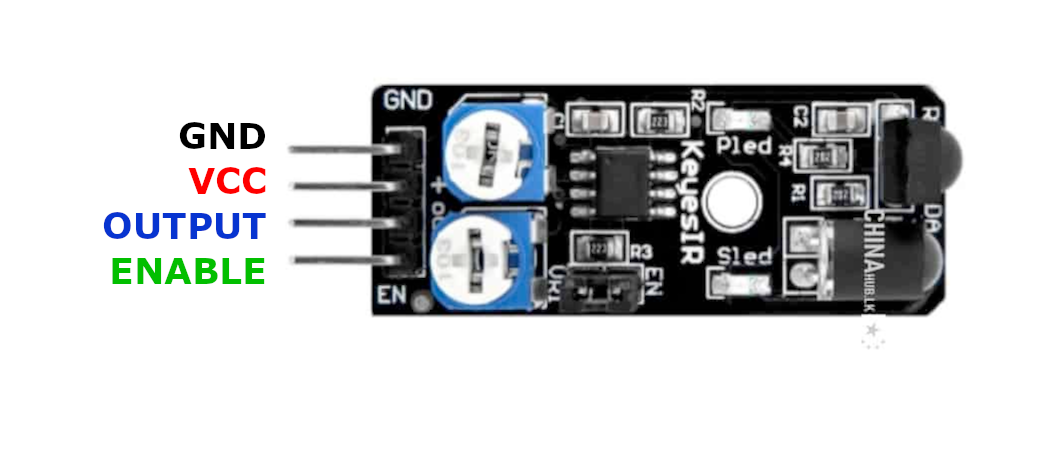
| Pin | Type | Description | Notes |
|---|---|---|---|
| GND | Power | Ground connection | |
| VCC | Power | Power supply | 3.3V or 5V |
| S | Communication | Signal output | LOW when obstacle detected |
| EN | Communication | Enable pin | Optional - controls sensor on/off |
Interface: Digital obstacle detection
Sensor: IR LED emitter + photodiode receiver pair
Signal: Active low - S pin goes LOW when obstacle detected
Power: 3.3V to 5V operation
Range: 2-30cm adjustable (depends on potentiometer and object reflectivity)
Adjustment: Two potentiometers - one for distance, one for sensitivity
Enable Pin: Pull EN LOW to disable sensor, HIGH (or leave open) to enable
Applications: Robot obstacle avoidance, line following, proximity detection, object counting
Wiring the KY-032 to ESP32
To interface the KY-032 with an ESP32 for obstacle detection:
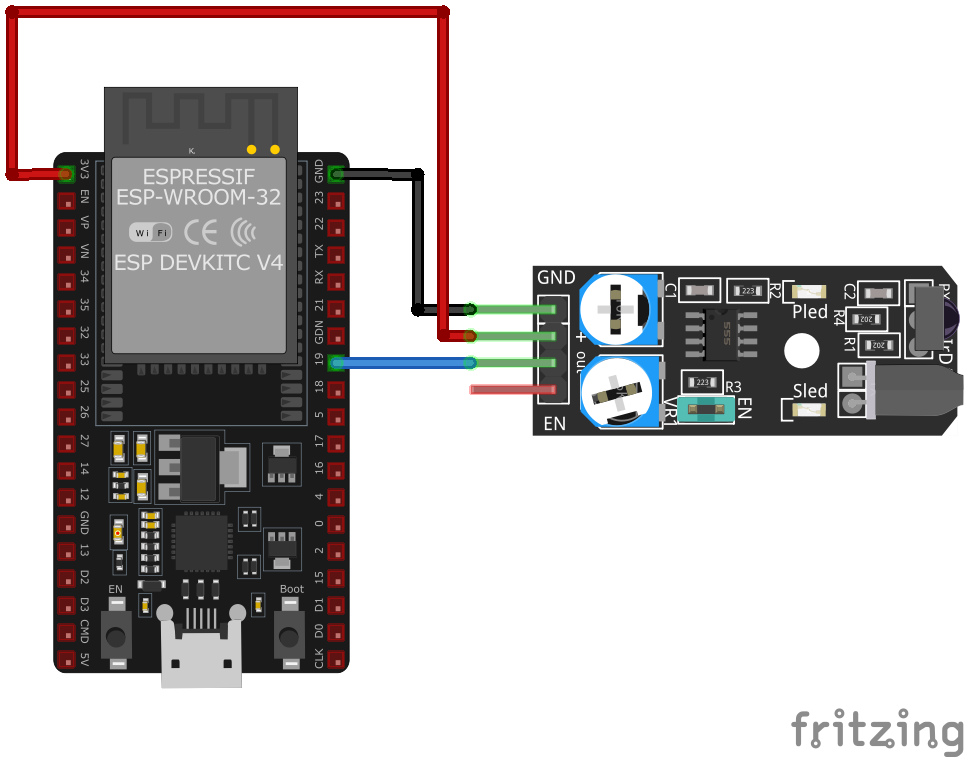
| KY-032 pin | ESP32 pin | Purpose |
|---|---|---|
| GND | GND | Ground |
| VCC | 3.3V or 5V | Power supply |
| S | GPIO16 | Digital input (any GPIO) |
| EN | GPIO17 or VCC | Enable control (optional) · optional |
Detection Logic: S pin reads LOW when obstacle present, HIGH when clear
Distance Tuning: Adjust onboard potentiometer to set detection range (2-30cm)
Sensitivity Tuning: Second potentiometer adjusts response to different surface colors/materials
Enable Control: Connect EN to GPIO for software on/off, or tie to VCC for always-on
LED Indicators: Power LED and detection status LED onboard
Ambient Light: Works best indoors - sunlight can cause false readings
Pull-up: Internal pull-up on S pin recommended for stable HIGH state
Robot Use: Mount at appropriate height for target obstacles (usually 5-15cm above ground)
KY-032 code examples
int sensorPin = 16; // KY-032 signal pin (GPIO16, matches the wiring above)

void setup() {
    pinMode(sensorPin, INPUT);
    Serial.begin(115200);
    Serial.println("KY-032 Obstacle Detection Test");
}

void loop() {
    int sensorValue = digitalRead(sensorPin);
    if (sensorValue == LOW) { // Obstacle detected
        Serial.println("Obstacle detected");
    } else {
        Serial.println("No obstacle");
    }
    delay(500);
}
This Arduino code initializes the sensor input pin and serial communication. In the loop, it reads the sensor value and prints "Obstacle detected" or "No obstacle" to the serial monitor based on the sensor's digital output.
#include <stdio.h>
#include "freertos/FreeRTOS.h"
#include "freertos/task.h"
#include "driver/gpio.h"

#define SENSOR_PIN GPIO_NUM_16

void app_main(void) {
    gpio_config_t io_conf = {
        .intr_type = GPIO_INTR_DISABLE,
        .mode = GPIO_MODE_INPUT,
        .pin_bit_mask = (1ULL << SENSOR_PIN),
        .pull_up_en = GPIO_PULLUP_ENABLE
    };
    gpio_config(&io_conf);

    printf("KY-032 Obstacle Detection Test\n");
    while (1) {
        int sensor_value = gpio_get_level(SENSOR_PIN);
        if (sensor_value == 0) { // Obstacle detected
            printf("Obstacle detected\n");
        } else {
            printf("No obstacle\n");
        }
        vTaskDelay(pdMS_TO_TICKS(500));
    }
}
This ESP-IDF code configures GPIO16 as an input with a pull-up resistor. It continuously reads the sensor's state and prints "Obstacle detected" or "No obstacle" to the console based on the sensor's output.
binary_sensor:
  - platform: gpio
    pin:
      number: GPIO16
      mode: INPUT_PULLUP
      inverted: true
    name: "KY-032 Obstacle Sensor"
    device_class: motion
    on_press:
      then:
        - logger.log: "Obstacle detected"
    on_release:
      then:
        - logger.log: "No obstacle detected"
The sensor's open-collector output is read on GPIO16 with the internal pull-up; inverted: true on the pin makes the entity read ON when an obstacle is detected (the module pulls the line low). The two loggers show the transitions; adjust the module's potentiometer for range.
[env:esp32]
platform = espressif32
board = esp32dev
framework = arduino#include <Arduino.h>
#define SENSOR_PIN 16
void setup() {
pinMode(SENSOR_PIN, INPUT_PULLUP);
Serial.begin(115200);
Serial.println("KY-032 Obstacle Sensor Test");
}
void loop() {
int sensor_value = digitalRead(SENSOR_PIN);
if (sensor_value == LOW) {
Serial.println("Obstacle detected");
} else {
Serial.println("No obstacle");
}
delay(500);
}This PlatformIO code sets up GPIO16 as an input with a pull-up resistor for the KY-032 sensor. It prints "Obstacle detected" or "No obstacle" to the serial monitor based on the sensor's state.
import machine
import time

SENSOR_PIN = machine.Pin(16, machine.Pin.IN, machine.Pin.PULL_UP)

while True:
    if SENSOR_PIN.value() == 0:
        print("Obstacle detected")
    else:
        print("No obstacle")
    time.sleep(0.5)
This MicroPython script configures GPIO16 as an input with a pull-up resistor for the KY-032 sensor. It continuously checks for obstacles and prints the corresponding message every 500ms.
KY-032 specifications
About the KY-032
The KY-032 is an active IR proximity sensor, not a passive one: an NE555 timer drives the emitter LED with a continuous ~38 kHz carrier, and a matched demodulating IR receiver (an HS0038-type part, the same family of chip used in remote-control receivers like the KY-022) only responds to light pulsing at that frequency, which is what lets it reject steady ambient light rather than triggering on every bright object nearby. Of the two onboard trimmers, only one is meant for regular tuning - it adjusts the emitter’s drive current and with it the detection distance - while the other tunes the 555’s oscillator frequency to match the receiver’s fixed 38 kHz and is normally factory-set and best left alone.
That 38 kHz filtering helps against constant light sources, but it isn’t complete immunity: strong sunlight can still wash out the receiver, and the 38 kHz bursts from a TV or air-conditioner remote pointed nearby can register as a false detection. The EN pin can shut the emitter off in software when the sensor isn’t needed, but by default the module ships active with EN unconnected. It’s a solid choice for close-range robot obstacle avoidance or line-following indoors; for reflectivity-based distance ranging outdoors or in bright light, a proper time-of-flight sensor is the more reliable option.
KY-032 troubleshooting
No Obstacle Detection
›
Issue: The sensor does not detect obstacles.
Solutions:
- Ensure proper wiring connections and verify the power supply voltage.
- Adjust the sensitivity and detection distance using the onboard potentiometers.
- Check for any obstructions or dirt on the sensor's infrared emitter and receiver.
False Positives
›
Issue: The sensor indicates obstacles when none are present.
Solutions:
- Reduce the sensitivity using the potentiometer to prevent detection of distant or small objects.
- Ensure the sensor is not exposed to direct sunlight or strong ambient infrared sources.
- Verify that the sensor is securely mounted to prevent vibrations or movements that could cause false readings.
Where to buy the KY-032

Resources
Similar sensors


