
MH-Z19 NDIR CO₂ Sensor
The MH-Z19 is a high-accuracy CO₂ sensor using NDIR technology, suitable for air quality monitoring. It supports UART and PWM communication, with a detection range up to 2000 ppm (optionally 5000 ppm). Its compact design and long lifespan make it ideal for HVAC and indoor air quality systems.

MH-Z19 pinout
The MH-Z19 has a 9-pin interface supporting UART communication and optional PWM output.
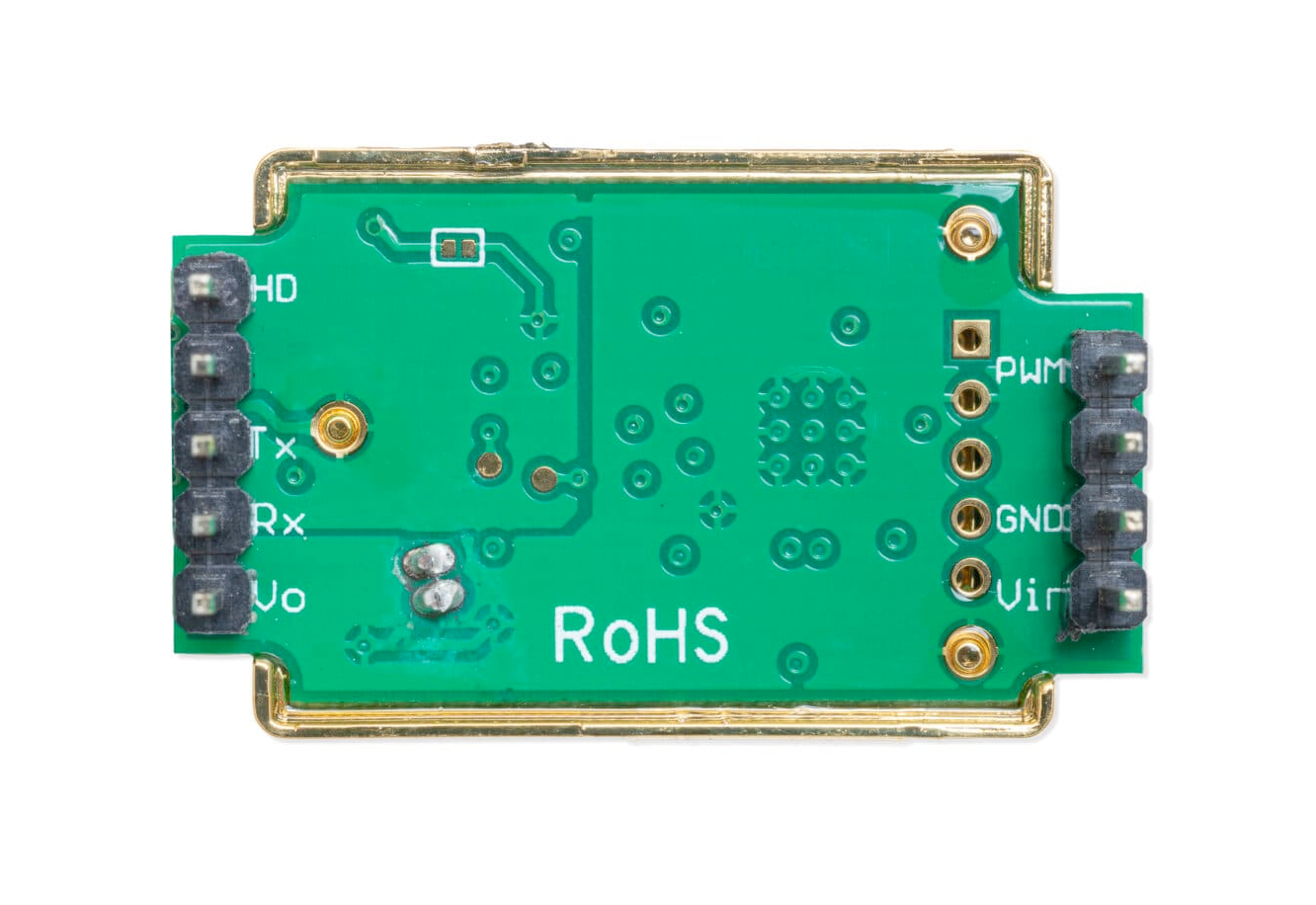
| Pin | Type | Description | Notes |
|---|---|---|---|
| Pin 1 (Vout) | Power | 3.3V output (max 10mA). Can power low-current 3.3V devices. | Not suitable for powering ESP32. |
| Pin 2 (RXD) | UART | UART receive input (3.3V logic). Receives commands from microcontroller. | Connect to ESP32 TX pin. |
| Pin 3 (TXD) | UART | UART transmit output (3.3V logic). Sends CO₂ data to microcontroller. | Connect to ESP32 RX pin. |
| Pin 4 (SR) | Reserved | Factory reserved. Do not connect. | |
| Pin 5 (HD) | Calibration | Zero calibration input. Pull low for >7 seconds to calibrate at 400ppm. | Use in fresh air environment for calibration. |
| Pin 6 (Vin) | Power | Power supply input (3.6V-5.5V). Connect to 5V for optimal performance. | Requires stable power supply. |
| Pin 7 (GND) | Power | Ground connection. Connect to system ground. | |
| Pin 8 (AOT) | Reserved | Factory reserved. Do not connect. | |
| Pin 9 (PWM) | PWM | PWM output for CO₂ concentration. Alternative to UART communication. | Optional - can use UART or PWM, not both. |
Detection range: 0-2000ppm (up to 5000ppm available)
Accuracy: ±50ppm + 5% of reading
NDIR technology for accurate CO₂ measurement
Includes temperature compensation
Warm-up time: ~3 minutes for stable readings
Wiring the MH-Z19 to ESP32
To interface the MH-Z19 with an ESP32 via UART, connect Vin to 5V, GND to ground, TXD to ESP32 RX (GPIO 16), and RXD to ESP32 TX (GPIO 17).
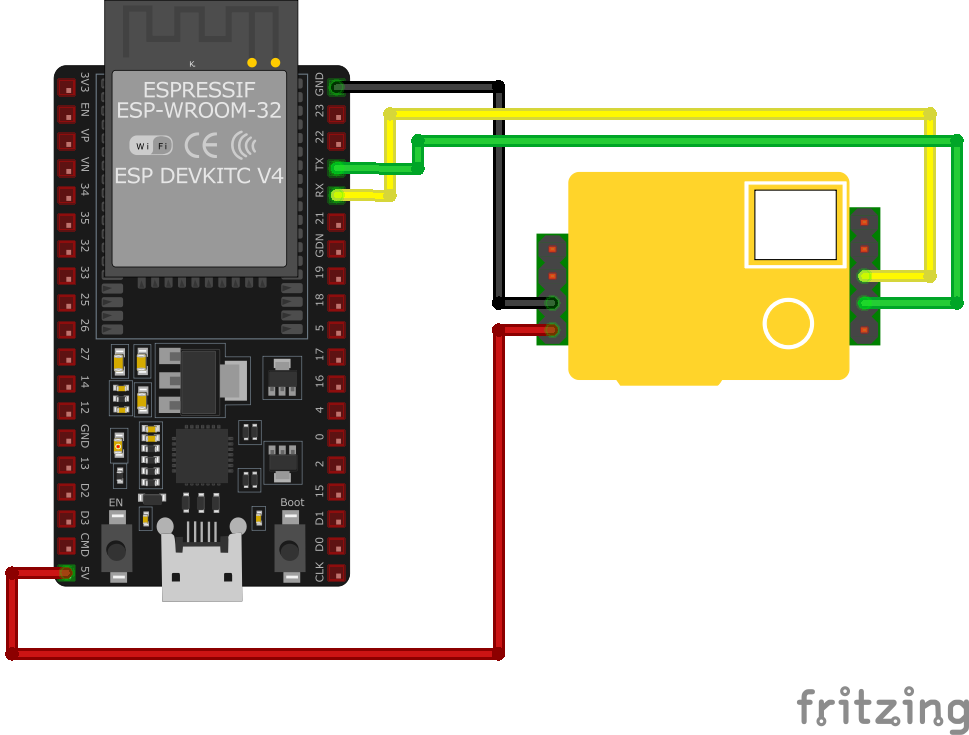
| MH-Z19 pin | ESP32 pin | Purpose |
|---|---|---|
| Pin 6 (Vin) | 5V | Power supply (3.6V-5.5V). Use 5V for best performance. |
| Pin 7 (GND) | GND | Ground connection. |
| Pin 3 (TXD) | GPIO 16 (RX2) | Sensor transmits CO₂ data to ESP32. |
| Pin 2 (RXD) | GPIO 17 (TX2) | Sensor receives commands from ESP32. |
| Pin 5 (HD) | Optional GPIO | Zero calibration trigger. Pull low for >7s in fresh air. · optional |
UART baud rate: 9600 bps (8N1 format)
Allow 3+ minutes warm-up time after power-on
Calibrate in fresh air (~400ppm CO₂) for accuracy
Sensor has 3.3V logic levels - directly compatible with ESP32
Use level shifter if interfacing with 5V-only microcontrollers
For PWM mode: connect Pin 9 to GPIO and measure duty cycle
MH-Z19 code examples
HardwareSerial co2Serial(2); // UART2: sensor TX -> GPIO16 (RX2), RX -> GPIO17 (TX2)

void setup() {
    Serial.begin(115200);
    co2Serial.begin(9600, SERIAL_8N1, 16, 17);
}

void loop() {
    // "Read CO2 concentration" command from the MH-Z19 datasheet
    byte cmd[9] = {0xFF, 0x01, 0x86, 0x00, 0x00, 0x00, 0x00, 0x00, 0x79};
    co2Serial.write(cmd, 9);
    delay(500);

    if (co2Serial.available() >= 9) {
        byte response[9];
        co2Serial.readBytes(response, 9);

        // Validate the reply: header plus checksum
        byte checksum = 0;
        for (int i = 1; i < 8; i++) checksum += response[i];
        checksum = 0xFF - checksum + 1;

        if (response[0] == 0xFF && response[1] == 0x86 && response[8] == checksum) {
            int CO2 = (response[2] << 8) + response[3];
            Serial.print("CO2 Concentration: ");
            Serial.print(CO2);
            Serial.println(" ppm");
        } else {
            Serial.println("Invalid response from sensor");
        }
    }
    delay(2000);
}
The MH-Z19 is read over the ESP32's second hardware UART (UART2, RX on GPIO16, TX on GPIO17) - no SoftwareSerial library is needed or available on the ESP32. The sketch sends the datasheet's read-CO2 command (0x86), validates the reply's header and checksum, and extracts the concentration from bytes 2-3. Give the sensor about 3 minutes to warm up after power-on before trusting the readings.
#include <stdio.h>
#include "driver/uart.h"
#include "driver/gpio.h"
#include "freertos/FreeRTOS.h"
#include "freertos/task.h"

#define UART_NUM UART_NUM_1
#define TXD_PIN (GPIO_NUM_17)
#define RXD_PIN (GPIO_NUM_16)

void app_main(void) {
    const uart_config_t uart_config = {
        .baud_rate = 9600,
        .data_bits = UART_DATA_8_BITS,
        .parity = UART_PARITY_DISABLE,
        .stop_bits = UART_STOP_BITS_1,
        .flow_ctrl = UART_HW_FLOWCTRL_DISABLE
    };
    uart_param_config(UART_NUM, &uart_config);
    uart_set_pin(UART_NUM, TXD_PIN, RXD_PIN, UART_PIN_NO_CHANGE, UART_PIN_NO_CHANGE);
    uart_driver_install(UART_NUM, 256, 0, 0, NULL, 0);

    uint8_t cmd[9] = {0xFF, 0x01, 0x86, 0x00, 0x00, 0x00, 0x00, 0x00, 0x79};
    uint8_t response[9];

    while (1) {
        uart_write_bytes(UART_NUM, (const char *)cmd, 9);
        vTaskDelay(pdMS_TO_TICKS(500));

        int len = uart_read_bytes(UART_NUM, response, 9, pdMS_TO_TICKS(1000));
        if (len == 9 && response[0] == 0xFF && response[1] == 0x86) {
            int CO2 = (response[2] << 8) | response[3];
            printf("CO2 Concentration: %d ppm\n", CO2);
        }
        vTaskDelay(pdMS_TO_TICKS(2000));
    }
}
This ESP-IDF example configures UART for communication with the MH-Z19 sensor. It sends a command to request CO₂ concentration, reads the response, and calculates the CO₂ concentration in ppm. The result is printed to the console every 2.5 seconds.
uart:
  tx_pin: GPIO17
  rx_pin: GPIO16
  baud_rate: 9600

sensor:
  - platform: mhz19
    co2:
      name: "MH-Z19 CO2"
    temperature:
      name: "MH-Z19 Temperature"
    update_interval: 60s
This ESPHome configuration interfaces with the MH-Z19 sensor over UART using GPIO17 (TX) and GPIO16 (RX). The CO₂ concentration and temperature are read every 60 seconds and displayed as named sensors. The UART baud rate is set to 9600.
[env:esp32dev]
platform = espressif32
board = esp32dev
framework = arduino
monitor_speed = 115200#include <Arduino.h>
HardwareSerial co2Serial(2); // UART2: sensor TX -> GPIO16 (RX2), RX -> GPIO17 (TX2)
void setup() {
Serial.begin(115200);
co2Serial.begin(9600, SERIAL_8N1, 16, 17);
}
void loop() {
// "Read CO2 concentration" command from the MH-Z19 datasheet
byte cmd[9] = {0xFF, 0x01, 0x86, 0x00, 0x00, 0x00, 0x00, 0x00, 0x79};
co2Serial.write(cmd, 9);
delay(500);
if (co2Serial.available() >= 9) {
byte response[9];
co2Serial.readBytes(response, 9);
// Validate the reply: header plus checksum
byte checksum = 0;
for (int i = 1; i < 8; i++) checksum += response[i];
checksum = 0xFF - checksum + 1;
if (response[0] == 0xFF && response[1] == 0x86 && response[8] == checksum) {
int CO2 = (response[2] << 8) + response[3];
Serial.print("CO2 Concentration: ");
Serial.print(CO2);
Serial.println(" ppm");
} else {
Serial.println("Invalid response from sensor");
}
}
delay(2000);
}This PlatformIO example reads the MH-Z19 over the ESP32's second hardware UART (UART2: sensor TX to GPIO16, RX to GPIO17) with no external library - it sends the datasheet's read-CO2 command (0x86), validates the reply's header and checksum, and extracts the concentration from bytes 2-3. Give the sensor about 3 minutes to warm up after power-on.
from machine import UART, Pin
import time

uart = UART(2, baudrate=9600, tx=Pin(17), rx=Pin(16))

cmd = bytearray([0xFF, 0x01, 0x86, 0x00, 0x00, 0x00, 0x00, 0x00, 0x79])

def read_co2():
    uart.write(cmd)
    time.sleep(0.1)
    if uart.any():
        response = uart.read(9)
        if len(response) == 9 and response[0] == 0xFF and response[1] == 0x86:
            co2 = (response[2] << 8) | response[3]
            return co2
    return None

while True:
    co2 = read_co2()
    if co2 is not None:
        print(f"CO2 Concentration: {co2} ppm")
    else:
        print("Error reading CO2 concentration")
    time.sleep(2)
This MicroPython script interfaces with the MH-Z19 sensor using UART (GPIO17 TX, GPIO16 RX). The script sends a command to request CO₂ concentration and parses the response. The CO₂ concentration in ppm is printed every 2 seconds, and errors during communication are handled gracefully.
MH-Z19 specifications
About the MH-Z19
The MH-Z19 is a genuine NDIR (non-dispersive infrared) CO2 sensor: it measures the gas directly by how much a specific infrared band gets absorbed passing through a sample chamber, rather than inferring a CO2-equivalent number from VOC readings the way metal-oxide sensors like the CCS811 or ENS160 do. If a project genuinely needs to know CO2 concentration rather than general air quality, this is the right sensor family for it; if a rough indoor-air-quality trend is all that is needed, one of those VOC sensors is cheaper and simpler to wire. A built-in temperature sensor also compensates the reading, per Winsen’s datasheet.
Winsen sells this sensor under several suffixes - B, C, D, E - that are easy to confuse, and the specs here (accuracy of ±50 ppm plus 5% of reading, a 3-minute preheat, response under 60 seconds, and the 33 x 20 x 9 mm body) match Winsen’s original base MH-Z19 datasheet rather than the newer variants: the MH-Z19C, for instance, tightens accuracy to ±3% of reading and cuts its sampling period to 1 second, and the MH-Z19E swaps to a cheaper aluminum housing. It is worth checking which variant actually shipped in a given module before assuming a spec from one applies to another. What stays consistent across the family is the power and logic setup: the module wants a proper 5V supply, but its UART and PWM pins run at 3.3V logic, so they connect straight to an ESP32 without a level shifter.
One behavior worth knowing before leaving this running indoors continuously: like other Winsen NDIR CO2 modules, the MH-Z19 runs automatic baseline correction (ABC) by default, which assumes the sensor sees a return to roughly 400 ppm outdoor-level air at least once every 24 hours and quietly recalibrates its zero point to the lowest value it saw in that window. In a space that rarely drops to outdoor CO2 levels - a sealed, always-occupied room, a greenhouse, a server closet - that assumption does not hold, and the baseline drifts upward, making every reading look lower than it really is. Disabling ABC, or scheduling a manual calibration in genuinely fresh air, is the fix for that kind of always-on deployment.
MH-Z19 troubleshooting
Sensor Initialization Failure
›
Issue: The MH-Z19 sensor fails to initialize, resulting in errors such as: MHZ19: Invalid preamble from MHZ19!.
Possible causes include incorrect wiring connections, incompatible serial communication settings, or insufficient power supply.
Solution: Verify that the sensor's TX and RX pins are correctly connected to the corresponding RX and TX pins on the microcontroller. Ensure that the serial communication parameters (baud rate, data bits, etc.) match between the sensor and the microcontroller. Provide a stable 5V power supply to the sensor, as it requires 4.5V to 5.5V for proper operation.
Consistent High CO2 Readings
›
Issue: The sensor outputs a constant high CO2 concentration value, such as 5000 ppm, which is the maximum measurable value.
Possible causes include sensor calibration issues, exposure to high concentrations of CO2 during startup, or faulty sensor hardware.
Solution: Perform a zero-point calibration in a fresh air environment (approximately 400 ppm CO2) to reset the sensor's baseline. Ensure the sensor is exposed to clean air during initialization to prevent incorrect baseline calibration. If the issue persists, consider replacing the sensor, as it may be defective.
Inaccurate CO2 Readings
›
Issue: The MH-Z19 sensor provides CO2 readings that are significantly higher or lower than expected.
Possible causes include incorrect calibration, interference from other gases, or environmental factors.
Solution: Check the sensor's calibration status and perform a manual calibration if necessary. Place the sensor in an environment with clean air to establish a proper baseline. Avoid placing the sensor near sources of volatile organic compounds (VOCs) or other gases that may interfere with CO2 measurements.
Serial Communication Errors
›
Issue: Serial communication with the MH-Z19 sensor fails, resulting in errors such as: Timeout waiting for response.
Possible causes include incorrect baud rate settings, reversed TX/RX connections, or noisy serial lines.
Solution: Confirm the baud rate used by the sensor (typically 9600 or 19200) and match it with the microcontroller's serial port settings. Double-check the TX and RX connections to ensure they are not swapped. Use short, high-quality cables to minimize noise on the serial lines.
Where to buy the MH-Z19

Resources
Similar sensors


