
MW33 Digital Temperature and Humidity Sensor Module
The MW33 module is a reliable solution for measuring temperature and humidity, offering calibrated digital output and ease of integration with microcontrollers. With a temperature measurement range of 0°C to 50°C and a humidity range of 20% to 95%, the MW33 is suitable for various applications, including environmental monitoring and HVAC systems.

MW33 pinout
The MW33 is a DHT11-based sensor module with 3 pins: VCC, DATA, and GND for single-wire communication.
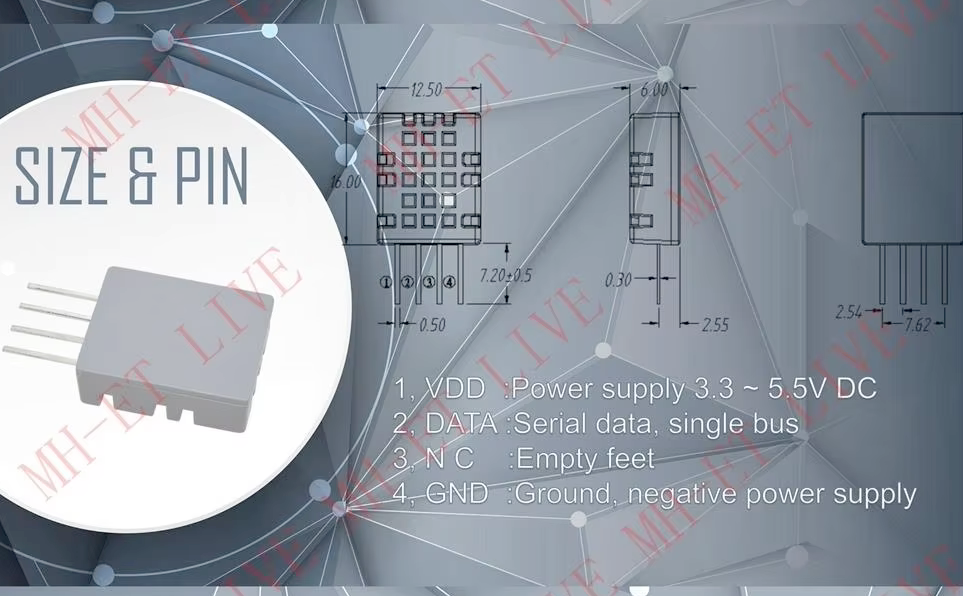
| Pin | Type | Description | Notes |
|---|---|---|---|
| VCC | Power | Power supply input (3.3V or 5V). Powers the DHT11 sensor. | Both 3.3V and 5V compatible. |
| DATA | Digital | Single-wire digital output. Transmits temperature and humidity data. | Requires 10kΩ pull-up resistor to VCC. |
| GND | Power | Ground connection. Connect to microcontroller ground. |
Based on DHT11 sensor (capacitive humidity + thermistor)
Temperature range: 0°C to 50°C (±2°C accuracy)
Humidity range: 20% to 95% RH (±5% accuracy)
Single-wire communication protocol
Sampling rate: 1Hz (1 second intervals)
Wiring the MW33 to ESP32
To interface the MW33 with an ESP32, connect VCC to 3.3V or 5V, GND to ground, and DATA to a GPIO pin with a 10kΩ pull-up resistor.
| MW33 pin | ESP32 pin | Purpose |
|---|---|---|
| VCC | 3.3V or 5V | Power supply. Use 3.3V or 5V depending on preference. |
| GND | GND | Ground connection. |
| DATA | GPIO 4 | Single-wire data line. Requires 10kΩ pull-up resistor to VCC. |
REQUIRED: Add 10kOhm pull-up resistor between DATA and VCC
Use DHT11 or DHT library for reading data
Minimum sampling interval: 1 second
First reading after power-on may be unreliable - discard it
Keep sensor away from heat sources for accurate readings
Avoid direct sunlight and rapid temperature changes
Similar to DHT11 - use same libraries and code examples
MW33 code examples
#include "DHT.h"

#define DHTPIN 4     // Digital pin connected to the DHT sensor
#define DHTTYPE DHT11   // DHT 11

DHT dht(DHTPIN, DHTTYPE);

void setup() {
  Serial.begin(115200);
  Serial.println("MW33 Sensor Example");

  dht.begin();
}

void loop() {
  // Wait a few seconds between measurements
  delay(2000);

  // Reading temperature or humidity takes about 250 milliseconds!
  float humidity = dht.readHumidity();
  // Read temperature as Celsius (the default)
  float temperature = dht.readTemperature();

  // Check if any reads failed and exit early (to try again).
  if (isnan(humidity) || isnan(temperature)) {
    Serial.println("Failed to read from DHT sensor!");
    return;
  }

  Serial.print("Humidity: ");
  Serial.print(humidity);
  Serial.print(" %	");
  Serial.print("Temperature: ");
  Serial.print(temperature);
  Serial.println(" °C");
}
This Arduino sketch demonstrates how to interface with the MW33 sensor module, which integrates a DHT11 sensor. It initializes the sensor on digital pin 4 and reads the temperature and humidity every 2 seconds. The readings are then printed to the Serial Monitor. The code includes checks to ensure that the sensor readings are valid.
// Requires the esp-idf-lib DHT driver from the ESP Component Registry:
//   idf.py add-dependency "esp-idf-lib/dht^1.2.0"

#include <stdio.h>
#include "freertos/FreeRTOS.h"
#include "freertos/task.h"
#include "dht.h"

#define DHT_GPIO  GPIO_NUM_4
#define DHT_TYPE  DHT_TYPE_DHT11

void app_main(void)
{
    float hum, temp;

    while (1) {
        if (dht_read_float_data(DHT_TYPE, DHT_GPIO, &hum, &temp) == ESP_OK) {
            printf("Hum %.1f%%  Temp %.1f C\n", hum, temp);
        } else {
            printf("Could not read data from sensor\n");
        }

        vTaskDelay(pdMS_TO_TICKS(2000));
    }
}
ESP-IDF ships no MW33 driver of its own, so this example uses the maintained esp-idf-lib DHT driver from the ESP Component Registry - the MW33 module is built around a DHT11 sensor. Install it into your project first with idf.py add-dependency "esp-idf-lib/dht^1.2.0", then build as usual.
dht_read_float_data() performs one complete read and fills in the humidity and temperature values, returning ESP_OK on success. DHT_TYPE_DHT11 selects the DHT11 protocol the MW33 speaks. No extra include is needed for GPIO_NUM_4 - dht.h pulls in the GPIO driver. The loop prints a reading every 2 seconds.
sensor:
  - platform: dht
    pin: GPIO4
    model: DHT11
    temperature:
      name: "Living Room Temperature"
    humidity:
      name: "Living Room Humidity"
    update_interval: 60s
This ESPHome configuration defines the MW33 sensor, which uses the DHT11 model. The sensor is connected to GPIO4, and two entities are created: one for temperature and one for humidity, with user-friendly names such as ‘Living Room Temperature’ and ‘Living Room Humidity.’ The sensor data is updated every 60 seconds, ensuring regular monitoring.
[env:esp32dev]
platform = espressif32
board = esp32dev
framework = arduino
lib_deps =
    adafruit/DHT sensor library @ ^1.4.4
monitor_speed = 115200#include "DHT.h"
#define DHTPIN 4 // Digital pin connected to the DHT sensor
#define DHTTYPE DHT11 // DHT 11
DHT dht(DHTPIN, DHTTYPE);
void setup() {
Serial.begin(115200);
Serial.println("MW33 Sensor Example");
dht.begin();
}
void loop() {
delay(2000); // Wait 2 seconds between measurements
float humidity = dht.readHumidity();
float temperature = dht.readTemperature();
if (isnan(humidity) || isnan(temperature)) {
Serial.println("Failed to read from MW33 sensor!");
return;
}
Serial.print("Humidity: ");
Serial.print(humidity);
Serial.print(" % ");
Serial.print("Temperature: ");
Serial.print(temperature);
Serial.println(" °C");
}This PlatformIO example uses the Adafruit DHT library to interact with the MW33 sensor. It reads temperature and humidity values every 2 seconds and prints them to the Serial Monitor. The configuration is designed for the ESP32 and ensures compatibility with the MW33’s DHT11 sensor module.
from machine import Pin
from time import sleep
import dht

# Initialize the DHT sensor
sensor = dht.DHT11(Pin(4))

print("MW33 Sensor Example")

while True:
    try:
        sensor.measure()
        temperature = sensor.temperature()
        humidity = sensor.humidity()

        print("Temperature: {:.1f}°C".format(temperature))
        print("Humidity: {:.1f}%".format(humidity))
    except Exception as e:
        print("Error reading from MW33 sensor:", e)

    sleep(2)
This MicroPython script demonstrates how to use the DHT11 sensor on the MW33 module. It initializes the sensor on GPIO4, retrieves temperature and humidity readings, and prints the results to the console every 2 seconds. Exception handling ensures that errors are caught and reported without halting the program.
MW33 specifications
About the MW33
The MW33 is a small breakout board sold mainly through African and Amazon resellers, built around a plain DHT11 sensor - at least one listing markets it outright as “same as the DHT11,” and the module’s 3-pin VCC/DATA/GND layout and single-wire protocol match a standard DHT11 breakout exactly. There’s no datasheet from a recognized sensor manufacturer for the “MW33” itself, which makes sense once you know it’s a DHT11 wired onto a small carrier PCB rather than its own silicon design - its real specs are the DHT11’s: ±2 degC and ±5% RH accuracy, a 0-50 degC range, and a roughly 1-second minimum sampling interval.
Because it is a DHT11 under a different name, treat it exactly like one in code: the same Arduino DHT library, the same 10 kOhm pull-up on the data line, and the same timing-critical single-wire quirks apply. If your specific board’s silkscreen disagrees with any of this, trust the silkscreen - carrier boards sold under the same rebrand vary between sellers.
For anything beyond a basic demo, the same upgrade path as the DHT11 applies: a DHT22 for real accuracy, or a DHT20 if I2C is preferred over the single-wire link.
MW33 troubleshooting
Sensor Not Detected
›
Issue: The MW33 sensor is not recognized by the microcontroller, resulting in failed data readings.
Possible causes include incorrect wiring, insufficient power supply, or a faulty sensor.
Solution: Verify that the sensor's VCC is connected to a 3.3V-5V power source, GND to ground, and the data output (DO) to the appropriate digital input pin on the microcontroller. Ensure that the connections are secure and that the sensor is receiving adequate power. If the problem persists, consider testing the sensor with a different microcontroller or replacing the sensor.
Inaccurate Temperature or Humidity Readings
›
Issue: The MW33 sensor provides temperature or humidity readings that are inconsistent or outside the expected range.
Possible causes include environmental interference, sensor placement, or sensor malfunction.
Solution: Ensure that the sensor is placed in an environment within its operating temperature range of 0°C to 50°C and humidity range of 20% to 95%. Avoid placing the sensor near heat sources, direct sunlight, or areas with rapid temperature changes. If inaccuracies persist, consider calibrating the sensor or replacing it if it is found to be defective.
Fluctuating Readings
›
Issue: The sensor outputs fluctuating temperature or humidity values, leading to unreliable data.
Possible causes include unstable power supply, loose connections, or environmental factors.
Solution: Ensure that the sensor is connected to a stable power source within the specified voltage range (3.3V-5V). Check all wiring connections for stability and secure any loose connections. Consider placing the sensor in an environment with stable temperature and humidity levels to minimize fluctuations.
Delayed Response Time
›
Issue: The MW33 sensor exhibits slow response times to changes in temperature or humidity.
Possible causes include sensor limitations or environmental conditions.
Solution: Recognize that the MW33 sensor may have inherent response time limitations. Ensure that the sensor is exposed to the environment without obstructions that could impede airflow. If faster response times are critical, consider using a sensor with a quicker response specification.
Where to buy the MW33

Resources
Similar sensors


