
SHT20 Temperature and Humidity Sensor
The SHT20 sensor is a digital temperature and humidity sensor that utilizes Sensirion's CMOSens® technology. It provides calibrated, linearized sensor signals in digital, I2C format, making it ideal for applications requiring accurate and reliable environmental measurements.

SHT20 pinout
The SHT20 uses standard I²C communication with 4 pins for power and data transfer.
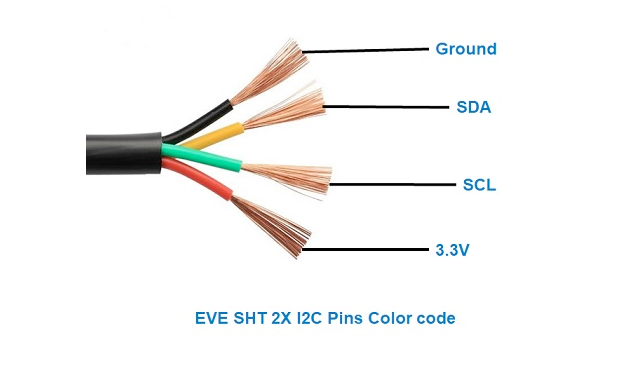
| Pin | Type | Description | Notes |
|---|---|---|---|
| VCC | Power | Power supply input (2.1V to 3.6V) | Low voltage sensor for battery applications |
| GND | Power | Ground connection | Connect to ESP32 ground |
| SDA | Communication | I²C data line | Bidirectional data communication |
| SCL | Communication | I²C clock line | Clock signal from master device |
Standard I²C interface for easy integration
Default I²C address is 0x40
High accuracy: ±0.3°C temperature, ±3% humidity
Pull-up resistors (10kΩ) recommended on SDA/SCL
Low voltage operation (2.1V-3.6V) for battery use
Wiring the SHT20 to ESP32
Connect the SHT20 using standard I²C interface for reliable environmental measurements.
| SHT20 pin | ESP32 pin | Purpose |
|---|---|---|
| VCC | 3.3V | Power supply (2.1V to 3.6V) |
| GND | GND | Ground connection |
| SDA | GPIO21 | I²C data line (default SDA) |
| SCL | GPIO22 | I²C clock line (default SCL) |
GPIO21/22 are default I²C pins on ESP32
I²C address is 0x40 (default)
Add 10kΩ pull-up resistors on SDA/SCL if needed
Can share I²C bus with other devices
SHT20 code examples
#include <Wire.h>
#include "DFRobot_SHT20.h"

DFRobot_SHT20 sht20;

void setup() {
  Serial.begin(115200);
  Wire.begin();
  sht20.initSHT20();
  delay(100);
  sht20.checkSHT20();
}

void loop() {
  float humidity = sht20.readHumidity();
  float temperature = sht20.readTemperature();
  Serial.print("Humidity: ");
  Serial.print(humidity);
  Serial.println(" %");
  Serial.print("Temperature: ");
  Serial.print(temperature);
  Serial.println(" °C");
  delay(2000);
}
This Arduino sketch demonstrates how to interface with the SHT20 sensor using the DFRobot_SHT20 library. It initializes the sensor and reads temperature and humidity data every 2 seconds, printing the results to the Serial Monitor. Ensure that the DFRobot_SHT20 library is installed in your Arduino IDE.
#include <stdio.h>
#include "freertos/FreeRTOS.h"
#include "freertos/task.h"
#include "driver/i2c.h"

#define I2C_MASTER_SCL_IO    22    /*!< GPIO number used for I2C master clock */
#define I2C_MASTER_SDA_IO    21    /*!< GPIO number used for I2C master data */
#define I2C_MASTER_NUM       I2C_NUM_0 /*!< I2C master I2C port number */
#define I2C_MASTER_FREQ_HZ   100000     /*!< I2C master clock frequency */
#define SHT20_SENSOR_ADDR    0x40       /*!< SHT20 I2C address */

static esp_err_t i2c_master_init(void) {
    i2c_config_t conf = {
        .mode = I2C_MODE_MASTER,
        .sda_io_num = I2C_MASTER_SDA_IO,
        .scl_io_num = I2C_MASTER_SCL_IO,
        .sda_pullup_en = GPIO_PULLUP_ENABLE,
        .scl_pullup_en = GPIO_PULLUP_ENABLE,
        .master.clk_speed = I2C_MASTER_FREQ_HZ,
    };
    esp_err_t err = i2c_param_config(I2C_MASTER_NUM, &conf);
    if (err != ESP_OK) {
        return err;
    }
    return i2c_driver_install(I2C_MASTER_NUM, conf.mode, 0, 0, 0);
}

void read_sht20_sensor() {
    uint8_t data[3];
    uint8_t cmd = 0xF5; // Command for humidity measurement
    i2c_master_write_to_device(I2C_MASTER_NUM, SHT20_SENSOR_ADDR, &cmd, 1, pdMS_TO_TICKS(1000));
    vTaskDelay(pdMS_TO_TICKS(50));
    i2c_master_read_from_device(I2C_MASTER_NUM, SHT20_SENSOR_ADDR, data, 3, pdMS_TO_TICKS(1000));

    uint16_t raw_humidity = (data[0] << 8) | (data[1] & 0xFC);
    float humidity = -6.0 + 125.0 * (raw_humidity / 65536.0);

    cmd = 0xF3; // Command for temperature measurement
    i2c_master_write_to_device(I2C_MASTER_NUM, SHT20_SENSOR_ADDR, &cmd, 1, pdMS_TO_TICKS(1000));
    vTaskDelay(pdMS_TO_TICKS(50));
    i2c_master_read_from_device(I2C_MASTER_NUM, SHT20_SENSOR_ADDR, data, 3, pdMS_TO_TICKS(1000));

    uint16_t raw_temperature = (data[0] << 8) | (data[1] & 0xFC);
    float temperature = -46.85 + 175.72 * (raw_temperature / 65536.0);

    printf("Temperature: %.2f °C, Humidity: %.2f %%\n", temperature, humidity);
}

void app_main() {
    ESP_ERROR_CHECK(i2c_master_init());

    while (1) {
        read_sht20_sensor();
        vTaskDelay(pdMS_TO_TICKS(2000));
    }
}
This ESP-IDF code interfaces with the SHT20 sensor using the I2C protocol. The read_sht20_sensor() function reads raw temperature and humidity data by sending the appropriate commands to the sensor and processing the response. The results are converted into human-readable temperature (°C) and humidity (%) values and printed to the console every 2 seconds.
i2c:
  sda: GPIO21
  scl: GPIO22

sensor:
  - platform: htu21d
    temperature:
      name: "Room Temperature"
    humidity:
      name: "Room Humidity"
    update_interval: 60s
The SHT20 belongs to Sensirion's SHT2x generation, which ESPHome serves with the htu21d platform (the HTU21D is the same die; the platform also covers Si7021 and SHT21) - not with sht3x-style platforms, which speak a different command set. The sensor sits at the family's fixed address 0x40 on the default I2C pins.
[env:esp32dev]
platform = espressif32
board = esp32dev
framework = arduino
lib_deps =
    DFRobot/DFRobot_SHT20 @ ^1.0.0
monitor_speed = 115200#include <Wire.h>
#include "DFRobot_SHT20.h"
DFRobot_SHT20 sht20;
void setup() {
Serial.begin(115200);
Wire.begin();
sht20.initSHT20();
delay(100);
sht20.checkSHT20();
}
void loop() {
float humidity = sht20.readHumidity();
float temperature = sht20.readTemperature();
Serial.print("Temperature: ");
Serial.print(temperature);
Serial.println(" °C");
Serial.print("Humidity: ");
Serial.print(humidity);
Serial.println(" %");
delay(2000);
}This PlatformIO code demonstrates how to interface with the SHT20 sensor using the DFRobot_SHT20 library. The code initializes the sensor, reads temperature and humidity data every 2 seconds, and prints the results to the Serial Monitor.
from machine import Pin, I2C
from time import sleep

# Initialize I2C
i2c = I2C(0, scl=Pin(22), sda=Pin(21))
SHT20_ADDR = 0x40

# Function to read data from the SHT20
def read_sht20(cmd):
    i2c.writeto(SHT20_ADDR, bytearray([cmd]))
    sleep(0.05)
    data = i2c.readfrom(SHT20_ADDR, 3)
    raw = (data[0] << 8) | (data[1] & 0xFC)
    return raw

while True:
    # Read humidity
    raw_humidity = read_sht20(0xF5)
    humidity = -6.0 + 125.0 * (raw_humidity / 65536.0)

    # Read temperature
    raw_temperature = read_sht20(0xF3)
    temperature = -46.85 + 175.72 * (raw_temperature / 65536.0)

    print(f"Temperature: {temperature:.2f} °C, Humidity: {humidity:.2f} %")
    sleep(2)
This MicroPython code interfaces with the SHT20 sensor using I2C. It sends commands to the sensor to read raw temperature and humidity data, processes the raw data into human-readable values, and prints the results every 2 seconds.
SHT20 specifications
About the SHT20
The SHT20 is the entry-level part in Sensirion’s second-generation SHT2x line: a factory-calibrated I2C sensor at the fixed address 0x40, rated for ±0.3 degC temperature and ±3 %RH humidity accuracy across a 2.1 V to 3.6 V supply. It measures both values with a single CMOSens chip and needs nothing beyond the usual bus pull-ups, which kept it a default choice for HVAC and data-logging projects for years.
Sensirion now lists the SHT20 as not recommended for new designs and names the SHT40 as its official replacement: accuracy improves to ±0.2 degC / ±1.8 %RH, the supply floor drops to 1.08 V for coin-cell projects, and current pricing on the newer part undercuts the SHT20 in most listings. For a design that already matches an old SHT20 hole pattern or driver, the part still works fine; for anything new, the SHT40 is the better buy.
Cheap breakout boards sold as “GY-21” or similar bundle the SHT20 alongside its sibling the SHT21 and HTU21D/Si7021 chips, all sharing the same 0x40 address and command set - handy if you want to swap in the SHT21’s tighter ±2 %RH spec without changing any code, but it also means the chip that actually arrives on a bargain-bin module is not guaranteed to be genuine Sensirion silicon.
SHT20 troubleshooting
Incorrect Temperature and Humidity Readings
›
Issue: The SHT20 sensor returns incorrect temperature and humidity values, such as 988 instead of the expected readings.
Possible causes include improper wiring, incorrect I2C address configuration, or sensor initialization issues.
Solution: Verify that the sensor is correctly wired to the microcontroller, ensuring proper connections for power, ground, and I2C data lines. Confirm that the correct I2C address (typically 0x40) is specified in your code. Ensure that the sensor is properly initialized in the software, and consider using a reliable library compatible with the SHT20 sensor.
No Output on Serial Monitor
›
Issue: The serial monitor displays initial messages (e.g., SHT20 example) but does not show subsequent temperature or humidity readings.
Possible causes include issues with sensor communication, missing pull-up resistors on the I2C lines, or incorrect sensor initialization.
Solution: Ensure that the I2C communication lines (SDA and SCL) have appropriate pull-up resistors (typically 4.7kΩ). Verify that the sensor is properly connected and initialized in the code. Check for any loose connections or wiring errors that might impede communication between the sensor and the microcontroller.
Compilation Errors with SHT20 Library
›
Issue: Compilation errors occur when using the SHT20 library with the Arduino IDE.
Possible causes include missing library files, incorrect library installation, or conflicts with other installed libraries.
Solution: Ensure that the SHT20 library is correctly installed in the Arduino IDE. Verify that there are no conflicting libraries that might interfere with the SHT20 library. If necessary, reinstall the library or try using an alternative library compatible with the SHT20 sensor.
Interference with Other I2C Devices
›
Issue: Connecting the SHT20 sensor alongside other I2C devices causes communication issues or device malfunctions.
Possible causes include I2C address conflicts or improper bus configuration.
Solution: Ensure that each device on the I2C bus has a unique address. The SHT20 sensor typically uses the address 0x40. Verify that no other devices share this address. If address conflicts exist, consider using an I2C multiplexer or modifying the setup to resolve the conflicts.
Where to buy the SHT20

Resources
Similar sensors


