
SIM7000 LTE CAT-M1/NB-IoT Module
The SIM7000 is a versatile LTE CAT-M1/NB-IoT module that provides reliable communication capabilities for various IoT applications. Its compact design, low power consumption, and multiple interfaces make it an ideal choice for projects requiring cellular connectivity.

SIM7000 pinout
The SIM7000 is a multi-band LTE CAT-M1/NB-IoT module with UART:
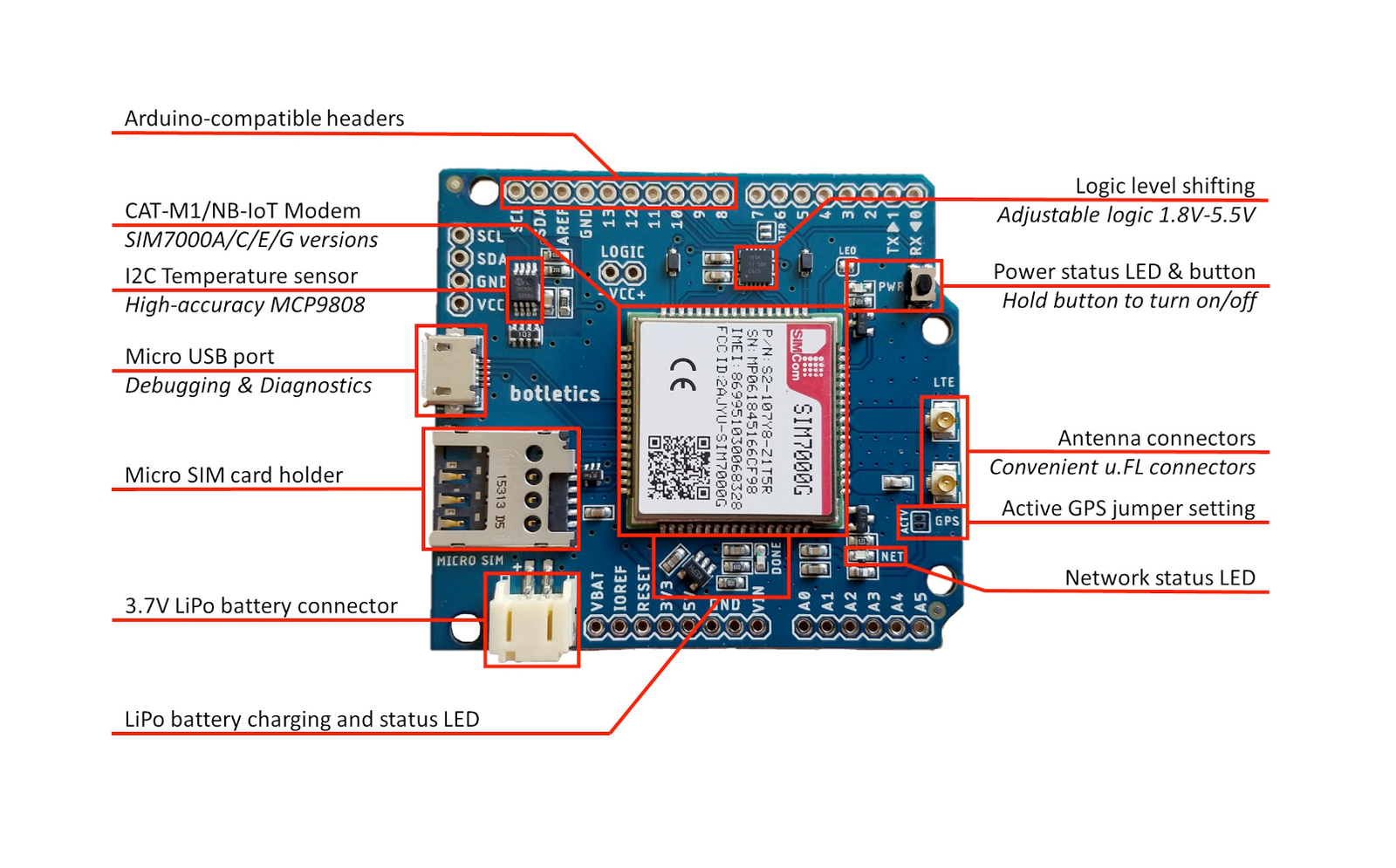
| Pin | Type | Description | Notes |
|---|---|---|---|
| VBAT | Power | Battery power input | 3.0V to 4.3V |
| GND | Power | Ground connection | |
| TXD | Communication | UART transmit | Module to MCU (connect to ESP32 RX) |
| RXD | Communication | UART receive | MCU to module (connect to ESP32 TX) |
| PWRKEY | Control | Power on/off control | Active low, pull low >1s to toggle |
| NETLIGHT | Status | Network status LED | Blink pattern indicates status |
| STATUS | Status | Module operating status | HIGH when module is ON |
| ANT_MAIN | RF | Main LTE/GPRS antenna | 50Ω impedance |
| ANT_GNSS | RF | GNSS antenna | For GPS/GLONASS/BeiDou |
Networks: LTE CAT-M1, NB-IoT (CAT-NB1), GPRS/EDGE
Power: 3.0V-4.3V with peak 2A current
Interface: UART (115200 baud default)
Bands: Multi-band LTE-FDD and GPRS
Antennas: Dual antenna (main + GNSS)
GNSS: Built-in GPS/GLONASS/BeiDou
SIM: Nano-SIM card slot
Pin Compatible: With SIM900/SIM800 series
Low Power: Optimized for battery IoT
Applications: Asset tracking, smart meters, remote monitoring
Wiring the SIM7000 to ESP32
To interface the SIM7000 with an ESP32 via UART:
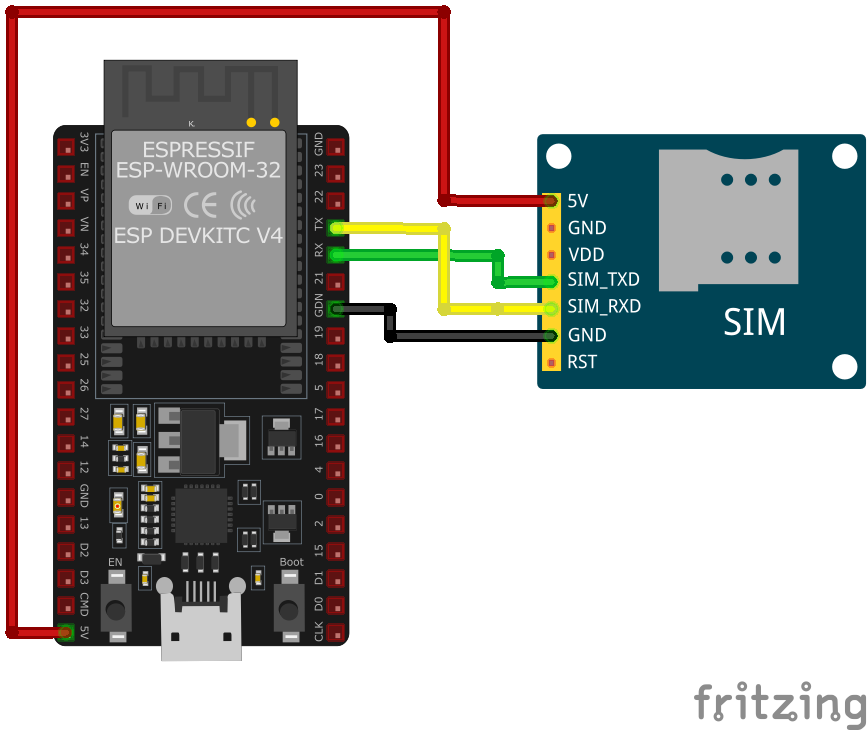
| SIM7000 pin | ESP32 pin | Purpose |
|---|---|---|
| VBAT | External 3.7-4.2V | LiPo battery or regulated supply |
| GND | GND | Ground (shared with ESP32) |
| TXD | GPIO16 (RX2) | Module transmit to ESP32 receive |
| RXD | GPIO17 (TX2) | Module receive from ESP32 transmit |
| PWRKEY | GPIO5 | Power control (pull low >1s) |
| ANT_MAIN | LTE Antenna | Main antenna connection |
| ANT_GNSS | GNSS Antenna | GPS antenna (optional) · optional |
Power: Use 3.7V LiPo or 3.3-4.2V regulated supply with 2A capability
Capacitors: Add 100µF + 1000µF low-ESR capacitors near power pins
Baud Rate: 115200 bps (configurable via AT commands)
PWRKEY: Pull low for >1 second to power on/off
Antennas: Use proper LTE antenna (50Ω) for main, GPS antenna for GNSS
SIM Card: Insert nano-SIM with data plan (LTE CAT-M1 or NB-IoT)
Network: Supports LTE CAT-M1, NB-IoT, and fallback to GPRS
GNSS: Optional GPS/GLONASS/BeiDou positioning
AT Commands: Standard AT command set
SIM7000 code examples
// SIM7000 on ESP32 UART2: module TXD -> GPIO16 (RX2), RXD -> GPIO17 (TX2), PWRKEY -> GPIO5
#define PWRKEY_PIN 5
#define MODEM_BAUD 115200

HardwareSerial modem(2); // UART2

void powerOnModem() {
    pinMode(PWRKEY_PIN, OUTPUT);
    digitalWrite(PWRKEY_PIN, LOW);
    delay(1200); // Hold PWRKEY low to power the module on
    digitalWrite(PWRKEY_PIN, HIGH);
    delay(5000); // Give the module time to boot and register
}

void sendATCommand(const char *command) {
    modem.println(command);
    delay(500);
    while (modem.available()) {
        Serial.write(modem.read());
    }
}

void setup() {
    Serial.begin(115200);
    modem.begin(MODEM_BAUD, SERIAL_8N1, 16, 17); // RX=GPIO16, TX=GPIO17

    powerOnModem();

    Serial.println("Testing AT communication...");
    sendATCommand("AT");       // Should answer OK
    sendATCommand("ATI");      // Module identification
    sendATCommand("AT+CSQ");   // Signal quality
    sendATCommand("AT+CREG?"); // Network registration status
}

void loop() {
    // Bridge the Serial Monitor and the modem so you can type AT commands directly
    while (Serial.available()) modem.write(Serial.read());
    while (modem.available()) Serial.write(modem.read());
}
This sketch talks to the SIM7000 over the ESP32's second hardware UART (UART2, RX on GPIO16, TX on GPIO17) - the ESP32 has three hardware UARTs, so the AVR-style SoftwareSerial library is neither available nor needed. GPIO5 pulses the module's PWRKEY to power it on, then a few basic AT commands verify communication, signal quality and network registration. The loop bridges the Serial Monitor to the module so you can type further AT commands interactively. Power the module from a supply that can deliver its transmit-burst current - not from the ESP32's 3.3V regulator.
#include <stdio.h>
#include <string.h>
#include "driver/uart.h"
#include "driver/gpio.h"
#include "freertos/task.h"

#define TX_PIN 17
#define RX_PIN 16
#define PWRKEY_PIN 5 // GPIO5, matches the wiring above
#define UART_PORT UART_NUM_1

void init_uart() {
    uart_config_t uart_config = {
        .baud_rate = 115200,
        .data_bits = UART_DATA_8_BITS,
        .parity = UART_PARITY_DISABLE,
        .stop_bits = UART_STOP_BITS_1,
        .flow_ctrl = UART_HW_FLOWCTRL_DISABLE
    };

    uart_param_config(UART_PORT, &uart_config);
    uart_set_pin(UART_PORT, TX_PIN, RX_PIN, UART_PIN_NO_CHANGE, UART_PIN_NO_CHANGE);
    uart_driver_install(UART_PORT, 1024, 0, 0, NULL, 0);
}

void power_on_sim7000() {
    gpio_set_direction(PWRKEY_PIN, GPIO_MODE_OUTPUT);
    gpio_set_level(PWRKEY_PIN, 0);
    vTaskDelay(1000 / portTICK_PERIOD_MS); // Hold PWRKEY low for 1 second
    gpio_set_level(PWRKEY_PIN, 1);
    vTaskDelay(5000 / portTICK_PERIOD_MS); // Wait for the module to initialize
}

void app_main(void) {
    init_uart();
    power_on_sim7000();

    char *test_cmd = "AT\r\n";
    uart_write_bytes(UART_PORT, test_cmd, strlen(test_cmd));

    while (true) {
        char data[128];
        int len = uart_read_bytes(UART_PORT, data, sizeof(data), 100 / portTICK_PERIOD_MS);
        if (len > 0) {
            data[len] = '\0';
            printf("Response: %s\n", data);
        }
        vTaskDelay(1000 / portTICK_PERIOD_MS);
    }
}
This ESP-IDF example initializes UART communication with the SIM7000 module and powers it on using the PWRKEY pin (GPIO4). The UART interface is configured with GPIO17 as TX and GPIO16 as RX. An AT command is sent to test communication, and responses from the module are printed to the console. This code can be extended to include SMS, GNSS data retrieval, or GPRS functionalities.
uart:
  tx_pin: GPIO17  # module RXD
  rx_pin: GPIO16  # module TXD
  baud_rate: 115200

# ESPHome's sim800l component speaks the generic SIM AT command set, which these modules share for SMS
sim800l:
  on_sms_received:
    - logger.log:
        format: "Received '%s' from %s"
        args: [ 'message.c_str()', 'sender.c_str()' ]
ESPHome has no dedicated LTE-modem component, and the custom platform older examples used was removed in 2025. The sim800l component speaks the generic SIM AT command set for SMS, which the SIM7000 shares - wire UART2 as shown (115200 baud) and you get on_sms_received plus sim800l.send_sms actions. Data connectivity (LTE networking) is outside ESPHome's scope.
[env:sim7000]
platform = espressif32
board = esp32dev
framework = arduino
monitor_speed = 115200#include <HardwareSerial.h>
#include <Arduino.h>
HardwareSerial sim7000(1);
#define PWRKEY 4
void power_on_sim7000() {
pinMode(PWRKEY, OUTPUT);
digitalWrite(PWRKEY, LOW);
delay(1000); // Hold PWRKEY low for 1 second
digitalWrite(PWRKEY, HIGH);
delay(5000); // Wait for initialization
}
void setup() {
Serial.begin(115200);
sim7000.begin(9600, SERIAL_8N1, 16, 17); // RX, TX
power_on_sim7000();
// Test AT command
sim7000.println("AT");
delay(1000);
while (sim7000.available()) {
Serial.write(sim7000.read());
}
// Send SMS
sim7000.println("AT+CMGF=1"); // Set SMS to text mode
delay(1000);
sim7000.println("AT+CMGS=\"+1234567890\""); // Replace with recipient's number
delay(1000);
sim7000.print("Hello from SIM7000");
sim7000.write(26); // CTRL+Z to send SMS
delay(5000);
}
void loop() {
// Handle incoming data or other functionalities
}This PlatformIO code interfaces with the SIM7000 module using HardwareSerial on an ESP32. The power_on_sim7000 function toggles the PWRKEY pin (GPIO4) to activate the module. The AT command is sent to test communication, and SMS functionality is implemented in the setup. Additional functionalities, like GNSS data retrieval or GPRS communication, can be added in the loop.
from machine import UART, Pin
import time

# Initialize UART
uart = UART(2, baudrate=115200, tx=17, rx=16)
pwrkey = Pin(5, Pin.OUT)  # PWRKEY, matches the wiring above

def power_on_sim7000():
    pwrkey.value(0)
    time.sleep(1)  # Hold PWRKEY low for 1 second
    pwrkey.value(1)
    time.sleep(5)  # Wait for module to initialize

def send_at(command):
    uart.write(command + '\r\n')
    time.sleep(1)
    while uart.any():
        print(uart.read().decode('utf-8'), end='')

# Power on the module
power_on_sim7000()

# Test communication
send_at('AT')

# Send SMS
send_at('AT+CMGF=1')  # Set SMS to text mode
send_at('AT+CMGS="+1234567890"')  # Replace with recipient's number
uart.write("Hello from MicroPython" + chr(26))
This MicroPython code communicates with the SIM7000 module over UART. The power_on_sim7000 function activates the module using the PWRKEY pin (GPIO4). The send_at function sends AT commands and prints the responses. The script initializes the module, tests communication, and demonstrates how to send an SMS. Additional logic for handling GNSS data or GPRS communication can be added.
SIM7000 specifications
About the SIM7000
The SIM7000 is an LPWA (low power wide area) module: it speaks LTE Cat-M1 (eMTC) and Cat-NB1 (NB-IoT) instead of broadband LTE, topping out around 375 Kbps rather than the 10 Mbps a Cat 1 part like the SIM7600G offers, with no voice calling. That is a deliberate trade - Cat-M1 and NB-IoT are built for small, infrequent packets from battery-powered devices, and in exchange for the low throughput a sensor node can sleep between transmissions and run for years instead of days. It also shares roughly the same 24x24mm footprint as the older SIM800/SIM900 family, which is why so many “upgrade your 2G tracker” projects use it as a drop-in for an aging module.
As with every regional cellular part, the SIM7000 comes in variants that are not interchangeable: the SIM7000E targets Europe, Africa and Southeast Asia with LTE bands B3/B8/B20/B28; the SIM7000C covers the Asia-Pacific band set B1/B3/B5/B8; and only the SIM7000G combines both band lists into one global-coverage part. A module bought for the wrong region will not register, regardless of how correctly it’s wired. It’s also worth confirming a carrier actually runs Cat-M1 or NB-IoT before committing - not every network operates both, and some only support one of the two.
TinyGSM lists the SIM7000E/A/G explicitly among its supported modems, so the mainline library works without a fork. For a newer part in the same family with a single global-band SKU and better sleep-current figures, see the SIM7080G; for real broadband speed and voice support, SIM7600G or A7670 are the better fit.
SIM7000 troubleshooting
Module Fails to Power On
›
Issue: The SIM7000 module does not power up or respond to commands.
Possible causes include insufficient power supply, incorrect wiring, or faulty hardware.
Solution: Ensure the module is connected to a stable power source within the recommended voltage range of 3.0V to 4.3V. Verify that all connections are secure and correctly configured. If the problem persists, consider testing the module with a different power source or replacing it.
SIM Card Not Recognized
›
Issue: The module fails to detect or register the SIM card.
Possible causes include improper SIM card insertion, unsupported SIM card type, or SIM card lock.
Solution: Ensure the SIM card is properly inserted into the module's SIM card slot and is compatible with the GSM network. Verify that the SIM card is active and unlocked. If necessary, test the SIM card in another device to confirm its functionality.
Poor Network Signal or Connectivity Issues
›
Issue: The module experiences weak signal strength or fails to maintain a stable network connection.
Possible causes include improper antenna connection, environmental interference, or network coverage limitations.
Solution: Ensure the GSM antenna is securely connected to the module and positioned for optimal signal reception. Avoid placing the module near sources of electromagnetic interference. Check the network coverage in your area to ensure adequate signal strength.
AT Commands Not Responding
›
Issue: The module does not respond to AT commands sent from the microcontroller or computer.
Possible causes include incorrect baud rate settings, faulty serial connections, or improper command syntax.
Solution: Verify that the baud rate of the module matches that of the microcontroller or computer; the default baud rate is 115200 bps. Check that the TX and RX lines are correctly connected and that there are no loose connections. Ensure that AT commands are correctly formatted and terminated with a carriage return.
GPS Functionality Not Working
›
Issue: The SIM7000 module fails to acquire GPS signals or provide location data.
Possible causes include improper antenna connection, obstructed view of the sky, or GPS functionality not enabled.
Solution: Ensure the GPS antenna is properly connected and has a clear view of the sky to receive satellite signals. Verify that the GPS functionality is enabled by sending the appropriate AT commands to power on the GPS engine.
Where to buy the SIM7000

Resources
Similar sensors


