
VL53L1X Time-of-Flight Sensor
The VL53L1X is a high-accuracy long-distance laser-ranging sensor from STMicroelectronics. It uses a 940nm VCSEL emitter and advanced SPAD detection to measure absolute distances up to 4 meters with millimeter-level precision.

VL53L1X pinout
The VL53L1X pinout includes I2C communication pins (SDA, SCL), power supply (VIN, GND), shutdown pin (XSHUT), and interrupt pin (GPIO1) for long-range distance measurements up to 4 meters.
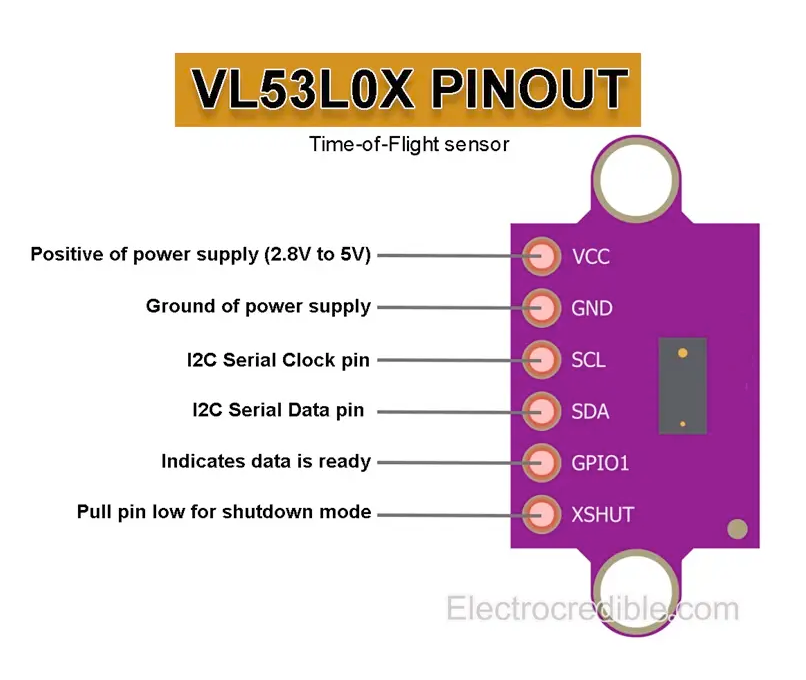
| Pin | Type | Description | Notes |
|---|---|---|---|
| VIN | Power | Power supply input (2.6V to 3.5V) | Typically 3.3V (strict requirement) |
| GND | Ground | Ground connection | Common ground |
| SCL | I2C Clock | I2C Serial Clock line | Clock signal (requires pull-up) |
| SDA | I2C Data | I2C Serial Data line | Bidirectional data (requires pull-up) |
| GPIO1 | Interrupt | Interrupt output pin | Optional for event-driven measurements |
| XSHUT | Control | Shutdown pin (active low) | Used to reset sensor or change I2C address |
Long-range Time-of-Flight (ToF) sensor
Measurement range: 0 mm to 4000 mm (4 meters)
Resolution: 1 mm
Field of View: 27°
Operating voltage: 2.6V to 3.5V (3.3V recommended)
I2C address: 0x29 (default)
Laser wavelength: 940 nm (Class 1)
Adjustable timing budget and distance modes
Current consumption: ~20-40 mA during ranging
Compact 6-pin PCB module with mounting holes
Wiring the VL53L1X to ESP32
Connect the VL53L1X to your ESP32 via I2C (SDA and SCL pins). This sensor offers extended range up to 4 meters compared to the VL53L0X. Operating voltage is 2.6V to 3.5V (use 3.3V). Pull-up resistors are typically included on modules.
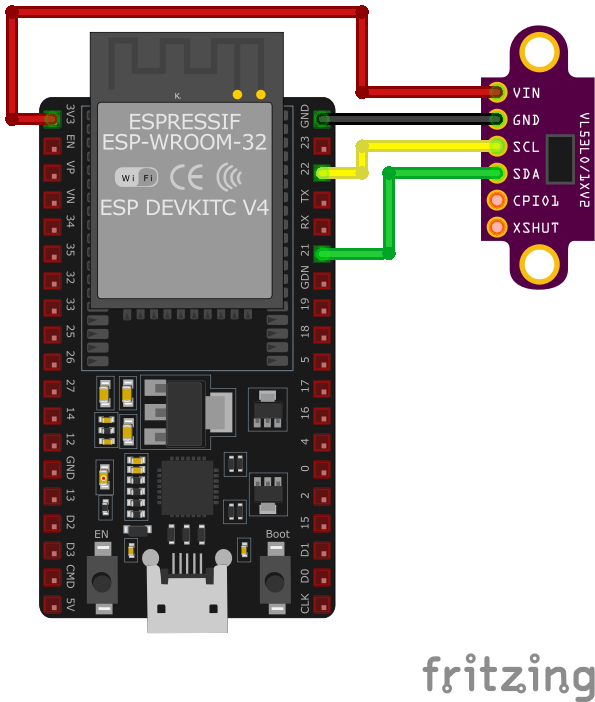
| VL53L1X pin | ESP32 pin | Purpose |
|---|---|---|
| VIN | 3.3V | Power supply (2.6V to 3.5V, use 3.3V) |
| GND | GND | Ground connection |
| SDA | GPIO21 | I2C data line (with pull-up) |
| SCL | GPIO22 | I2C clock line (with pull-up) |
| XSHUT | GPIO (optional) | Shutdown/reset control (tie high to enable) · optional |
| GPIO1 | GPIO (optional) | Interrupt output for measurement ready · optional |
Extended range: up to 4 meters (2x the VL53L0X)
I2C address: 0x29 (same as VL53L0X)
Operating voltage: 2.6V to 3.5V - use 3.3V, NOT 5V!
Pull-up resistors (4.7kΩ) typically included on module
Adjustable distance modes: short (1.3m), medium (3m), long (4m)
Adjustable timing budget affects accuracy and speed
XSHUT pin allows multiple sensors on same I2C bus
Tie XSHUT high (3.3V) to enable sensor by default
Use Adafruit_VL53L1X or Pololu VL53L1X library
Better performance in ambient light than VL53L0X
Avoid shiny, transparent, or very dark surfaces
Field of view (27°) wider than VL53L0X (25°)
VL53L1X code examples
// Requires library: "VL53L1X"
#include <Wire.h>
#include <VL53L1X.h>

VL53L1X sensor;

void setup() {
  Serial.begin(115200);
  Wire.begin(); // SDA=GPIO21, SCL=GPIO22

  sensor.setTimeout(500);
  if (!sensor.init()) {
    Serial.println("Failed to initialize VL53L1X! Check wiring.");
    while (1);
  }
  sensor.setDistanceMode(VL53L1X::Long);        // up to ~4 m
  sensor.setMeasurementTimingBudget(50000);     // 50 ms per measurement
  sensor.startContinuous(50);
}

void loop() {
  int distance = sensor.read(); // mm
  if (sensor.timeoutOccurred()) {
    Serial.println("Timeout - check wiring");
  } else {
    Serial.print("Distance: ");
    Serial.print(distance);
    Serial.println(" mm");
  }
  delay(100);
}
The example uses Pololu's VL53L1X library (install "VL53L1X" from the Library Manager - note the VL53L1X is a different chip from the VL53L0X and needs its own driver). Long distance mode ranges up to about 4 m; the 50 ms timing budget balances speed and accuracy, and read() returns millimeters from the continuous ranging started in setup.
// Requires the VL53L1X ULD wrapper (ESP Component Registry):
//   idf.py add-dependency "saleca/vl53l1x_uld_esp_wrapper^0.0.6"

#include <stdio.h>
#include "freertos/FreeRTOS.h"
#include "freertos/task.h"
#include "vl53l1x.h"
#include "esp_log.h"

static const char *TAG = "VL53L1X";

vl53l1x_handle_t vl53l1x_handle = VL53L1X_INIT;
vl53l1x_device_handle_t vl53l1x_device = VL53L1X_DEVICE_INIT;

void app_main(void)
{
    vl53l1x_i2c_handle_t i2c_handle = VL53L1X_I2C_INIT;
    i2c_handle.scl_gpio = GPIO_NUM_22; // matches the wiring above
    i2c_handle.sda_gpio = GPIO_NUM_21;

    vl53l1x_handle.i2c_handle = &i2c_handle;
    if (!vl53l1x_init(&vl53l1x_handle)) {
        ESP_LOGE(TAG, "VL53L1X initialization failed");
        return;
    }

    vl53l1x_device.vl53l1x_handle = &vl53l1x_handle;
    if (!vl53l1x_add_device(&vl53l1x_device)) {
        ESP_LOGE(TAG, "Failed to add VL53L1X device");
        return;
    }

    while (1) {
        printf("Distance: %d mm\n", vl53l1x_get_mm(&vl53l1x_device));
        vTaskDelay(pdMS_TO_TICKS(500));
    }
}
The example uses the saleca/vl53l1x_uld_esp_wrapper component from the ESP Component Registry, which bundles ST's official VL53L1X ULD driver with an ESP-IDF I2C implementation: after initializing the wrapper on the default I2C pins and adding the device, vl53l1x_get_mm() returns the distance in millimeters. The underlying ST ULD API (distance modes, timing budgets, ROI) is available through VL53L1X_api.h for advanced use.
external_components:
  - source: github://Averyy/esphome-custom-components
    components: [vl53l1x]

i2c:
  sda: GPIO21
  scl: GPIO22

vl53l1x:

sensor:
  - platform: vl53l1x
    distance:
      name: "VL53L1X Distance"
Core ESPHome has no VL53L1X platform (its vl53l0x component speaks a different chip's protocol), but community external components cover it - this example pins the vl53l1x component from Averyy/esphome-custom-components, which exposes distance readings with configurable distance mode and timing budget. For people-counting use cases, the well-known Roode external component builds a full counter on the same chip.
[env:esp32dev]
platform = espressif32
board = esp32dev
framework = arduino
monitor_speed = 115200
lib_deps =
pololu/VL53L1X @ ^1.3.1#include <Arduino.h>
#include <Wire.h>
#include <VL53L1X.h>
VL53L1X sensor;
void setup() {
Serial.begin(115200);
Wire.begin(); // SDA=GPIO21, SCL=GPIO22
sensor.setTimeout(500);
if (!sensor.init()) {
Serial.println("Failed to initialize VL53L1X! Check wiring.");
while (1);
}
sensor.setDistanceMode(VL53L1X::Long); // up to ~4 m
sensor.setMeasurementTimingBudget(50000); // 50 ms per measurement
sensor.startContinuous(50);
}
void loop() {
int distance = sensor.read(); // mm
if (sensor.timeoutOccurred()) {
Serial.println("Timeout - check wiring");
} else {
Serial.print("Distance: ");
Serial.print(distance);
Serial.println(" mm");
}
delay(100);
}Same as the Arduino example, with Pololu's VL53L1X library pinned in lib_deps. Long distance mode ranges up to ~4 m and read() returns millimeters.
# Requires driver: vl53l1x.py from https://github.com/drakxtwo/vl53l1x_pico
# Copy it to the board: mpremote cp vl53l1x.py :
from machine import I2C, Pin
from vl53l1x import VL53L1X
import time

i2c = I2C(0, scl=Pin(22), sda=Pin(21))
sensor = VL53L1X(i2c)

while True:
    print("Distance: {} mm".format(sensor.read()))
    time.sleep(0.5)
The example uses the drakxtwo/vl53l1x_pico driver (pure machine.I2C, so it runs fine on the ESP32 despite the name - copy vl53l1x.py to the board). The driver performs the VL53L1X's init sequence and read() returns the distance in millimeters. Note the VL53L1X needs its own driver - VL53L0X code does not work on it.
About the VL53L1X
The VL53L1X is STMicroelectronics’s longer-range FlightSense sensor: the same 940 nm laser time-of-flight principle as the VL53L0X, but built around a 16x16 SPAD array that lets it reach up to 4 meters and adds a genuinely useful feature the VL53L0X lacks - a programmable region of interest (ROI). Instead of always using the full sensor array (a roughly 27-degree field of view), firmware can narrow the active zone down to as small as 4x4 SPADs and move its center around the array, which is how people-counting projects like the well-known Roode ESPHome component avoid double-counting someone passing at an angle.
The 4-meter figure needs the same caveat as the VL53L0X’s 2-meter one, just more pronounced: it is a dark-room, high-reflectance-target number. The chip actually offers three distance modes - short (up to 1.3 m), medium (up to 3 m) and long (up to 4 m) - that trade integration time for range, and ambient light hits the longer modes hard. Independent testing against ST’s own figures shows long mode’s usable range collapsing from about 360 cm in the dark to around 73 cm in strong ambient light, and medium mode from about 290 cm down to roughly 76 cm; short mode barely moves (136 cm to 135 cm) because its short integration window has little time to pick up stray light. For anything used outdoors or under bright lighting, short or medium mode is often more reliable than “long” despite the smaller number.
ESPHome has no built-in VL53L1X platform - community external components fill the gap, including a dedicated one for people-counting - and the TOF400C is the same VL53L1X chip on a different breakout. If 4 meters is more range than you need and simpler ambient-light behavior matters more, the shorter-range VL53L0X is the easier sensor to get consistent numbers from.
VL53L1X troubleshooting
Sensor Not Responding on I²C
›
Issue: Sensor not responding over I²C.
Solution: Verify wiring, check if XSHUT is high, and ensure the I²C address does not conflict with other devices.
Distance Readings Fluctuate
›
Issue: Unstable distance values.
Solution: Use longer timing budget in code, or stabilize the environment (lighting, surface reflectivity).
Always Reads Maximum
›
Issue: Sensor stuck at max distance (4000 mm).
Solution: Ensure object is within line of sight, avoid high IR interference, and ensure proper power supply.
Where to buy the VL53L1X

Resources
Similar sensors


