

Powering ESP32 with 12V Power Source using Buck Converter
Safely power an ESP32 from a 12V source using a buck converter. Discover buck (step-down) converter modules, wiring diagrams, voltage adjustment, and safety tips.
Need to power your ESP32 from a 12V source? If you're building car electronics, controlling LED strips, or automating with relays, this guide shows you how to safely step down voltage using a buck converter.
⚠️ Warning: Connecting 12V directly to ESP32 will cause irreversible damage! ESP32 boards operate at 3.3V logic and require 5V input for stable operation.
⬇️ Quick navigation: Jump to Wiring Diagram
Common Use Cases for 12V ESP32 Projects #
Car Electronics
ESP32-based IoT dashboards, GPS trackers, or smart vehicle monitoring systems powered directly by a 12V car battery.
12V LED Strips
Controlling addressable or analog LED strips where a single power source simplifies wiring for both LEDs and ESP32.
Pumps & Relays
Automation projects with 12V solenoid valves, motors, or relays benefit from unified power distribution.
� Related Resources:
Why Direct Connection is Dangerous #
🔥 Critical: ESP32 Voltage Requirements
The ESP32 operates at 3.3V logic but development boards typically require 5V on the Vin pin to function properly. The boards have a built-in voltage regulator that takes 5V from USB or Vin and steps it down to 3.3V for the microcontroller.
ESP32 Pin Voltage Specifications:
3.3V Pin
3.3V (regulated output)
Vin Pin
5V (regulated input)
USB Port
5V
Why 12V Direct Connection Causes Damage:
Overheating & Inefficiency
Most ESP32 boards use linear voltage regulators that convert excess voltage into heat. Stepping down from 12V to 3.3V generates excessive heat, causing instability and reduced lifespan.
Regulator Load Limitations
Even if the regulator accepts 12V input technically, it may not handle high current loads efficiently. Wi-Fi, sensors, or peripherals can overload it.
Voltage Drop at High Current
As ESP32 draws more current (especially during Wi-Fi transmissions), the regulator may struggle to maintain a steady 3.3V output.
Component Stress & Failure Risks
Running the regulator at maximum rated voltage (12V) continuously puts excessive stress on it, leading to early component failure and unpredictable resets.
ℹ️ Does Your ESP32 Board Have a Built-in Voltage Regulator?
Most ESP32 development boards include an onboard voltage regulator that steps down 5V to 3.3V, but not all boards have the same regulator specs! Some boards claim to support higher input voltages (e.g., 6V-12V on Vin), but this depends entirely on the regulator used.
📖 Always check your board's datasheet or look up detailed specifications here:
Explore All ESP32 Development Boards →
✅ Safe Powering Solution
Instead of direct connection, use a buck converter (step-down regulator) to safely bring 12V down to 5V before connecting to Vin. More details in the next section!
💡 Also consider: Deep Sleep & Low Power Optimization on ESP32
Voltage Compatibility Chart #
Not all voltages are safe to supply directly to an ESP32 board. Here's what happens at different voltage levels:
Best Solution: Buck Converter (Step-Down Voltage Regulator) #
When powering an ESP32 from a 12V source, the best approach is to use a buck converter (also called a step-down switching regulator). Unlike linear regulators, which dissipate excess voltage as heat, buck converters efficiently convert higher voltages to lower voltages with minimal energy loss.
⚙️ What is a Buck Converter?
A buck converter is a DC-DC switching regulator that reduces input voltage while maintaining efficiency. It works by rapidly switching the input voltage on and off, storing energy in an inductor, and then smoothing it into a stable lower voltage.
How It Works (Simplified):
High-frequency switching: The circuit rapidly turns the input voltage on and off using a MOSFET.
Inductor stores energy: Each time the switch is on, energy builds up in an inductor.
Controlled release: The stored energy is gradually released when the switch turns off, creating a lower, stable output voltage.
Smoothing capacitor: A capacitor at the output reduces ripple, providing a clean 5V output.
Why Choose a Buck Converter Over a Linear Regulator?
You might have heard of linear voltage regulators like the AMS1117-3.3V or 7805, which are commonly used to step down voltage. While they are simple to use and don't require additional circuitry, they come with a major drawback:
🔥 Linear regulators convert excess voltage into heat, making them extremely inefficient for large voltage drops!
On the other hand, a buck converter (switching regulator) efficiently steps down voltage without wasting energy as heat, making it a much better option for power-sensitive applications.
⚡ Performance Comparison
✅ Buck Converter
✓ Ideal for battery-powered & heat-sensitive apps
❌ Linear Regulator
⚠ Only for small voltage drops (5V → 3.3V)
💡 Bottom Line
If you're dropping from 12V to 5V, a buck converter is the way to go! It avoids heat buildup, reduces power loss, and keeps your ESP32 stable.

LM2596 Module

MP1584 Module

MINI360 Module
These modules are excellent for powering ESP32 boards from batteries or higher-voltage power sources.
📊 Quick Comparison
LM2596
MP1584
Mini360 5V
Adjustable vs. Fixed Voltage Regulators #
Adjustable Regulators
Modules like the LM2596 allow fine-tuning via a potentiometer.
✅ Pros
- • Versatile for different voltage outputs
- • Single module for multiple projects
- • Precision voltage adjustment
⚠️ Cons
- • Requires manual adjustment
- • Misconfiguration risk
- • Can accidentally damage ESP32
Fixed 5V Regulators
Pre-configured for stable 5V output. Recommended for ESP32!
✅ Pros
- • No adjustment needed
- • Zero overvoltage risk
- • Plug-and-play simplicity
- • Perfect for ESP32's Vin pin
💡 Best Choice for ESP32 Projects
⚡ Current Rating Considerations
The ESP32 itself typically consumes 100-300mA, but total power demand increases with peripherals:
1A Regulator
Basic Projects
- ✓ ESP32 only
- ✓ Simple sensors
- ✓ Low-power applications
2A Regulator
Standard Projects
- ✓ Multiple sensors
- ✓ Small displays
- ✓ Single relay
3A Regulator
Advanced Projects
- ✓ Large displays
- ✓ Multiple relays
- ✓ Motors & servos
- ✓ Future expansion
💡 Pro Tip: Choose a regulator with extra current capacity to prevent voltage drops and ensure reliable operation under load.
Wiring a Buck Converter to an ESP32 #
If you're using a 12V power source and need to power an ESP32, a buck converter (step-down voltage regulator) is the safest and most efficient way to convert 12V down to 5V.
💡 Many ESP32 development boards, such as those listed in the ESP32 development board guide, have a Vin pin that accepts 5V, making this an easy setup.
Connect the 12V Input to the Buck Converter
- → Identify the input terminals on the buck converter (IN+ and IN-).
- → Connect IN+ to the positive terminal of the 12V power supply.
- → Connect IN- to the ground (GND) of the power supply.
Adjust the Output Voltage to 5V
🔧 Adjustable Converters
- Use a multimeter to measure the output voltage between OUT+ and OUT-.
- Turn the adjustment potentiometer (small screw on the module) until the output reads 5V.
⚠️ Important: Always measure the output voltage with a multimeter BEFORE connecting to your ESP32 to avoid damage!
Connect the Buck Converter Output to the ESP32
- → Connect the OUT+ (5V) of the buck converter to the Vin pin on the ESP32.
- → Connect the OUT- (GND) of the buck converter to the GND pin on the ESP32.
✅ Done! Your ESP32 is now safely powered from a 12V source.
Wiring Diagram #
Below are visual wiring diagrams showing how to connect a buck converter between a 12V power source and an ESP32:
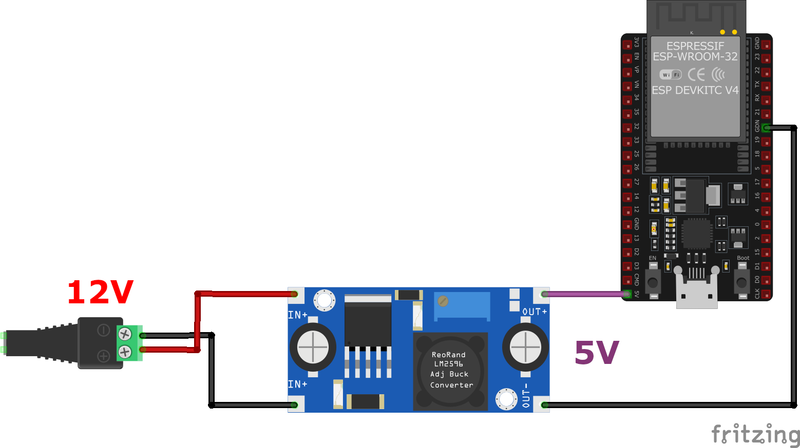
LM2596 Buck Converter Setup
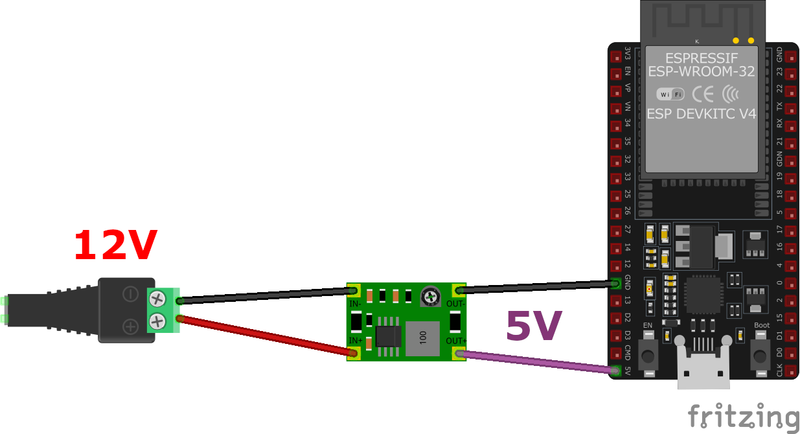
Mini360 Buck Converter Setup
🔌 Connection Reference Table
| Component | Buck Converter Pin | ESP32 Pin |
|---|---|---|
| 12V Power (+) | IN+ | N/A |
| 12V Power (GND) | IN- | N/A |
| Buck 5V Output | OUT+ | Vin |
| Buck GND Output | OUT- | GND |
⚠️ Important Safety Notes
- Most ESP32 boards, including ESP32 DevKit V1, have a voltage regulator on Vin, allowing safe operation with 5V input.
- Generally avoid exceeding 5.5V on the Vin pin, as it may damage the onboard regulator.
- Ensure your buck converter can supply at least 1A or more, if additional peripherals (e.g., sensors, displays) are connected.
Summary #
Powering an ESP32 from a 12V source is best done using a buck converter, which ensures efficient and stable 5V output. Adjustable regulators like the LM2596 and MP1584 allow fine-tuning, while fixed 5V models offer reliability. Proper wiring involves connecting the 12V source to the converter’s input, adjusting the output if necessary, and supplying the ESP32’s Vin and GND with 5V.
Measuring the voltage before connecting ensures the ESP32 isn’t exposed to overvoltage, which could damage its internal regulator. Compared to linear regulators, buck converters provide higher efficiency, reducing heat and extending battery life in portable applications.