
Adafruit Feather ESP32-S2 Reverse TFT
ESP32-S2 Feather board with a front-facing TFT - perfect for compact dashboards and visual projects.

Adafruit Feather ESP32-S2 Reverse TFT Pinout
28 pins · 2.54 mm pitch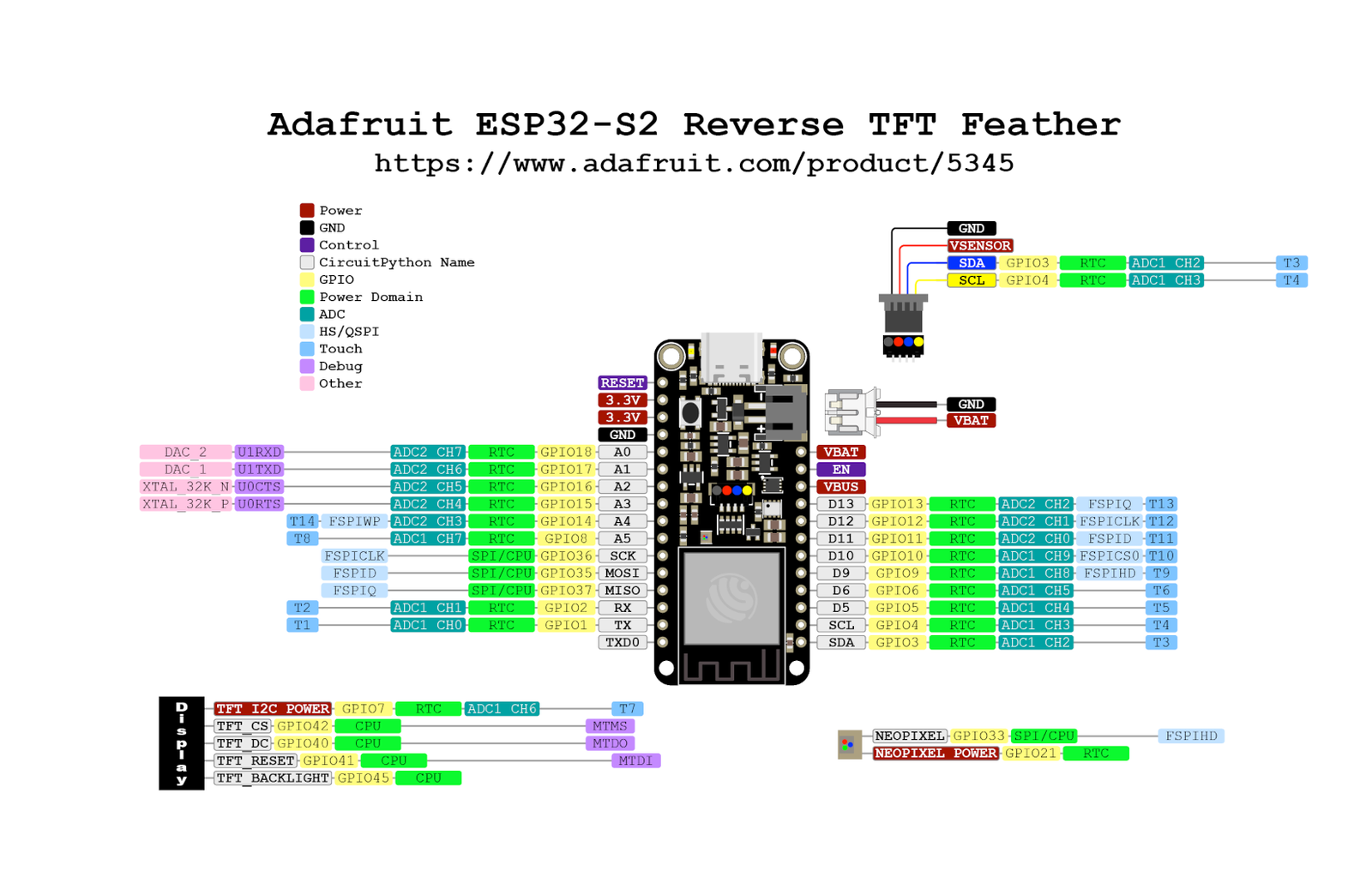
| Pin | GPIO | Labels | Status | Capabilities | Notes |
|---|---|---|---|---|---|
| 1 | 1 | NEOPIXEL_NUMPWM | safe | - | |
| 2 | 3 | SDAPWM | safe | i2c | |
| 3 | 4 | SCLPWM | safe | i2c | |
| 4 | 5 | T5PWM | safe | touch | |
| 5 | 6 | T6PWM | safe | touch | |
| 6 | 7 | TFT_I2C_POWERPWM | safe | - | |
| 7 | 8 | A5T8PWM | safe | adc · touch | |
| 8 | 9 | T9PWM | strapping | touch | |
| 9 | 10 | T10PWM | strapping | touch | |
| 10 | 11 | T11PWM | strapping | touch | |
| 11 | 12 | T12PWM | strapping | touch | |
| 12 | 13 | LED_BUILTINT13PWM | strapping | touch | |
| 13 | 14 | A4T14PWM | strapping | adc · touch | |
| 14 | 15 | A3PWM | strapping | adc | |
| 15 | 16 | A2PWM | strapping | adc | |
| 16 | 17 | A1DAC1PWM | safe | adc · dac | |
| 17 | 18 | A0DAC2PWM | safe | adc · dac | |
| 18 | 21 | NEOPIXEL_POWERPWM | safe | - | |
| 19 | 33 | PIN_NEOPIXELPWM | safe | - | |
| 20 | 35 | MOSIPWM | safe | spi | |
| 21 | 36 | SCKPWM | safe | spi | |
| 22 | 37 | MISOPWM | safe | spi | |
| 23 | 2 | RXPWM | uart | uart | |
| 24 | 1 | TXPWM | uart | uart | |
| 25 | 40 | TFT_DCPWM | strapping | - | |
| 26 | 41 | TFT_RSTPWM | strapping | - | |
| 27 | 42 | TFT_CSSSPWM | strapping | spi | |
| 28 | 45 | TFT_BACKLITEPWM | strapping | - |
Start with these
16 pins with no boot or system involvementFreely assignable - no strapping, flash, USB or JTAG duties. Ideal first picks for buttons, sensors and LEDs.
Fine - with a little care
12 pins · 7 things to knowT9GPIO9T10GPIO10T11GPIO11T12GPIO12LED_BUILTINGPIO13A4GPIO14 General-purpose SPI2 (FSPI) IO MUX pins Other
IO MUX pin of the general-purpose SPI2 (FSPI) bus, not of the in-package flash - that sits on GPIO26-32. The datasheet does not restrict it, so it is only taken if your board wires flash, an SD card or a display to FSPI.
- T9General-purpose SPI2 (FSPI) IO MUX pin - hold/data line (FSPIHD)
- T10General-purpose SPI2 (FSPI) IO MUX pin - chip select (FSPICS0)
- T11General-purpose SPI2 (FSPI) IO MUX pin - data in (FSPID)
- T12General-purpose SPI2 (FSPI) IO MUX pin - clock (FSPICLK)
- LED_BUILTINGeneral-purpose SPI2 (FSPI) IO MUX pin - data out (FSPIQ)
- A4General-purpose SPI2 (FSPI) IO MUX pin - write-protect/data line (FSPIWP)
A3GPIO15 32.768 kHz RTC crystal oscillator positive input (XTAL_32K_P); also functions as GPIO15 (U0RTS, ADC2_CH4). Other
If an external 32 kHz crystal is used for RTC, this pin is dedicated to the crystal and cannot be used as GPIO.
A2GPIO16 32.768 kHz RTC crystal negative input (XTAL_32K_N); also GPIO16 (U0CTS, ADC2_CH5). Other
If using an external 32 kHz crystal, this pin is connected to the crystal and should not be used as general I/O.
TFT_DCGPIO40 JTAG test data-out pin (MTDO); also GPIO40, supports CLK_OUT2. JTAG
Part of JTAG interface (TDO); should be avoided as GPIO if JTAG debugging is needed.
TFT_RSTGPIO41 JTAG test data-in pin (MTDI); also GPIO41, supports CLK_OUT1. JTAG
Part of JTAG interface (TDI); avoid using as GPIO to retain ability for JTAG debug.
TFT_CSGPIO42 JTAG test mode select pin (MTMS); also GPIO42. JTAG
JTAG TMS pin; should not be repurposed if JTAG debugging or programming via JTAG is required.
TFT_BACKLITEGPIO45 Bootstrapping pin; selects flash supply voltage (VDD_SPI) (0 = 3.3 V, 1 = 1.8 V). Strapping
Must be set correctly at boot (usually low for 3.3 V); improper level can cause boot failure or flash malfunction.
The Adafruit Feather ESP32-S2 Reverse TFT pinout brings out 28 GPIO pins at a 2.54 mm pitch - every one of them usable in your project.
For peripherals, I²C is mapped to SDA on GPIO3 and SCL on GPIO4; the SPI bus (MOSI, MISO, SCK, SS) is broken out in full; TX/RX on GPIO1 and GPIO2 cover serial logging and flashing.
On the analog side there are 6 ADC-capable pins for sensors and battery monitoring, 9 capacitive-touch inputs and 2 true DAC outputs.
If you want zero surprises, NEOPIXEL_NUM, SDA, SCL, T5 and 12 more are free of any such role - the safest first picks. 12 of the exposed pins carry boot-time or system duties on the ESP32-S2 (T9, T10, T11 and 9 more).
Getting started
flash your first firmware in ~2 minutesBoard: ESP32S2 Dev Module USB CDC On Boot: Enabled Flash Size: 4MB (32Mb) Flash Mode: DIO PSRAM: QSPI PSRAM Partition Scheme: Default 4MB with spiffs (1.2MB APP/1.5MB SPIFFS) Upload Speed: 921600
// toggle GPIO1 - wire an LED and resistor to it
void setup() {
  pinMode(1, OUTPUT);
}
void loop() {
  digitalWrite(1, HIGH); delay(500);
  digitalWrite(1, LOW);  delay(500);
}[env:adafruit_feather_esp32s2_reversetft]
platform = espressif32
board = esp32-s2-saola-1
framework = arduino
monitor_speed = 115200
upload_speed = 921600
board_build.arduino.memory_type = qio_qspi
build_flags = -DBOARD_HAS_PSRAMesp32-s2-saola-1 - or type it after board =.esp32:
board: esp32-s2-saola-1
variant: esp32s2
framework:
type: esp-idf
psram:
mode: quad
speed: 80MHz
# blink - GPIO1
output:
- platform: gpio
pin: 1
id: led_out
light:
- platform: binary
name: "LED"
output: led_outesp32-s2-saola-1 (same ids as PlatformIO).esptool.py --chip esp32s2 --port /dev/ttyACM0 \
--baud 921600 write_flash 0x1000 firmware.bin--port = your /dev/tty* (macOS/Linux) or COMx (Windows).Specifications
ESP32-S2 · 52 × 23 mm · vs other ESP32 chips →Dimensions
About this board
At its core is the ESP32-S2 - a single-core Xtensa with native USB-OTG and no Bluetooth.
Expect to pay about $24.95 - above the ~$20 typical for ESP32-S2 boards.
Onboard you'll find 2MB PSRAM, a TFT 1.14" 240x135 display, a STEMMA QT connector, an addressable RGB LED (GPIO33), a battery fuel gauge (MAX17048), battery charging via JST-PH 2.0, status LEDs (On, Charge, User (D13)) and Reset/D0/D1/D2 buttons.
It flashes over native USB - no serial-converter driver needed, which isn't a given among ESP32-S2 boards.
- Also sold in a u.FL external-antenna variant (product
- Early units shipped with an LC709203F fuel gauge instead of the MAX17048
- Reverse-mounted display sits on the same face as the three user buttons
Where to buy
prices are typical street pricesResources
Similar boards


