
AHT10 Temperature and Humidity Sensor
The AHT10 is an advanced, fully calibrated, and highly integrated temperature and humidity sensor that provides reliable, precise environmental measurements. Designed with cutting-edge CMOSens® technology, it offers high performance in a compact and energy-efficient package, making it ideal for various applications ranging from consumer electronics to industrial monitoring systems.

AHT10 pinout
The AHT10 pinout includes four pins: VCC (power), GND (ground), SDA (I2C data), and SCL (I2C clock). The sensor provides digital temperature and humidity measurements via I2C protocol.
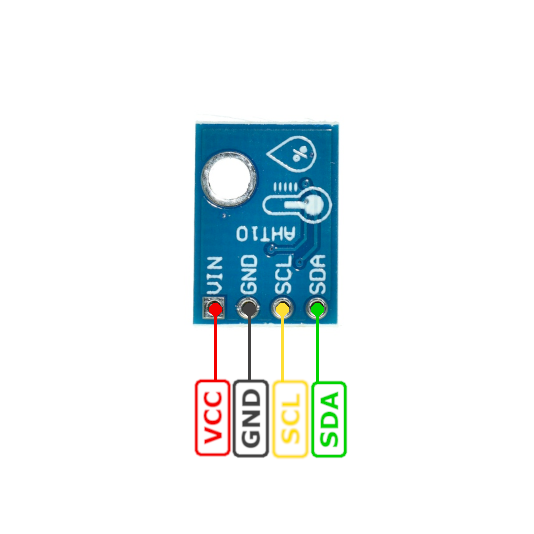
| Pin | Type | Description | Notes |
|---|---|---|---|
| VCC | Power | Power supply input (3.3V to 5V) | Typically 3.3V for ESP32 |
| GND | Ground | Ground connection | Common ground |
| SDA | I2C Data | I2C Serial Data line | Bidirectional data (requires pull-up) |
| SCL | I2C Clock | I2C Serial Clock line | Clock signal (requires pull-up) |
First sensor in AHT series by AOSONG Electronics
Temperature accuracy: ±0.3°C
Humidity accuracy: ±2% RH
Operating voltage: 3.3V to 5V
I2C address: 0x38 (fixed)
Compact and energy-efficient design
Digital output with I2C interface
Budget-friendly option for basic climate sensing
Wiring the AHT10 to ESP32
Connect the AHT10 to your ESP32 via I2C (SDA and SCL pins). The sensor operates at 3.3V or 5V and provides factory-calibrated temperature and humidity readings. Pull-up resistors (typically 4.7kΩ) are required on I2C lines.
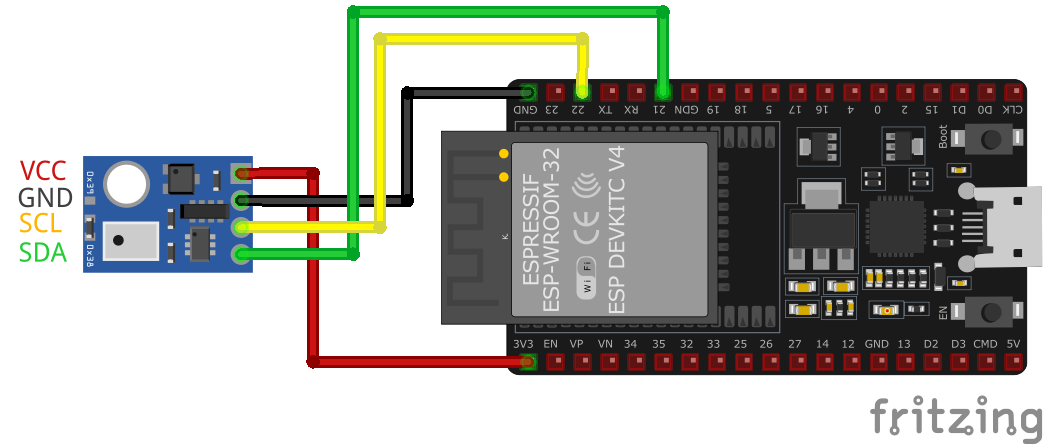
| AHT10 pin | ESP32 pin | Purpose |
|---|---|---|
| VCC | 3.3V | Power supply (3.3V or 5V) |
| GND | GND | Ground connection |
| SDA | GPIO21 | I2C data line (with 4.7kΩ pull-up) |
| SCL | GPIO22 | I2C clock line (with 4.7kΩ pull-up) |
I2C address: 0x38 (fixed, not configurable)
Pull-up resistors (4.7kΩ) required on SDA and SCL
Most modules include pull-up resistors on board
Factory calibrated - no user calibration needed
Position away from heat sources for accurate readings
Multiple AHT10 sensors cannot share same I2C bus (fixed address)
Use I2C multiplexer (e.g., TCA9548A) for multiple sensors
Budget-friendly alternative to AHT20 and AHT21
Lower accuracy than AHT20 but sufficient for most applications
Ideal for IoT, smart home, and weather monitoring projects
AHT10 code examples
#include <Wire.h>
#include <Adafruit_AHT10.h>

// Create an instance of the AHT10 sensor
Adafruit_AHT10 aht;

void setup() {
  // Initialize Serial Monitor
  Serial.begin(115200);
  Serial.println("AHT10 Sensor Example");

  // Initialize I2C communication
  if (!aht.begin()) {
    Serial.println("Failed to find AHT10 sensor! Check wiring.");
    while (1);
  }
  Serial.println("AHT10 sensor initialized.");
}

void loop() {
  // Read temperature and humidity from the sensor
  sensors_event_t humidity, temp;
  aht.getEvent(&humidity, &temp); // Populate the event objects

  // Print temperature and humidity to Serial Monitor
  Serial.print("Temperature: ");
  Serial.print(temp.temperature);
  Serial.println(" °C");

  Serial.print("Humidity: ");
  Serial.print(humidity.relative_humidity);
  Serial.println(" %");

  // Delay between readings
  delay(2000);
}
This code demonstrates how to use the AHT10 temperature and humidity sensor with an Arduino-compatible microcontroller. The sensor communicates over I2C and is initialized using the Adafruit AHT10 library.
Library Installation
To use this code, you need to install the Adafruit AHT10 library. Follow these steps:
- Open Arduino IDE.
- Navigate to Sketch → Include Library → Manage Libraries.
- Search for “Adafruit AHT10” and install it.
Alternatively, you can download the library from the official Adafruit GitHub repository:
Adafruit AHT10 Library
#include <stdio.h>
#include "driver/i2c.h"
#include "esp_log.h"

#define I2C_MASTER_NUM I2C_NUM_0
#define I2C_MASTER_SDA_IO 21
#define I2C_MASTER_SCL_IO 22
#define I2C_MASTER_FREQ_HZ 100000

#define AHT10_I2C_ADDR 0x38
#define AHT10_CMD_INIT 0xE1
#define AHT10_CMD_MEASURE 0xAC

static const char *TAG = "AHT10";

void aht10_init(i2c_port_t i2c_num) {
    uint8_t init_cmd[] = {AHT10_CMD_INIT, 0x08, 0x00};
    esp_err_t ret = i2c_master_write_to_device(i2c_num, AHT10_I2C_ADDR, init_cmd, sizeof(init_cmd), 1000 / portTICK_PERIOD_MS);
    if (ret == ESP_OK) {
        ESP_LOGI(TAG, "AHT10 initialized successfully");
    } else {
        ESP_LOGE(TAG, "Failed to initialize AHT10");
    }
}

void aht10_measure(i2c_port_t i2c_num, float *temperature, float *humidity) {
    uint8_t measure_cmd[] = {AHT10_CMD_MEASURE, 0x33, 0x00};
    uint8_t data[6];

    // Send measurement command
    esp_err_t ret = i2c_master_write_to_device(i2c_num, AHT10_I2C_ADDR, measure_cmd, sizeof(measure_cmd), 1000 / portTICK_PERIOD_MS);
    if (ret != ESP_OK) {
        ESP_LOGE(TAG, "Failed to send measurement command");
        return;
    }

    vTaskDelay(100 / portTICK_PERIOD_MS);

    // Read measurement data
    ret = i2c_master_read_from_device(i2c_num, AHT10_I2C_ADDR, data, sizeof(data), 1000 / portTICK_PERIOD_MS);
    if (ret != ESP_OK) {
        ESP_LOGE(TAG, "Failed to read data");
        return;
    }

    // Parse temperature and humidity
    uint32_t raw_humidity = (data[1] << 12) | (data[2] << 4) | (data[3] >> 4);
    uint32_t raw_temperature = ((data[3] & 0x0F) << 16) | (data[4] << 8) | data[5];

    *humidity = ((float)raw_humidity / 1048576.0) * 100.0;
    *temperature = ((float)raw_temperature / 1048576.0) * 200.0 - 50.0;

    ESP_LOGI(TAG, "Temperature: %.2f °C, Humidity: %.2f %%", *temperature, *humidity);
}

void app_main() {
    // Configure I2C master
    i2c_config_t i2c_config = {
        .mode = I2C_MODE_MASTER,
        .sda_io_num = I2C_MASTER_SDA_IO,
        .scl_io_num = I2C_MASTER_SCL_IO,
        .sda_pullup_en = GPIO_PULLUP_ENABLE,
        .scl_pullup_en = GPIO_PULLUP_ENABLE,
        .master.clk_speed = I2C_MASTER_FREQ_HZ,
    };
    ESP_ERROR_CHECK(i2c_param_config(I2C_MASTER_NUM, &i2c_config));
    ESP_ERROR_CHECK(i2c_driver_install(I2C_MASTER_NUM, i2c_config.mode, 0, 0, 0));

    // Initialize AHT10
    aht10_init(I2C_MASTER_NUM);

    while (1) {
        float temperature = 0.0, humidity = 0.0;
        aht10_measure(I2C_MASTER_NUM, &temperature, &humidity);
        vTaskDelay(2000 / portTICK_PERIOD_MS);
    }
}
The program begins by defining the I2C settings, including the I2C port, pins, frequency, and the AHT10 I2C address (0x38). The aht10_init() function sends an initialization command to the sensor over I2C and logs whether the initialization was successful. The aht10_measure() function sends a command to start a measurement, waits for the result, and reads six bytes of data from the sensor. It then parses the raw data into temperature (in Celsius) and relative humidity (percentage) values. In the app_main() function, the I2C master is configured and installed, and the AHT10 sensor is initialized. A continuous loop then calls aht10_measure() every 2 seconds to read and log the temperature and humidity values.
i2c:
  sda: GPIO21
  scl: GPIO22

sensor:
  - platform: aht10
    variant: AHT10
    temperature:
      name: "Living Room Temperature"
    humidity:
      name: "Living Room Humidity"
    update_interval: 60s
The configuration begins with specifying the aht10 platform and defining the variant as AHT10 to ensure the correct handling of the sensor. The temperature and humidity keys define the sensor outputs, assigning user-friendly names like ‘Living Room Temperature’ and ‘Living Room Humidity.’ These names make the sensor data easily identifiable in smart home platforms like Home Assistant. An update_interval of 60 seconds is specified, which determines how often the ESP32 reads and updates the temperature and humidity values.
[env:esp32dev]
platform = espressif32
board = esp32dev
framework = arduino
monitor_speed = 115200
lib_deps =
adafruit/Adafruit AHTX0 @ ^2.0.5#include <Arduino.h>
#include <Wire.h>
#include <Adafruit_AHTX0.h> // The AHTX0 library also drives the AHT10
Adafruit_AHTX0 aht;
void setup() {
Serial.begin(115200);
Serial.println("AHT10 Sensor Example");
if (!aht.begin()) {
Serial.println("Failed to find AHT10 sensor! Check wiring.");
while (1);
}
Serial.println("AHT10 sensor initialized.");
}
void loop() {
sensors_event_t humidity, temp;
aht.getEvent(&humidity, &temp);
Serial.print("Temperature: ");
Serial.print(temp.temperature);
Serial.println(" C");
Serial.print("Humidity: ");
Serial.print(humidity.relative_humidity);
Serial.println(" %");
delay(2000);
}This PlatformIO example uses the Adafruit AHTX0 library (pinned in lib_deps) - Adafruit's older AHT10-only library is not published on the PlatformIO registry, and AHTX0 drives the AHT10 and AHT20 alike. getEvent() fills unified-sensor events for humidity and temperature every 2 seconds on the default I2C pins.
# Requires driver: ahtx0.py from https://github.com/targetblank/micropython_ahtx0
# Copy it to the board: mpremote cp ahtx0.py :
from machine import I2C, Pin
from time import sleep
import ahtx0

# Initialize I2C communication (SDA = GPIO21, SCL = GPIO22)
i2c = I2C(0, scl=Pin(22), sda=Pin(21))

# Initialize the AHT10 sensor
sensor = ahtx0.AHT10(i2c)

print("AHT10 Sensor Example")

while True:
    # Read temperature and humidity
    temperature = sensor.temperature  # Temperature in Celsius
    humidity = sensor.relative_humidity  # Relative Humidity in %

    # Print temperature and humidity to the console
    print("Temperature: {:.2f} °C".format(temperature))
    print("Humidity: {:.2f} %".format(humidity))

    # Delay between readings
    sleep(2)
The example uses the community ahtx0 driver (copy ahtx0.py from targetblank/micropython_ahtx0 to the board with mpremote). The AHT10 object exposes temperature and relative_humidity properties, read every 2 seconds over I2C on the default pins (SDA GPIO21, SCL GPIO22).
AHT10 specifications
About the AHT10
The AHT10 is AOSONG’s entry-level temperature and humidity sensor, and at around a dollar per module it is usually the cheapest way to get calibrated digital readings over I2C. Accuracy of ±0.3 degC and ±2 %RH is a step below sensors like the SHT40, but perfectly fine for a smart-home dashboard or a greenhouse monitor.
Its one quirk worth knowing before you wire it up: early AHT10 revisions are known to misbehave when sharing an I2C bus with other devices, so give it its own bus (or the ESP32’s second I2C peripheral) if you see intermittent reads. The AHT20 fixes this and tightens accuracy for a few cents more, which is why we usually recommend it for new builds - but if an AHT10 is what came in your kit, it will serve you well.
We cover where the AHT10 sits among the options in our ESP32 temperature sensor guide, and it features in a real project in the IKEA Vindriktning air quality sensor guide.
AHT10 troubleshooting
Sensor Not Detected on I2C Bus
›
Issue: The AHT10 sensor is not recognized on the I2C bus, resulting in communication failures.
Possible causes include incorrect wiring, insufficient power supply, or sensor malfunction.
Solution: Ensure proper wiring connections: connect VCC to 3.3V (as the AHT10 operates at 3.3V), GND to ground, SDA to the data line, and SCL to the clock line. Verify that the I2C address matches the sensor's default (0x38). Use an I2C scanner to detect the sensor's presence on the bus. If the sensor is still not detected, consider testing with a different microcontroller or replacing the sensor.
Compilation Errors When Using AHT10 Library
›
Issue: Compilation errors occur when attempting to use the AHT10 sensor with an Arduino board.
Errors such as 'stray '\342' in program' or 'TwoWire' does not name a type' may appear.
Solution: Ensure that the correct library for the AHT10 sensor is installed and properly included in the sketch. Verify that the code does not contain any unintended characters or formatting issues, especially if copied from external sources. If errors persist, consider using alternative libraries compatible with the AHT10 sensor.
Inaccurate Temperature or Humidity Readings
›
Issue: The AHT10 sensor provides temperature or humidity readings that are inconsistent or incorrect.
Possible causes include sensor placement near heat sources, inadequate sensor initialization, or lack of calibration.
Solution: Position the sensor away from direct heat sources or sunlight to avoid skewed readings. Ensure that the sensor is properly initialized in the code before attempting to read data. While the AHT10 is factory-calibrated, if discrepancies persist, consider implementing software-based calibration adjustments based on known reference values.
Interference with Other I2C Devices
›
Issue: Connecting the AHT10 sensor alongside other I2C devices causes communication issues or device malfunctions.
Possible causes include the AHT10's fixed I2C address or improper bus management.
Solution: The AHT10 has a fixed I2C address (0x38), limiting the ability to use multiple AHT10 sensors on the same bus. To use multiple sensors, consider using an I2C multiplexer or selecting sensors with configurable addresses. Ensure that all devices on the I2C bus are functioning correctly and that there are no address conflicts.
Where to buy the AHT10

Resources
Similar sensors


