
BME680 Environmental Sensor
The BME680 is a versatile environmental sensor capable of measuring air quality (VOCs), temperature, humidity, and pressure. It supports I2C and SPI interfaces and is ideal for indoor monitoring, IoT devices, and smart homes.

BME680 pinout
The BME680 supports both I²C and SPI with integrated air quality sensing:
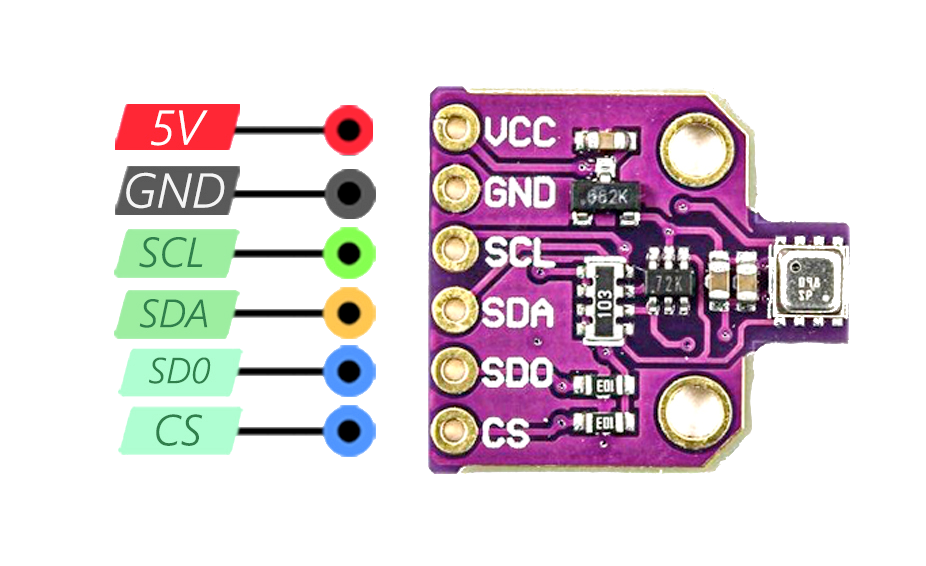
| Pin | Type | Description | Notes |
|---|---|---|---|
| VIN | Power | Power input | 3.3V or 5V (depending on module) |
| GND | Power | Ground connection | |
| SDA/SCL | Communication | I²C data / clock | Connect to ESP32 GPIO21 (SDA) / GPIO22 (SCL) |
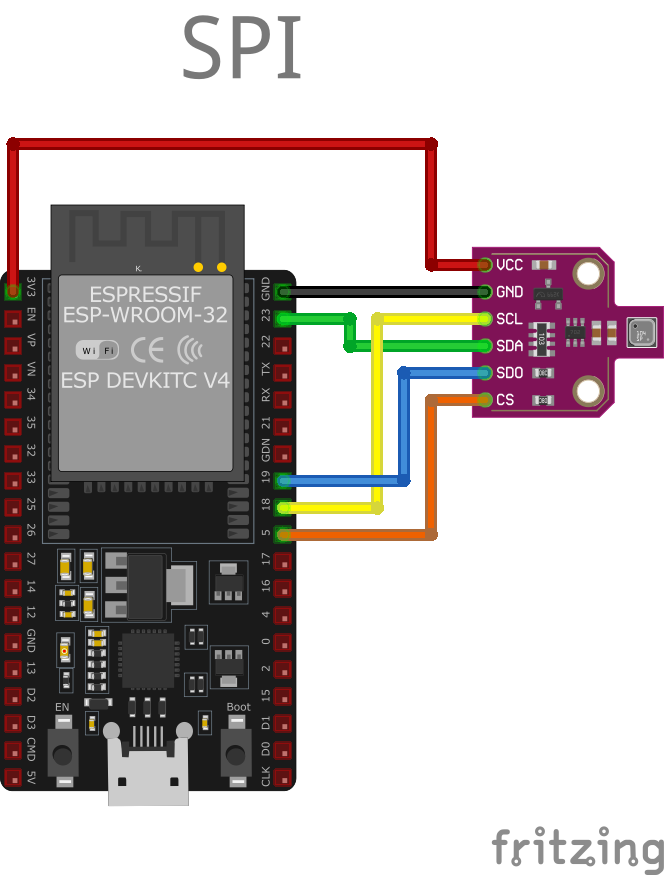
| SCK | Communication | SPI clock (SPI mode only) | GPIO18 for SPI |
| SDI/MOSI | Communication | SPI data in | GPIO23 for SPI |
| SDO/MISO | Communication | SPI data out | GPIO19 for SPI |
| CS | Communication | Chip select (SPI mode) | GPIO5 for SPI |
Dual Protocol: Supports both I²C and SPI
I²C Address: 0x76 or 0x77
Temperature: -40°C to +85°C
Humidity: 0-100% RH
Pressure: 300-1100 hPa
Gas Sensor: Detects VOCs and air quality
IAQ Index: Indoor Air Quality measurement
Power: 3.3V or 5V compatible
Applications: Air quality monitoring, HVAC, smart homes
Wiring the BME680 to ESP32
To interface the BME680 with an ESP32 using I²C:
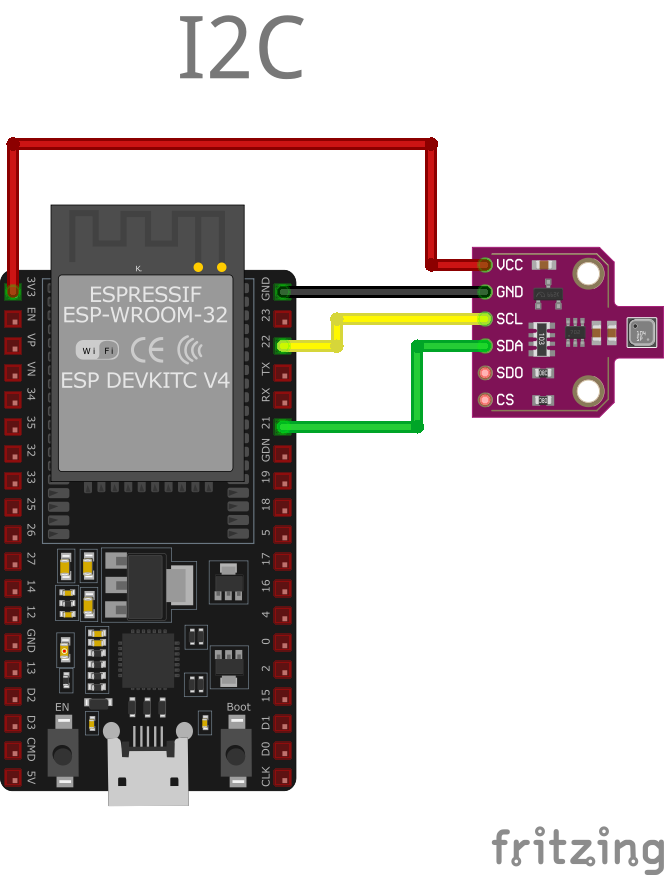
| BME680 pin | ESP32 pin | Purpose |
|---|---|---|
| VIN | 3.3V | Power supply |
| GND | GND | Ground |
| SDA | GPIO21 | I²C data line |
| SCL | GPIO22 | I²C clock line |
I²C Address: 0x76 or 0x77 (check with I²C scanner)
Gas Sensor: Requires heating element (sensor handles automatically)
Power: Use 3.3V for most modules
Warm-up: Gas sensor needs ~30 minutes for accurate readings
Simple: Only 4 wires for I²C mode
BME680 code examples
#include <Wire.h>
#include <Adafruit_Sensor.h>
#include <Adafruit_BME680.h>

Adafruit_BME680 bme;

void setup() {
  Serial.begin(115200);
  if (!bme.begin(0x76)) {
    Serial.println("Could not find a valid BME680 sensor, check wiring!");
    while (1);
  }
  bme.setTemperatureOversampling(BME680_OS_8X);
  bme.setHumidityOversampling(BME680_OS_2X);
  bme.setPressureOversampling(BME680_OS_4X);
  bme.setGasHeater(320, 150); // 320*C for 150 ms
}

void loop() {
  if (!bme.performReading()) {
    Serial.println("Failed to perform reading :(");
    return;
  }
  Serial.print("Temperature = "); Serial.print(bme.temperature); Serial.println(" *C");
  Serial.print("Pressure = "); Serial.print(bme.pressure / 100.0); Serial.println(" hPa");
  Serial.print("Humidity = "); Serial.print(bme.humidity); Serial.println(" %");
  Serial.print("Gas = "); Serial.print(bme.gas_resistance / 1000.0); Serial.println(" KOhms");
  delay(2000);
}
This Arduino code initializes the BME680 sensor and configures it for temperature, humidity, pressure, and gas readings. Oversampling settings are used to improve data accuracy. The loop() function reads sensor data every two seconds and outputs the values to the Serial Monitor. The setGasHeater function configures the gas sensor for VOC detection.
// Requires the esp-idf-lib BME680 driver from the ESP Component Registry:
//   idf.py add-dependency "esp-idf-lib/bme680^1.0.7"

#include <stdio.h>
#include <string.h>
#include "freertos/FreeRTOS.h"
#include "freertos/task.h"
#include "bme680.h"

#define SDA_GPIO GPIO_NUM_21
#define SCL_GPIO GPIO_NUM_22

void app_main(void)
{
    ESP_ERROR_CHECK(i2cdev_init());

    bme680_t sensor;
    memset(&sensor, 0, sizeof(bme680_t));
    ESP_ERROR_CHECK(bme680_init_desc(&sensor, BME680_I2C_ADDR_1, 0, SDA_GPIO, SCL_GPIO));
    ESP_ERROR_CHECK(bme680_init_sensor(&sensor));

    bme680_set_oversampling_rates(&sensor, BME680_OSR_4X, BME680_OSR_2X, BME680_OSR_2X);
    bme680_set_filter_size(&sensor, BME680_IIR_SIZE_7);
    bme680_set_heater_profile(&sensor, 0, 320, 150); // 320 C for 150 ms
    bme680_use_heater_profile(&sensor, 0);

    uint32_t duration;
    bme680_get_measurement_duration(&sensor, &duration);

    while (1) {
        bme680_values_float_t values;
        if (bme680_force_measurement(&sensor) == ESP_OK) {
            vTaskDelay(duration);
            if (bme680_get_results_float(&sensor, &values) == ESP_OK)
                printf("Temp %.2f C, Hum %.2f%%, Press %.2f hPa, Gas %.0f Ohm\n",
                       values.temperature, values.humidity,
                       values.pressure, values.gas_resistance);
        }
        vTaskDelay(pdMS_TO_TICKS(2000));
    }
}
ESP-IDF ships no BME680 driver of its own, so this example uses the maintained esp-idf-lib BME680 driver from the ESP Component Registry. Install it into your project first with idf.py add-dependency "esp-idf-lib/bme680^1.0.7", then build as usual.
The BME680 runs in forced mode: each cycle the code triggers a measurement with bme680_force_measurement(), waits the duration the driver calculated, then reads temperature, humidity, pressure and gas resistance with bme680_get_results_float(). The heater profile (320 C for 150 ms) is the standard setting for the gas sensor; raw gas resistance is what you get at this level - computing an IAQ index requires Bosch's proprietary BSEC library. If your board uses I2C address 0x76, change BME680_I2C_ADDR_1 to BME680_I2C_ADDR_0.
i2c:
  sda: GPIO21
  scl: GPIO22

sensor:
  - platform: bme680
    temperature:
      name: "BME680 Temperature"
    pressure:
      name: "BME680 Pressure"
    humidity:
      name: "BME680 Humidity"
    gas_resistance:
      name: "BME680 Gas Resistance"
    address: 0x76
This ESPHome configuration integrates the BME680 sensor. It creates sensor entities for temperature, pressure, humidity, and gas resistance, which are monitored via the I2C address 0x76. The setup is ideal for home automation and IoT systems.
[env:esp32dev]
platform = espressif32
board = esp32dev
framework = arduino
monitor_speed = 115200
lib_deps =
    adafruit/Adafruit BME680 Library @ ^2.0.5
adafruit/Adafruit Unified Sensor @ ^1.1.15#include <Arduino.h>
#include <Wire.h>
#include <Adafruit_Sensor.h>
#include <Adafruit_BME680.h>
Adafruit_BME680 bme;
void setup() {
Serial.begin(115200);
if (!bme.begin(0x76)) {
Serial.println("Could not find a valid BME680 sensor, check wiring!");
while (1);
}
bme.setTemperatureOversampling(BME680_OS_8X);
bme.setHumidityOversampling(BME680_OS_2X);
bme.setPressureOversampling(BME680_OS_4X);
bme.setGasHeater(320, 150); // 320*C for 150 ms
}
void loop() {
if (!bme.performReading()) {
Serial.println("Failed to perform reading :(");
return;
}
Serial.print("Temperature = "); Serial.print(bme.temperature); Serial.println(" *C");
Serial.print("Pressure = "); Serial.print(bme.pressure / 100.0); Serial.println(" hPa");
Serial.print("Humidity = "); Serial.print(bme.humidity); Serial.println(" %");
Serial.print("Gas = "); Serial.print(bme.gas_resistance / 1000.0); Serial.println(" KOhms");
delay(2000);
}This PlatformIO code integrates the Adafruit BME680 library for reading environmental data from the sensor. Temperature, humidity, pressure, and gas readings are fetched and printed to the Serial Monitor every two seconds.
# Requires driver: bme680 - install with: mpremote mip install github:robert-hh/BME680-Micropython
from time import sleep
from machine import I2C, Pin
from bme680 import BME680_I2C

# Initialize I2C (SDA=GPIO21, SCL=GPIO22)
i2c = I2C(0, scl=Pin(22), sda=Pin(21))

# Initialize BME680 (address 0x77; pass address=0x76 if SDO is low)
bme = BME680_I2C(i2c=i2c)

while True:
    print("Temperature: {:.2f} C".format(bme.temperature))
    print("Pressure: {:.2f} hPa".format(bme.pressure))
    print("Humidity: {:.2f} %".format(bme.humidity))
    print("Gas: {:.1f} kOhm".format(bme.gas / 1000))
    sleep(2)
The example uses robert-hh's BME680 driver (mpremote mip install github:robert-hh/BME680-Micropython), a MicroPython port of the Adafruit driver: BME680_I2C exposes temperature, pressure, humidity and gas resistance (printed here in kilo-ohms). Computing an IAQ index requires Bosch's proprietary BSEC library, which does not exist for MicroPython.
BME680 specifications
About the BME680
The BME680 adds a fourth measurement to Bosch’s usual temperature, humidity and pressure combo: a heated metal-oxide gas sensor for volatile organic compounds. What it actually outputs, though, is raw gas resistance in ohms, not an air-quality number. Turning that resistance into an IAQ index, eCO2 or VOC estimate requires Bosch’s proprietary BSEC library, which is closed-source and ships for only a limited set of platforms - Arduino and ESP-IDF are covered, but there is no BSEC port for MicroPython.
Bosch now marks the BME680 not recommended for new designs, pointing new projects at the pin- and register-compatible BME688, which adds a trainable gas-scanning mode on the same die. For an existing BME680 design that just wants a rough air-quality trend, the raw resistance is still usable without BSEC - rising resistance broadly means cleaner air, falling means more VOCs - if you would rather not take on the closed-source dependency.
If you want a finished air-quality number without any of that, ScioSense’s ENS160 computes eCO2, TVOC and an AQI index on-chip and hands you the result over I2C with no external library at all, for less than the BME680’s roughly $15 - though without the temperature, humidity and pressure bundle.
BME680 troubleshooting
Sensor Not Detected on I2C Bus
›
Issue: The BME680 sensor is not recognized on the I2C bus, resulting in errors such as: Could not find a valid BME680 sensor, check wiring!.
Possible causes include incorrect wiring, improper power supply, or incorrect I2C address configuration.
Solution: Verify that the sensor's SDA and SCL lines are correctly connected to the corresponding pins on the microcontroller. Ensure that the sensor is supplied with the appropriate voltage (3.3V or 5V, depending on the sensor's specifications). Use an I2C scanner to detect the sensor's address; if the sensor is not found, check for loose connections or potential damage to the sensor. Additionally, confirm that the correct I2C address is specified in your code, as some BME680 modules may use different default addresses.
Intermittent Reading Errors Over I2C
›
Issue: The BME680 sensor intermittently fails to provide readings over the I2C interface, leading to runtime errors such as: RuntimeError: Failed to find BME680! Chip ID 0x0.
Possible causes include unstable electrical connections, insufficient power supply, or interference on the I2C bus.
Solution: Inspect all electrical connections for stability and ensure that solder joints are secure. Verify that the power supply meets the sensor's requirements and is free from significant noise or fluctuations. Consider adding pull-up resistors to the SDA and SCL lines if they are not already present, as these are essential for proper I2C communication. Additionally, ensure that the I2C bus is not overloaded with too many devices, which can cause communication issues.
Compilation Errors with BME680 Library
›
Issue: When compiling code that interfaces with the BME680 sensor, errors such as: invalid conversion from 'int' to 'SPIClass*' occur.
Possible causes include outdated or incompatible library versions, or incorrect library usage in the code.
Solution: Ensure that the latest version of the BME680 library is installed and compatible with your development environment. Review the library's documentation to confirm proper usage and initialization in your code. If the issue persists, consider seeking assistance from the library's support resources or community forums.
Incorrect Temperature Readings Due to Self-Heating
›
Issue: The BME680 sensor reports temperature readings higher than the actual ambient temperature, potentially due to self-heating effects from nearby components.
Possible causes include the sensor being placed too close to heat-generating components, such as microcontrollers or voltage regulators.
Solution: Position the sensor away from components that emit heat to prevent thermal interference. Implement proper ventilation around the sensor to allow accurate ambient temperature measurements. If necessary, use physical barriers or enclosures to shield the sensor from external heat sources.
Where to buy the BME680

Resources
Similar sensors


