
DHT21 / AM2301A Temperature and Humidity Sensor
The DHT21 is a reliable sensor for measuring temperature and humidity, offering calibrated digital output and ease of integration with microcontrollers. With a temperature measurement range of -40°C to 80°C and a humidity range of 0% to 100%, the DHT21 is suitable for various applications, including environmental monitoring and HVAC systems.

DHT21 / AM2301A pinout
The DHT21/AM2301A features the same 4-pin layout as DHT22, with nearly identical specifications and performance.
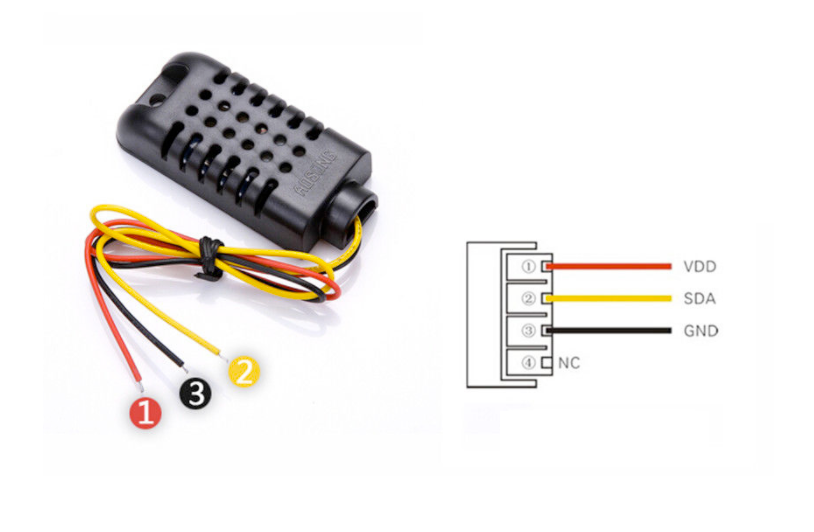
| Pin | Type | Description | Notes |
|---|---|---|---|
| VCC | Power | Power supply input (3.3V to 6V) | Compatible with both 3.3V and 5V systems |
| DATA | Communication | Digital signal output | Single-wire digital interface for data |
| NC | Control | Not connected | Leave this pin unconnected |
| GND | Power | Ground connection | Connect to ESP32 ground |
Uses same single-wire protocol as DHT22
Requires 5kΩ to 10kΩ pull-up resistor on DATA pin
Nearly identical to DHT22 in performance
Read interval of 2 seconds minimum
Wide temperature range (-40°C to 80°C)
Wiring the DHT21 / AM2301A to ESP32
Connect the DHT21/AM2301A using the single-wire digital interface, identical to DHT22 wiring.
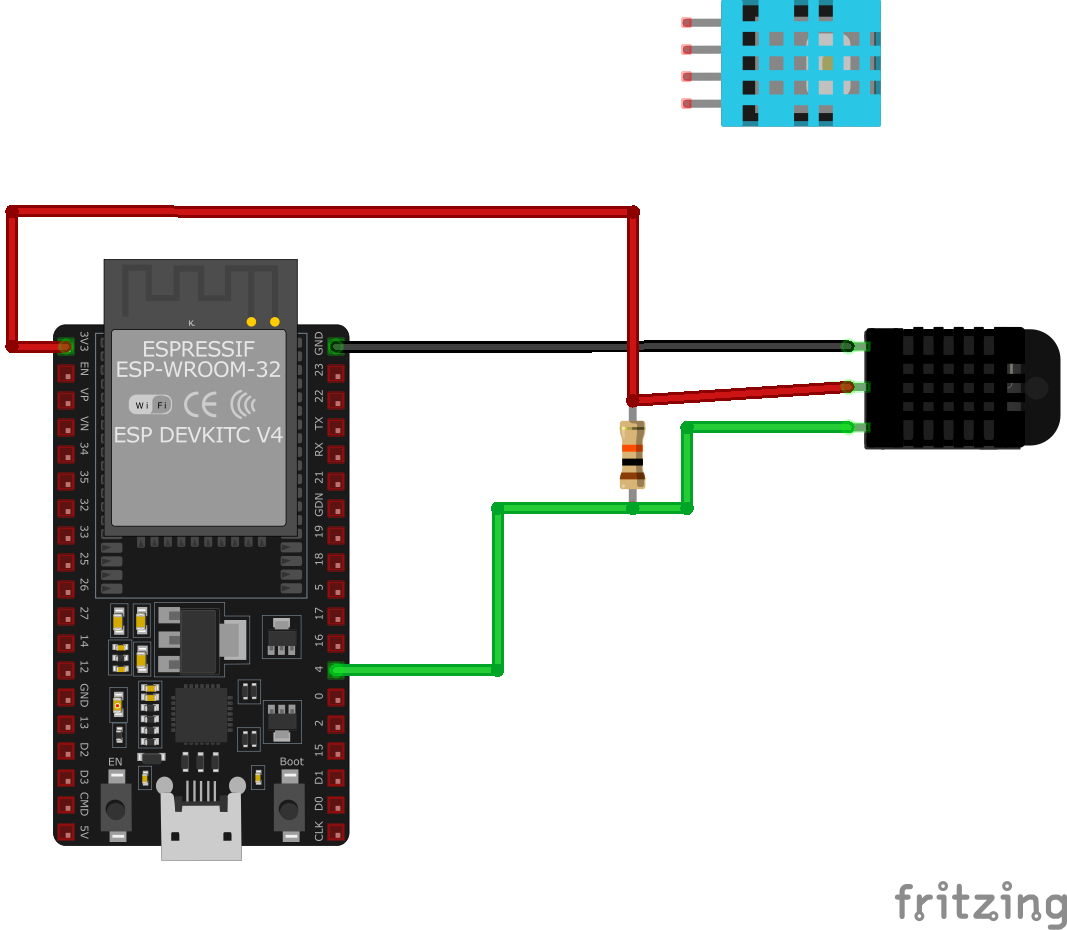
| DHT21 / AM2301A pin | ESP32 pin | Purpose |
|---|---|---|
| VCC | 3.3V | Power supply (3.3V to 6V supported) |
| GND | GND | Ground connection |
| DATA | GPIO4 | Digital data line |
| DATA (Pull-up) | 5kΩ to VCC | Pull-up resistor for reliable data transfer |
Any GPIO pin works - GPIO4 is commonly used
5kΩ pull-up resistor recommended (10kΩ also works)
Use 3.3V for ESP32 compatibility
Minimum 2 second delay between readings
Compatible with DHT22 libraries and code
DHT21 / AM2301A code examples
#include "DHT.h"

#define DHTPIN 4     // Digital pin connected to the DHT sensor
#define DHTTYPE DHT21   // DHT 21 (AM2301)

DHT dht(DHTPIN, DHTTYPE);

void setup() {
  Serial.begin(115200);
  Serial.println("DHT21 Sensor Example");

  dht.begin();
}

void loop() {
  // Wait a few seconds between measurements
  delay(2000);

  // Reading temperature or humidity takes about 250 milliseconds!
  float humidity = dht.readHumidity();
  // Read temperature as Celsius (the default)
  float temperature = dht.readTemperature();

  // Check if any reads failed and exit early (to try again).
  if (isnan(humidity) || isnan(temperature)) {
    Serial.println("Failed to read from DHT sensor!");
    return;
  }

  Serial.print("Humidity: ");
  Serial.print(humidity);
  Serial.print(" %	");
  Serial.print("Temperature: ");
  Serial.print(temperature);
  Serial.println(" °C");
}
This Arduino sketch demonstrates how to interface with the DHT21 sensor. It initializes the sensor on digital pin 4 and reads the temperature and humidity every 2 seconds. The readings are then printed to the Serial Monitor. The code includes checks to ensure that the sensor readings are valid.
// Requires the esp-idf-lib DHT driver (ESP Component Registry):
//   idf.py add-dependency "esp-idf-lib/dht^1.2.0"

#include <stdio.h>
#include "freertos/FreeRTOS.h"
#include "freertos/task.h"
#include "dht.h"

#define DHT_GPIO  GPIO_NUM_4
#define DHT_TYPE  DHT_TYPE_AM2301   // DHT21 / AM2301

void app_main(void)
{
    float hum, temp;

    while (1) {
        if (dht_read_float_data(DHT_TYPE, DHT_GPIO, &hum, &temp) == ESP_OK) {
            printf("Hum %.1f%%  Temp %.1f C\n", hum, temp);
        } else {
            printf("Could not read data from sensor\n");
        }

        vTaskDelay(pdMS_TO_TICKS(2000));
    }
}
ESP-IDF ships no DHT driver of its own, so this example uses the maintained esp-idf-lib DHT driver from the ESP Component Registry. Install it into your project first with idf.py add-dependency "esp-idf-lib/dht^1.2.0", then build as usual.
dht_read_float_data() performs one complete read and fills in the humidity and temperature values, returning ESP_OK on success. DHT_TYPE_AM2301 is the correct sensor type for the DHT21 (AM2301); for a DHT11 use DHT_TYPE_DHT11 instead. No extra include is needed for GPIO_NUM_4 - dht.h pulls in the GPIO driver. The loop prints a reading every 2 seconds.
sensor:
  - platform: dht
    pin: GPIO4
    model: DHT22  # DHT21 / AM2301 uses the DHT22 protocol
    temperature:
      name: "Living Room Temperature"
    humidity:
      name: "Living Room Humidity"
    update_interval: 60s
ESPHome's dht platform drives the DHT21/AM2301 with the DHT22 timing profile, so model: DHT22 is the correct setting (the model list has no separate DHT21 entry). Data pin per the wiring above.
[env:esp32dev]
platform = espressif32
board = esp32dev
framework = arduino
lib_deps =
    adafruit/DHT sensor library @ ^1.4.2
monitor_speed = 115200#include <DHT.h>
#define DHTPIN 4
#define DHTTYPE DHT21
DHT dht(DHTPIN, DHTTYPE);
void setup() {
Serial.begin(115200);
Serial.println("DHT21 Sensor Example");
dht.begin();
}
void loop() {
// Wait a few seconds between measurements
delay(2000);
// Reading temperature or humidity takes about 250 milliseconds!
float humidity = dht.readHumidity();
// Read temperature as Celsius (the default)
float temperature = dht.readTemperature();
// Check if any reads failed and exit early (to try again).
if (isnan(humidity) || isnan(temperature)) {
Serial.println("Failed to read from DHT sensor!");
return;
}
Serial.print("Humidity: ");
Serial.print(humidity);
Serial.print(" % ");
Serial.print("Temperature: ");
Serial.print(temperature);
Serial.println(" °C");
}This PlatformIO code demonstrates interfacing the DHT21 sensor with an ESP32 board. It initializes the sensor on GPIO pin 4, reads the temperature and humidity values every 2 seconds, and outputs the data to the Serial Monitor. The code includes checks for invalid readings and retries if necessary.
from machine import Pin
from time import sleep
import dht

# Initialize the DHT21 sensor
sensor = dht.DHT21(Pin(4))

print('DHT21 Sensor Example')

while True:
    sensor.measure()
    temperature = sensor.temperature()  # Temperature in Celsius
    humidity = sensor.humidity()  # Relative Humidity in %

    print('Temperature: {} °C'.format(temperature))
    print('Humidity: {} %'.format(humidity))

    sleep(2)
This MicroPython script uses the dht module to interact with the DHT21 sensor. The sensor is initialized on GPIO pin 4, and readings are taken every 2 seconds. The sensor.measure() method updates the data, and sensor.temperature() and sensor.humidity() retrieve the temperature and humidity values, respectively. The results are printed to the console in a user-friendly format.
DHT21 / AM2301A specifications
About the DHT21 / AM2301A
The DHT21, sold under Aosong’s AM2301 (and later AM2301A) part numbers, sits between the DHT11 and DHT22 in the same product line: it shares the DHT22’s 4-pin housing, wiring, and single-wire timing profile closely enough that ESPHome’s dht platform has no separate DHT21 entry - you configure it as a DHT22 and it just works.
The one place it doesn’t quite match its bigger sibling is humidity accuracy: Aosong’s own AM2301/AM2301A datasheets specify ±3% RH, a step behind the AM2302/DHT22’s ±2% RH, even though the two parts look and wire up identically. Temperature accuracy (±0.5 degC) and the -40 to 80 degC range are the same across both.
Because the code, pinout, and pull-up requirements are identical to the DHT22, and street prices for the two rarely differ by much, there’s little reason to seek out a DHT21 specifically for a new build - buy whichever one your supplier has in stock, or the DHT22 if you can choose. If an old DHT21/AM2301 is what you already own, it behaves exactly like a DHT22 in every example on this site. And if the single-wire protocol itself is the pain point, the I2C-based DHT20 sidesteps it entirely.
DHT21 / AM2301A troubleshooting
Incorrect Temperature Readings
›
Issue: The DHT21 (AM2301A) sensor returns incorrect temperature values, such as 225°C.
Possible causes include incorrect sensor initialization or improper data handling in the code.
Solution: Ensure that the sensor is properly initialized in the code and that the correct data type is specified. Verify that the data reading and conversion logic accurately interpret the sensor's output. Refer to the sensor's datasheet for the correct data format and adjust the code accordingly.
Humidity Reading Stuck at 99.9%
›
Issue: The DHT21 sensor consistently reports a humidity value of 99.9%, regardless of the actual environmental conditions.
Possible causes include sensor malfunction or environmental factors causing sensor saturation.
Solution: Ensure that the sensor is not exposed to conditions beyond its operational limits, such as high humidity or condensation. If the issue persists, consider replacing the sensor, as it may be defective.
Receiving NaN (Not a Number) Values
›
Issue: The sensor intermittently returns NaN values for temperature or humidity readings.
Possible causes include unstable connections, lack of a pull-up resistor on the data line, or timing issues in data communication.
Solution: Verify that all connections are secure and that a pull-up resistor (typically 5kΩ) is connected between the data line and VCC. Ensure that the code accounts for the sensor's timing requirements, including appropriate delays between readings.
Compilation Errors with DHT Library
›
Issue: Compilation errors occur when using the DHT library with the DHT21 sensor.
Possible causes include incorrect library version or improper library installation.
Solution: Ensure that the latest version of the DHT library is installed and correctly included in the project. Verify that the library supports the DHT21 sensor and that the correct sensor type is defined in the code.
Where to buy the DHT21 / AM2301A

Resources
Similar sensors


