
HDC1080 / GY-213V-HDC1080 Temperature and Humidity Sensor
The HDC1080 sensor is a digital humidity and temperature sensor that provides accurate and reliable measurements. Its low power consumption and factory calibration make it ideal for applications such as HVAC systems, weather stations, and consumer electronics.

HDC1080 / GY-213V-HDC1080 pinout
The HDC1080 has 4 pins for I²C communication with minimal external components required.
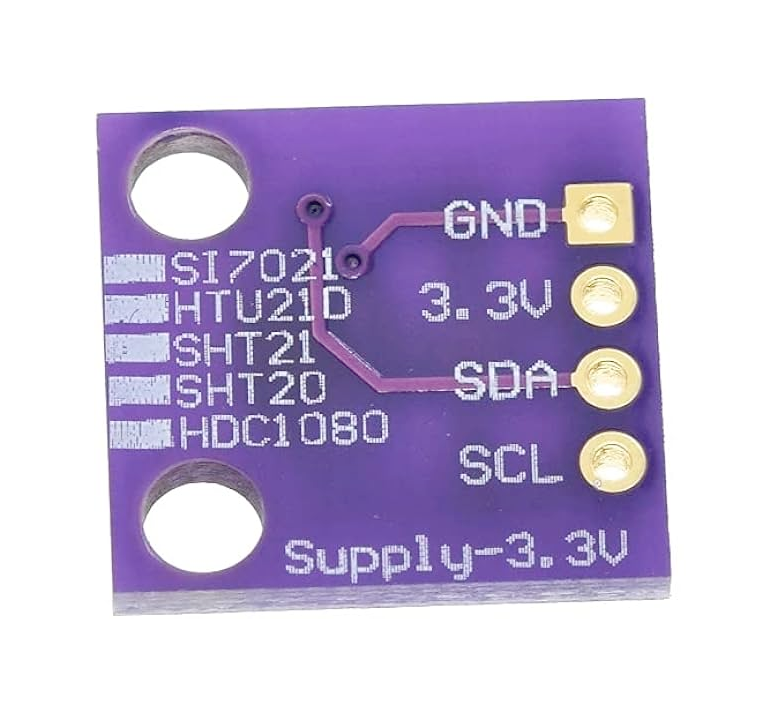
| Pin | Type | Description | Notes |
|---|---|---|---|
| Pin 1 (GND) | Power | Ground connection. Connect to system ground. | |
| Pin 2 (VDD) | Power | Power supply voltage (2.7V to 5.5V). Wide voltage range. | Use 3.3V or 5V depending on system. |
| Pin 3 (SDA) | I2C | I²C Serial Data Line. Bidirectional data communication. | Connect to ESP32 GPIO 21. Requires pull-up resistor. |
| Pin 4 (SCL) | I2C | I²C Serial Clock Line. Clock signal for I²C communication. | Connect to ESP32 GPIO 22. Requires pull-up resistor. |
I²C address: 0x40 (default), 0x41, 0x42, or 0x43 (configurable)
Temperature range: -40°C to 125°C (±0.2°C accuracy)
Humidity range: 0% to 100% RH (±2% accuracy)
Low power: 1.3µA average at 1Hz sampling
Factory calibrated - no user calibration required
14-bit resolution for both temp and humidity
Wiring the HDC1080 / GY-213V-HDC1080 to ESP32
To interface the HDC1080 with an ESP32 via I²C, connect VDD to 3.3V, GND to ground, SDA to GPIO 21, and SCL to GPIO 22. Add 10kΩ pull-up resistors on SDA and SCL.
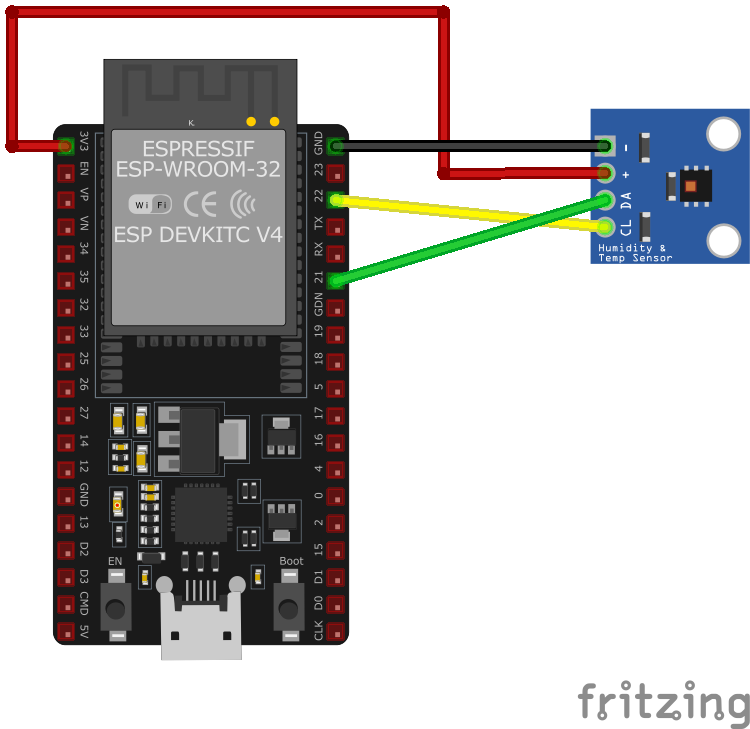
| HDC1080 / GY-213V-HDC1080 pin | ESP32 pin | Purpose |
|---|---|---|
| Pin 2 (VDD) | 3.3V | Power supply. Use 3.3V for low-power applications. |
| Pin 1 (GND) | GND | Ground connection. |
| Pin 3 (SDA) | GPIO 21 | I²C data line. Add 10kΩ pull-up to VDD. |
| Pin 4 (SCL) | GPIO 22 | I²C clock line. Add 10kΩ pull-up to VDD. |
I²C address: 0x40 (default), configurable to 0x41/0x42/0x43
Add 10kΩ pull-up resistors on both SDA and SCL lines
Use Adafruit_HDC1000 or ClosedCube_HDC1080 library
Low power consumption: ideal for battery-powered projects
Factory calibrated - no user calibration needed
Conversion time: 6.5ms (temp) + 6.5ms (humidity)
Can measure temp and humidity simultaneously or separately
Add 0.1µF bypass capacitor between VDD and GND (close to sensor)
Avoid condensing humidity - sensor may require recovery time
HDC1080 / GY-213V-HDC1080 code examples
#include <Wire.h>
#include "ClosedCube_HDC1080.h"

ClosedCube_HDC1080 hdc1080;

void setup() {
  Wire.begin();
  Serial.begin(9600);
  hdc1080.begin(0x40);
}

void loop() {
  float temperature = hdc1080.readTemperature();
  float humidity = hdc1080.readHumidity();
  Serial.print("Temperature: ");
  Serial.print(temperature, 2);
  Serial.println(" °C");
  Serial.print("Humidity: ");
  Serial.print(humidity, 2);
  Serial.println(" %");
  delay(2000);
}
This Arduino sketch demonstrates how to interface with the HDC1080 sensor using the ClosedCube_HDC1080 library. It initializes the sensor and reads temperature and humidity data every 2 seconds, printing the results to the Serial Monitor. Ensure that the ClosedCube_HDC1080 library is installed in your Arduino IDE.
#include <stdio.h>
#include "freertos/FreeRTOS.h"
#include "freertos/task.h"
#include "driver/i2c.h"

#define I2C_MASTER_SCL_IO    22    /*!< GPIO number used for I2C master clock */
#define I2C_MASTER_SDA_IO    21    /*!< GPIO number used for I2C master data */
#define I2C_MASTER_NUM       I2C_NUM_0 /*!< I2C master I2C port number */
#define I2C_MASTER_FREQ_HZ   100000     /*!< I2C master clock frequency */
#define HDC1080_SENSOR_ADDR  0x40       /*!< HDC1080 I2C address */

static esp_err_t i2c_master_init(void) {
    i2c_config_t conf = {
        .mode = I2C_MODE_MASTER,
        .sda_io_num = I2C_MASTER_SDA_IO,
        .scl_io_num = I2C_MASTER_SCL_IO,
        .sda_pullup_en = GPIO_PULLUP_ENABLE,
        .scl_pullup_en = GPIO_PULLUP_ENABLE,
        .master.clk_speed = I2C_MASTER_FREQ_HZ,
    };
    esp_err_t err = i2c_param_config(I2C_MASTER_NUM, &conf);
    if (err != ESP_OK) {
        return err;
    }
    return i2c_driver_install(I2C_MASTER_NUM, conf.mode, 0, 0, 0);
}

void read_hdc1080_sensor() {
    uint8_t data[4];

    // Send command to measure temperature and humidity
    uint8_t cmd = 0x00; // Temperature measurement command
    i2c_master_write_to_device(I2C_MASTER_NUM, HDC1080_SENSOR_ADDR, &cmd, 1, pdMS_TO_TICKS(1000));
    vTaskDelay(pdMS_TO_TICKS(15)); // Delay for measurement to complete

    // Read 4 bytes of data: temperature (2 bytes) + humidity (2 bytes)
    i2c_master_read_from_device(I2C_MASTER_NUM, HDC1080_SENSOR_ADDR, data, 4, pdMS_TO_TICKS(1000));

    // Convert temperature and humidity values
    uint16_t raw_temp = (data[0] << 8) | data[1];
    uint16_t raw_humidity = (data[2] << 8) | data[3];

    float temperature = (raw_temp / 65536.0) * 165.0 - 40.0;
    float humidity = (raw_humidity / 65536.0) * 100.0;

    printf("Temperature: %.2f °C, Humidity: %.2f %%\n", temperature, humidity);
}

void app_main() {
    ESP_ERROR_CHECK(i2c_master_init());

    while (1) {
        read_hdc1080_sensor();
        vTaskDelay(pdMS_TO_TICKS(2000));
    }
}
This ESP-IDF code demonstrates how to interface with the HDC1080 sensor using the I2C protocol. It initializes the I2C master, sends a command to the sensor to measure temperature and humidity, reads the raw data, converts it to human-readable values, and prints the results to the console every 2 seconds.
i2c:
  sda: GPIO21
  scl: GPIO22

sensor:
  - platform: hdc1080
    temperature:
      name: "Living Room Temperature"
    humidity:
      name: "Living Room Humidity"
    update_interval: 60s
This ESPHome configuration defines the HDC1080 sensor. Two sensor entities are created: one for temperature and one for humidity, with user-friendly names such as ‘Living Room Temperature’ and ‘Living Room Humidity.’ The update_interval is set to 60 seconds, ensuring that the sensor data is updated once per minute.
[env:esp32dev]
platform = espressif32
board = esp32dev
framework = arduino
lib_deps =
    closedcube/ClosedCube HDC1080 @ ^1.1.0
monitor_speed = 115200#include <Wire.h>
#include "ClosedCube_HDC1080.h"
ClosedCube_HDC1080 hdc1080;
void setup() {
Wire.begin();
Serial.begin(115200);
hdc1080.begin(0x40);
Serial.println("HDC1080 initialized.");
}
void loop() {
float temperature = hdc1080.readTemperature();
float humidity = hdc1080.readHumidity();
Serial.print("Temperature: ");
Serial.print(temperature, 2);
Serial.println(" °C");
Serial.print("Humidity: ");
Serial.print(humidity, 2);
Serial.println(" %");
delay(2000);
}This PlatformIO code demonstrates how to use the ClosedCube_HDC1080 library to interface with the HDC1080 sensor. It initializes the sensor and reads temperature and humidity data every 2 seconds, printing the results to the Serial Monitor.
from machine import I2C, Pin
from time import sleep

# Initialize I2C
i2c = I2C(0, scl=Pin(22), sda=Pin(21))

# HDC1080 I2C address
HDC1080_ADDR = 0x40

# Function to read temperature and humidity
def read_hdc1080():
    i2c.writeto(HDC1080_ADDR, b'\x00')  # Command to start measurement
    sleep(0.015)  # Wait for measurement to complete
    data = i2c.readfrom(HDC1080_ADDR, 4)  # Read 4 bytes of data

    # Convert temperature and humidity data
    raw_temp = (data[0] << 8) | data[1]
    raw_humidity = (data[2] << 8) | data[3]

    temperature = (raw_temp / 65536.0) * 165.0 - 40.0
    humidity = (raw_humidity / 65536.0) * 100.0

    return temperature, humidity

while True:
    temp, hum = read_hdc1080()
    print("Temperature: {:.2f} °C".format(temp))
    print("Humidity: {:.2f} %".format(hum))
    sleep(2)
This MicroPython script interfaces with the HDC1080 sensor using the I2C protocol. It sends a command to the sensor to trigger temperature and humidity measurements, reads the raw data, converts it into human-readable values, and prints the results to the console every 2 seconds.
HDC1080 / GY-213V-HDC1080 specifications
About the HDC1080 / GY-213V-HDC1080
The HDC1080 is Texas Instruments’ factory-calibrated digital temperature and humidity sensor, and - unlike some TI parts that quietly go end-of-life - it remains in active production. It talks I2C at address 0x40, claims ±0.2 degC and ±2% RH accuracy (on par with Sensirion’s SHT31), and draws only around 1.3 uA average at a 1 Hz sample rate, which is why it shows up in battery-powered designs as often as mains-powered ones. Most hobbyist boards sell it under the “GY-213V-HDC1080” breakout name, which is why both names appear on this page.
Positioning-wise, the HDC1080 sits in the same accuracy tier as Sensirion’s SHT40 and above the budget AHT20; which one you reach for is mostly a question of which ecosystem’s library and breakout you already have. If TI’s part or the GY-213V board is what’s in your parts bin, it’s a perfectly capable choice, with no strong technical reason to swap it out for something else in an existing design.
HDC1080 / GY-213V-HDC1080 troubleshooting
Humidity Readings Stuck at 100%
›
Issue: The HDC1080 sensor reports a constant humidity value of 100%, regardless of the actual environmental conditions.
Possible causes include sensor saturation due to prolonged exposure to high humidity environments or contamination on the sensor's surface.
Solution: Allow the sensor to operate in a controlled, lower humidity environment to facilitate recovery. If the issue persists, consider activating the sensor's internal heater to help eliminate moisture or contaminants. Ensure that the sensor is not exposed to condensing environments, and verify that no physical obstructions or residues are present on the sensor's surface. ([e2e.ti.com](https://e2e.ti.com/support/sensors-group/sensors/f/sensors-forum/635445/hdc1080-humidity-value-stuck-with-100-no-change))
Temperature and Humidity Readings Return 0xFFFF
›
Issue: Attempts to read temperature and humidity values from the HDC1080 sensor consistently return 0xFFFF, indicating a communication error.
Possible causes include incorrect I2C communication sequences, improper sensor initialization, or issues with the microcontroller's I2C implementation.
Solution: Review the I2C communication sequence to ensure it aligns with the HDC1080 datasheet specifications. Confirm that the sensor's configuration register is correctly set before initiating measurements. Additionally, verify the integrity of the I2C connections and consider testing with a different microcontroller or I2C library to rule out implementation-specific issues. ([e2e.ti.com](https://e2e.ti.com/support/sensors-group/sensors/f/sensors-forum/677597/hdc1080-temp-and-humidity-always-read-at-0xffff))
Humidity Measurement Errors Up to +6%
›
Issue: The HDC1080 sensor exhibits humidity measurement errors, with readings deviating by up to +6% from the actual humidity levels.
Possible causes include sensor drift over time, exposure to contaminants, or calibration issues.
Solution: Implement a regular calibration schedule to maintain measurement accuracy. Ensure that the sensor is protected from environmental contaminants and consider using conformal coatings if appropriate. If the sensor has been exposed to harsh conditions, utilize the internal heater to attempt recovery. For critical applications, consider cross-referencing readings with a calibrated reference device. ([e2e.ti.com](https://e2e.ti.com/support/sensors-group/sensors/f/sensors-forum/621732/hdc1080-humidity-measurement-error-going-up-to-6))
Inconsistent Humidity Readings Across Multiple Sensors
›
Issue: Multiple HDC1080 sensors in identical conditions report significantly different humidity values, indicating inconsistency among sensors.
Possible causes include manufacturing variances, sensor contamination, or differences in sensor placement leading to micro-environmental discrepancies.
Solution: Perform a controlled comparison by placing all sensors in a stable environment and recording their outputs. Identify and replace any outliers that consistently deviate from the mean. Ensure that all sensors are handled and soldered according to the manufacturer's guidelines to prevent contamination. For applications requiring high precision, consider individual sensor calibration. ([e2e.ti.com](https://e2e.ti.com/support/sensors-group/sensors/f/sensors-forum/611140/hdc1080-accuracy-issue-with-humidity-sensor))
Where to buy the HDC1080 / GY-213V-HDC1080

Resources
Similar sensors


