
KY-015 Temperature and Humidity Sensor Module
The KY-015 is a temperature and humidity sensor module based on the DHT11 sensor. It provides digital output for temperature and humidity measurements, making it ideal for environmental monitoring applications.

KY-015 pinout
The KY-015 is a 3-pin temperature and humidity sensor module based on the DHT11:
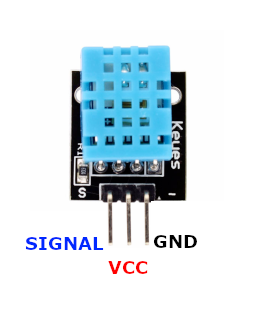
| Pin | Type | Description | Notes |
|---|---|---|---|
| Pin (-) | Power | Ground connection | |
| Pin (middle) | Power | Power supply | 3.3V to 5V |
| Pin (S) | Communication | Digital signal output | 1-Wire DHT protocol |
Interface: 1-Wire DHT protocol (proprietary single-wire)
Temperature: 0°C to 50°C range, ±2°C accuracy
Humidity: 20% to 90% RH, ±5% accuracy
Power: 3.3V or 5V operation
Sampling: 2-second interval (slow refresh rate)
Based On: DHT11 digital sensor chip
Wiring the KY-015 to ESP32
To interface the KY-015 with an ESP32 using DHT protocol:
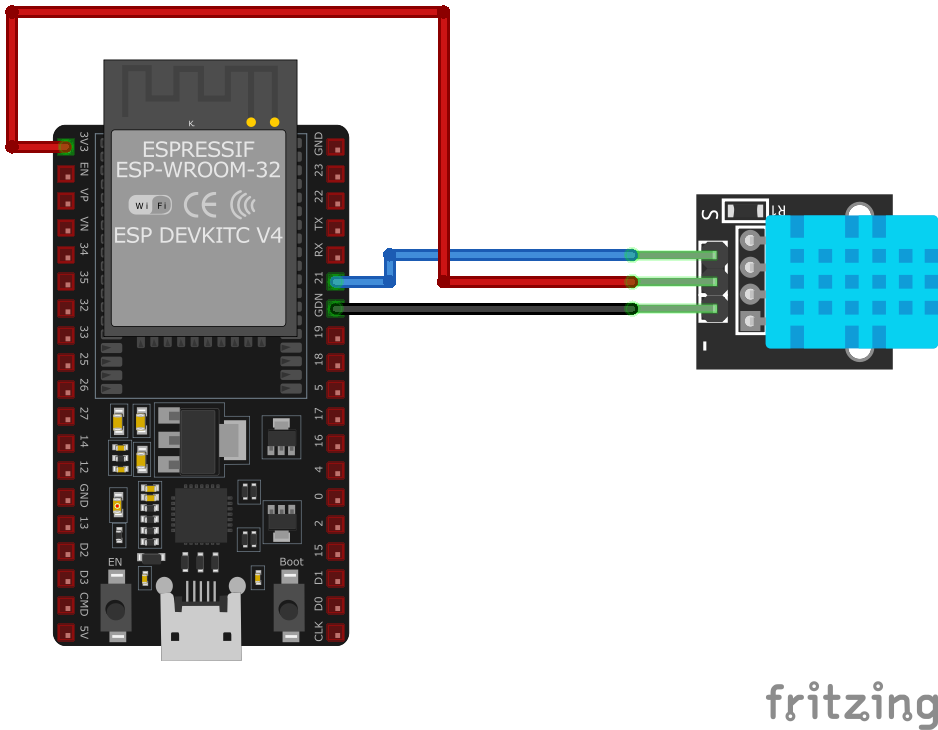
| KY-015 pin | ESP32 pin | Purpose |
|---|---|---|
| Pin (-) | GND | Ground |
| Pin (middle) | 3.3V or 5V | Power supply |
| Pin (S) | GPIO4 | DHT data line (any GPIO) |
No Pull-up Needed: Module typically includes built-in pull-up resistor
GPIO Selection: Can use any GPIO pin, GPIO4 is just an example
Voltage: Use 3.3V for ESP32 compatibility
Sampling Delay: Wait at least 2 seconds between readings
KY-015 code examples
#include <DHT.h>

#define DHTPIN 2     // Digital pin connected to the DHT sensor
#define DHTTYPE DHT11   // DHT 11

DHT dht(DHTPIN, DHTTYPE);

void setup() {
    Serial.begin(9600);
    Serial.println("KY-015 Test - Temperature and Humidity:");
    dht.begin();
}

void loop() {
    delay(2000);
    float h = dht.readHumidity();
    float t = dht.readTemperature();
    if (isnan(h) || isnan(t)) {
        Serial.println("Failed to read from DHT sensor!");
        return;
    }
    Serial.print("Humidity: ");
    Serial.print(h);
    Serial.print(" %	");
    Serial.print("Temperature: ");
    Serial.print(t);
    Serial.println(" °C");
}
This Arduino code utilizes the DHT library to read temperature and humidity data from the KY-015 sensor. The sensor is connected to digital pin 2, and the readings are displayed on the serial monitor every two seconds.
// Requires the esp-idf-lib DHT driver from the ESP Component Registry:
//   idf.py add-dependency "esp-idf-lib/dht^1.2.0"

#include <stdio.h>
#include "freertos/FreeRTOS.h"
#include "freertos/task.h"
#include "dht.h"

#define DHT_GPIO  GPIO_NUM_4
#define DHT_TYPE  DHT_TYPE_DHT11

void app_main(void)
{
    float hum, temp;

    while (1) {
        if (dht_read_float_data(DHT_TYPE, DHT_GPIO, &hum, &temp) == ESP_OK) {
            printf("Hum %.1f%%  Temp %.1f C\n", hum, temp);
        } else {
            printf("Could not read data from sensor\n");
        }

        vTaskDelay(pdMS_TO_TICKS(2000));
    }
}
ESP-IDF ships no DHT11 driver of its own, so this example uses the maintained esp-idf-lib DHT driver from the ESP Component Registry - the KY-015 is a DHT11 on a breakout board. Install it into your project first with idf.py add-dependency "esp-idf-lib/dht^1.2.0", then build as usual.
dht_read_float_data() performs one complete read and fills in the humidity and temperature values, returning ESP_OK on success. DHT_TYPE_DHT11 selects the DHT11 protocol used by the KY-015. No extra include is needed for GPIO_NUM_4 - dht.h pulls in the GPIO driver. The loop prints a reading every 2 seconds.
sensor:
  - platform: dht
    pin: GPIO4
    model: DHT11
    temperature:
      name: "KY-015 Temperature"
    humidity:
      name: "KY-015 Humidity"
    update_interval: 2s
This ESPHome configuration sets up the KY-015 temperature and humidity sensor using the DHT11 protocol. The sensor is connected to GPIO4, and readings are updated every 2 seconds.
[env:esp32]
platform = espressif32
board = esp32dev
framework = arduino
lib_deps =
adafruit/DHT sensor library#include <Arduino.h>
#include <DHT.h>
#define DHTPIN 4 // Digital pin connected to the DHT sensor
#define DHTTYPE DHT11
DHT dht(DHTPIN, DHTTYPE);
void setup() {
Serial.begin(115200);
Serial.println("KY-015 Test - Temperature and Humidity:");
dht.begin();
}
void loop() {
delay(2000);
float h = dht.readHumidity();
float t = dht.readTemperature();
if (isnan(h) || isnan(t)) {
Serial.println("Failed to read from DHT sensor!");
return;
}
Serial.print("Humidity: ");
Serial.print(h);
Serial.print(" % ");
Serial.print("Temperature: ");
Serial.print(t);
Serial.println(" °C");
}This PlatformIO code reads the KY-015 sensor data using the DHT library. It prints temperature and humidity values every 2 seconds, with error handling for failed sensor readings.
import dht
import machine
import time

sensor = dht.DHT11(machine.Pin(4))

while True:
    try:
        sensor.measure()
        temp = sensor.temperature()
        humidity = sensor.humidity()
        print("Temperature:", temp, "°C", " Humidity:", humidity, "%")
    except OSError as e:
        print("Failed to read sensor.")
    time.sleep(2)
This MicroPython script reads temperature and humidity data from the KY-015 sensor connected to GPIO4. It updates readings every 2 seconds and handles errors in case of sensor failure.
KY-015 specifications
About the KY-015
The KY-015 is literally a DHT11 chip on a 3-pin breakout, so everything that actually determines behavior - the ±2 degC / ±5% RH accuracy, the 0-50 degC / 20-90% RH range, and the roughly 2-second minimum interval between readings - belongs to the DHT11 itself, not to anything the module adds. What the breakout does add is convenience: most of these boards ship with the pull-up resistor already built onto the PCB, so the data pin can go straight to any GPIO without wiring one in separately, unlike a bare DHT11.
That accuracy and sample rate are fine for casually checking whether a room is warm or humid, but they rule the module out for anything more demanding - a DHT22 or a calibrated I2C sensor like the SHT40 reads faster and tighter if the project needs it. For a first temperature-and-humidity readout on an ESP32, though, the KY-015’s built-in pull-up and one-wire protocol make it about as simple as this category gets.
KY-015 troubleshooting
No Data Output
›
Issue: The sensor is not providing any data.
Solutions:
- Ensure all connections are secure and correctly placed.
- Verify that the microcontroller pin connected to the sensor's data pin is correctly configured as an input.
- Confirm that the sensor is receiving adequate power (3.3V or 5V).
Incorrect or Fluctuating Readings
›
Issue: The sensor outputs incorrect or unstable temperature and humidity values.
Solutions:
- Check for electromagnetic interference from nearby devices; try to isolate the sensor from potential sources of interference.
- Ensure that the sensor is not exposed to condensation or water droplets, which can affect readings.
- Allow the sensor to stabilize in the environment for a few minutes before taking readings.
Where to buy the KY-015

Resources
Similar sensors


