
LD2410 Human Presence Sensor
The LD2410 is a millimeter-wave radar sensor for human presence detection, supporting both stationary and moving target detection. It uses UART communication and is ideal for smart home automation systems.

LD2410 pinout
The LD2410 is a 5-pin 24GHz mmWave radar human presence sensor:
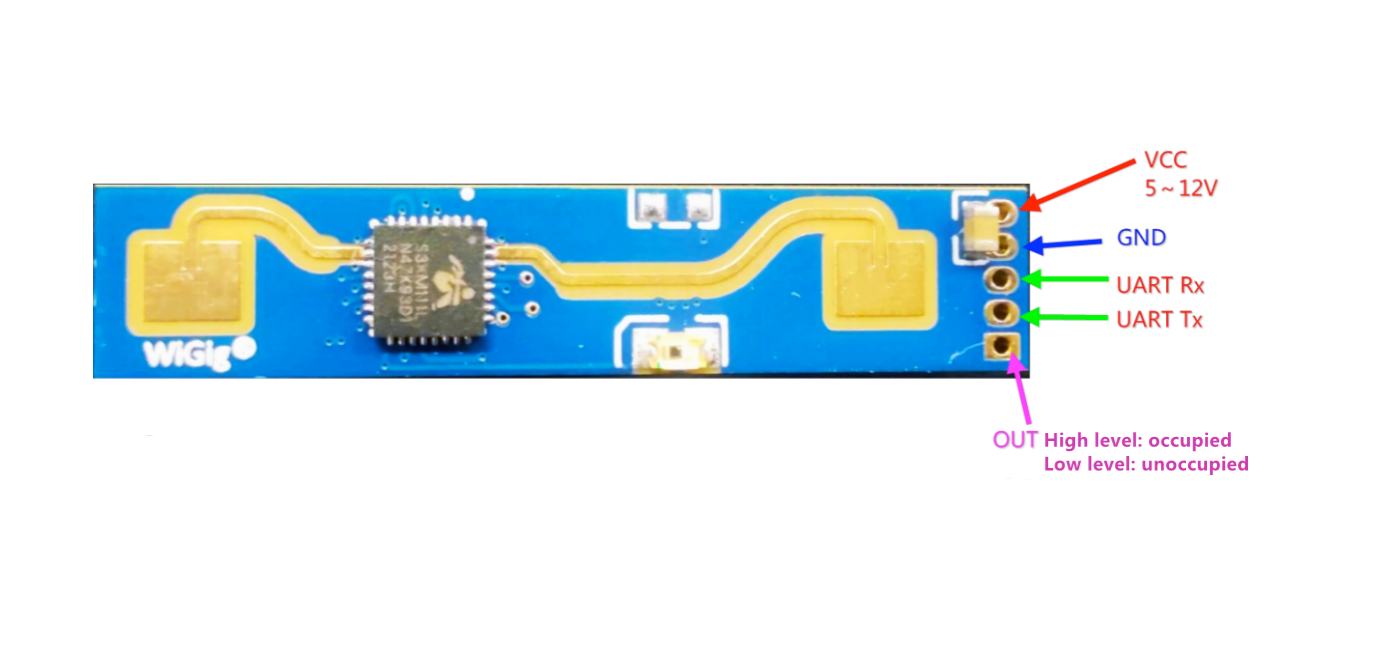
| Pin | Type | Description | Notes |
|---|---|---|---|
| VCC | Power | Power input | 5V DC |
| GND | Power | Ground connection | |
| TX | Communication | UART transmit | Sends data from sensor (connect to ESP32 RX) |
| RX | Communication | UART receive | Receives commands (connect to ESP32 TX) |
| OUT | Communication | Digital presence output | HIGH when presence detected (optional) |
Interface: UART (256000 baud)
Technology: 24GHz FMCW radar (Frequency Modulated Continuous Wave)
Detection: Both stationary and moving human targets
Range: Up to 5 meters
Field of View: ±60° detection angle
Gates: Configurable distance gates (0.2m or 0.75m resolution)
Power: 5V DC, stable power required
Pin Spacing: 1.27mm (compact design)
Applications: Smart lighting, occupancy sensing, HVAC control, security systems
Wiring the LD2410 to ESP32
To interface the LD2410 with an ESP32 for human presence detection via UART:
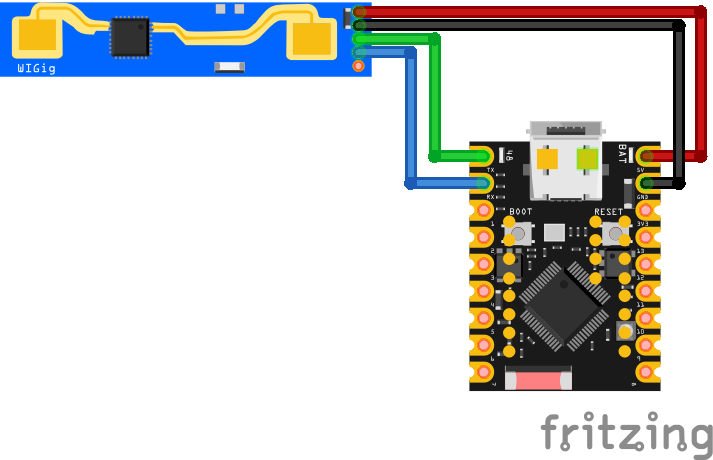
| LD2410 pin | ESP32 pin | Purpose |
|---|---|---|
| VCC | 5V | Power supply (5V) |
| GND | GND | Ground |
| TX | GPIO16 (RX2) | Sensor transmit to ESP32 receive |
| RX | GPIO17 (TX2) | Sensor receive from ESP32 transmit |
| OUT | GPIO18 | Digital presence output (optional) · optional |
UART2: Use UART2 on ESP32 (GPIO16/17 are default UART2 pins)
Baud Rate: 256000 bps - must match in firmware configuration
Power: Requires stable 5V supply (100mA typical)
TX/RX: Connect sensor TX to ESP32 RX, sensor RX to ESP32 TX
OUT Pin: Optional digital output goes HIGH on presence detection
Configuration: Use HLK Radar Tool or ESPHome for gate sensitivity tuning
Distance Gates: Configurable zones for moving/stationary detection
Pin Spacing: 1.27mm pitch - use adapter or careful soldering
LD2410 code examples
// Requires library: "MyLD2410"
#if defined(ARDUINO_SAMD_NANO_33_IOT) || defined(ARDUINO_AVR_LEONARDO)
//ARDUINO_SAMD_NANO_33_IOT RX_PIN is D1, TX_PIN is D0
//ARDUINO_AVR_LEONARDO RX_PIN(RXI) is D0, TX_PIN(TXO) is D1
#define sensorSerial Serial1
#elif defined(ARDUINO_XIAO_ESP32C3) || defined(ARDUINO_XIAO_ESP32C6)
//RX_PIN is D7, TX_PIN is D6
#define sensorSerial Serial0
#elif defined(ESP32)
//Other ESP32 device - choose available GPIO pins
#define sensorSerial Serial1
#if defined(ARDUINO_ESP32S3_DEV)
#define RX_PIN 18
#define TX_PIN 17
#else
#define RX_PIN 16
#define TX_PIN 17
#endif
#else
#error "This sketch only works on ESP32, Arduino Nano 33IoT, and Arduino Leonardo (Pro-Micro)"
#endif

// User defines
// #define DEBUG_MODE
#define ENHANCED_MODE
#define SERIAL_BAUD_RATE 115200

//Change the communication baud rate here, if necessary
//#define LD2410_BAUD_RATE 256000
#include "MyLD2410.h"

#ifdef DEBUG_MODE
MyLD2410 sensor(sensorSerial, true);
#else
MyLD2410 sensor(sensorSerial);
#endif

unsigned long nextPrint = 0, printEvery = 1000;  // print every second

void printValue(const byte &val) {
  Serial.print(' ');
  Serial.print(val);
}

void printData() {
  Serial.print(sensor.statusString());
  if (sensor.presenceDetected()) {
    Serial.print(", distance: ");
    Serial.print(sensor.detectedDistance());
    Serial.print("cm");
  }
  Serial.println();
  if (sensor.movingTargetDetected()) {
    Serial.print(" MOVING    = ");
    Serial.print(sensor.movingTargetSignal());
    Serial.print("@");
    Serial.print(sensor.movingTargetDistance());
    Serial.print("cm ");
    if (sensor.inEnhancedMode()) {
      Serial.print("\n signals->[");
      sensor.getMovingSignals().forEach(printValue);
      Serial.print(" ] thresholds:[");
      sensor.getMovingThresholds().forEach(printValue);
      Serial.print(" ]");
    }
    Serial.println();
  }
  if (sensor.stationaryTargetDetected()) {
    Serial.print(" STATIONARY= ");
    Serial.print(sensor.stationaryTargetSignal());
    Serial.print("@");
    Serial.print(sensor.stationaryTargetDistance());
    Serial.print("cm ");
    if (sensor.inEnhancedMode()) {
      Serial.print("\n signals->[");
      sensor.getStationarySignals().forEach(printValue);
      Serial.print(" ] thresholds:[");
      sensor.getStationaryThresholds().forEach(printValue);
      Serial.print(" ]");
    }
    Serial.println();
  }

  if (sensor.inEnhancedMode() && (sensor.getFirmwareMajor() > 1)) {
    Serial.print("Light level: ");
    Serial.println(sensor.getLightLevel());
    Serial.print("Output level: ");
    Serial.println((sensor.getOutLevel()) ? "HIGH" : "LOW");
  }

  Serial.println();
}

void setup() {
  Serial.begin(SERIAL_BAUD_RATE);
#if defined(ARDUINO_XIAO_ESP32C3) || defined(ARDUINO_XIAO_ESP32C6) || defined(ARDUINO_SAMD_NANO_33_IOT) || defined(ARDUINO_AVR_LEONARDO)
  sensorSerial.begin(LD2410_BAUD_RATE);
#else
  sensorSerial.begin(LD2410_BAUD_RATE, SERIAL_8N1, RX_PIN, TX_PIN);
#endif
  delay(2000);
  Serial.println(__FILE__);
  if (!sensor.begin()) {
    Serial.println("Failed to communicate with the sensor.");
    while (true) {}
  }

#ifdef ENHANCED_MODE
  sensor.enhancedMode();
#else
  sensor.enhancedMode(false);
#endif

  delay(nextPrint);
}

void loop() {
  if ((sensor.check() == MyLD2410::Response::DATA) && (millis() > nextPrint)) {
    nextPrint = millis() + printEvery;
    printData();
  }
}
This Arduino example uses the MyLD2410 library to interface with the LD2410 radar sensor via UART. The code initializes the sensor on UART2 using GPIO16 (RX) and GPIO17 (TX), reads presence data continuously, and prints whether presence is detected to the Serial Monitor. The LD2410 supports detection of both moving and still targets, and this library abstracts the complex UART protocol into a simple interface. The library automatically handles packet parsing and offers methods like presenceDetected() for easy integration. You can download the library or explore its source from the official GitHub repository: MyLD2410 on GitHub.
#include <stdio.h>
#include <string.h>
#include "freertos/FreeRTOS.h"
#include "freertos/task.h"
#include "driver/uart.h"

// LD2410 on UART2: radar TX -> GPIO16 (RX2), RX -> GPIO17 (TX2), 256000 baud
#define RADAR_UART UART_NUM_2
#define RADAR_RX_PIN 16
#define RADAR_TX_PIN 17

static const uint8_t FRAME_HEAD[4] = {0xF4, 0xF3, 0xF2, 0xF1};

void app_main(void)
{
    uart_config_t config = {
        .baud_rate = 256000,
        .data_bits = UART_DATA_8_BITS,
        .parity = UART_PARITY_DISABLE,
        .stop_bits = UART_STOP_BITS_1,
        .flow_ctrl = UART_HW_FLOWCTRL_DISABLE,
    };
    ESP_ERROR_CHECK(uart_param_config(RADAR_UART, &config));
    ESP_ERROR_CHECK(uart_set_pin(RADAR_UART, RADAR_TX_PIN, RADAR_RX_PIN,
                                 UART_PIN_NO_CHANGE, UART_PIN_NO_CHANGE));
    ESP_ERROR_CHECK(uart_driver_install(RADAR_UART, 1024, 0, 0, NULL, 0));

    uint8_t buf[64];
    int matched = 0;

    while (1) {
        uint8_t byte;
        if (uart_read_bytes(RADAR_UART, &byte, 1, pdMS_TO_TICKS(100)) != 1)
            continue;

        // Sync on the F4 F3 F2 F1 data-frame header
        if (matched < 4) {
            matched = (byte == FRAME_HEAD[matched]) ? matched + 1 : (byte == FRAME_HEAD[0]);
            continue;
        }

        // Read length (2 bytes, little-endian), then the payload + 4-byte tail
        uint8_t len_bytes[2];
        len_bytes[0] = byte;
        uart_read_bytes(RADAR_UART, &len_bytes[1], 1, pdMS_TO_TICKS(100));
        int length = len_bytes[0] | (len_bytes[1] << 8);
        matched = 0;
        if (length < 11 || length > (int)sizeof(buf))
            continue; // implausible - resync

        if (uart_read_bytes(RADAR_UART, buf, length + 4, pdMS_TO_TICKS(100)) != length + 4)
            continue;

        // Basic-mode report: [0]=0x02, [1]=0xAA, [2]=state, then little-endian values
        if (buf[0] != 0x02 || buf[1] != 0xAA)
            continue; // engineering-mode or config frame - ignore here

        uint8_t state = buf[2]; // 0 none, 1 moving, 2 still, 3 both
        int moving_cm = buf[3] | (buf[4] << 8);
        int still_cm = buf[6] | (buf[7] << 8);
        int detect_cm = buf[9] | (buf[10] << 8);

        static const char *STATES[] = {"no target", "moving", "still", "moving + still"};
        printf("%s | moving %d cm (energy %d) | still %d cm (energy %d) | detect %d cm\n",
               STATES[state & 0x03], moving_cm, buf[5], still_cm, buf[8], detect_cm);
    }
}
ESP-IDF has no component for the LD2410, but the radar's continuous data stream is easy to parse directly: every report starts with the header F4 F3 F2 F1 followed by a little-endian length, a basic-mode payload (type 0x02, head 0xAA) carrying the target state (none/moving/still/both), the moving and still target distances in centimeters with their energy values, and the overall detection distance. The example syncs on the header, validates the type bytes and prints each report. Configuration commands (sensitivity, gate settings) use a separate FD FC FB FA frame format described in the vendor's protocol manual.
uart:
  id: uart_bus
  tx_pin: GPIO17
  rx_pin: GPIO16
  baud_rate: 256000

ld2410:
  uart_id: uart_bus

binary_sensor:
  - platform: ld2410
    has_target:
      name: "Presence Detected"
    has_moving_target:
      name: "Moving Target Detected"
    has_still_target:
      name: "Still Target Detected"

sensor:
  - platform: ld2410
    moving_distance:
      name: "Moving Distance"
    still_distance:
      name: "Still Distance"
    moving_energy:
      name: "Moving Energy"
    still_energy:
      name: "Still Energy"
    detection_distance:
      name: "Detection Distance"

text_sensor:
  - platform: ld2410
    version:
      name: "LD2410 Firmware Version"
    mac_address:
      name: "LD2410 MAC Address"
This uses ESPHome's core ld2410 component over UART2 at the radar's fixed 256000 baud. Older examples carried their own esphome: block with the removed platform: ESP32 syntax - the snippet now contains only the sensor-specific parts. Presence, moving/still target states and their distances/energies all become entities, and the component also exposes configuration entities (timeout, gate sensitivities) if you add them.
[env:esp32dev]
platform = espressif32
board = esp32dev
framework = arduino
monitor_speed = 115200
lib_deps =
iavorvel/MyLD2410 @ ^1.2.8#include <Arduino.h>
#if defined(ARDUINO_SAMD_NANO_33_IOT) || defined(ARDUINO_AVR_LEONARDO)
//ARDUINO_SAMD_NANO_33_IOT RX_PIN is D1, TX_PIN is D0
//ARDUINO_AVR_LEONARDO RX_PIN(RXI) is D0, TX_PIN(TXO) is D1
#define sensorSerial Serial1
#elif defined(ARDUINO_XIAO_ESP32C3) || defined(ARDUINO_XIAO_ESP32C6)
//RX_PIN is D7, TX_PIN is D6
#define sensorSerial Serial0
#elif defined(ESP32)
//Other ESP32 device - choose available GPIO pins
#define sensorSerial Serial1
#if defined(ARDUINO_ESP32S3_DEV)
#define RX_PIN 18
#define TX_PIN 17
#else
#define RX_PIN 16
#define TX_PIN 17
#endif
#else
#error "This sketch only works on ESP32, Arduino Nano 33IoT, and Arduino Leonardo (Pro-Micro)"
#endif
// User defines
// #define DEBUG_MODE
#define ENHANCED_MODE
#define SERIAL_BAUD_RATE 115200
//Change the communication baud rate here, if necessary
//#define LD2410_BAUD_RATE 256000
#include "MyLD2410.h"
#ifdef DEBUG_MODE
MyLD2410 sensor(sensorSerial, true);
#else
MyLD2410 sensor(sensorSerial);
#endif
unsigned long nextPrint = 0, printEvery = 1000; // print every second
void printValue(const byte &val) {
Serial.print(' ');
Serial.print(val);
}
void printData() {
Serial.print(sensor.statusString());
if (sensor.presenceDetected()) {
Serial.print(", distance: ");
Serial.print(sensor.detectedDistance());
Serial.print("cm");
}
Serial.println();
if (sensor.movingTargetDetected()) {
Serial.print(" MOVING = ");
Serial.print(sensor.movingTargetSignal());
Serial.print("@");
Serial.print(sensor.movingTargetDistance());
Serial.print("cm ");
if (sensor.inEnhancedMode()) {
Serial.print("\n signals->[");
sensor.getMovingSignals().forEach(printValue);
Serial.print(" ] thresholds:[");
sensor.getMovingThresholds().forEach(printValue);
Serial.print(" ]");
}
Serial.println();
}
if (sensor.stationaryTargetDetected()) {
Serial.print(" STATIONARY= ");
Serial.print(sensor.stationaryTargetSignal());
Serial.print("@");
Serial.print(sensor.stationaryTargetDistance());
Serial.print("cm ");
if (sensor.inEnhancedMode()) {
Serial.print("\n signals->[");
sensor.getStationarySignals().forEach(printValue);
Serial.print(" ] thresholds:[");
sensor.getStationaryThresholds().forEach(printValue);
Serial.print(" ]");
}
Serial.println();
}
if (sensor.inEnhancedMode() && (sensor.getFirmwareMajor() > 1)) {
Serial.print("Light level: ");
Serial.println(sensor.getLightLevel());
Serial.print("Output level: ");
Serial.println((sensor.getOutLevel()) ? "HIGH" : "LOW");
}
Serial.println();
}
void setup() {
Serial.begin(SERIAL_BAUD_RATE);
#if defined(ARDUINO_XIAO_ESP32C3) || defined(ARDUINO_XIAO_ESP32C6) || defined(ARDUINO_SAMD_NANO_33_IOT) || defined(ARDUINO_AVR_LEONARDO)
sensorSerial.begin(LD2410_BAUD_RATE);
#else
sensorSerial.begin(LD2410_BAUD_RATE, SERIAL_8N1, RX_PIN, TX_PIN);
#endif
delay(2000);
Serial.println(__FILE__);
if (!sensor.begin()) {
Serial.println("Failed to communicate with the sensor.");
while (true) {}
}
#ifdef ENHANCED_MODE
sensor.enhancedMode();
#else
sensor.enhancedMode(false);
#endif
delay(nextPrint);
}
void loop() {
if ((sensor.check() == MyLD2410::Response::DATA) && (millis() > nextPrint)) {
nextPrint = millis() + printEvery;
printData();
}
}This PlatformIO example uses the MyLD2410 library to interface with the LD2410 24GHz presence sensor via UART on an ESP32. The code initializes the sensor using Serial2 with GPIO16 as RX and GPIO17 as TX, and sets the baud rate to 256000 as required by the sensor. After successful initialization, it reads presence detection data in the main loop. The code reports whether presence is detected and prints both still and moving target distances to the Serial Monitor. The MyLD2410 library handles all packet parsing, error checking, and data structuring internally, making it easy to work with the radar's complex UART protocol. This library is actively maintained and officially hosted on the PlatformIO Registry. You can find it here: MyLD2410 PlatformIO Library.
from machine import UART
import time

# Initialize UART2: TX=17, RX=16, baud rate 256000
uart = UART(2, baudrate=256000, tx=17, rx=16)

# Function to read and print data from LD2410
def read_ld2410():
    while True:
        if uart.any():
            data = uart.read()
            if data:
                print(data)
        time.sleep(0.1)

read_ld2410()
This MicroPython script initializes UART2 on an ESP32 with TX on GPIO17 and RX on GPIO16 at a baud rate of 256000, which is required by the LD2410 sensor. It continuously reads data from the sensor and prints the raw bytes to the console. This setup allows for basic communication with the LD2410 sensor. For more advanced features and parsing of the sensor's data, refer to the MicroPython driver available at vjsyong/LD2410.
LD2410 specifications
About the LD2410
The LD2410 is Hi-Link’s original 24GHz FMCW millimeter-wave radar for human presence detection, and it is the sensor the rest of this HLK-LD24xx family gets measured against. Unlike a PIR module, it does not need a warm body crossing its field of view to trigger - the radar picks up the chest motion of someone sitting still and breathing, so it reports separate “moving” and “stationary” target states instead of one binary motion flag. Detection reaches roughly 5 to 6 meters out in 0.2 m or 0.75 m distance gates across a ±60 degree field of view, and it talks UART at a fixed 256000 baud - the community MyLD2410 Arduino library and ESPHome’s core ld2410 component both target exactly this base model.
The module wants a proper 5V supply (Hi-Link specs a source that can deliver over 200 mA), but despite that 5V rail its UART and OUT pins run at 3.3V logic, so the sensor’s TX wire goes straight into an ESP32 RX pin with no level shifter needed. What separates the plain LD2410 from its closest siblings is mostly what it lacks: no Bluetooth for wireless tuning, and a 1.27 mm pin pitch that needs an adapter or careful soldering to reach a breadboard - both addressed by the LD2410C, which adds Bluetooth-app configuration on a standard 2.54 mm header.
For most ESP32 builds the base LD2410 is still the sensible default: it has by far the deepest library and ESPHome support of any sensor in this family, and its detection performance is identical to the B and C variants that only add wireless setup. Step up to the LD2412 for a wider field of view and longer range, or to the LD2410S if the project runs on a battery and the base sensor’s roughly 80 mA draw is a dealbreaker.
LD2410 troubleshooting
No Data Received
›
Issue: The ESP32 receives no data from the sensor.
Ensure correct wiring: swap TX and RX if needed, and confirm baud rate is set to 256000. Verify power is supplied at 5V.
Presence Not Detected
›
Issue: The sensor does not detect presence even when someone is in range.
Check detection gates and sensitivity settings using the LD2410 configuration tool. Ensure ESPHome configuration matches sensor wiring.
Intermittent Detection
›
Issue: Sensor intermittently detects presence or fails to maintain detection.
Adjust gate sensitivity or reposition sensor to minimize obstructions. Use HLK Radar Tool for fine-tuning detection zones.
UART Initialization Fails
›
Issue: UART component in ESPHome reports failure to initialize.
Verify UART pins are correct, baud rate is 256000, and no other component is using the same UART bus.
Where to buy the LD2410

Resources
Similar sensors


