
LD2461 Human Presence & Trajectory Radar Sensor
The LD2461 is a high-precision 24GHz radar sensor capable of detecting multiple human targets and tracking their trajectories. It communicates via UART and is ideal for advanced presence detection applications.

LD2461 pinout
The LD2461 is a 5-pin 24GHz mmWave sensor with advanced 2T4R antenna and 5-target tracking:
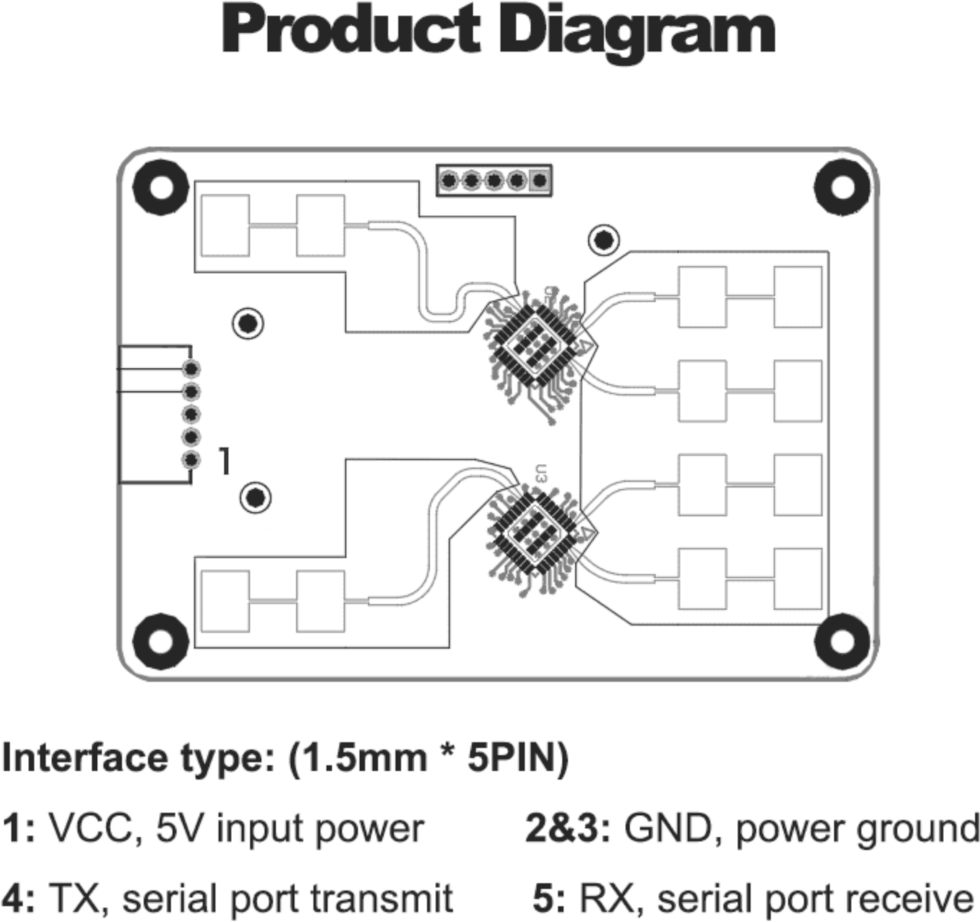
| Pin | Type | Description | Notes |
|---|---|---|---|
| VCC | Power | Power input | 5V DC regulated power supply |
| GND | Power | Ground connection | |
| TX | Communication | UART transmit | Sends trajectory data (connect to ESP32 RX) |
| RX | Communication | UART receive | Receives commands (connect to ESP32 TX) |
| OUT | Communication | Digital presence output | 3.3V HIGH when presence detected (optional) |
Interface: UART (256000 baud)
Technology: 24GHz FMCW radar with 2T4R antenna (2 transmit, 4 receive)
Multi-Target: Tracks up to 5 moving or stationary targets simultaneously
Precision: Range and angle measurements for trajectory tracking
Motion Data: Position, speed, and presence for each target
Advanced Tracking: Multi-target trajectory analysis
Power: 5V DC (OUT signal is 3.3V logic)
OUT Logic: 3.3V compatible, safe for ESP32 GPIO
Applications: Occupancy monitoring, security systems, smart lighting, gesture detection
High Data Rate: Requires stable power and UART for multi-target streaming
Wiring the LD2461 to ESP32
To interface the LD2461 with an ESP32 for trajectory tracking via UART:
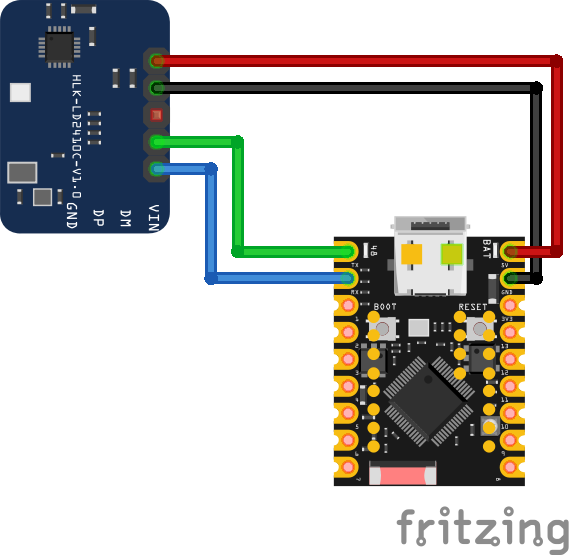
| LD2461 pin | ESP32 pin | Purpose |
|---|---|---|
| VCC | 5V | Power supply (5V regulated and stable) |
| GND | GND | Ground |
| TX | GPIO16 (RX2) | Sensor transmit to ESP32 receive |
| RX | GPIO17 (TX2) | Sensor receive from ESP32 transmit |
| OUT | GPIO18 | Digital presence output (optional) · optional |
UART2: Use UART2 on ESP32 (GPIO16/17 are default UART2 pins)
Baud Rate: 256000 bps, no parity, 1 stop bit
Power: Requires clean stable 5V supply (high data rate sensor)
TX/RX: Connect sensor TX to ESP32 RX, sensor RX to ESP32 TX
OUT Pin: 3.3V logic level, safe for direct ESP32 GPIO connection
5-Target Tracking: Streams data for up to 5 simultaneous targets
Trajectory: Provides position, speed, and angle data
Data Rate: High-speed UART - ensure no other components share UART2
Mounting: Secure mounting required (vibrations affect performance)
LD2461 code examples
// LD2461: module TX -> GPIO16 (RX2), RX -> GPIO17 (TX2), 9600 baud
HardwareSerial radar(2);

void setup() {
  Serial.begin(115200);
  radar.begin(9600, SERIAL_8N1, 16, 17);
  Serial.println("LD2461 frame monitor");
}

void loop() {
  while (radar.available()) {
    uint8_t b = radar.read();
    if (b < 0x10) Serial.print("0");
    Serial.print(b, HEX);
    Serial.print(" ");
  }
  Serial.println();
  delay(200);
}
There is no established Arduino library for the LD2461, so this example prints its UART stream (9600 baud) as hex - decode it with HLK's LD2461 protocol manual - or use ESPHome, where the Chreece/LD2461-ESPHome external component decodes per-person positions (see the ESPHome tab).
#include <stdio.h>
#include "freertos/FreeRTOS.h"
#include "freertos/task.h"
#include "driver/uart.h"

// LD2461 on UART2: module TX -> GPIO16 (RX2), RX -> GPIO17 (TX2), 9600 baud
#define RADAR_UART UART_NUM_2

void app_main(void)
{
    uart_config_t config = {
        .baud_rate = 9600,
        .data_bits = UART_DATA_8_BITS,
        .parity = UART_PARITY_DISABLE,
        .stop_bits = UART_STOP_BITS_1,
        .flow_ctrl = UART_HW_FLOWCTRL_DISABLE,
    };
    ESP_ERROR_CHECK(uart_param_config(RADAR_UART, &config));
    ESP_ERROR_CHECK(uart_set_pin(RADAR_UART, 17, 16, UART_PIN_NO_CHANGE, UART_PIN_NO_CHANGE));
    ESP_ERROR_CHECK(uart_driver_install(RADAR_UART, 1024, 0, 0, NULL, 0));

    uint8_t buf[64];
    while (1) {
        int len = uart_read_bytes(RADAR_UART, buf, sizeof(buf), pdMS_TO_TICKS(200));
        if (len > 0) {
            for (int i = 0; i < len; i++)
                printf("%02X ", buf[i]);
            printf("\n");
        }
    }
}
ESP-IDF has no LD2461 component, so this example reads the radar's UART stream (9600 baud) and prints each burst as hex - decode it with HLK's LD2461 protocol manual - or use ESPHome, where the Chreece/LD2461-ESPHome external component decodes per-person positions (see the ESPHome tab).
external_components:
  - source: github://Chreece/LD2461-ESPHome
    components: [ld2461]

uart:
  id: uart_bus
  tx_pin: GPIO17
  rx_pin: GPIO16
  baud_rate: 9600

ld2461:
  uart_id: uart_bus

binary_sensor:
  - platform: ld2461
    has_target:
      name: "LD2461 Presence"

sensor:
  - platform: ld2461
    target_count:
      name: "LD2461 Target Count"
    person_1:
      position_x:
        name: "Person 1 X"
      position_y:
        name: "Person 1 Y"
Core ESPHome has no LD2461 component, so this pins the Chreece/LD2461-ESPHome external component. Its schema exposes a target count, per-person coordinates (person_1: position_x/position_y, up to five people) and a presence binary sensor; the radar talks 9600 baud over UART2.
[env:esp32dev]
platform = espressif32
board = esp32dev
framework = arduino
monitor_speed = 115200#include <Arduino.h>
// LD2461: module TX -> GPIO16 (RX2), RX -> GPIO17 (TX2), 9600 baud
HardwareSerial radar(2);
void setup() {
Serial.begin(115200);
radar.begin(9600, SERIAL_8N1, 16, 17);
Serial.println("LD2461 frame monitor");
}
void loop() {
while (radar.available()) {
uint8_t b = radar.read();
if (b < 0x10) Serial.print("0");
Serial.print(b, HEX);
Serial.print(" ");
}
Serial.println();
delay(200);
}Same hex frame monitor as the Arduino example, built with PlatformIO. Decode with HLK's LD2461 protocol manual - or use ESPHome, where the Chreece/LD2461-ESPHome external component decodes per-person positions (see the ESPHome tab).
from machine import UART
import time

# Initialize UART2 for LD2461 (TX=17, RX=16)
uart = UART(2, baudrate=256000, tx=17, rx=16)

buffer = b''

while True:
    if uart.any():
        buffer += uart.read()
        if b'\n' in buffer:
            lines = buffer.split(b'\n')
            for line in lines[:-1]:
                try:
                    print(line.decode('utf-8').strip())
                except UnicodeDecodeError:
                    pass
            buffer = lines[-1]
    time.sleep(0.05)
A MicroPython implementation for the LD2461 sensor is available, developed by marconicivitavecchia. It provides basic functionality for interfacing the sensor with an ESP32 using MicroPython. For more details and code examples, refer to the GitHub repository: esp32-LD2461.
LD2461 specifications
About the LD2461
The LD2461 is Hi-Link’s step up from the LD2450 in target count: where the LD2450 caps out at three tracked people, the LD2461’s 2T4R (2 transmit, 4 receive) antenna array pushes that to 5 simultaneous targets, each reported with range and angle for trajectory tracking rather than a single position snapshot. That extra antenna hardware narrows the field of view to roughly ±45 degree horizontal by ±25 degree vertical - tighter than the LD2450’s ±60/±35 degree coverage - and the tradeoff buys tiered range instead: Hi-Link rates stationary targets to 5 meters, someone sitting still (micro-motion) to 6 meters, and moving targets out to 8 meters, all still over the family’s usual 256000-baud UART.
Software support lags the hardware here. There is no established Arduino library and no official ESPHome component; the community Chreece/LD2461-ESPHome external component is the practical path into Home Assistant, exposing a target count plus per-person X/Y coordinates for up to five people. Unlike the LD2450, the LD2461 carries no Bluetooth radio, so zone and sensitivity tuning goes through UART commands instead of a phone app.
At the top of this family’s price range, the LD2461 only earns its keep when a project genuinely needs to track more than three people or wants the finer 15-degree angular resolution. For anything simpler, the cheaper LD2450 or the binary presence of the base LD2410 gets there with far better software support.
LD2461 troubleshooting
No Data Received
›
Issue: The ESP32 receives no data from the sensor.
Ensure correct wiring: verify that TX and RX lines are properly connected, and confirm that the UART baud rate is set to 256000 bps. Also, ensure that the sensor is powered with a stable 5V supply.
Presence Not Detected
›
Issue: The sensor does not detect presence even when someone is in range.
Check the sensor's field of view and ensure there are no obstructions. Verify that the sensor's configuration parameters are set correctly for the desired detection range and sensitivity.
Intermittent Detection
›
Issue: Sensor intermittently detects presence or fails to maintain detection.
Ensure that the sensor is securely mounted and not subject to vibrations. Check for sources of interference in the environment that may affect radar performance.
UART Initialization Fails
›
Issue: UART component in ESPHome reports failure to initialize.
Verify that the UART pins specified in the configuration match the physical connections. Ensure that no other devices are using the same UART bus, and that the baud rate is correctly set to 256000 bps.
Where to buy the LD2461

Resources
Similar sensors


