
LD2450 Human Presence Sensor
The LD2450 is a 24GHz mmWave radar sensor designed for precise human presence detection and tracking. It supports both UART and BLE communication, making it suitable for advanced automation applications.

LD2450 pinout
The LD2450 is a 4-pin 24GHz mmWave multi-target tracker with BLE:
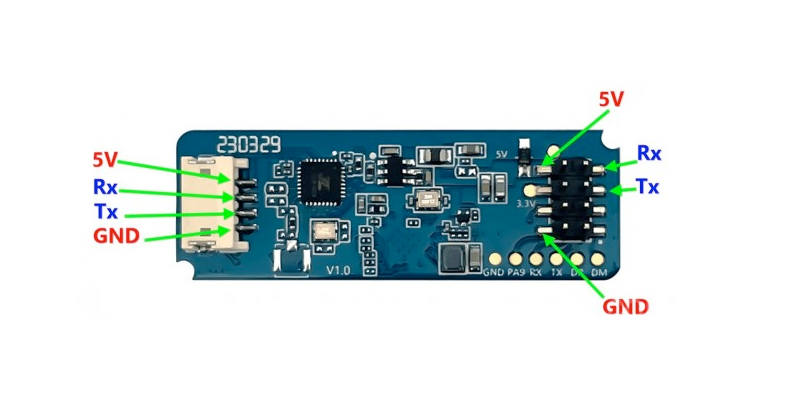
| Pin | Type | Description | Notes |
|---|---|---|---|
| 5V | Power | Power input | 5V DC regulated power supply |
| GND | Power | Ground connection | |
| TX | Communication | UART transmit | Sends target tracking data (connect to ESP32 RX) |
| RX | Communication | UART receive | Receives commands (connect to ESP32 TX) |
Interface: UART (256000 baud) + BLE
Technology: 24GHz FMCW radar
Multi-Target: Tracks up to 3 human targets simultaneously
Position Data: Real-time X, Y coordinates for each target
Speed Tracking: Movement speed for each tracked target
Range: Precise motion tracking within detection zone
Power: 5V DC (required for radar and BLE)
Bluetooth: Built-in BLE for wireless configuration
No OUT Pin: Uses only UART for data (no digital output pin)
Applications: Multi-occupancy detection, smart lighting zones, security systems
Wiring the LD2450 to ESP32
To interface the LD2450 with an ESP32 for multi-target tracking via UART:
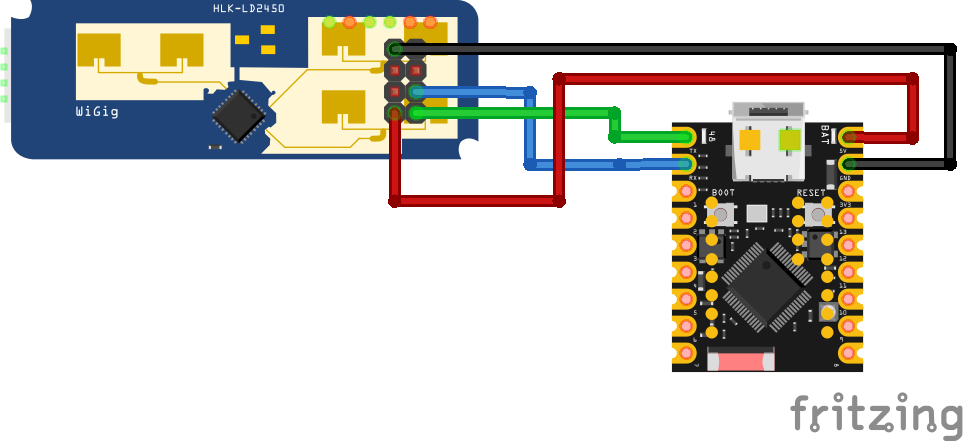
| LD2450 pin | ESP32 pin | Purpose |
|---|---|---|
| 5V | 5V | Power supply (5V regulated) |
| GND | GND | Ground |
| TX | GPIO16 (RX2) | Sensor transmit to ESP32 receive |
| RX | GPIO17 (TX2) | Sensor receive from ESP32 transmit |
UART2: Use UART2 on ESP32 (GPIO16/17 are default UART2 pins)
Baud Rate: 256000 bps, no parity, 1 stop bit
Power: Requires clean regulated 5V supply for radar + BLE
TX/RX: Connect sensor TX to ESP32 RX, sensor RX to ESP32 TX
Multi-Target: Receives data for up to 3 tracked individuals
Data Format: X/Y position coordinates and speed for each target
BLE: Use for configuration/debugging (no pin wiring needed)
Bluetooth: Ensure ESP32 BLE doesn’t conflict with UART if both active
LD2450 code examples
// Requires library: "HLK-LD2450"
#include <LD2450.h>

LD2450 radar;

void setup() {
  Serial.begin(115200);
  Serial2.begin(256000, SERIAL_8N1, 16, 17); // sensor TX -> GPIO16, RX -> GPIO17
  radar.begin(Serial2, true); // serial port is already initialized
}

void loop() {
  if (radar.read() > 0) {
    for (int i = 0; i < radar.getSensorSupportedTargetCount(); i++) {
      LD2450::RadarTarget target = radar.getTarget(i);
      if (!target.valid) continue;
      Serial.print("Target ");
      Serial.print(i);
      Serial.print(": X=");
      Serial.print(target.x);
      Serial.print(" mm, Y=");
      Serial.print(target.y);
      Serial.print(" mm, Distance=");
      Serial.print(target.distance);
      Serial.print(" mm, Speed=");
      Serial.print(target.speed);
      Serial.println(" cm/s");
    }
  }
  delay(500);
}
This example uses the "HLK-LD2450" Arduino library (header LD2450.h) over UART2 - sensor TX to GPIO16, RX to GPIO17 at the LD2450's fixed 256000 baud. Each read() refreshes up to three tracked targets; every valid target reports X/Y coordinates and computed distance in millimeters plus speed in cm/s, which is the LD2450's specialty compared to simpler presence radars.
#include <stdio.h>
#include "freertos/FreeRTOS.h"
#include "freertos/task.h"
#include "driver/uart.h"

// LD2450 on UART2: radar TX -> GPIO16 (RX2), RX -> GPIO17 (TX2), 256000 baud
#define RADAR_UART UART_NUM_2
#define RADAR_RX_PIN 16
#define RADAR_TX_PIN 17

// Coordinates are int16 with bit 15 as the sign flag (1 = positive)
static int decode_coord(uint8_t lo, uint8_t hi)
{
    int v = ((hi & 0x7F) << 8) | lo;
    return (hi & 0x80) ? v : -v;
}

void app_main(void)
{
    uart_config_t config = {
        .baud_rate = 256000,
        .data_bits = UART_DATA_8_BITS,
        .parity = UART_PARITY_DISABLE,
        .stop_bits = UART_STOP_BITS_1,
        .flow_ctrl = UART_HW_FLOWCTRL_DISABLE,
    };
    ESP_ERROR_CHECK(uart_param_config(RADAR_UART, &config));
    ESP_ERROR_CHECK(uart_set_pin(RADAR_UART, RADAR_TX_PIN, RADAR_RX_PIN,
                                 UART_PIN_NO_CHANGE, UART_PIN_NO_CHANGE));
    ESP_ERROR_CHECK(uart_driver_install(RADAR_UART, 1024, 0, 0, NULL, 0));

    uint8_t frame[28]; // AA FF 03 00 + 3 targets x 8 bytes
    int matched = 0;
    static const uint8_t HEAD[4] = {0xAA, 0xFF, 0x03, 0x00};

    while (1) {
        uint8_t byte;
        if (uart_read_bytes(RADAR_UART, &byte, 1, pdMS_TO_TICKS(100)) != 1)
            continue;
        if (matched < 4) {
            matched = (byte == HEAD[matched]) ? matched + 1 : (byte == HEAD[0]);
            continue;
        }
        frame[0] = byte;
        if (uart_read_bytes(RADAR_UART, &frame[1], 25, pdMS_TO_TICKS(100)) != 25) {
            matched = 0;
            continue;
        }
        matched = 0;
        if (frame[24] != 0x55 || frame[25] != 0xCC)
            continue; // bad tail - resync

        for (int t = 0; t < 3; t++) {
            const uint8_t *d = &frame[t * 8];
            int x = decode_coord(d[0], d[1]);       // mm
            int y = decode_coord(d[2], d[3]);       // mm
            int speed = decode_coord(d[4], d[5]);   // cm/s
            if (x == 0 && y == 0)
                continue; // no target in this slot
            printf("Target %d: X=%d mm, Y=%d mm, speed=%d cm/s\n", t + 1, x, y, speed);
        }
    }
}
ESP-IDF has no LD2450 component, so the example parses the radar's stream directly: each report is AA FF 03 00 followed by three 8-byte target slots (X, Y in millimeters and speed in cm/s, each an int16 whose top bit is the sign flag) and a 55 CC tail, at the LD2450's fixed 256000 baud. Empty slots read as all zeros. Zone configuration uses the separate command framing described in HLK's protocol manual.
uart:
  id: uart_bus
  tx_pin: GPIO17
  rx_pin: GPIO16
  baud_rate: 256000
  parity: NONE
  stop_bits: 1

ld2450:
  id: ld2450_radar
  uart_id: uart_bus

sensor:
  - platform: ld2450
    ld2450_id: ld2450_radar
    target_count:
      name: "Presence Target Count"
    target_1:
      x:
        name: "Target 1 X"
      y:
        name: "Target 1 Y"
      speed:
        name: "Target 1 Speed"
      distance:
        name: "Target 1 Distance"
ESPHome's core ld2450 component tracks up to three targets over UART2 at the radar's fixed 256000 baud. Each target is configured as target_1/target_2/target_3 with X/Y position, speed and distance sub-sensors - the older single target: list syntax is not valid. Presence zones can be added with the zone options.
[env:esp32dev]
platform = espressif32
board = esp32dev
framework = arduino
monitor_speed = 115200
lib_deps =
rbegamer/HLK-LD2450 @ ^1.1.0#include <Arduino.h>
#include <LD2450.h>
LD2450 radar;
void setup() {
Serial.begin(115200);
Serial2.begin(256000, SERIAL_8N1, 16, 17); // sensor TX -> GPIO16, RX -> GPIO17
radar.begin(Serial2, true); // serial port is already initialized
}
void loop() {
if (radar.read() > 0) {
for (int i = 0; i < radar.getSensorSupportedTargetCount(); i++) {
LD2450::RadarTarget target = radar.getTarget(i);
if (!target.valid) continue;
Serial.print("Target ");
Serial.print(i);
Serial.print(": X=");
Serial.print(target.x);
Serial.print(" mm, Y=");
Serial.print(target.y);
Serial.print(" mm, Distance=");
Serial.print(target.distance);
Serial.print(" mm, Speed=");
Serial.print(target.speed);
Serial.println(" cm/s");
}
}
delay(500);
}This PlatformIO example uses the HLK_LD2450 library to communicate with the LD2450 sensor over UART. It initializes Serial2 with a baud rate of 256000 and reads data for up to three targets, printing their positions and speeds to the serial monitor. Ensure that the sensor is connected to GPIO16 (RX) and GPIO17 (TX) on the ESP32. The library is available on the PlatformIO Registry: HLK-LD2450 PlatformIO Library.
from machine import UART
import time

uart = UART(2, baudrate=256000, tx=17, rx=16)

while True:
    if uart.any():
        data = uart.read()
        if data:
            print(data)
    time.sleep(0.5)
This MicroPython code initializes UART2 on an ESP32 using GPIO17 for TX and GPIO16 for RX, configured at a baud rate of 256000. It reads raw byte data from the LD2450 sensor and prints it to the console. This can be used for debugging or as a base for parsing structured radar output. For a more complete implementation, refer to the MicroPython driver available at csRon/HLK-LD2450.
LD2450 specifications
About the LD2450
The LD2450 is Hi-Link’s multi-target tracking radar, and it solves a different problem than the presence sensors elsewhere in this family: instead of a moving/stationary flag, it reports live X/Y coordinates, distance and speed in cm/s for up to 3 people at once, refreshed about 10 times a second. That makes it the right tool when a project needs to know where someone is in a room, not just whether anyone is there - multi-zone lighting, per-seat desk occupancy, or splitting one radar’s field of view into separate trigger areas.
Range tops out around 6 meters across a ±60 degree horizontal by ±35 degree vertical field, and it talks UART at a fixed 256000 baud like most of its siblings. ESPHome ships a native ld2450 component - each of the three targets becomes its own set of x/y/speed/distance entities, and the component can carve the detection area into zones for presence logic. A Bluetooth radio is built in too, but it is used for wireless configuration through Hi-Link’s HLKRadarTool app over a short-range BLE link rather than for streaming target data.
At its price point the LD2450 undercuts the pricier LD2461, which tracks up to 5 targets across a narrower field with no Bluetooth, and it costs less than the dual-interface C4001. For a project that only needs a yes/no presence flag, the plain LD2410 is simpler to wire and cheaper besides - save the LD2450 for builds that actually use the position data.
LD2450 troubleshooting
No Data Received
›
Issue: The ESP32 receives no data from the sensor.
Ensure correct wiring: verify that TX and RX are properly connected. Confirm that the UART is configured with the correct baud rate (256000), no parity, and 1 stop bit. Also, ensure that the sensor is powered with 5V DC.
Presence Not Detected
›
Issue: The sensor does not detect presence even when someone is in range.
Check the sensor's field of view and ensure there are no obstructions. Verify that the sensor's firmware is up to date and that the configuration settings are appropriate for the detection range and sensitivity required.
Intermittent Detection
›
Issue: Sensor intermittently detects presence or fails to maintain detection.
Ensure stable power supply and UART communication. Check for environmental factors that may cause interference, such as reflective surfaces or moving objects outside the intended detection area.
BLE Connection Issues
›
Issue: Unable to connect to the sensor via BLE.
Ensure that the ESP32's Bluetooth is enabled and that the sensor is in range. Verify that the correct BLE address is being used and that there are no other devices interfering with the connection.
Where to buy the LD2450

Resources
Similar sensors


