
DFRobot C4001 mmWave Presence Sensor
The DFRobot C4001 is a compact, high-performance mmWave radar sensor supporting UART and I2C. It provides flexible configuration and reliable presence detection for smart home and industrial applications.

C4001 pinout
The C4001 has 6 pins supporting both UART and I²C communication (not simultaneously).
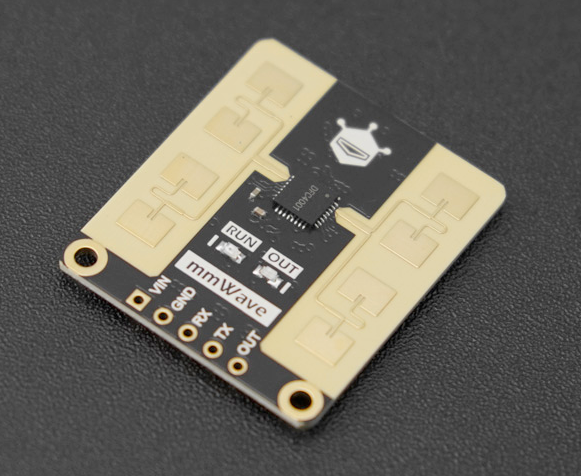
| Pin | Type | Description | Notes |
|---|---|---|---|
| VCC | Power | Power input (3.3V to 5.5V). Wide voltage range for flexibility. | Both 3.3V and 5V compatible. |
| GND | Power | Ground connection. Connect to system ground. | |
| RX | UART | UART receive pin. Accepts commands from microcontroller. | Connect to ESP32 TX (GPIO 17) for UART mode. |
| TX | UART | UART transmit pin. Sends presence and motion data. | Connect to ESP32 RX (GPIO 16) for UART mode. |
| SDA | I2C | I²C data line. Bidirectional data communication. | Connect to ESP32 GPIO 21 for I²C mode. |
| SCL | I2C | I²C clock line. Clock signal for I²C communication. | Connect to ESP32 GPIO 22 for I²C mode. |
24GHz mmWave radar sensor
Detection range: 0.3 to 12 meters
Field of view: 120° horizontal
Supports UART (9600 baud) or I²C (address 0x2A, switchable to 0x2B)
Cannot use UART and I²C simultaneously
Configurable detection zones and thresholds
Wiring the C4001 to ESP32
The C4001 can be connected via either UART or I²C. For I²C: connect SDA to GPIO 21, SCL to GPIO 22. For UART: connect TX to GPIO 16 (RX), RX to GPIO 17 (TX).
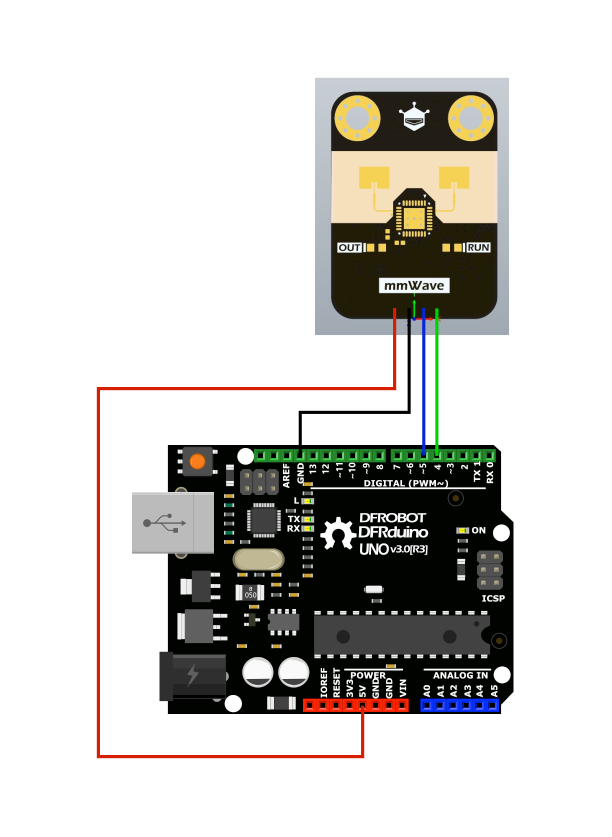
| C4001 pin | ESP32 pin | Purpose |
|---|---|---|
| VCC | 3.3V or 5V | Power supply (3.3V-5.5V). Use 3.3V or 5V. |
| GND | GND | Ground connection. |
| SDA (I²C mode) | GPIO 21 | I²C data line. Use with 4.7kΩ pull-up resistor. · optional |
| SCL (I²C mode) | GPIO 22 | I²C clock line. Use with 4.7kΩ pull-up resistor. · optional |
| TX (UART mode) | GPIO 16 (RX2) | Sensor transmits data to ESP32. · optional |
| RX (UART mode) | GPIO 17 (TX2) | ESP32 sends commands to sensor. · optional |
Choose either UART or I²C - cannot use both at same time
For I²C: Default address 0x20, add 4.7kΩ pull-up resistors on SDA/SCL
For UART: Baud rate 9600 bps (8N1 format)
Use DFRobot_C4001 library for Arduino/ESP32
Configurable via commands: detection zones, sensitivity, thresholds
Detection range: 0.3-12m with 120° horizontal FOV
GPIO output available for direct presence indication
C4001 code examples
// Requires library: "DFRobot_C4001"
#include <DFRobot_C4001.h>

// UART mode per the wiring above: sensor TX -> GPIO16 (RX2), sensor RX -> GPIO17 (TX2)
DFRobot_C4001_UART radar(&Serial2, 9600, 16, 17);

void setup() {
  Serial.begin(115200);
  while (!radar.begin()) {
    Serial.println("C4001 not found, check wiring!");
    delay(1000);
  }
  radar.setSensorMode(eExitMode); // presence-detection mode
  Serial.println("C4001 ready");
}

void loop() {
  if (radar.motionDetection()) {
    Serial.println("Presence detected");
  } else {
    Serial.println("No presence");
  }
  delay(500);
}
This example uses DFRobot's official DFRobot_C4001 library in UART mode: the constructor wires UART2 to GPIO16/GPIO17 as shown above, setSensorMode(eExitMode) selects presence-detection mode, and motionDetection() reports whether anyone is in range. The same library also supports I2C mode (DFRobot_C4001_I2C) and a speed-measurement mode (eSpeedMode) with getTargetRange() and getTargetSpeed().
#include <stdio.h>
#include "freertos/FreeRTOS.h"
#include "freertos/task.h"
#include "driver/uart.h"

// C4001 on UART2: module TX -> GPIO16 (RX2), RX -> GPIO17 (TX2), 9600 baud
#define RADAR_UART UART_NUM_2

void app_main(void)
{
    uart_config_t config = {
        .baud_rate = 9600,
        .data_bits = UART_DATA_8_BITS,
        .parity = UART_PARITY_DISABLE,
        .stop_bits = UART_STOP_BITS_1,
        .flow_ctrl = UART_HW_FLOWCTRL_DISABLE,
    };
    ESP_ERROR_CHECK(uart_param_config(RADAR_UART, &config));
    ESP_ERROR_CHECK(uart_set_pin(RADAR_UART, 17, 16, UART_PIN_NO_CHANGE, UART_PIN_NO_CHANGE));
    ESP_ERROR_CHECK(uart_driver_install(RADAR_UART, 1024, 0, 0, NULL, 0));

    uint8_t buf[64];
    while (1) {
        int len = uart_read_bytes(RADAR_UART, buf, sizeof(buf), pdMS_TO_TICKS(200));
        if (len > 0) {
            for (int i = 0; i < len; i++)
                printf("%02X ", buf[i]);
            printf("\n");
        }
    }
}
There is no established library for the C4001, so this example reads its UART stream (9600 baud on UART2) and prints each burst as hex - decode it with the frame tables in DFRobot's C4001 protocol documentation, or use the official DFRobot_C4001 Arduino library (see the Arduino tab).
external_components:
  - source: github://mikelawrence/esphome-component-dfrobot-c4001
    components: [dfrobot_c4001]

uart:
  id: c4001_uart
  tx_pin: GPIO17
  rx_pin: GPIO16
  baud_rate: 9600

dfrobot_c4001:
  id: mmwave_sensor
  uart_id: c4001_uart
  mode: PRESENCE
  model: SEN0609  # use SEN0610 for the 12 m variant

binary_sensor:
  - platform: dfrobot_c4001
    dfrobot_c4001_id: mmwave_sensor
    occupancy:
      name: "C4001 Occupancy"
Core ESPHome has no C4001 component (and dfrobot_sen0395 is a different DFRobot radar despite the similar name), but the community mikelawrence/esphome-component-dfrobot-c4001 external component drives it over UART: set model to SEN0609 (25 m) or SEN0610 (12 m), choose PRESENCE or SPEED mode, and the component exposes occupancy plus range/sensitivity tuning entities. An official ESPHome integration is in review upstream.
[env:esp32dev]
platform = espressif32
board = esp32dev
framework = arduino
monitor_speed = 115200
lib_deps =
dfrobot/DFRobot_C4001 @ ^1.0.0#include <Arduino.h>
#include <DFRobot_C4001.h>
// UART mode per the wiring above: sensor TX -> GPIO16 (RX2), sensor RX -> GPIO17 (TX2)
DFRobot_C4001_UART radar(&Serial2, 9600, 16, 17);
void setup() {
Serial.begin(115200);
while (!radar.begin()) {
Serial.println("C4001 not found, check wiring!");
delay(1000);
}
radar.setSensorMode(eExitMode); // presence-detection mode
Serial.println("C4001 ready");
}
void loop() {
if (radar.motionDetection()) {
Serial.println("Presence detected");
} else {
Serial.println("No presence");
}
delay(500);
}This PlatformIO example uses the official DFRobot_C4001 library to initialize and read radar data via UART. It prints motion and presence values every 500ms. Ensure wiring and serial port configuration match your ESP32 setup.
from machine import UART
import time

# C4001: module TX -> GPIO16 (RX2), RX -> GPIO17 (TX2), 9600 baud
uart = UART(2, baudrate=9600, tx=17, rx=16)

while True:
    data = uart.read()
    if data:
        print(" ".join("{:02X}".format(b) for b in data))
    time.sleep(0.2)
There is no established library for the C4001, so this example reads its UART stream (9600 baud on UART2) and prints each burst as hex - decode it with the frame tables in DFRobot's C4001 protocol documentation, or use the official DFRobot_C4001 Arduino library (see the Arduino tab).
C4001 specifications
About the C4001
The DFRobot C4001 sold here is the Gravity SEN0610 variant of DFRobot’s C4001 chipset - a 24GHz FMCW radar that ships under two SKUs with different antennas: SEN0609 reaches out to 25 meters through a narrow 100x40 degree beam, while SEN0610, the one this page’s datasheet and specs describe, trades that range for a wider 100x80 degree beam and a 12-meter ceiling. It talks over your choice of UART at 9600 baud or I2C at address 0x2A (switchable to 0x2B via an onboard DIP switch), though only one interface at a time.
Where the C4001 stands apart from the Hi-Link LD24xx family is interface choice: every LD2410-series sensor talks UART only, but the C4001 runs over UART or I2C, never both at the same time, and exposes detection zones, thresholds and filtering through a documented command protocol rather than a phone app. That flexibility, plus the Gravity connector, is why it costs noticeably more than the base LD2410 or the multi-target LD2450.
ESPHome has no official C4001 component; the community mikelawrence/esphome-component-dfrobot-c4001 project covers both SEN0609 and SEN0610 over UART, with an official integration reportedly in review upstream. If out-of-the-box Home Assistant support matters more than I2C flexibility, the native-ESPHome LD2450 or MR24HPC1 gets there with less setup - the C4001 earns its keep in projects that already share an I2C bus and would rather not dedicate a second UART to presence sensing.
C4001 troubleshooting
No Detection Output
›
Issue: No presence data is received.
Verify correct interface selection and wiring. Check for power supply issues. Ensure I2C address (default 0x2A) or UART baud rate (9600) is properly configured.
Communication Fails
›
Issue: Sensor does not respond to commands.
Ensure no interface conflict between I2C and UART. Confirm proper voltage level and pull-up resistors for I2C. Use a logic analyzer or serial monitor to debug command responses.
Where to buy the C4001

Resources
Similar sensors


