
LD2411S Human Presence Sensor
The LD2411S is a 24GHz mmWave radar sensor for human presence detection, supporting both motion and micro-motion detection. It includes Bluetooth functionality for configuration and firmware updates. Due to its unique UART communication protocol, it is not widely compatible with standard libraries.

LD2411S pinout
The LD2411S is a 5-pin 24GHz mmWave radar with Bluetooth and micro-motion detection:
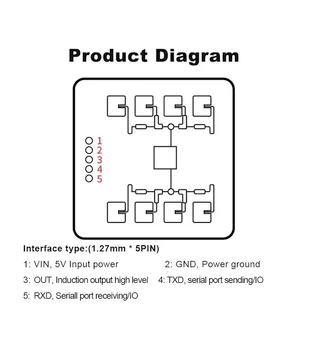
| Pin | Type | Description | Notes |
|---|---|---|---|
| VIN | Power | Power input | 5V DC regulated power supply |
| GND | Power | Ground connection | |
| TXD | Communication | UART transmit | Sends data from sensor (connect to ESP32 RX) |
| RXD | Communication | UART receive | Receives commands (connect to ESP32 TX) |
| OUT | Communication | Digital presence output | 3.3V HIGH when presence detected (optional) |
Interface: UART (115200 baud)
Technology: 24GHz FMCW radar
Detection: Motion + micro-motion (breathing detection)
Range: Up to 6 meters
Field of View: ±45° detection angle
Precision: ±5cm positioning accuracy
Power: 5V only (OUT signal is 3.3V logic)
Bluetooth: Integrated BLE for HLKRadarTool app configuration
Protocol: Custom UART protocol (not compatible with standard LD2410 libraries)
Custom Component: Use github.com/Chreece/LD2411S-ESPHome
OUT Logic: 3.3V compatible, safe for ESP32 GPIO
Wiring the LD2411S to ESP32
To interface the LD2411S with an ESP32 for human presence detection via UART:
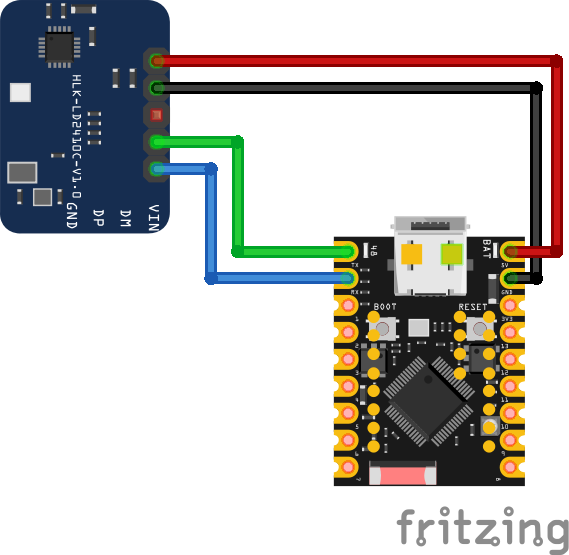
| LD2411S pin | ESP32 pin | Purpose |
|---|---|---|
| VIN | 5V | Power supply (5V regulated) |
| GND | GND | Ground |
| TXD | GPIO16 (RX2) | Sensor transmit to ESP32 receive |
| RXD | GPIO17 (TX2) | Sensor receive from ESP32 transmit |
| OUT | GPIO18 | Digital presence output (optional) · optional |
UART2: Use UART2 on ESP32 (GPIO16/17 are default UART2 pins)
Baud Rate: 115200 bps - must match in firmware configuration
Power: Requires 5V regulated supply (OUT signal is 3.3V logic)
TX/RX: Connect sensor TXD to ESP32 RX, sensor RXD to ESP32 TX
OUT Pin: 3.3V logic level, safe for direct ESP32 GPIO connection
Custom Protocol: Requires custom ESPHome component (github.com/Chreece/LD2411S-ESPHome)
Bluetooth: Disable BLE in firmware if using UART (may conflict)
Configuration: Use HLKRadarTool app for BLE configuration
Micro-motion: Capable of detecting breathing and micro-movements
LD2411S code examples
#define RADAR_OUT_PIN 18 // LD2411S OUT pin (GPIO18, matches the wiring above)

void setup() {
    Serial.begin(115200);
    pinMode(RADAR_OUT_PIN, INPUT);
    Serial.println("LD2411S Presence Detection");
}

void loop() {
    if (digitalRead(RADAR_OUT_PIN) == HIGH) {
        Serial.println("Presence detected");
    } else {
        Serial.println("No presence");
    }
    delay(500);
}
The most robust way to use the LD2411S is its OUT pin (GPIO18 in the wiring above), which the radar drives HIGH while presence is detected - all the radar processing happens on the module. The UART pins carry the LD2411S's serial protocol for configuration and distance reporting - use HLK's vendor tools to tune it, or parse the frames per the LD2411S protocol manual.
#include <stdio.h>
#include "freertos/FreeRTOS.h"
#include "freertos/task.h"
#include "driver/gpio.h"

#define RADAR_OUT_PIN GPIO_NUM_18 // LD2411S OUT pin, matches the wiring above

void app_main(void)
{
    gpio_set_direction(RADAR_OUT_PIN, GPIO_MODE_INPUT);
    printf("LD2411S Presence Detection\n");

    while (1) {
        if (gpio_get_level(RADAR_OUT_PIN)) {
            printf("Presence detected\n");
        } else {
            printf("No presence\n");
        }
        vTaskDelay(pdMS_TO_TICKS(500));
    }
}
The most robust way to use the LD2411S is its OUT pin (GPIO18 in the wiring above), which the radar drives HIGH while presence is detected - all the radar processing happens on the module. The UART pins carry the LD2411S's serial protocol for configuration and distance reporting - use HLK's vendor tools to tune it, or parse the frames per the LD2411S protocol manual.
binary_sensor:
  - platform: gpio
    pin: GPIO18  # LD2411S OUT pin, matches the wiring above
    name: "LD2411S Presence"
    device_class: occupancy
ESPHome has no dedicated LD2411S component, but the radar's OUT pin makes that unnecessary for presence detection: a plain GPIO binary_sensor on GPIO18 reports occupancy, with all radar processing done on the module. The UART pins carry the LD2411S's serial protocol for configuration and distance reporting - use HLK's vendor tools to tune it, or parse the frames per the LD2411S protocol manual.
[env:esp32dev]
platform = espressif32
board = esp32dev
framework = arduino
monitor_speed = 115200#include <Arduino.h>
#define RADAR_OUT_PIN 18 // LD2411S OUT pin (GPIO18, matches the wiring above)
void setup() {
Serial.begin(115200);
pinMode(RADAR_OUT_PIN, INPUT);
Serial.println("LD2411S Presence Detection");
}
void loop() {
if (digitalRead(RADAR_OUT_PIN) == HIGH) {
Serial.println("Presence detected");
} else {
Serial.println("No presence");
}
delay(500);
}The most robust way to use the LD2411S is its OUT pin (GPIO18 in the wiring above), which the radar drives HIGH while presence is detected - all the radar processing happens on the module. The UART pins carry the LD2411S's serial protocol for configuration and distance reporting - use HLK's vendor tools to tune it, or parse the frames per the LD2411S protocol manual.
from machine import Pin
import time

# LD2411S OUT pin (GPIO18, matches the wiring above)
radar_out = Pin(18, Pin.IN)

while True:
    if radar_out.value():
        print("Presence detected")
    else:
        print("No presence")
    time.sleep(0.5)
The most robust way to use the LD2411S is its OUT pin (GPIO18 in the wiring above), which the radar drives HIGH while presence is detected - all the radar processing happens on the module. The UART pins carry the LD2411S's serial protocol for configuration and distance reporting - use HLK's vendor tools to tune it, or parse the frames per the LD2411S protocol manual.
LD2411S specifications
About the LD2411S
The LD2411S sits alongside the LD2410S as a newer-generation Hi-Link radar rather than a direct upgrade of the original LD2410: it runs on 5V like the base sensor and its B/C siblings, but draws only about 48 mA at a 20 Hz report rate versus roughly 80 mA for the plain LD2410, and adds Bluetooth Low Energy with Hi-Link’s HLKRadarTool app for wireless configuration and firmware updates. Detection tops out around 6 meters for a moving target and about 3.5 meters for micro-motion (breathing-level) sensing, with a much narrower detection cone in azimuth (±20 degrees) than the LD2410’s ±60 degree field of view, trading side coverage for a tighter, more precise beam.
Like the LD2410S, the LD2411S uses its own UART protocol at 115200 baud rather than the LD2410 family’s 256000-baud framing, so the standard MyLD2410 library and ESPHome’s core ld2410 component do not understand it. A community ESPHome integration (Chreece/LD2411S-ESPHome) exists, but as of this writing its author has flagged it as deprecated and broken on ESPHome versions after 2025.2 - anyone planning an ESPHome project around this sensor should check the component’s current status before buying rather than assuming it works out of the box.
For a straightforward ESP32 presence project, the plain LD2410 remains the safer pick purely on software maturity; the LD2411S is worth choosing over it mainly for the lower current draw and tighter beam, not for easier integration.
LD2411S troubleshooting
No Data Received
›
Issue: The ESP32 receives no data from the sensor.
Ensure correct wiring: swap TX and RX if needed, and confirm baud rate is set to 115200. Verify power is supplied at 5V.
Presence Not Detected
›
Issue: The sensor does not detect presence even when someone is in range.
Check detection parameters using the HLKRadarTool app. Ensure UART communication is functioning correctly.
Intermittent Detection
›
Issue: Sensor intermittently detects presence or fails to maintain detection.
Adjust detection thresholds using the HLKRadarTool app. Reposition sensor to minimize obstructions.
UART Initialization Fails
›
Issue: UART component in ESPHome reports failure to initialize.
Verify UART pins are correct, baud rate is 115200, and no other component is using the same UART bus.
Where to buy the LD2411S

Resources
Similar sensors


