
LD2420 Human Presence Sensor
The LD2420 is a mmWave radar sensor for motion, micro-motion, and presence detection. It supports UART communication and GPIO output, and integrates easily with ESPHome and Arduino platforms.

LD2420 pinout
The LD2420 is a 5-pin 24GHz mmWave radar with firmware-dependent baud rate:
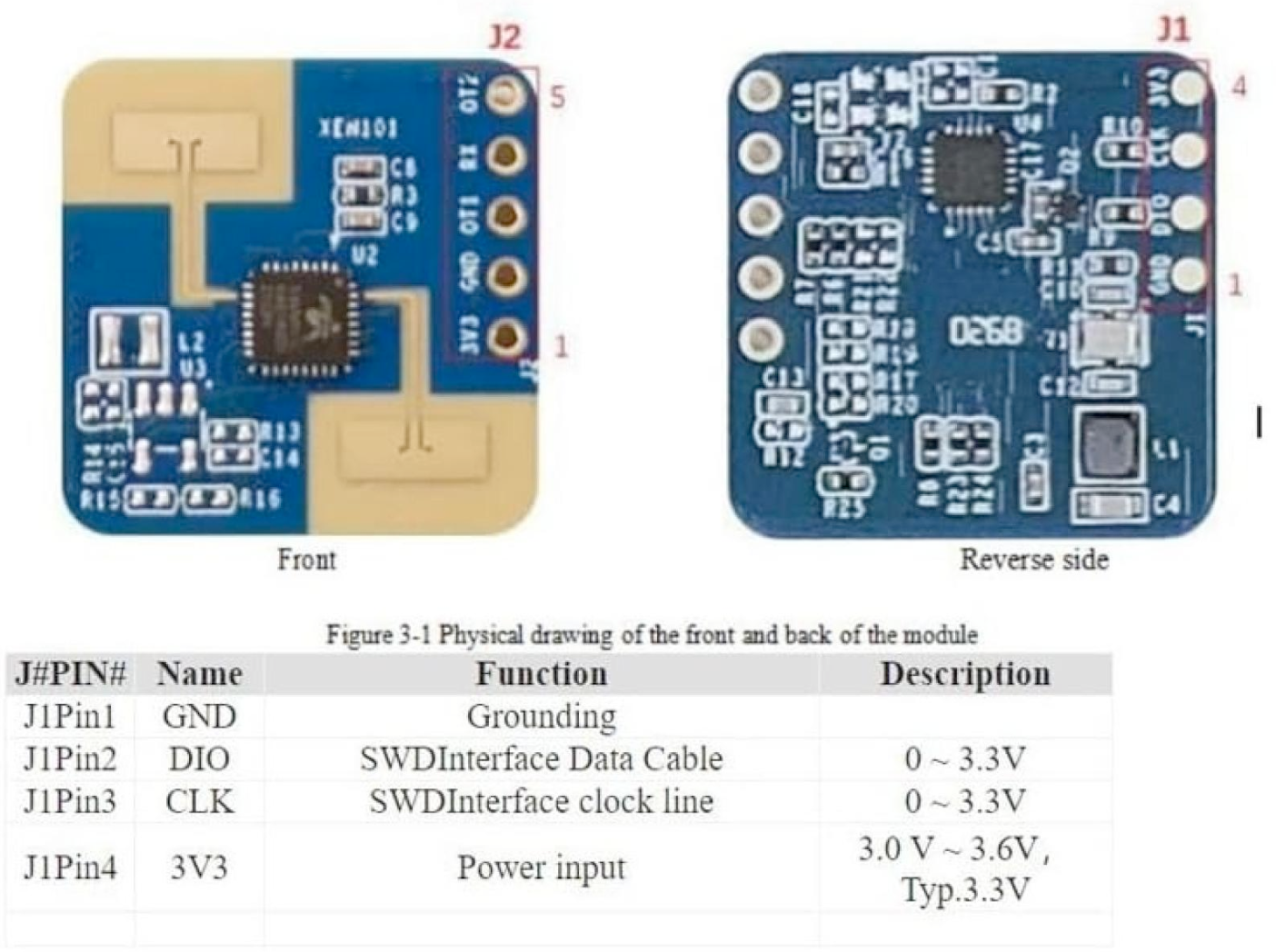
| Pin | Type | Description | Notes |
|---|---|---|---|
| VCC | Power | Power input | 3.3V DC only (not 5V tolerant) |
| GND | Power | Ground connection | |
| TX | Communication | UART transmit | Sends data from sensor (connect to ESP32 RX) |
| RX | Communication | UART receive | Receives commands (connect to ESP32 TX) |
| OUT | Communication | Digital presence output | 3.3V HIGH when presence detected (optional) |
Interface: UART (baud depends on firmware version)
Technology: 24GHz FMCW radar
Detection: Motion, micro-motion, and stationary presence
Range: 0.3 to 8 meters
Gates: Configurable distance gates for zone-based detection
Power: 3.3V ONLY (not 5V tolerant)
Baud Rate: 256000 (firmware <1.5.3) or 115200 (firmware ≥1.5.3)
Firmware: Check firmware version to determine correct baud rate
OUT Logic: 3.3V compatible, safe for ESP32 GPIO
Applications: Smart lighting, occupancy sensing, automation systems
Wiring the LD2420 to ESP32
To interface the LD2420 with an ESP32 for presence detection via UART:
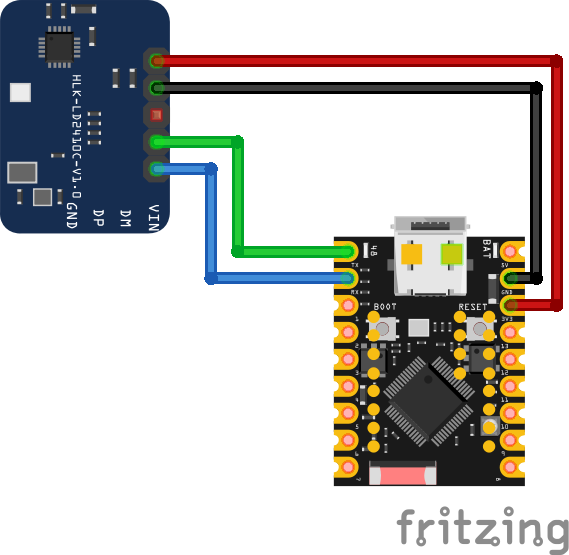
| LD2420 pin | ESP32 pin | Purpose |
|---|---|---|
| VCC | 3.3V | Power supply (3.3V only) |
| GND | GND | Ground |
| TX | GPIO16 (RX2) | Sensor transmit to ESP32 receive |
| RX | GPIO17 (TX2) | Sensor receive from ESP32 transmit |
| OUT | GPIO18 | Digital presence output (optional) · optional |
UART2: Use UART2 on ESP32 (GPIO16/17 are default UART2 pins)
Baud Rate: 256000 (firmware <1.5.3) or 115200 (≥1.5.3) - check firmware version
Power: 3.3V ONLY - do NOT connect to 5V (will damage sensor)
TX/RX: Connect sensor TX to ESP32 RX, sensor RX to ESP32 TX
OUT Pin: 3.3V logic level, safe for direct ESP32 GPIO connection
Firmware Check: Verify firmware version to set correct baud rate
Configuration: Use UART commands or ESPHome for gate configuration
Distance Gates: Configurable for precise zone-based detection
LD2420 code examples
#define RADAR_OUT_PIN 18 // LD2420 OT1 pin (GPIO18, matches the wiring above)

void setup() {
    Serial.begin(115200);
    pinMode(RADAR_OUT_PIN, INPUT);
    Serial.println("LD2420 Presence Detection");
}

void loop() {
    if (digitalRead(RADAR_OUT_PIN) == HIGH) {
        Serial.println("Presence detected");
    } else {
        Serial.println("No presence");
    }
    delay(500);
}
The most robust way to use the LD2420 from Arduino is its OT1 output pin (GPIO18 in the wiring above), which goes HIGH while presence is detected - the module does all the radar processing. The UART pins (GPIO16/17) carry the LD2420's serial protocol - note that the popular ld2410 Arduino library does NOT speak it; for UART work use HLK's tools or ESPHome's dedicated ld2420 component (see the ESPHome tab).
#include <stdio.h>
#include "freertos/FreeRTOS.h"
#include "freertos/task.h"
#include "driver/gpio.h"

#define RADAR_OUT_PIN GPIO_NUM_18 // LD2420 OUT pin, matches the wiring above

void app_main(void)
{
    gpio_set_direction(RADAR_OUT_PIN, GPIO_MODE_INPUT);
    printf("LD2420 Presence Detection\n");

    while (1) {
        if (gpio_get_level(RADAR_OUT_PIN)) {
            printf("Presence detected\n");
        } else {
            printf("No presence\n");
        }
        vTaskDelay(pdMS_TO_TICKS(500));
    }
}
The most robust way to use the LD2420 from Arduino is its OT1 output pin (GPIO18 in the wiring above), which goes HIGH while presence is detected - the module does all the radar processing. The UART pins (GPIO16/17) carry the LD2420's serial protocol - note that the popular ld2410 Arduino library does NOT speak it; for UART work use HLK's tools or ESPHome's dedicated ld2420 component (see the ESPHome tab).
uart:
  id: uart_bus
  tx_pin: GPIO17
  rx_pin: GPIO16
  baud_rate: 115200

ld2420:

text_sensor:
  - platform: ld2420
    fw_version:
      name: LD2420 Firmware

sensor:
  - platform: ld2420
    moving_distance:
      name : Moving Distance

binary_sensor:
  - platform: ld2420
    has_target:
      name: Presence

select:
  - platform: ld2420
    operating_mode:
      name: Operating Mode

number:
  - platform: ld2420
    presence_timeout:
      name: Detection Presence Timeout
    min_gate_distance:
      name: Detection Gate Minimum
    max_gate_distance:
      name: Detection Gate Maximum
    # See "Number" section below for detail
    gate_select:
      name: Select Gate to Set
    still_threshold:
      name: Set Still Threshold Value
    move_threshold:
      name: Set Move Threshold Value

button:
  - platform: ld2420
    apply_config:
      name: Apply Config
    factory_reset:
      name: Factory Reset
    restart_module:
      name: Restart Module
    revert_config:
      name: Undo Edits
ESPHome's core ld2420 component needs a uart: block - the radar talks 115200 baud on current firmware (older v1.5.3 units use 256000). Firmware version, presence, distance, operating-mode select and gate-tuning numbers all become entities; run calibration from the operating-mode select after mounting.
[env:esp32dev]
platform = espressif32
board = esp32dev
framework = arduino
monitor_speed = 115200#include <Arduino.h>
#define RADAR_OUT_PIN 18 // LD2420 OUT pin (GPIO18, matches the wiring above)
void setup() {
Serial.begin(115200);
pinMode(RADAR_OUT_PIN, INPUT);
Serial.println("LD2420 Presence Detection");
}
void loop() {
if (digitalRead(RADAR_OUT_PIN) == HIGH) {
Serial.println("Presence detected");
} else {
Serial.println("No presence");
}
delay(500);
}The most robust way to use the LD2420 from Arduino is its OT1 output pin (GPIO18 in the wiring above), which goes HIGH while presence is detected - the module does all the radar processing. The UART pins (GPIO16/17) carry the LD2420's serial protocol - note that the popular ld2410 Arduino library does NOT speak it; for UART work use HLK's tools or ESPHome's dedicated ld2420 component (see the ESPHome tab).
from machine import Pin
import time

# LD2420 OUT pin (GPIO18, matches the wiring above)
radar_out = Pin(18, Pin.IN)

while True:
    if radar_out.value():
        print("Presence detected")
    else:
        print("No presence")
    time.sleep(0.5)
The most robust way to use the LD2420 from Arduino is its OT1 output pin (GPIO18 in the wiring above), which goes HIGH while presence is detected - the module does all the radar processing. The UART pins (GPIO16/17) carry the LD2420's serial protocol - note that the popular ld2410 Arduino library does NOT speak it; for UART work use HLK's tools or ESPHome's dedicated ld2420 component (see the ESPHome tab).
LD2420 specifications
About the LD2420
The LD2420 is a no-frills, lower-tier member of the family: it skips Bluetooth entirely, runs on 3.3V, and reaches a rated 8-meter detection range across roughly the same ±60 degree field of view as the base LD2410. Its most important quirk is not electrical but firmware-driven: units running firmware older than v1.5.3 talk UART at 256000 baud through an output pin labeled OT2, while v1.5.3 and newer switch to 115200 baud and rename that pin OT1 - a genuine trap if you copy wiring or baud-rate settings from an LD2420 tutorial written for the other firmware branch. Check the firmware version reported over UART before assuming which baud rate applies.
Unlike the LD2410S and LD2411S, the LD2420 does get a native ESPHome ld2420 component, with firmware version, presence, moving distance and even live gate-threshold calibration exposed as entities from firmware v1.5.4 onward - but it speaks a completely different protocol from the LD2410 family’s, so the popular MyLD2410 Arduino library and ESPHome’s ld2410 component do not work with it. One more hazard worth knowing before flashing anything: Hi-Link’s own documentation warns against downgrading an LD2420’s firmware, since doing so can brick the module.
Buy the LD2420 when the project just needs basic presence sensing and ESPHome is the target platform - its component is solid and actively maintained. For Bluetooth-based field tuning or drop-in compatibility with the wider LD2410 ecosystem, the LD2410C or LD2412 is the better fit.
LD2420 troubleshooting
Baud Rate Mismatch
›
Issue: Sensor does not respond over UART.
Check firmware version: use 256000 baud for firmware < v1.5.3 and 115200 baud for ≥ v1.5.3. Ensure both TX and RX lines are properly connected.
No Presence Detection
›
Issue: The sensor does not detect movement.
Verify power is 3.3V. Confirm detection zones and sensitivity settings via UART or ESPHome configuration.
Intermittent Readings
›
Issue: Sensor data updates inconsistently.
Ensure stable UART connection. Check signal quality and reduce environmental interference or obstacles.
ESPHome Entity Unavailable
›
Issue: Home Assistant shows unknown or unavailable sensor states.
Ensure sensor firmware matches baud rate in configuration. Also confirm ESPHome version supports LD2420.
Where to buy the LD2420

Resources
Similar sensors


